ERR_TOO_MANY_REDIRECTS when accessing HA nodes directly

```
Product: PowerShell Universal
Version: 2026.1.6 (also 2026.1.3 before upgrade)
```
We have two nodes in HA. Connecting to SQL server on the back-end, as well as Azure Devops for the git sync. we have a single certificate that's on both nodes, as well as the load balancer.
What works: Accessing each endpoint locally via http(s)://localhost, or via the load balanced hostname.
What doesn't: Using each node's hostname, either locally on the server or from a different machine on the same network.
This is what's showing up in the browser's network calls.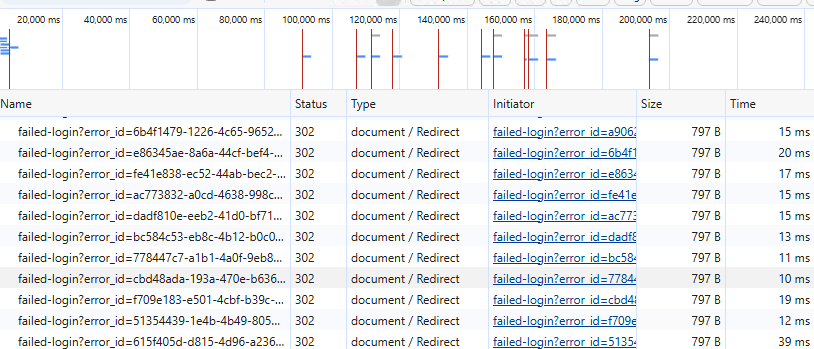
There's also this filling up the log:
```
2026-05-13 11:28:07.368 +01:00 [INF][Microsoft.AspNetCore.Authentication.Negotiate.NegotiateHandler] Incomplete Negotiate handshake, sending an additional 401 Negotiate challenge.
2026-05-13 11:28:07.368 +01:00 [INF][Microsoft.AspNetCore.Hosting.Diagnostics] Request finished HTTP/1.1 GET https://SERVER_FQDN:5001/failed-login?error_id=225172db-fc68-43f5-88f2-0adb34037e51 - 401 0 null 0.4677ms
2026-05-13 11:28:07.372 +01:00 [INF][Microsoft.AspNetCore.Hosting.Diagnostics] Request starting HTTP/1.1 GET https://SERVER_FQDN/failed-login?error_id=225172db-fc68-43f5-88f2-0adb34037e51 - null null
2026-05-13 11:28:07.372 +01:00 [INF][Microsoft.AspNetCore.Hosting.Diagnostics] Request finished HTTP/1.1 GET https://SERVER_FQDN/failed-login?error_id=225172db-fc68-43f5-88f2-0adb34037e51 - 302 0 null 0.6914ms
2026-05-13 11:28:07.377 +01:00 [INF][Microsoft.AspNetCore.Hosting.Diagnostics] Request starting HTTP/1.1 GET https://SERVER_FQDN/failed-login?error_id=5a4214e0-5a25-4cf5-a155-b7e2c85ef7d2 - null null
```
Edge gives you an option to delete cookies when you receive the error, and on doing so it shows a PSU error page with the following:
```
An anonymous request was received in between authentication handshake requests.
Authentication configuration is invalid. Please contact your administrator.
```
Refreshing after this has no effect.
Both the servers and load balanced address are the same domain.
I've tried changing ports, changing the wildcard for kestrel in appsettings to be a hostname (that just breaks it in other ways) and adding CORS exceptions to no avail.
You get a basic auth prompt if in incognito or standard http, but that's the same result as above after filling out the credentials.
We have a legacy Universal server on version 3.x which doesn't have the same issue with direct access. That server's in the same Active Directory OU, with the same policies. It's a 2016 server however, and the new ones are 2022.
Right now it feels like either I've missed something in the configuration, or the OS is behaving differently with the auth requests. Hopefully someone has some insight they can shed on this...
TIA
Screenshot 2026-05-13 112839.png
All Comments (9)
```
Product: PowerShell Universal
Version: 2026.1.6 (also 2026.1.3 before upgrade)
```
We have two nodes in HA. Connecting to SQL server on the back-end, as well as Azure Devops for the git sync. we have a single certificate that's on both nodes, as well as the load balancer.
What works: Accessing each endpoint locally via http(s)://localhost, or via the load balanced hostname.
What doesn't: Using each node's hostname, either locally on the server or from a different machine on the same network.
This is what's showing up in the browser's network calls.
There's also this filling up the log:
```
2026-05-13 11:28:07.368 +01:00 [INF][Microsoft.AspNetCore.Authentication.Negotiate.NegotiateHandler] Incomplete Negotiate handshake, sending an additional 401 Negotiate challenge.
2026-05-13 11:28:07.368 +01:00 [INF][Microsoft.AspNetCore.Hosting.Diagnostics] Request finished HTTP/1.1 GET https://SERVER_FQDN:5001/failed-login?error_id=225172db-fc68-43f5-88f2-0adb34037e51 - 401 0 null 0.4677ms
2026-05-13 11:28:07.372 +01:00 [INF][Microsoft.AspNetCore.Hosting.Diagnostics] Request starting HTTP/1.1 GET https://SERVER_FQDN/failed-login?error_id=225172db-fc68-43f5-88f2-0adb34037e51 - null null
2026-05-13 11:28:07.372 +01:00 [INF][Microsoft.AspNetCore.Hosting.Diagnostics] Request finished HTTP/1.1 GET https://SERVER_FQDN/failed-login?error_id=225172db-fc68-43f5-88f2-0adb34037e51 - 302 0 null 0.6914ms
2026-05-13 11:28:07.377 +01:00 [INF][Microsoft.AspNetCore.Hosting.Diagnostics] Request starting HTTP/1.1 GET https://SERVER_FQDN/failed-login?error_id=5a4214e0-5a25-4cf5-a155-b7e2c85ef7d2 - null null
```
Edge gives you an option to delete cookies when you receive the error, and on doing so it shows a PSU error page with the following:
```
An anonymous request was received in between authentication handshake requests.
Authentication configuration is invalid. Please contact your administrator.
```
Refreshing after this has no effect.
Both the servers and load balanced address are the same domain.
I've tried changing ports, changing the wildcard for kestrel in appsettings to be a hostname (that just breaks it in other ways) and adding CORS exceptions to no avail.
You get a basic auth prompt if in incognito or standard http, but that's the same result as above after filling out the credentials.
We have a legacy Universal server on version 3.x which doesn't have the same issue with direct access. That server's in the same Active Directory OU, with the same policies. It's a 2016 server however, and the new ones are 2022.
Right now it feels like either I've missed something in the configuration, or the OS is behaving differently with the auth requests. Hopefully someone has some insight they can shed on this...
TIA
@lloydmitchell
I am looking into this to see if I can help. This is to acknowledge your post. I'll have an update within 24 hours. In the meantime, although you've provided plenty of information, if you have any more you can provide that may be helpful down the line. The more information/logs that are presented, the better.
Thank you!
Ok, another interesting one we just discovered.
We changed the DNS entry for the load balanced IP to instead point to one of the nodes. After waiting for that to update, it worked flawlessly; accessing a single node directly via the load-balanced address is successful.
Could this be certificate related? The CN of the cert is the load balanced hostname, and both nodes have been added as SANs (DNS Name= fqdn.of.server).
Ok, another interesting one we just discovered.
We changed the DNS entry for the load balanced IP to instead point to one of the nodes. After waiting for that to update, it worked flawlessly; accessing a single node directly via the load-balanced address is successful.
Could this be certificate related? The CN of the cert is the load balanced hostname, and both nodes have been added as SANs (DNS Name= fqdn.of.server).
@lloydmitchell
This is exactly the kind of information we need to try to understand this and reproduce an issue. Could you please add more like a diagram? It's not that I can't understand what you've written it's that the information needs to properly gathered. If you could help to define the shape of your environment in great detail, that will help. The less information we have, the more blind spots we have, the longer it will take to get an answer for you.
Ok, another interesting one we just discovered.
We changed the DNS entry for the load balanced IP to instead point to one of the nodes. After waiting for that to update, it worked flawlessly; accessing a single node directly via the load-balanced address is successful.
Could this be certificate related? The CN of the cert is the load balanced hostname, and both nodes have been added as SANs (DNS Name= fqdn.of.server).
@lloydmitchell
This is exactly the kind of information we need to try to understand this and reproduce an issue. Could you please add more like a diagram? It's not that I can't understand what you've written it's that the information needs to properly gathered. If you could help to define the shape of your environment in great detail, that will help. The less information we have, the more blind spots we have, the longer it will take to get an answer for you.
@DataTraveler
Not quite sure what to put in a diagram - it essentially mirrors the HA documentation.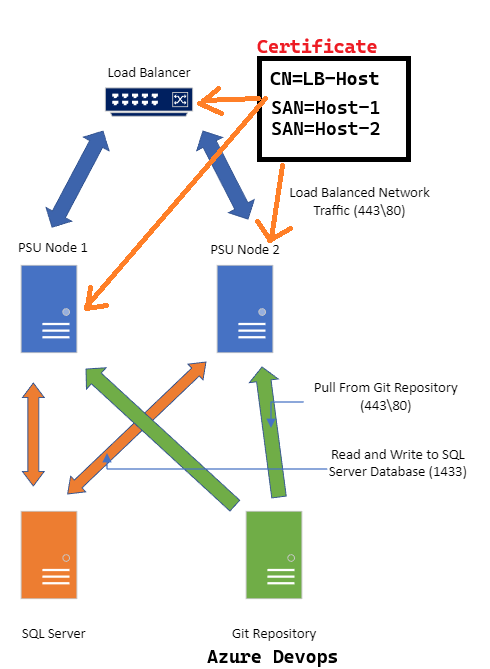
The Load balancer has an IP that that's registered in DNS as the load-balanced hostname. The same certificate exists on all three (LB/host1/host2). The common name of the cert is the load-balanced hostname, and both nodes (plus LB) are subject alternative names containing the FQDN.
As stated, if we change the DNS entry from the IP of the load balancer to the IP of one of the hosts, we don't have an issue. We connect directly to that node without the "too many redirects" warning.
This now seems entirely related to how the certificate is handled. I'll admit I only have a crude working knowledge of using certificates, but we've got the same setup on some other systems without any issues.
EDIT: One last thing - the certificate on the Powershell Universal hosts is in the filesystem. For some reason I simply couldn't get the service to start if I tried loading it from the personal store of the machine.
5ebfc29c-e424-4ffa-85a1-1c2a09670f0b.png
@lloydmitchell I'm not entirely sure why this is happening but I wanted to provide a little insight into what PSU is trying to do.
When a negotiate authentication request comes in, the PSU server will return a 401 with the www-authenticate header set to negotiate. The browser then performs a replay of the request with the kerberos or NTLM ticket for the server to use for that authentication.
This error in PSU is causing it to fail that handshake and try to authentication again.
2026-05-13 11:28:07.368 +01:00 [INF][Microsoft.AspNetCore.Authentication.Negotiate.NegotiateHandler] Incomplete Negotiate handshake, sending an additional 401 Negotiate challenge.
Since this happens over and over again, it eventually throws an authentication failure exception internally and then forwards to the /failed-login route. I don't totally understand why that causes infinite redirects, but if it didn't, it would be showing an error page anyways. The incomplete negotiate handshake is likely the root cause.
By changing the DNS, you are no longer routing through the load balancer, so I wonder if something is happening with the authentication header after the browser is attempting to return it to the server. What load balancer are you using? Is it just proxying or is it authentication header aware?
Adam Driscoll
PowerShell Expert and Software Architect at Devolutions
By changing the DNS, you are no longer routing through the load balancer, so I wonder if something is happening with the authentication header after the browser is attempting to return it to the server. What load balancer are you using? Is it just proxying or is it authentication header aware?
@Adam Driscoll Thank you for the reply.
Just so we're on the same page...
Let's call the load balancer (or rather, the virtual server set up on the load balancer to handle the two nodes) as LB, and the nodes N1 and N2.
Certificate subject:
- CN=LB
Certificate extension, Subject alternative name:
- DNS=LB
- DNS=N1
- DNS=N2
Working:
- DNS entry of LB points at IP of LB, access via LB address
- DNS entry of LB points at IP of N1 (or N2), access via LB address
- Access N1/N2 via their IP (ignoring invalid cert error)
- locally on the N1/N2 servers, access via localhost (http and https)
Not working:
- from a client machine, access N1/N2 directly via their hostname
- locally on the N1/N2 servers, access via their hostname
As you can see, this doesn't appear to be anything to do with the load balancer itself - it works even if we're accessing a node directly by changing the DNS entry we're using for the load balancer hostname. It only fails by using a node's hostname. This feels, as stated, more related to how the certificate is being utilised.
The only thing I've thought of but not tried yet is to change the certificates on the nodes from the single one being used across the platform, to individual ones (self-signed in the first instance).
You certainly could try the certificate but, for me it sounds a bit like an SPN issue. Maybe the load balancer is registered and then when you switch the DNS to the node, it picks up on the SPN of the load balancer.
The fact that it works locally by host name means that it's likely using NTLM rather than Kerberos. Can you double check the SPN registrations?
Configure Windows Authentication in ASP.NET Core | Microsoft Learn
Windows SSO | PowerShell Universal
Adam Driscoll
PowerShell Expert and Software Architect at Devolutions
You certainly could try the certificate but, for me it sounds a bit like an SPN issue. Maybe the load balancer is registered and then when you switch the DNS to the node, it picks up on the SPN of the load balancer.
The fact that it works locally by host name means that it's likely using NTLM rather than Kerberos. Can you double check the SPN registrations?
Configure Windows Authentication in ASP.NET Core | Microsoft Learn
Windows SSO | PowerShell Universal
@Adam Driscoll
Well, thank you!
I didn't even register the SPNs for the nodes! The only thing not making sense is regarding the SPN for the load balancer against the account being used. It was configured by a different team unaware of the service account. Some more investigation/digging needed to satisfy curiosity, but otherwise it's fixed.
@lloydmitchell Happy to hear it!
Adam Driscoll
PowerShell Expert and Software Architect at Devolutions