Groom job failures
Product: PowerShell Universal
Version: 5.6.12
I’m currently getting groom job failures but not sure why or how to fix.
The only error in my log files are:
2025-12-23 13:14:49.191 +00:00 [ERR][Universal.Server.Services.Configuration.ConfigurationSystemWatcher] Error processing configuration change notifications
System.ObjectDisposedException: Cannot access a disposed object.
Object name: 'System.Collections.Concurrent.BlockingCollection`1[[System.String, System.Private.CoreLib, Version=9.0.0.0, Culture=neutral, PublicKeyToken=7cec85d7bea7798e]]'.
   at Universal.Server.Services.Configuration.ConfigurationSystemWatcher.ProcessNotificationQueue(CancellationToken cancellationToken) in D:\a\powershell-universal\powershell-universal\src\PowerShellUniversal.Configuration\ConfigurationSystemWatcher.cs:line 124
   at Universal.Server.Services.Configuration.ConfigurationSystemWatcher.<StartAsync>b__16_0() in D:\a\powershell-universal\powershell-universal\src\PowerShellUniversal.Configuration\ConfigurationSystemWatcher.cs:line 56
I’ve rebooted the server to no avail.
My setup is installed via MSI, on a windows server, with two nodes in HA mode pointing at the same SQL db.
Any ideas?
All Comments (7)

Hi insomniacc, thanks for the details.
The ConfigurationSystemWatcherObjectDisposedException you pasted may be unrelated to the Groom failure (it can occur when a background watcher is being stopped or restarted). To identify the real cause, we need the actual Groom failure entry.
Could you please share the following (from both nodes)?
- The log lines that include “Failed to groom” (or similar) plus ~30 lines before and after.
- A screenshot of Health Checks showing the Groom failure details (timestamp and any expanded error text).
- Approximate SQL database size and whether you’ve recently increased job history / output retention.
- Whether you see any of these in the logs:
SqlException,Execution Timeout Expired,deadlock,FOREIGN KEY,DbUpdateException.
Initial items to try while gathering the above:
- If you have noisy schedules producing large output, reduce output (for example, pipe non-essential output to
Out-Null) and lower job history for those “unimportant” jobs. This reduces load on the Job / JobOutput tables and can make grooming more reliable. - Confirm the SQL login used by PSU has the correct privileges (especially if this started after an upgrade or DB change). During upgrades, the DB user typically needs
db_owner; day-to-day it generally only needsdb_datareaderanddb_datawriter. - If you are seeing timeouts or blocking in SQL during grooming, the KB article below explains why deletes can lock Job / JobOutput and what remediation looks like.
- Ruben,
Hey,
- The error above was the only entry/content in my C:\ProgramData\PowerShellUniversal\Logs\System\systemLog.txt file after a reboot. I just changed the log level from ‘Error’, ‘Warning’ and restarted, I can now see the following (this is the full systemLog with a few redacted/modified parts to remove hostnames, filepaths and script names etc):
2025-12-24 13:12:16.209 +00:00 [WRN][PowerShellUniversal.SQL.PsuDbContext] Slow Query Detected: SELECT [j].[Id], [j].[AccessToken], [j].[Activity], [j].[AgentId], [j].[AppTokenId], [j].[Archived], [j].[Batch], [j].[ComputerGroup], [j].[ComputerGroupInvocationType], [j].[ComputerId], [j].[ComputerName], [j].[CreatedTime], [j].[Credential], [j].[CurrentOperation], [j].[Debug], [j].[DebugPreference], [j].[EndTime], [j].[Environment], [j].[ErrorPreference], [j].[IdToken], [j].[IdentityId], [j].[InformationPreference], [j].[IsScriptDeleted], [j].[MemoryBytes], [j].[Notes], [j].[Output], [j].[ParentJobId], [j].[ParentLineNumber], [j].[PercentComplete], [j].[Port], [j].[ProcessId], [j].[ProgressPreference], [j].[ReadPermission], [j].[RefreshToken], [j].[Resource], [j].[RetryCount], [j].[Roles], [j].[RunId], [j].[RunspaceId], [j].[Schedule], [j].[ScheduleId], [j].[ScriptCommitId], [j].[ScriptFullPath], [j].[SecondsRemaining], [j].[SecurityContextId], [j].[StartTime], [j].[Status], [j].[StatusDescription], [j].[Tags], [j].[Trigger], [j].[Triggered], [j].[VerbosePreference], [j].[WarningPreference]
FROM [Job] AS [j]
WHERE [j].[ScriptFullPath] = @__scriptFullPath_0 AND [j].[Status] IN (2, 5, 3, 10, 9, 11)
ORDER BY [j].[EndTime] DESC
OFFSET @__p_1 ROWS FETCH NEXT @__p_1 ROWS ONLY | Parameters: @__scriptFullPath_0=FolderA\FolderB\ScriptName.ps1, @__p_1=100,  took 1036.797 ms
2025-12-24 13:12:16.222 +00:00 [WRN][PowerShellUniversal.SQL.PsuDbContext] Slow Query Detected: SET IMPLICIT_TRANSACTIONS OFF;
SET NOCOUNT ON;
UPDATE [GitStatus] SET [Changes] = @p0, [CommitId] = @p1, [ComputerName] = @p2, [Location] = @p3, [Remote] = @p4, [Result] = @p5, [ResultMessage] = @p6, [SyncTime] = @p7, [Timestamp] = @p8
OUTPUT 1
WHERE [Id] = @p9;
 | Parameters: @p9=5325, @p0=0, @p1=bdcc6df75859e1090615d6a1f46459e69038ba01, @p2=HOSTNAME, @p3=, @p4=, @p5=1, @p6=, @p7=00:00:02.1120110, @p8=24/12/2025 13:12:13,  took 968.2044 ms
2025-12-24 13:12:19.076 +00:00 [WRN][UniversalAutomation.GroomService] Failed to delete jobs.
Microsoft.Data.SqlClient.SqlException (0x80131904): The DELETE statement conflicted with the SAME TABLE REFERENCE constraint "FK_Job_Job_ParentJobId". The conflict occurred in database "Database", table "Domain\ServiceAccountName.Job", column 'ParentJobId'.
The statement has been terminated.
   at Microsoft.Data.SqlClient.TdsParser.ThrowExceptionAndWarning(TdsParserStateObject stateObj, SqlCommand command, Boolean callerHasConnectionLock, Boolean asyncClose)
   at Microsoft.Data.SqlClient.TdsParser.TryRun(RunBehavior runBehavior, SqlCommand cmdHandler, SqlDataReader dataStream, BulkCopySimpleResultSet bulkCopyHandler, TdsParserStateObject stateObj, Boolean& dataReady)
   at Microsoft.Data.SqlClient.SqlCommand.FinishExecuteReader(SqlDataReader ds, RunBehavior runBehavior, String resetOptionsString, Boolean isInternal, Boolean forDescribeParameterEncryption, Boolean shouldCacheForAlwaysEncrypted)
   at Microsoft.Data.SqlClient.SqlCommand.CompleteAsyncExecuteReader(Boolean isInternal, Boolean forDescribeParameterEncryption)
   at Microsoft.Data.SqlClient.SqlCommand.InternalEndExecuteNonQuery(IAsyncResult asyncResult, Boolean isInternal, String endMethod)
   at Microsoft.Data.SqlClient.SqlCommand.EndExecuteNonQueryInternal(IAsyncResult asyncResult)
   at Microsoft.Data.SqlClient.SqlCommand.EndExecuteNonQueryAsync(IAsyncResult asyncResult)
   at System.Threading.Tasks.TaskFactory`1.FromAsyncCoreLogic(IAsyncResult iar, Func`2 endFunction, Action`1 endAction, Task`1 promise, Boolean requiresSynchronization)
--- End of stack trace from previous location ---
   at Microsoft.EntityFrameworkCore.Storage.RelationalCommand.ExecuteNonQueryAsync(RelationalCommandParameterObject parameterObject, CancellationToken cancellationToken)
   at Microsoft.EntityFrameworkCore.Storage.RelationalCommand.ExecuteNonQueryAsync(RelationalCommandParameterObject parameterObject, CancellationToken cancellationToken)
   at Microsoft.EntityFrameworkCore.Storage.RelationalCommand.ExecuteNonQueryAsync(RelationalCommandParameterObject parameterObject, CancellationToken cancellationToken)
   at Microsoft.EntityFrameworkCore.RelationalDatabaseFacadeExtensions.ExecuteSqlRawAsync(DatabaseFacade databaseFacade, String sql, IEnumerable`1 parameters, CancellationToken cancellationToken)
   at PowerShellUniversal.SQL.Database.GroomJobsAsync(Int32 daysBack) in D:\a\powershell-universal\powershell-universal\src\PowerShellUniversal.SQL\Database.cs:line 150
   at PowerShellUniversal.SQL.Database.GroomJobsAsync(Int32 daysBack) in D:\a\powershell-universal\powershell-universal\src\PowerShellUniversal.SQL\Database.cs:line 150
   at UniversalAutomation.GroomService.ServerWideGroom() in D:\a\powershell-universal\powershell-universal\src\Universal.Server\Services\GroomService.cs:line 245
ClientConnectionId:da375605-4c68-41d2-8a7d-272f2fc0550a
Error Number:547,State:0,Class:16
2025-12-24 13:14:01.034 +00:00 [WRN][UniversalAutomation.GroomService] Failed to delete jobs.
Microsoft.Data.SqlClient.SqlException (0x80131904): The DELETE statement conflicted with the SAME TABLE REFERENCE constraint "FK_Job_Job_ParentJobId". The conflict occurred in database "Database", table "Domain\ServiceAccountName.Job", column 'ParentJobId'.
The statement has been terminated.
   at Microsoft.Data.SqlClient.TdsParser.ThrowExceptionAndWarning(TdsParserStateObject stateObj, SqlCommand command, Boolean callerHasConnectionLock, Boolean asyncClose)
   at Microsoft.Data.SqlClient.TdsParser.TryRun(RunBehavior runBehavior, SqlCommand cmdHandler, SqlDataReader dataStream, BulkCopySimpleResultSet bulkCopyHandler, TdsParserStateObject stateObj, Boolean& dataReady)
   at Microsoft.Data.SqlClient.SqlCommand.FinishExecuteReader(SqlDataReader ds, RunBehavior runBehavior, String resetOptionsString, Boolean isInternal, Boolean forDescribeParameterEncryption, Boolean shouldCacheForAlwaysEncrypted)
   at Microsoft.Data.SqlClient.SqlCommand.CompleteAsyncExecuteReader(Boolean isInternal, Boolean forDescribeParameterEncryption)
   at Microsoft.Data.SqlClient.SqlCommand.InternalEndExecuteNonQuery(IAsyncResult asyncResult, Boolean isInternal, String endMethod)
   at Microsoft.Data.SqlClient.SqlCommand.EndExecuteNonQueryInternal(IAsyncResult asyncResult)
   at Microsoft.Data.SqlClient.SqlCommand.EndExecuteNonQueryAsync(IAsyncResult asyncResult)
   at System.Threading.Tasks.TaskFactory`1.FromAsyncCoreLogic(IAsyncResult iar, Func`2 endFunction, Action`1 endAction, Task`1 promise, Boolean requiresSynchronization)
--- End of stack trace from previous location ---
   at Microsoft.EntityFrameworkCore.Storage.RelationalCommand.ExecuteNonQueryAsync(RelationalCommandParameterObject parameterObject, CancellationToken cancellationToken)
   at Microsoft.EntityFrameworkCore.Storage.RelationalCommand.ExecuteNonQueryAsync(RelationalCommandParameterObject parameterObject, CancellationToken cancellationToken)
   at Microsoft.EntityFrameworkCore.Storage.RelationalCommand.ExecuteNonQueryAsync(RelationalCommandParameterObject parameterObject, CancellationToken cancellationToken)
   at Microsoft.EntityFrameworkCore.RelationalDatabaseFacadeExtensions.ExecuteSqlRawAsync(DatabaseFacade databaseFacade, String sql, IEnumerable`1 parameters, CancellationToken cancellationToken)
   at PowerShellUniversal.SQL.Database.GroomJobsAsync(Int32 daysBack) in D:\a\powershell-universal\powershell-universal\src\PowerShellUniversal.SQL\Database.cs:line 150
   at PowerShellUniversal.SQL.Database.GroomJobsAsync(Int32 daysBack) in D:\a\powershell-universal\powershell-universal\src\PowerShellUniversal.SQL\Database.cs:line 150
   at UniversalAutomation.GroomService.ServerWideGroom() in D:\a\powershell-universal\powershell-universal\src\Universal.Server\Services\GroomService.cs:line 245
ClientConnectionId:dbe809b2-74ca-467f-a5d6-cf781389db3c
Error Number:547,State:0,Class:16
2025-12-24 13:16:01.565 +00:00 [WRN][UniversalAutomation.GroomService] Failed to delete jobs.
Microsoft.Data.SqlClient.SqlException (0x80131904): The DELETE statement conflicted with the SAME TABLE REFERENCE constraint "FK_Job_Job_ParentJobId". The conflict occurred in database "Database", table "Domain\ServiceAccountName.Job", column 'ParentJobId'.
The statement has been terminated.
   at Microsoft.Data.SqlClient.TdsParser.ThrowExceptionAndWarning(TdsParserStateObject stateObj, SqlCommand command, Boolean callerHasConnectionLock, Boolean asyncClose)
   at Microsoft.Data.SqlClient.TdsParser.TryRun(RunBehavior runBehavior, SqlCommand cmdHandler, SqlDataReader dataStream, BulkCopySimpleResultSet bulkCopyHandler, TdsParserStateObject stateObj, Boolean& dataReady)
   at Microsoft.Data.SqlClient.SqlCommand.FinishExecuteReader(SqlDataReader ds, RunBehavior runBehavior, String resetOptionsString, Boolean isInternal, Boolean forDescribeParameterEncryption, Boolean shouldCacheForAlwaysEncrypted)
   at Microsoft.Data.SqlClient.SqlCommand.CompleteAsyncExecuteReader(Boolean isInternal, Boolean forDescribeParameterEncryption)
   at Microsoft.Data.SqlClient.SqlCommand.InternalEndExecuteNonQuery(IAsyncResult asyncResult, Boolean isInternal, String endMethod)
   at Microsoft.Data.SqlClient.SqlCommand.EndExecuteNonQueryInternal(IAsyncResult asyncResult)
   at Microsoft.Data.SqlClient.SqlCommand.EndExecuteNonQueryAsync(IAsyncResult asyncResult)
   at System.Threading.Tasks.TaskFactory`1.FromAsyncCoreLogic(IAsyncResult iar, Func`2 endFunction, Action`1 endAction, Task`1 promise, Boolean requiresSynchronization)
--- End of stack trace from previous location ---
   at Microsoft.EntityFrameworkCore.Storage.RelationalCommand.ExecuteNonQueryAsync(RelationalCommandParameterObject parameterObject, CancellationToken cancellationToken)
   at Microsoft.EntityFrameworkCore.Storage.RelationalCommand.ExecuteNonQueryAsync(RelationalCommandParameterObject parameterObject, CancellationToken cancellationToken)
   at Microsoft.EntityFrameworkCore.Storage.RelationalCommand.ExecuteNonQueryAsync(RelationalCommandParameterObject parameterObject, CancellationToken cancellationToken)
   at Microsoft.EntityFrameworkCore.RelationalDatabaseFacadeExtensions.ExecuteSqlRawAsync(DatabaseFacade databaseFacade, String sql, IEnumerable`1 parameters, CancellationToken cancellationToken)
   at PowerShellUniversal.SQL.Database.GroomJobsAsync(Int32 daysBack) in D:\a\powershell-universal\powershell-universal\src\PowerShellUniversal.SQL\Database.cs:line 150
   at PowerShellUniversal.SQL.Database.GroomJobsAsync(Int32 daysBack) in D:\a\powershell-universal\powershell-universal\src\PowerShellUniversal.SQL\Database.cs:line 150
   at UniversalAutomation.GroomService.ServerWideGroom() in D:\a\powershell-universal\powershell-universal\src\Universal.Server\Services\GroomService.cs:line 245
ClientConnectionId:bf593074-aab7-4d8a-955b-351f87102270
Error Number:547,State:0,Class:16
2025-12-24 13:17:23.819 +00:00 [WRN][PowerShellUniversal.SQL.PsuDbContext] Slow Query Detected: SELECT [g].[Id], [g].[Branch], [g].[Bundle], [g].[BundlePath], [g].[BundleTimestamp], [g].[ExternalGit], [g].[GitSshKey], [g].[InitBehavior], [g].[Interval], [g].[ManualMode], [g].[Mode], [g].[Name], [g].[Password], [g].[Paused], [g].[ProxyUrl], [g].[Remote], [g].[SyncBehavior], [g].[UpdateSubmodules], [g].[UserName]
FROM [GitSettings] AS [g] took 735.372 ms
2025-12-24 13:18:02.096 +00:00 [WRN][UniversalAutomation.GroomService] Failed to delete jobs.
Microsoft.Data.SqlClient.SqlException (0x80131904): The DELETE statement conflicted with the SAME TABLE REFERENCE constraint "FK_Job_Job_ParentJobId". The conflict occurred in database "Database", table "Domain\ServiceAccountName.Job", column 'ParentJobId'.
The statement has been terminated.
   at Microsoft.Data.SqlClient.TdsParser.ThrowExceptionAndWarning(TdsParserStateObject stateObj, SqlCommand command, Boolean callerHasConnectionLock, Boolean asyncClose)
   at Microsoft.Data.SqlClient.TdsParser.TryRun(RunBehavior runBehavior, SqlCommand cmdHandler, SqlDataReader dataStream, BulkCopySimpleResultSet bulkCopyHandler, TdsParserStateObject stateObj, Boolean& dataReady)
   at Microsoft.Data.SqlClient.SqlCommand.FinishExecuteReader(SqlDataReader ds, RunBehavior runBehavior, String resetOptionsString, Boolean isInternal, Boolean forDescribeParameterEncryption, Boolean shouldCacheForAlwaysEncrypted)
   at Microsoft.Data.SqlClient.SqlCommand.CompleteAsyncExecuteReader(Boolean isInternal, Boolean forDescribeParameterEncryption)
   at Microsoft.Data.SqlClient.SqlCommand.InternalEndExecuteNonQuery(IAsyncResult asyncResult, Boolean isInternal, String endMethod)
   at Microsoft.Data.SqlClient.SqlCommand.EndExecuteNonQueryInternal(IAsyncResult asyncResult)
   at Microsoft.Data.SqlClient.SqlCommand.EndExecuteNonQueryAsync(IAsyncResult asyncResult)
   at System.Threading.Tasks.TaskFactory`1.FromAsyncCoreLogic(IAsyncResult iar, Func`2 endFunction, Action`1 endAction, Task`1 promise, Boolean requiresSynchronization)
--- End of stack trace from previous location ---
   at Microsoft.EntityFrameworkCore.Storage.RelationalCommand.ExecuteNonQueryAsync(RelationalCommandParameterObject parameterObject, CancellationToken cancellationToken)
   at Microsoft.EntityFrameworkCore.Storage.RelationalCommand.ExecuteNonQueryAsync(RelationalCommandParameterObject parameterObject, CancellationToken cancellationToken)
   at Microsoft.EntityFrameworkCore.Storage.RelationalCommand.ExecuteNonQueryAsync(RelationalCommandParameterObject parameterObject, CancellationToken cancellationToken)
   at Microsoft.EntityFrameworkCore.RelationalDatabaseFacadeExtensions.ExecuteSqlRawAsync(DatabaseFacade databaseFacade, String sql, IEnumerable`1 parameters, CancellationToken cancellationToken)
   at PowerShellUniversal.SQL.Database.GroomJobsAsync(Int32 daysBack) in D:\a\powershell-universal\powershell-universal\src\PowerShellUniversal.SQL\Database.cs:line 150
   at PowerShellUniversal.SQL.Database.GroomJobsAsync(Int32 daysBack) in D:\a\powershell-universal\powershell-universal\src\PowerShellUniversal.SQL\Database.cs:line 150
   at UniversalAutomation.GroomService.ServerWideGroom() in D:\a\powershell-universal\powershell-universal\src\Universal.Server\Services\GroomService.cs:line 245
ClientConnectionId:da375605-4c68-41d2-8a7d-272f2fc0550a
Error Number:547,State:0,Class:16
2025-12-24 13:18:08.654 +00:00 [WRN][PowerShellUniversal.SQL.PsuDbContext] Slow Query Detected: SELECT [g].[Id], [g].[Branch], [g].[Bundle], [g].[BundlePath], [g].[BundleTimestamp], [g].[ExternalGit], [g].[GitSshKey], [g].[InitBehavior], [g].[Interval], [g].[ManualMode], [g].[Mode], [g].[Name], [g].[Password], [g].[Paused], [g].[ProxyUrl], [g].[Remote], [g].[SyncBehavior], [g].[UpdateSubmodules], [g].[UserName]
FROM [GitSettings] AS [g] took 571.2718 ms
2025-12-24 13:19:09.756 +00:00 [WRN][PowerShellUniversal.SQL.PsuDbContext] Slow Query Detected: SELECT COUNT(*)
FROM [Notification] AS [n]
WHERE [n].[Viewed] = CAST(0 AS bit) took 986.248 ms
2025-12-24 13:19:34.739 +00:00 [WRN][PowerShellUniversal.SQL.PsuDbContext] Slow Query Detected: SELECT TOP(1) [j].[Status]
FROM [Job] AS [j]
WHERE [j].[Id] = @__job_Id_0 | Parameters: @__job_Id_0=4674,  took 695.9073 ms
2025-12-24 13:19:34.741 +00:00 [WRN][PowerShellUniversal.SQL.PsuDbContext] Slow Query Detected: SET IMPLICIT_TRANSACTIONS OFF;
SET NOCOUNT ON;
UPDATE [Licenses] SET [ComputerName] = @p0, [Developer] = @p1, [EndDate] = @p2, [LicenseText] = @p3, [Licensee] = @p4, [Module] = @p5, [Online] = @p6, [Product] = @p7, [ReadOnly] = @p8, [Seats] = @p9, [Source] = @p10, [StartDate] = @p11, [Status] = @p12
OUTPUT 1
WHERE [Id] = @p13;
 | Parameters: @p13=4, @p0=, @p1=False, @p2=8/27/2026 12:00:00 AM, @p3=<License>...</License>, @p4=Org, @p5=, @p6=False, @p7=PowerShellUniversal, @p8=False, @p9=1, @p10=, @p11=8/27/2025 3:47:15 PM, @p12=Licensed,  took 685.3496 ms
2025-12-24 13:19:40.920 +00:00 [ERR][Universal.Server.Services.Configuration.ConfigurationSystemWatcher] Error processing configuration change notifications
System.ObjectDisposedException: Cannot access a disposed object.
Object name: 'System.Collections.Concurrent.BlockingCollection`1[[System.String, System.Private.CoreLib, Version=9.0.0.0, Culture=neutral, PublicKeyToken=7cec85d7bea7798e]]'.
   at Universal.Server.Services.Configuration.ConfigurationSystemWatcher.ProcessNotificationQueue(CancellationToken cancellationToken) in D:\a\powershell-universal\powershell-universal\src\PowerShellUniversal.Configuration\ConfigurationSystemWatcher.cs:line 124
   at Universal.Server.Services.Configuration.ConfigurationSystemWatcher.<StartAsync>b__16_0() in D:\a\powershell-universal\powershell-universal\src\PowerShellUniversal.Configuration\ConfigurationSystemWatcher.cs:line 56
- Here’s a screenshot, there doesnt appear to be any expanded text.
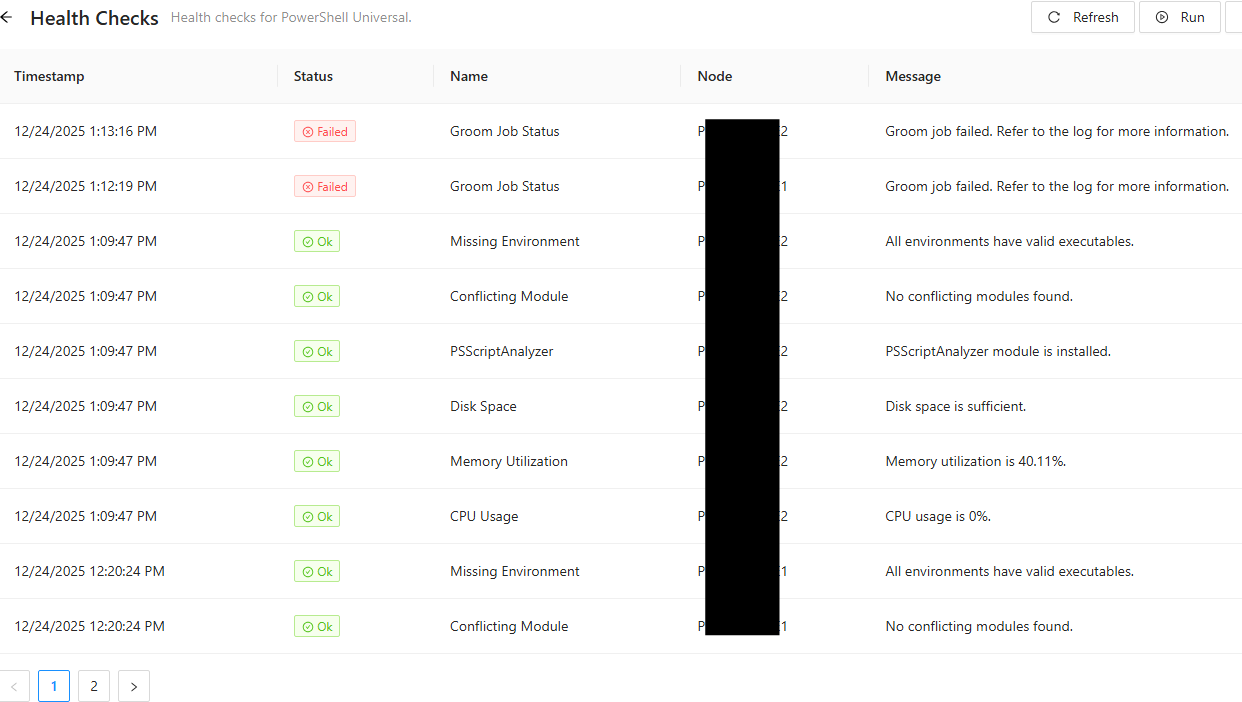
I use my SQL database for both PSU as well as my own custom schema with data tables for my own automation (which contains a lot of synced data from other sources) so the overall size is not at all reflective of just the PSU & Hangfire schema on it’s own. it’s 2300MB.
I havent really changed anything in terms of scripts or job output, since getting this error, and my job output is very minimal, we’re talking a handful of lines of write-output (probably no more than about 5lines of text) for a handful of automations just to show a summary of what it’s done. I havent changed job retention either. The row count in my job table is 634.
- I only noticed the error after an upgrade (not sure if it’s related or not).
- SqlException as per the above logs, when failing to DELETE.
As for the other points you mentioned, I dont really have many schedules or output nothing that would be of concern.
SQL login has full DBO permissions, this hasnt changed.
No timeouts seen.
Thanks,
Tom
31af323c8d33cceaa23df1f4932510f7956811bb.png
Also, another side question, while I was poking around in my logs folder, I noticed a new folder for ‘PowerShellHost’ this didnt used to be here - not sure which version it was introduced, but it just seems to fill up with hundreds and hudreds of empty 0kb host-number.txt files. Is this a bug or do I need to change my configuration?
Thanks for the additional log details, that helps a lot. The key item is the Groom failure throwing SqlException (547) against FK_Job_Job_ParentJobId. That means the Groom process is attempting to delete one or more “parent” jobs while there are still “child” jobs referencing them via ParentJobId, so SQL blocks the delete for referential integrity.
To narrow this down, could you please provide the following:
- The full “Failed to delete jobs” block from the system log (including the timestamp and the SQL statement) from each node.
- Your current retention settings for Jobs and JobOutput (Settings > General > Data).
- Confirmation whether you have scripts that frequently trigger other scripts (for example, nested execution patterns), since that commonly creates parent-child job chains.
If you can run read-only queries against the PSU database, these can help identify the pattern. Please take a backup first and run them during a quiet window:
-- Children referencing a missing parent (should return 0 rows)
SELECT TOP 50 c.Id, c.ParentJobId
FROM Job c
LEFT JOIN Job p ON p.Id = c.ParentJobId
WHERE c.ParentJobId IS NOT NULL AND p.Id IS NULL;

-- Parent jobs that still have children
SELECT TOP 50 p.Id AS ParentId, COUNT(*) AS ChildCount
FROM Job p
JOIN Job c ON c.ParentJobId = p.Id
GROUP BY p.Id
ORDER BY ChildCount DESC;
In parallel, if your environment stores a lot of pipeline output, reducing it can significantly lower load on the Job tables and help overall stability (Discard Pipeline, Out-Null, and more aggressive retention for unimportant jobs).
Thanks for the reply, I’ll open a support ticket so that I can provide you the necessary details in a more private way.
Hi @AnonymousUser ,
This is still an issue in my instance, I updated the github issue you logged here: Groom job fails to delete job history in SQL Server due to self-referencing FK on Job.ParentJobId (SqlException 547) · Issue #5497 · ironmansoftware/powershell-universal
Couple of questions that I’d just like to get an answer on if possible:
- by having this issue on-going for so long - is it going to cause any impact to my instance
- Is there a workaround that I can use, for example sql query you can provide that will allow me to delete the jobs in question and clear the error so that my health checks pass?
I have the same issues with one of my instances