PowerShell Universal - 5.6.11
PowerShell Universal - 5.6.11
Release Notes
Bug Fixes
- Admin Console - Issue with creating app tokens #5379
- Admin Console - Improved git settings credential dialog #5364
- Platform - File System Watcher in 5.6.x does not respect module changes #5385
- Platform - Fixed an issue where SQLite VACUUM would run too frequently. #5402
- Module - Invoke-PSUScript errors in strict mode #5339
Downloads
Adam Driscoll
PowerShell Expert and Developer at Devolutions
All Comments (6)
On both my servers, clicking the version number in the admin console main page
open /admin/releases and sits there circling forever, not showing any release info.
This always has worked before.
this fails as well
update-PSUServer -verbose -LatestVersion -Path “C:\Program Files (x86)\Universal”
VERBOSE: Requested HTTP/1.1 GET with 0-byte payload
VERBOSE: Received HTTP/1.1 8-byte response of content type text/plain
VERBOSE: Requested HTTP/1.1 GET with 0-byte payload
VERBOSE: Received HTTP/1.1 312-byte response of content type text/html
Invoke-WebRequest: Bad RequestBad Request - Invalid URLHTTP Error 400. The request URL is invalid.
Update:
Release now get shows again in the admin console.
Cmd line update-psuserver -latestversion still fails with invalid URL.
Update 2:
Meanwhile update-psuserver worked.

I get “MUI X Expired package version” on data grids: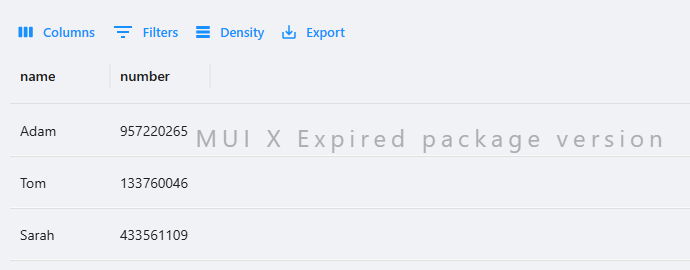
4c924f344ed809368187269facdf0ca7519cb1e2.png
Also for visibility, raised an issue with New-UDLink when nesting New-UDIcons in the -Children scriptblock:
New-UDLink child icons break in v5.6.11 · Issue #5427 · ironmansoftware/powershell-universal
Edit: the issue was marked as fixed and it will be resolved in 5.6.12
editing pages in App (by Web) in docker container finally works) !!!
thx @Adam Driscoll
i got this issue aswell
Edit: the issue was marked as fixed and it will be resolved in 5.6.12
We lost the sidebar buttons in the admin portal for API, Automation, Portal and Apps, i can still go to those if i go there if i type the URL.