Dynamically create UDColumns

Product: PowerShell Universal
Version: 5.6.1
Hello folks, @Adam Driscoll
Problem is similar to described here:
I recently ran into a similar problem. The issue was that the variable was out of scope by the time the scriptblock was executed. I fixed this by first creating the scriptblock as a string and expanding the variable. After that, I passed the scriptblock to the -OnRender parameter like this: $Fy = $year.FiscalYear $ScriptBlockContent = @" `$Fy = `'$Fy`' "{0:C}" -f `$EventData.`$fy "@ $scriptBlock = [ScriptBlock]::Create($ScriptBlockContent) New-UDTableColumn -Property $Fy -Title $Fy -OnR…
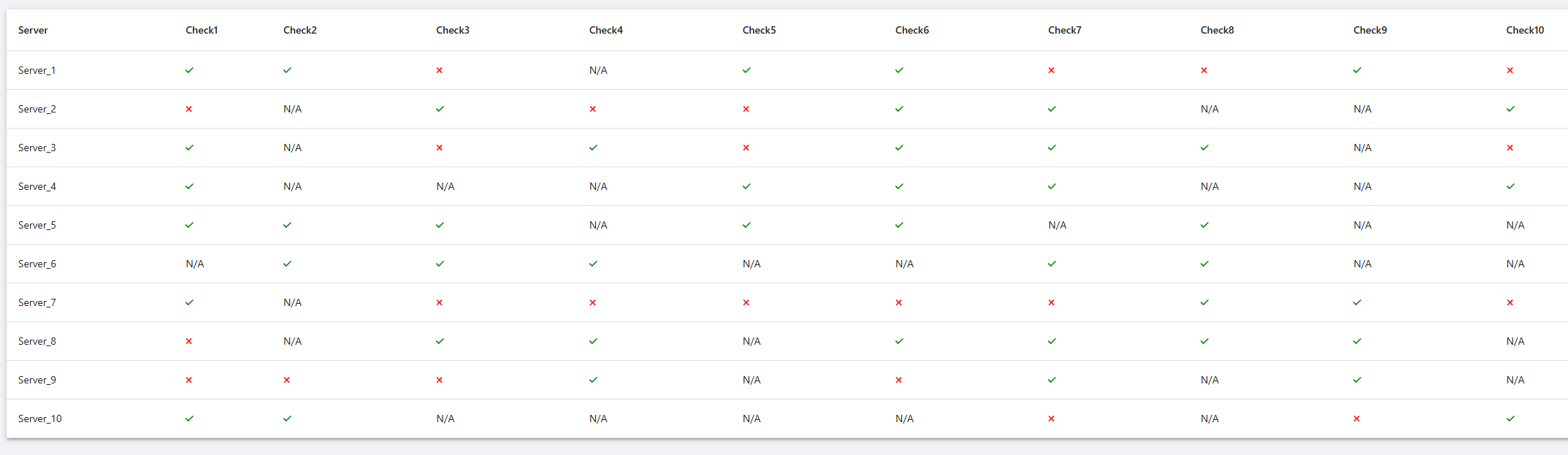
i need to dynamically create columns for udtable with on render script block that displays green check icon for pass, red for fail and N/A for other
Data contains columns server and 10 columns from check1 to check10
This does not work - shows N/A everywhere
$columns = @(
New-UDTableColumn -Property Server -Title “Server”
(1..10 | ForEach-Object {
$check_n = “Check$_”
New-UDTableColumn -Property “$check_n” -Title “$check_n” -OnRender {
if ($EventData -eq “PASS”) { New-UDIcon -Icon check -Color green -Size sm }
elseif ($EventData -eq “FAIL”) { New-UDIcon -Icon times -Color red -Size sm }
else { New-UDTypography “N/A”
}
}
}
)
)
and using this [ScriptBlock]::Create approach also is not possible because i want to utilize udiconbutton for onclick script blocks.
and coding it in this format will be nightmare.
any working solutions ? AI chats are not very helpful..
All Comments (2)
Hi,
thats because you cannot match $EventData with a string like “PASS” because $EventData is a PSCustomObject of the concurrent Row so you need to identify the indentifier before.
Something like this should work for you:
$columns = @(
    New-UDTableColumn -Property "Server" -Title "Server"
    (1..10 | ForEach-Object {
            $check_n = "Check$_"
            New-UDTableColumn -Property "$check_n" -Title "$check_n" -OnRender {
                $CheckProperty = $EventData.PSObject.Properties.Name | Where-Object { $_ -match "Check" }
                if ($EventData.$CheckProperty -eq "PASS") {
                    New-UDIcon -Icon check -Color green -Size sm
                } elseif ($EventData.$CheckProperty -eq "FAIL") {
                    New-UDIcon -Icon times -Color red -Size sm
                } else {
                    New-UDTypography "N/A"
                }
            }
        }
    )
)
Edit:
The example above only works with one column named “CheckXXX”.
Here is a example of a working set of Servers with 10 checks, also you need to use -LoadRows in New-UDTable to get $EventData.$Property to work
$columns = @(
    New-UDTableColumn -Property "Server" -Title "Server"
    (1..10 | ForEach-Object {
            $check_n = "Check$_"
            $OnRender = {
                $CheckProperty = $EventData.$Property
                if ($CheckProperty -eq "PASS") {
                    New-UDIcon -Icon check -Color green -Size sm
                } elseif ($CheckProperty -eq "FAIL") {
                    New-UDIcon -Icon times -Color red -Size sm
                } else {
                    New-UDTypography "N/A"
                }
            }
            New-UDTableColumn -Property "$check_n" -Title "$check_n" -OnRender $OnRender
        }
    )
)

$TableData = 1..10 | Foreach-Object {
    $InnerData = [PSCustomObject]@{
        Server = "Server_$_"
    }

    1..10 | Foreach-Object {
        $CheckKey = "Check$_"
        $RandomValue = Get-Random -Minimum 1 -Maximum 10
        $CheckValue = if($RandomValue % 2 -eq 0) {
            "PASS"
        } elseif ($RandomValue % 3 -eq 0) {
            "FAIL"
        } else {
            "N/A"
        }
        Add-Member -InputObject $InnerData -NotePropertyName $CheckKey -NotePropertyValue $CheckValue
    }

    $InnerData
}

New-UDTable -Columns $columns -LoadRows {
    $TotalCount = $TableData.Count
    $TableData | Out-UDTableData -Page $EventData.Page -TotalCount $TotalCount -Properties $EventData.Properties
}
b5a15ce3bf8b635edfcef77a6d51bd70c7936796.png
yep seems to be working, thanks a lot , you are better than AI chats