Error executing job: SQLite Error 5: 'database is locked'

Product: PowerShell Universal
Version: 5.6.7
Seeing frequent database locked errors. This started to happen when on version 5.4.3 and now continues with version 5.6.7.
For a long time I had two scheduled scripts running. One every 10 minutes and one every 5 minutes and never ran into this error. Not too long ago I added another scheduled script to run every 10 minutes and then I started to run into this issue. I adjusted the schedules so that the jobs would not run at the same time and that did not help. Right now, I’ve disabled the other scheduled scripts and have only 1 running and i’m still running into this issue.
Is there perhaps some grooming needed on the database? Cleanup of old events or log files? Ultimately, I will migrate to a SQL database but i’m not ready to do that yet.
All Comments (23)
I am still seeing this error even when it is only one job running at a time. This is going to be a big problem for me as we’re about to kickoff a project where scheduled tasks need to be able to run consistently.
@Adam Driscoll wanted to know if you’re aware of this issue?
im also getting those errors recently.
its very annoying because its eating all ram and when i log into system in the morning is either already dead or is working so slow that needs to be restarted anyway
its getting kind of critical for me…
2025-10-08 14:03:17.914 +02:00 [ERR][PowerShellUniversal.Automation.ExecutionService] Failed to report progress
Microsoft.Data.Sqlite.SqliteException (0x80004005): SQLite Error 5: 'database is locked'.
   at PowerShellUniversal.Extensibility.EFTable`2.Update[TProp](T item, Expression`1 updates) in D:\a\universal\universal\src\PowerShellUniversal.Extensibility\Persistence\EFTable.cs:line 332
   at PowerShellUniversal.Automation.ExecutionCallback.ReportProgress(JobProgress request) in D:\a\universal\universal\src\PowerShellUniversal.Automation\ExecutionCallback.cs:line 103
How are you hosting PSU? How large is your database and do you have any groom job failures? I’ve opened an issue for this here: SQLite Database Locking Issue · Issue #5303 · ironmansoftware/powershell-universal · GitHub
We had a support case come in about something similar but I’m not sure if it’s related at the moment. Feel free to comment on that issue as well and use it to track any progress.
Adam Driscoll
PowerShell Expert and Developer at Devolutions
my database size is 53MB. Is that large for a sql lite db? I’m not aware of any grooming job failures. where would I see those?
That’s very small. It shouldn’t cause any issues.
You would see a notification and a health check failure if the groom job was failing.
Adam Driscoll
PowerShell Expert and Developer at Devolutions
health checks look good. I also want to add that this error only seems to happen with scheduled scripts. I have apps that also submit jobs and those never run into the issue. in addition it looks like the schedules are not working properly. I have two schedules. one to run a script every 5 minutes another to run a script every 10 minutes and they do not run at the same time. I can see that they do not always run when expected.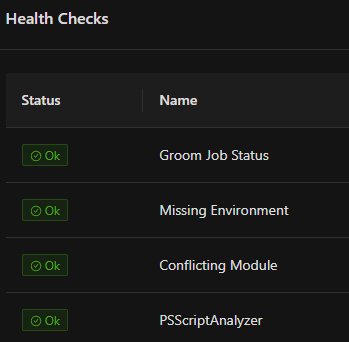
40698a94b2d57d8297253b9a5705d7e5d4c14599.png
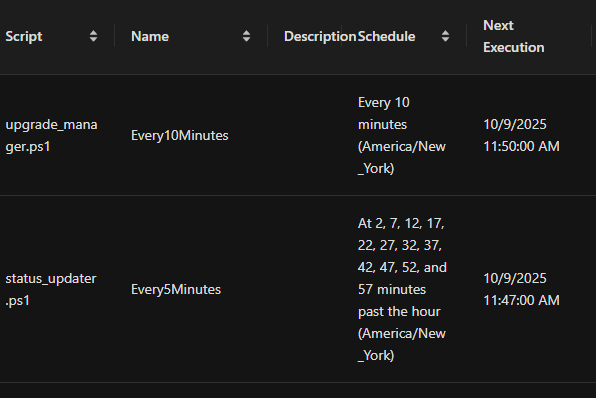
Here you can see the two schedules and when they get executed. you can see they get skipped often.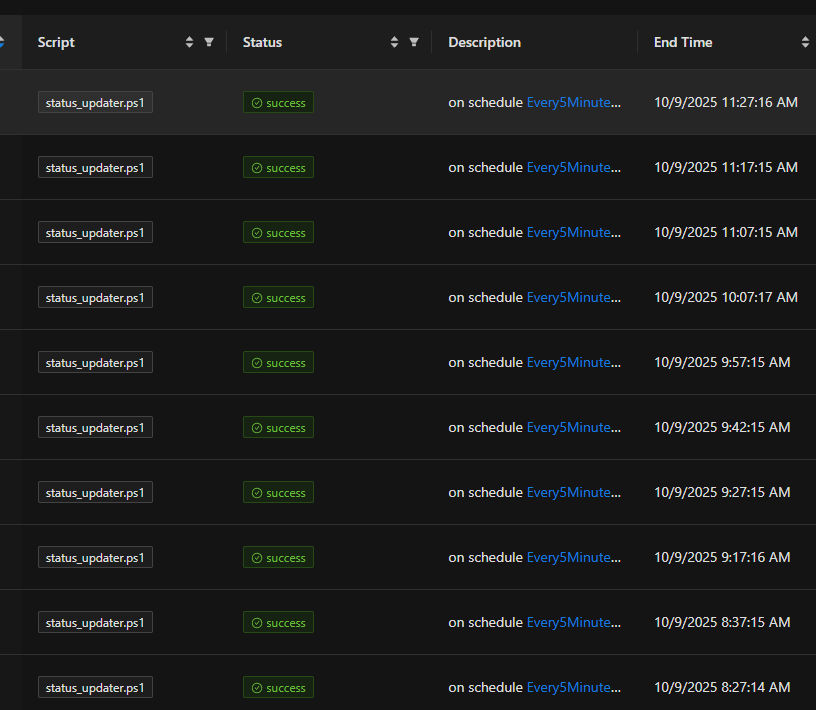
db6e1356edc62e8d35488d3b5f0ba5c44227e792.png
68c7edaebd92470cae6529e48207becc3595b3da.png
I starting seeing this as well in 5.6.6 or.7, but seemed to have cleared up in 5.6.8 (for me). I also had just setup git sync before the error showed up. But no issue so far…
My db is only 11mb
my db i 60mb
have a lot of script jobs running by schedule every 30 min
i changed schedule to 4h , will se if it helps
but it crashed 3rd time in a row today
i see also this line i log before SQLite Error 5: ‘database is locked’ line:
2025-10-09 14:03:36.613 +02:00 [ERR][PowerShellUniversal.Automation.ExecutionService] Failed to report progress
@Adam Driscoll could you take a look ?
the error occurred on a git sync attempt. first time i’ve seen it happen on a git sync attempt.
43239f2a07b6c25eb32e60a990710919ffe566e6.png
Besides the database lock issue, i’m having problems with scheduled tasks simply not running according to the schedules. this is probably a different issue but I did mention this before in this thread. here’s a script set to run every 10 minutes and you can clearly see it does not.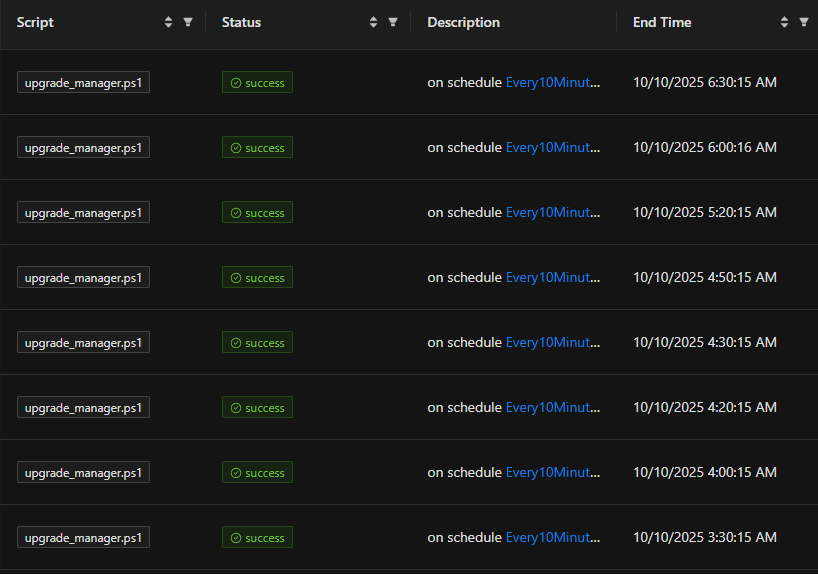
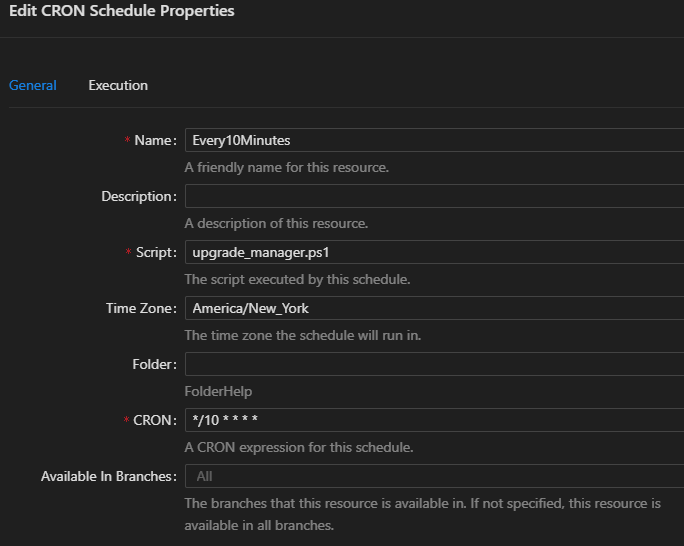
83767808ff509bbcb8923165fefc174755d55726.png
1eeddbb45ee47de8443f59c8e9446fa35f18d7b7.png
If the database is locked, lots of things will fail to work. I have a call with another customer that has a similar issue this morning. I’ll update this thread and the issue with any findings.
Adam Driscoll
PowerShell Expert and Developer at Devolutions
things are getting worse for me now. not only are schedule tasks not running but even when I try to manually submit a job it never runs and says it being queued. i’ve tried to restart services several times and the issue remains.
I believe we have root cause. Please see details here: SQLite Database Locking Issue · Issue #5303 · ironmansoftware/powershell-universal · GitHub
Adam Driscoll
PowerShell Expert and Developer at Devolutions
that’s good to hear. I’m looking at it now. what is the workaround? it is not clear to me
I’ve added this at the top of the scripts i’m trying to run and they are still getting stuck in the queued state.$PSDefaultParameterValues = @{'*:ProgressAction' = "SilentlyContinue"}
my problem may also be that I have one script with three job instances stuck in the canceling state. how can we force cancel a job?
one of my problems was that I had one script set to only execute one instance at a time. and since I have a few jobs for that script stuck in the cancelling state, it was keeping new instances in the queued state. so at least I can manually execute jobs again even though the scheduler is still not working properly.
Is there any update on this database locking issue?
This issue seemed to have mysteriously gone away on its own which is weird. I also just updated to 5.6.9 today and will keep an eye on whether or not I get any more database locking issues. the scheduled tasks seem to be working fine.
My errors have disappeared as well. It was probably related to some scheduled scripts that were generating strange errors I hadn’t noticed. Since fixing those scripts, there haven’t been any “database is locked” messages in the logs.
It might be connected—or maybe not—but either way, it shouldn’t have caused such a severe impact like in my case, where the PSU server froze or completely stopped.
After upgrading to 5.6.9, I am still seeing this issue when attempting to run a script. This was immediately after a recycle of the app pool (IIS):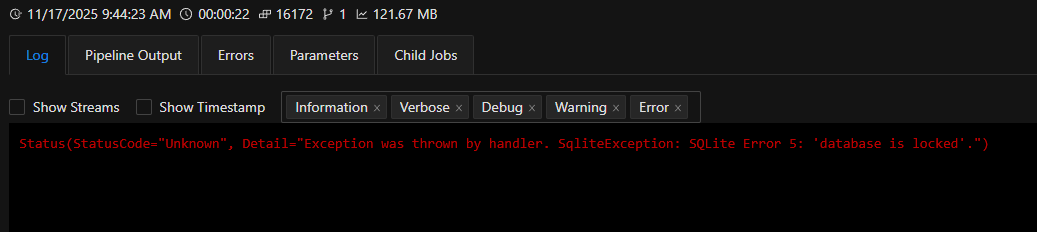
This script was working fine on Friday, while also on 5.6.9. No correlating log was found in the system log. Should I engage support?
9258a36eab6849e7f366d3031651be0a17afe027.png