PowerShell Universal - 5.6.3
PowerShell Universal - 5.6.3
Release Notes
Features
Bug Fixes
Admin Console
- Admin Console JavaScript Errors #5096
- Clear Cache from /admin/platform/cache #5080
- End time filtering not working #5006
- Issue with editing variables in the UI in web view mode. #5034
- Optimized Automation \ Schedules page #5104
Apps
- cross threaded console logs #5049
- New-UDCheckbox LabelPlacement value is case-sensitive (and other properties as well) #5010
- Slide transitions are not working #3460
Automation
- Jobs get stuck when cancelling #5078
Cmdlets
- Set-PSUCache does not store nested objects well after 3 depth #5086
Downloads
Adam Driscoll
PowerShell Expert and Developer at Devolutions
All Comments (5)

Hi @Adam Driscoll - after installing 5.6.3 in our test environment New-UDButton is broken.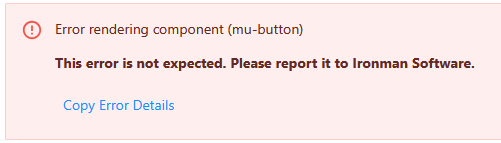
If I look at the built-in doc, it seems that New-UDButton only works if -Size is specified.
4db14f04ad40c60151052d93ce4227a938954f4e.png
Additionally I cannot view any jobs, I get the following error:
An error was unhandled and caused this component to fail to render. Please report this to Ironman Software using the tracker link below.
An error occured. Could not find 'ansiToHtml' ('ansiToHtml' was undefined). findFunction/<@https://psutst.rn.dk/_framework/blazor.server.js?v=5.6.3:1:374 findFunction@https://psutst.rn.dk/_framework/blazor.server.js?v=5.6.3:1:342 b@https://psutst.rn.dk/_framework/blazor.server.js?v=5.6.3:1:5091 beginInvokeJSFromDotNet/i<@https://psutst.rn.dk/_framework/blazor.server.js?v=5.6.3:1:2884 beginInvokeJSFromDotNet@https://psutst.rn.dk/_framework/blazor.server.js?v=5.6.3:1:2847 _invokeClientMethod@https://psutst.rn.dk/_framework/blazor.server.js?v=5.6.3:1:63689 _processIncomingData@https://psutst.rn.dk/_framework/blazor.server.js?v=5.6.3:1:61078 Jt/this.connection.onreceive@https://psutst.rn.dk/_framework/blazor.server.js?v=5.6.3:1:54719 connect/</i.onmessage@https://psutst.rn.dk/_framework/blazor.server.js?v=5.6.3:1:78667
at Microsoft.JSInterop.JSRuntime.InvokeAsync[TValue](Int64 targetInstanceId, String identifier, Object[] args) at PowerShellUniversal.ScriptOutputLine.OnParametersSetAsync() in D:\a\universal\universal\src\Universal.Server\Shared\Automation\ScriptOutputLine.razor:line 61 at Microsoft.AspNetCore.Components.ComponentBase.CallStateHasChangedOnAsyncCompletion(Task task) at Microsoft.AspNetCore.Components.RenderTree.Renderer.GetErrorHandledTask(Task taskToHandle, ComponentState owningComponentState) An error occured. Could not find 'ansiToHtml' ('ansiToHtml' was undefined). Error: Could not find 'ansiToHtml' ('ansiToHtml' was undefined). at http://localhost:5000/_framework/blazor.server.js?v=5.6.3:1:374 at Array.forEach (<anonymous>) at l.findFunction (http://localhost:5000/_framework/blazor.server.js?v=5.6.3:1:342) at b (http://localhost:5000/_framework/blazor.server.js?v=5.6.3:1:5091) at http://localhost:5000/_framework/blazor.server.js?v=5.6.3:1:2884 at new Promise (<anonymous>) at w.beginInvokeJSFromDotNet (http://localhost:5000/_framework/blazor.server.js?v=5.6.3:1:2847) at Jt._invokeClientMethod (http://localhost:5000/_framework/blazor.server.js?v=5.6.3:1:63689) at Jt._processIncomingData (http://localhost:5000/_framework/blazor.server.js?v=5.6.3:1:61078) at nn.onreceive (http://localhost:5000/_framework/blazor.server.js?v=5.6.3:1:54719)at Microsoft.JSInterop.JSRuntime.InvokeAsync[TValue](Int64 targetInstanceId, String identifier, Object[] args) at PowerShellUniversal.ScriptOutputLine.OnParametersSetAsync() in D:\a\universal\universal\src\Universal.Server\Shared\Automation\ScriptOutputLine.razor:line 61 at Microsoft.AspNetCore.Components.ComponentBase.CallStateHasChangedOnAsyncCompletion(Task task) at Microsoft.AspNetCore.Components.RenderTree.Renderer.GetErrorHandledTask(Task taskToHandle, ComponentState owningComponentState)
We got these errors when we run a script. Any idea?
We’ve identified the issue with this build and 5.6.4 will be out shortly.
Adam Driscoll
PowerShell Expert and Developer at Devolutions
Thanks for the quick reply Adam.