Secret Variables not working when called as a script parameter
Secret Variables not working when called as a script parameter

Product: PowerShell Universal
PSU Version
5.5.4
Connection String
Data Source=%HOME%/.PowerShellUniversal/psu.db
Repository Folder
%HOME%/.PowerShellUniversal/Repository
I’m currently attempting to build out a new PSU server on Ubuntu and having some trouble with my first automation script. Here are the parameters of the script:
param (
    [Parameter(Mandatory)]
    [string]$Domain,

    [string]$IPAddress,

    [parameter(Mandatory)]
    [PSCredential]$Token
)
I have a PSCredential secret set up like this: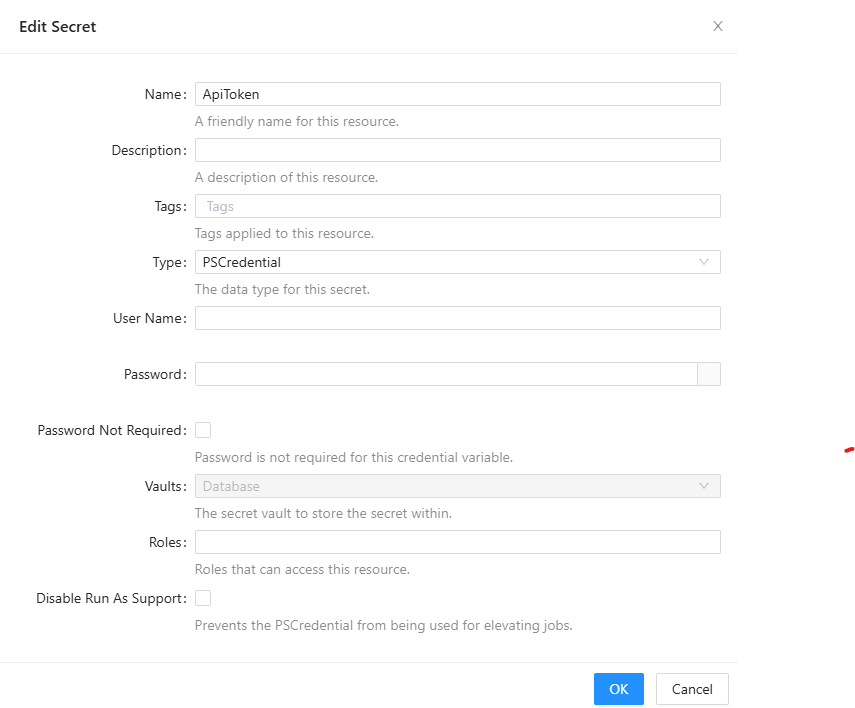
Then, when running or scheduling the script, I use these parameters: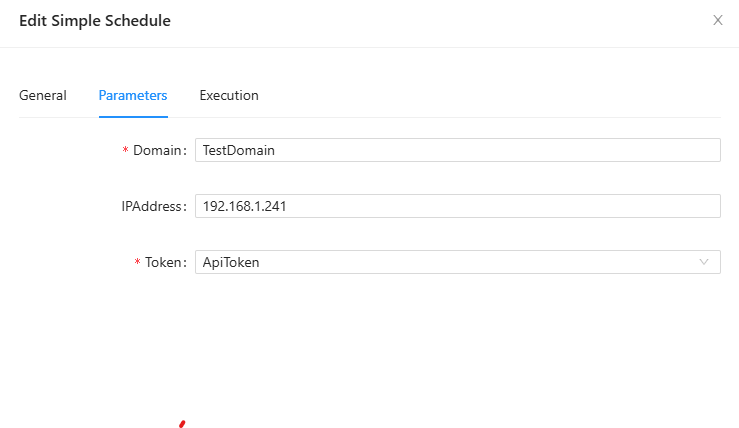
Every time I run the script, I’m getting this error: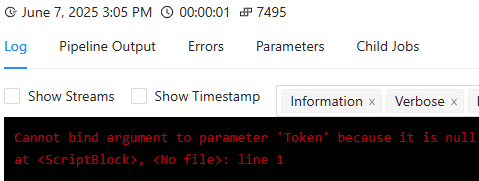
This seems pretty straight-forward - what am I doing wrong here?
Thanks all, it’s good to be back on this forum after a long hiatus!
08a24359b640d37fade46f838a9e747af2bce276.png
2b4bf865630073f7519429ff796a8f2c8272e359.png
d3ae2ecf35dde257c050322e34d05affafbab0e6.png
All Comments (11)
You can’t (at least, that I’m aware of) use a PSCredential for app tokens since you only have a hash (the token) and not a username/password. You can store your token as a Secret variable instead, but you’d need to execute your script in a user context under an identity that’s got access to read the Secrets entries in order to do that.
I would suggest providing the token in your query in a literal string rather than trying to reference it dynamically as a parameter, personally, similar to how you’d do it in any other public API query.
For example, create an app token that’s tied to an identity with access to run whatever it is in PSU that needs to be accessed, then add that token as a passed parameter to your PSU endpoint (API) or whatever it is you’re running.
If you were using CURL, you could have something like:
curl --location --request POST 'https://<PSU-FQDN>/<PSU-Endpoint>?Domain=<domain>&IPAddress=<IPAddress>&Token=<Token>' \
--header 'Authorization: Basic <Base64 Hash of PSU identity to authenticate to the API with>' \
--data ''
Not sure what you mean - the docs say you can create a secret variable as a string or a PScredential object. And when I assign a value to the script parameter, I’m offered the choice of the credential variable I created. So from my perspective I can’t see any reason why parameter binding would fail here.
docs.powershelluniversal.com
Do you get the same error if you try to run the script from Scripts? You schedule might not have permission to get the secret:
docs.powershelluniversal.com
Well, I kinda blew it and after I couldn’t figure this out I tried to uninstall PSU and then reinstall it. Now I can’t get it running again. I just did this with Uninstall-PSUServer and then re-ran Install-PSUServer, all with no additional parameter values. Now when I try to login I get the error:
SQLite Error 1: ‘no such table: Identity’.
I’m not sure what to do now, I’m guessing maybe some artifacts from the original installation are hanging around. I’ll keep poking around to see what I can figure out and then get back to this original question.
Brief answer to your question is - yes, I believe I was getting the same error even if I just tried to launch the script rather than running the schedule. I can’t currently confirm that, though.
I’ve had re-install issues on Windows before, and I had to uninstall again, remove the folders below, and reinstall:
%ProgramData%\PowerShellUniversal
%ProgramData%\UniversalAutomation
Based on your original post, the location of the first folder would be %HOME%/.PowerShellUniversal/Repository for you, but I’m not sure about the second one.
You’re a lifesaver! I had to dig through and do a find of any PowerShellUniversal files and folders, but I was finally able to remove all the artifacts and get this running again. I’ll do some testing and see if I can recreate the variable issue.
I finally got a chance to revisit this problem, and I have PSU running again on my Linux server. However, I’m still having trouble with getting a script to run on a schedule. I was incorrect before - I am able to run this script manually with no problem, but it fails when I attempt to run it via schedule. This points to a permissions issue like you stated.
I’m not able to run a schedule as a different user. Here’s what I did:
- Create a local user named “Sched,” set a password, and assigned the Execute role
- Created a PSCredential variable to store the username and password
- Set the schedule to Run As the Sched user by selecting the secret variable I just created
When I run the schedule, I get this error:
Any thoughts about what I might be doing wrong here?
6f0ff33f95dbadc36e3fc0aebb2ca44cb97afd08.png
Unfortunately, no. I have a couple of things that depend on Windows, so I haven’t tried installing PSU on Linux or in a container.
Actually, Jesse’s answer in this thread might be helpful:
Hi All, I’m having another wierd one here. I’ve got an automation script that connects to a database and returns data. I’ve created a secret variable and wish to use that. I’m using the following: $sec = ($Secret:MySecretName).password | Convertfrom-SecureString -AsPlainText This works great when executing the script manually or through an app. But it throws an error when doing it as an scheduled job? The error message is: “Cannot bind argument to parameter ‘SecureString’ because it is nul…
Essentially, you need an app token to retrieve the secret, but the app token can’t also be a secret. I think that might be what Jesse was talking about in his initial reply to you.
So your schedule would invoke the script which would retrieve the app token from an environment variable or a plain text PSU variable, then that token would be used with Get-PSUVariable to retrieve your credential object. Something like:$cred = Get-PSUVariable -Name MyCred -AppToken $env:PSUMySchedAppToken
I would try it with an app token with the admin role to confirm it works. If it does, you can try to create a more restrictive custom role in roles.ps1. I think it would need a permission like platform.variables.MyCred/read.
That’s a bit confusing as I believe I have this set up exactly as documented, and it seems that the use case I’m describing is why there are PSCredential secrets in the first place. Otherwise, why would that be selectable as a parameter value in the Execution interface?
Regardless, I’ll try it and report back.
Thanks all!
If you’re selecting the credential under the Execution tab (Run As), I would expect it to work without the extra hoops. It may depend on your security model, though.
If you’re selecting the credential for a parameter on the Parameters tab, then that parameter is only appearing there because you put it in your script. The identity executing the script will need permission to retrieve the secret in that scenario.