Error: Status(StatusCode="Internal", Detail="Bad gRPC response. HTTP status code: 400")
Error: Status(StatusCode="Internal", Detail="Bad gRPC response. HTTP status code: 400")

Product: PowerShell Universal
Version: 5.5.3
Getting the following error when trying to run PSU commands inside a script after upgrading from PSU 4.x to 5.5.3:
Status(StatusCode=“Internal”, Detail=“Bad gRPC response. HTTP status code: 400”)
For example the following all return the above error:
Invoke-PSUScript -Name "TestTarget.ps1" -Parameters @{ FullName = "Bob Smith" } -AppToken $Secret:AppToken

Invoke-PSUScript -Name "TestTarget.ps1"

Invoke-PSUScript -Name "TestTarget.ps1" -TrustCertificate

Get-PSUComputer

Get-PSULicense
Any suggestions on how to resolve this?
Thank you.
All Comments (9)
That’s because scheduled jobs and scripts executed from within an endpoint (API) don’t run in user context, so they aren’t authenticated and can’t access the secrets. You need to create an app token for an identity that has admin access to PSU (or at least has access to the secrets you need to reference below), and then add the following to the top of your script (before any lines that attempt to access secrets) being called in your scheduled task:
$AppToken = <redacted>
Connect-PSUServer -AppToken $AppToken -ComputerName 'https://<redacted>'
Or, if you prefer not to have your app token and FQDN defined within the script directly, you could create a non-secret (standard) variable in PSU that contains the app token and another that contains the PSU FQDN, and then you could do:
Connect-PSUServer -AppToken $PSUInternalToken -ComputerName $PSUFQDN
@Jesse.Peden - Thanks for the suggestion!
I have an app token with admin role assigned, and created 2 files:
- TestSource.ps1
- TestTarget.ps1
In TestSource.ps1 I have:
Connect-PSUServer -AppToken $Secret:AppToken -ComputerName "https://psu-server-name"
Invoke-PSUScript -Name "TestTarget.ps1" -Parameters @{ FullName = "Bob Smith" }
In TestTarget.ps1 I have:
param (
    [Parameter(Mandatory = $true)]
    [string]$FullName
)

Write-Output $FullName
When I run TestSource.ps1 in PSU, I still get the same error:
Cannot retrieve the dynamic parameters for the cmdlet. Status(StatusCode=“Internal”, Detail=“Bad gRPC response. HTTP status code: 400”)
Output from TestSource.ps1:
Mode          : Server
Username      : username
OneWayGitSync : False
ManualGitMode : False
Roles         : {Administrator}
BuiltInRole   : True
Cannot retrieve the dynamic parameters for the cmdlet. Status(StatusCode="Internal", Detail="Bad gRPC response. HTTP status code: 400")
at <ScriptBlock>, C:\ProgramData\UniversalAutomation\Repository\Test\TestSource.ps1: line 3
at <ScriptBlock>, <No file>: line 1
I get the same “Bad gRPC response” error if I update TestSource.ps1 to be:
Connect-PSUServer -AppToken $Secret:AppToken -ComputerName "https://psu-server-name"
Get-PSUComputer
I also get the same error if I run just Get-PSUComputer from both PS 7 and PS 5 terminals in PSU:
Get-PSUComputer
[ERROR] Status(StatusCode="Internal", Detail="Bad gRPC response. HTTP status code: 400")
Does the Connect-PSUServer need to be added anywhere else, or any other configuration/settings I should look at?
Thank you.
The app token you’re referencing with the Connect-PSUServer cmdlet can’t be in a secret variable, as you can’t look up the value of the secret variable until you’ve connected to the PSU server.
That’s why I was saying that you need to store the token in a non-secret (standard) variable or enter it directly into the script (which will cause the PSU script analyzer to complain, but it still works).
I’ve had gRPC errors, but they can be a bit misleading as to the actual root cause.
I’ve actually been trying to get my head around the different security models and this doc really helped: Module | PowerShell Universal
I’m currently running my instance in Integrated mode so it mimics how it was operated in v4 a bit closer, I can issue commands without the need to use app tokens, or even -integrated switch (as it does it by default). This is considered less secure as it bypasses security but if thats an issue or not really depends how you intend to use PSU.
@Jesse.Peden - Tried using the token directly for testing and hit the same error. We’ll look at the auth security models as @AnonymousUser suggested to see what works, e.g. testing Permissive mode with -Integrated or Integrated mode. We’re waiting for a window when jobs aren’t running to make the config change and restart PSU. Thank you.
Odd. I use Strict mode, for the record.
@Jesse.Peden - Yeah it’s weird - perhaps something specific to our env or some remnant from the upgrade from 4.x - not sure, but yeah I tried the token directly when in Strict mode (currently):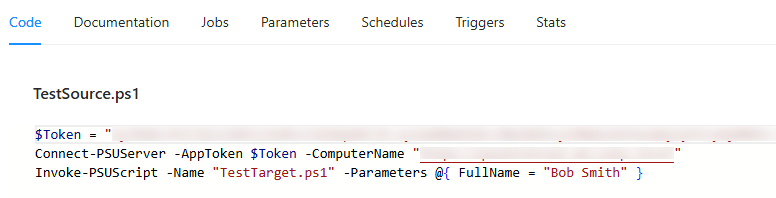
But same error: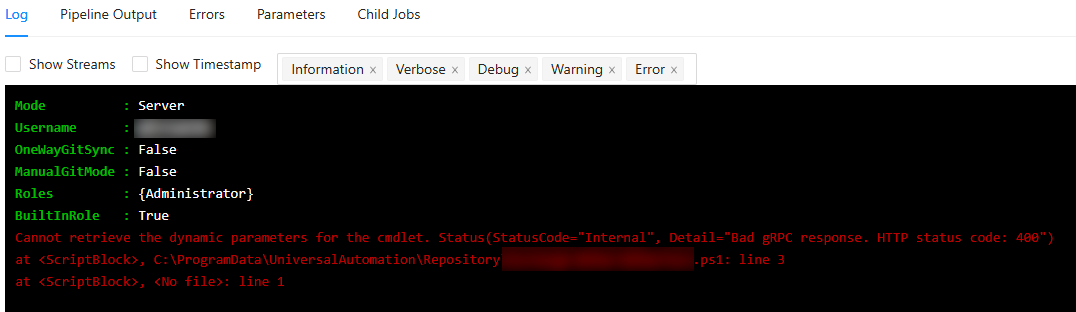
Hopefully the auth security model change will do the trick (when we can reboot the instance)
1124be4d7b74200ed6bf62d3338a2f84cb5d1d7b.png
df22602c7567f593abab4e234d4818257bb42188.png
Changing the authorization security model to Permissive, restarting PSU, and using -Integrated did the trick . So the following works without any tokens:Invoke-PSUScript -Name "TestTarget.ps1" -Parameters @{ FullName = "Bob Smith" } -Integrated
Thank you @Jesse.Peden and @AnonymousUser for the help and suggestions!
if your server is behind a proxy that can also cause problems as i’ve found out. Glad that you got it working though!