VSCode Extension issues - Unable to load Scripts

Product: PowerShell Universal
Version: 4.5.2 + 4.5.3
From one day to the next, I’ve suddenly been having issues using the VSCode Extension.
Oddly enough it’s only for loading Scripts.. All other functionality seems to function perfectly fine.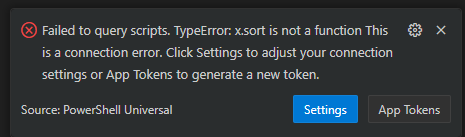
I’ve triple-checked to make sure my AppToken is valid and can confirm due to the fact that 90% of the VSCode extension is working as expected…
053f86ff1bf4bd3d1eb2c711448ca602a8712c0c.png
All Comments (5)
I had the same issue for several days, and then it went away.
All good again.
VsCode extensions are so many and they update so often, I hardly keep track.
So it might have been an update…
I’m having this issue too for about 1 week now. Version 5.4.4
Generating a new token had no effect.
We had the issue recently as well, with PSU 5.3.3 and VSC extension 5.5.0 and 5.5.1. It seems that the current versions of the VSC extension are not backward compatible. Upgrading our PSU server to 5.5.2 resolved the issue and the VSC extension connects again without any further modifications.
Thank you for your suggestion. I was able to downgrade the extension to a specific version, restarted vs studio and got it working.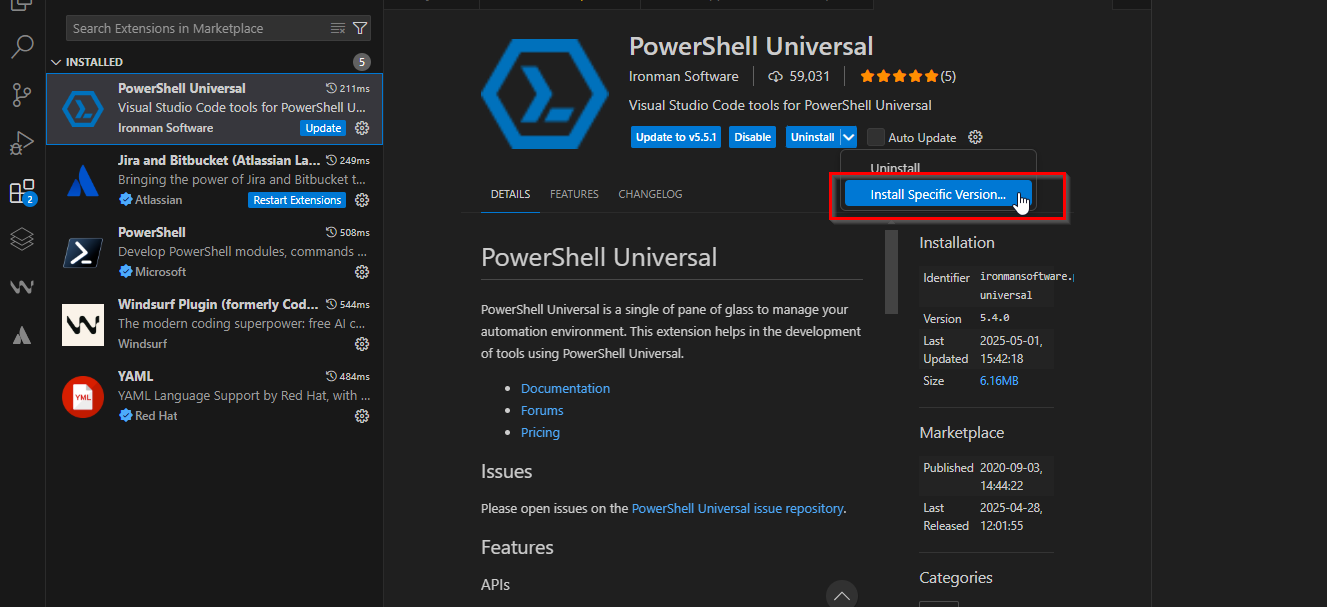
351bfc9d8c0bb514d47eaadb9ce9f78d74d7fab8.png
Thanks guys, installing a specific version solved it for me too!