PowerShell Universal - 5.5.0
PowerShell Universal - 5.5.0
Release Notes
Features
Admin Console
- Improved event hub and scripts pages
- Added known environment variables to support page
Automation
- Added Computer Offline trigger
- Added global preference variable settings
- Added support for individual script permissions
Apps
- Add option for to make apps as critical for load balancing purposes
- Add new parameters to New-UDTextbox, New-UDCheckbox, New-UDTransition, and Hide-UDModal
- Add new New-UDGauge and New-UDSparkline components
APIs
- C# endpoints now support references and using statements
Module
- Improved connection management with scopes and disconnection
- Added cmdlet for retrieving event hub connections
- Added parameters to Get-PSUJobOutput to limit output and return as object
Platform
- Added the ability to use powershell.exe directly for environments
- Added support for app tokens with multiple roles
- Improved login page layout and added support for Windows Form Login
Bug Fixes
Admin Console
- Resolved an issue where git credentials could be saved incorrectly when other settings were updated
Apps
- Resolved an issue where the tree view would not display
- Resolved an issue with Nivo heatmap charts would display an error
- Resolved an issue updating page icons from the admin console
Automation
- Resolved issues with the job dispatcher for computer groups, offline nodes and continuous schedules
- Resolved an issue where file parameters for scripts did not work properly
Cmdlets
- Resolved several issues with Invoke-PSUScript
Platform
- Resolved an issue with password expiration not displaying the password reset form causing lockout
- Resolved an issue where PSModulePath contained invalid entries for Windows PowerShell 5.1
- Resolved an issue loading the MicrosoftTeams, Az.Accounts and ExchangeOnlineManagement modules
Downloads
Adam Driscoll
PowerShell Expert and Developer at Devolutions
All Comments (29)
Nice. Looking forward to some of these changes/fixes, but I’m gonna hold off until 5.5.1 so I don’t have to deal with disappearing modules and some of the other issues I see slated to be patched in 5.5.1.

So I installed this because one of the issues being fixed with it was a major breaking issue for our environment/workflows. All seems to be good now with that, except I’ve noticed the behavior around listing the jobs has changed. Used to be, when you were looking at a script, and selected the “Jobs” tab above the code, it would show you JUST the jobs for that script. Now it’s showing all of them. I don’t know about anyone else, but that’s a non-starter for me. Why did that have to change? It really breaks the functionality of that page. I don’t know what the formal process is for feedback here (still fairly new), but I’m happy to submit a github issue or something.
It was an unintentional change likely due to a change in how job filtering works in the admin console overall. Bug opened here: Incorrect filtering of jobs from scripts page · Issue #4661 · ironmansoftware/powershell-universal · GitHub
Adam Driscoll
PowerShell Expert and Developer at Devolutions
Ah, ok. That makes sense. I noticed that changed as well, but I don’t remember seeing that change noted in the release notes. But that doesn’t mean anything, my memory is shot. Thanks for responding quickly and putting in the issue! I would have been happy to do it.
We are seeing an issue where secrets that were working the same day prior to the update appear to be no longer accessible. Is anyone else having that issue?
What type of secret vault are you using?
Adam Driscoll
PowerShell Expert and Developer at Devolutions
Azure Keyvault.
Ok. Let me give it a shot. Can you share your Az module version?
Adam Driscoll
PowerShell Expert and Developer at Devolutions
For reference, it looks like someone already filed an issue for this same problem (not sure if that was you). 5.5.0 can't access secrets in scripts · Issue #4669 · ironmansoftware/powershell-universal · GitHub
That was a co-worker. For some reason I cannot create a ticket in the issue tracker. Lets me fill out the template, then gives an generic error and doesn’t create the ticket.
We are running 6.3.1.
I also created a test credential using the MS SQL database, and had the same issue.
I’m getting that same generic error in GitHub. No idea why. I can create blank issues though.
I can’t reproduce this issue with database secrets at all. I still need to check Az. Can you check the log for any errors related to this?
Adam Driscoll
PowerShell Expert and Developer at Devolutions
We deleted all of the secrets and recreated a couple. When stored in the database it is working. We are getting the error below for the Azure Key Vault.
2025-04-21 10:40:31.114 -05:00 [ERR][PowerShellUniversal.Secrets.SecretManagerService] Failed to read secret: Your Azure credentials have not been set up or have expired, please run Connect-AzAccount to set up your Azure credentials.
Method not found: ‘Void Azure.Identity.Broker.SharedTokenCacheCredentialBrokerOptions..ctor(Azure.Identity.TokenCachePersistenceOptions)’.
Microsoft.Azure.Commands.Common.Exceptions.AzPSArgumentException: Your Azure credentials have not been set up or have expired, please run Connect-AzAccount to set up your Azure credentials.
Method not found: ‘Void Azure.Identity.Broker.SharedTokenCacheCredentialBrokerOptions..ctor(Azure.Identity.TokenCachePersistenceOptions)’.
—> System.MissingMethodException: Method not found: ‘Void Azure.Identity.Broker.SharedTokenCacheCredentialBrokerOptions..ctor(Azure.Identity.TokenCachePersistenceOptions)’.
at Microsoft.Azure.PowerShell.Authenticators.SilentAuthenticator.GetTokenCredentialOptions(SilentParameters silentParameters, String tenantId, String authority, PowerShellTokenCacheProvider tokenCacheProvider)
at Microsoft.Azure.PowerShell.Authenticators.SilentAuthenticator.Authenticate(AuthenticationParameters parameters, CancellationToken cancellationToken)
at Microsoft.Azure.Commands.Common.Authentication.DelegatingAuthenticator.TryAuthenticate(AuthenticationParameters parameters, CancellationToken cancellationToken, Task1& token) at Microsoft.Azure.Commands.Common.Authentication.DelegatingAuthenticator.TryAuthenticate(AuthenticationParameters parameters, CancellationToken cancellationToken, Task1& token)
at Microsoft.Azure.Commands.Common.Authentication.DelegatingAuthenticator.TryAuthenticate(AuthenticationParameters parameters, CancellationToken cancellationToken, Task1& token) at Microsoft.Azure.Commands.Common.Authentication.DelegatingAuthenticator.TryAuthenticate(AuthenticationParameters parameters, CancellationToken cancellationToken, Task1& token)
at Microsoft.Azure.Commands.Common.Authentication.DelegatingAuthenticator.TryAuthenticate(AuthenticationParameters parameters, CancellationToken cancellationToken, Task1& token) at Microsoft.Azure.Commands.Common.Authentication.DelegatingAuthenticator.TryAuthenticate(AuthenticationParameters parameters, CancellationToken cancellationToken, Task1& token)
at Microsoft.Azure.Commands.Common.Authentication.DelegatingAuthenticator.TryAuthenticate(AuthenticationParameters parameters, Task1& token) at Microsoft.Azure.Commands.Common.Authentication.Factories.AuthenticationFactory.Authenticate(IAzureAccount account, IAzureEnvironment environment, String tenant, SecureString password, String promptBehavior, Action1 promptAction, IAzureTokenCache tokenCache, String resourceId)
at Microsoft.Azure.Commands.Common.Authentication.Factories.AuthenticationFactory.Authenticate(IAzureAccount account, IAzureEnvironment environment, String tenant, SecureString password, String promptBehavior, Action1 promptAction, String resourceId) at Microsoft.Azure.Commands.Common.Authentication.Factories.AuthenticationFactory.GetServiceClientCredentials(IAzureContext context, String targetEndpoint, String resourceId) --- End of inner exception stack trace --- at Microsoft.Azure.Commands.Common.Authentication.Factories.AuthenticationFactory.GetServiceClientCredentials(IAzureContext context, String targetEndpoint, String resourceId) at Microsoft.Azure.Commands.Common.Authentication.Factories.AuthenticationFactory.GetServiceClientCredentials(IAzureContext context, String targetEndpoint) at Microsoft.Azure.Commands.KeyVault.Models.KeyVaultDataServiceClient..ctor(IAuthenticationFactory authFactory, IAzureContext context) at Microsoft.Azure.Commands.KeyVault.Models.KeyVaultCmdletBase.get_DataServiceClient() at Microsoft.Azure.Commands.KeyVault.GetAzureKeyVaultSecret.ExecuteCmdlet() at Microsoft.WindowsAzure.Commands.Utilities.Common.CmdletExtensions.<>c__31.b__3_0(T c)
at Microsoft.WindowsAzure.Commands.Utilities.Common.CmdletExtensions.ExecuteSynchronouslyOrAsJob[T](T cmdlet, Action`1 executor)
at Microsoft.WindowsAzure.Commands.Utilities.Common.CmdletExtensions.ExecuteSynchronouslyOrAsJob[T](T cmdlet)
at Microsoft.WindowsAzure.Commands.Utilities.Common.AzurePSCmdlet.ProcessRecord()
2025-04-21 10:40:31.490 -05:00 [INF][PowerShellUniversal.Automation.ExecutionService] Job 941 completed with status Error.
Thanks. I will have to have to track this down. It’s an assembly mismatch. We downgraded some assemblies to support other libraries and I worry it may have affected the Az module as well.
Adam Driscoll
PowerShell Expert and Developer at Devolutions
Thanks Adam. Is there a process to downgrade to the previous version?
We have some information here.
docs.powershelluniversal.com
You shouldn’t have to downgrade the database schema since it wasn’t a major version change, which should simplify it a lot.
Adam Driscoll
PowerShell Expert and Developer at Devolutions
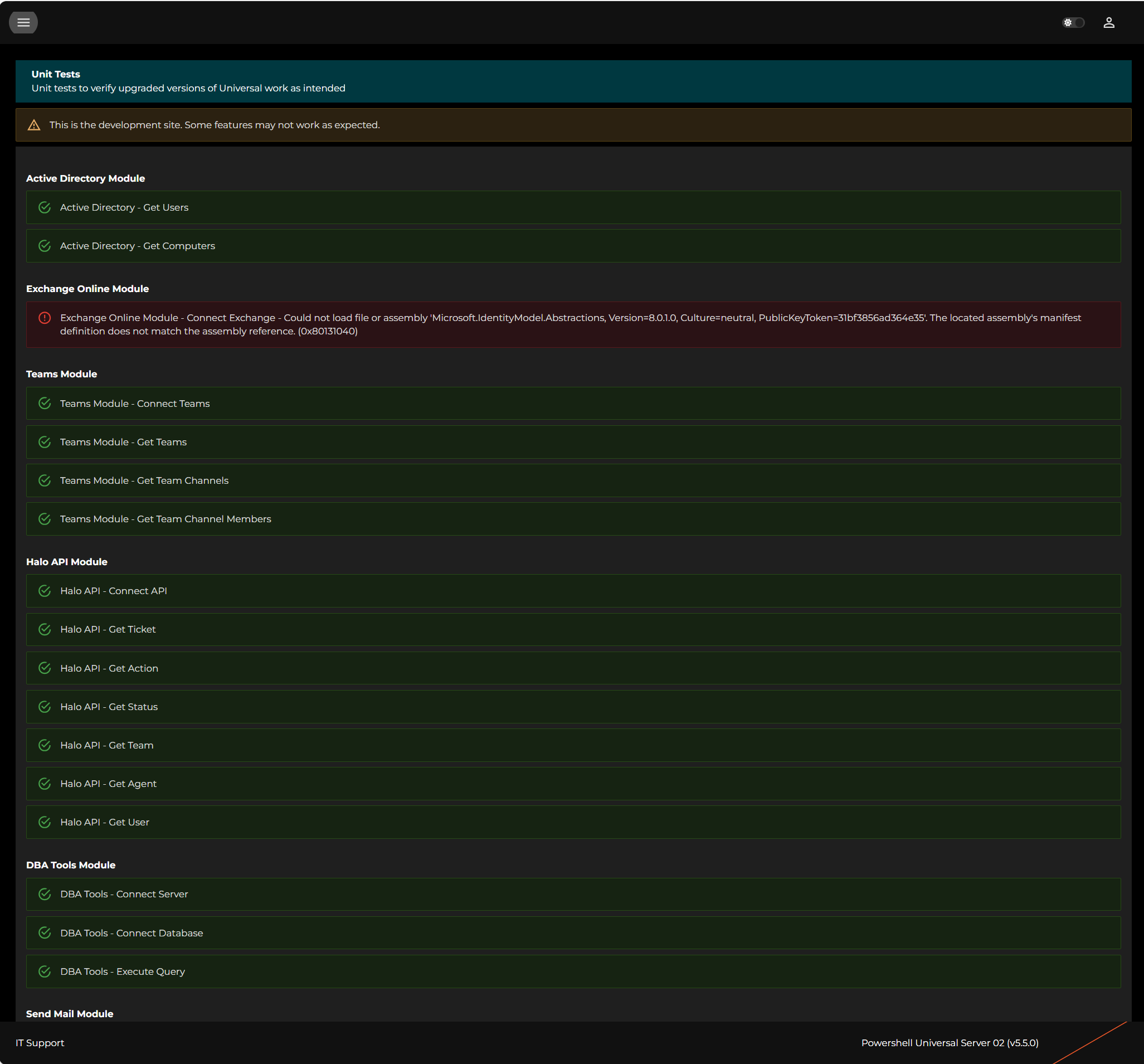
I’m still seeing issues connecting to Exchange using ExchangeOnlineManagement module version 3.7.2 using the command below;
Is there anything I’m overlooking or that might need updating on the server? Or was this particular issue not addressed in 5.5.0?
Thanks.
Connect-ExchangeOnline -CertificateThumbprint $Session:Thumbprint -AppID "xxxxxxxx-xxxx-xxxx-xxxx-xxxxxxxxxxxx" -Organization "xxxxxxxxxxxxxx.onmicrosoft.com" -ShowBanner:$False
9d90040d9017bd02940c99c17eda237f24c4e4e3.png
Further to the above, it only errors if I run in this environment;
Integrated works ok and I have additionally installed Powershell 7 directly on the server and pointed a new environment at it - that works ok also.
fec91b3969de0637889daf6a771e97c96b5b4675.png
Is there a reason why you don’t want to use the integrated PS7 or the one installed manually on the server? Does anything else run without an issue with that other one you’re having problems with?
I’m seeing this exchange issue as well, on my new build server. I can’t really compare it to the current production server, because that is using version 2 of the EXO cmdlets, and there were major changes when they went to v3. I can connect successfully to Exchange Online if I do it manually in a PowerShell 7 windows, but PSU can’t do it when it’s called by a script. I’m using the integrated 7 environment for the script.
I’m not seeing any issues connecting with EXO v3.6.0. This is a new server build from January with Universal v5.2 installed and then upgraded to v5.5 last week.
You’re using a different version of EXO. Both of us who had the issue are running 3.7.2.
I can load 3.7.2 fine in 5.5.0 and 5.5.1 (pending release).
I’m using the PowerShell 7 environment for my script. It does not seem to work in the integrated environment. It also works in a custom PS 7.4 environment I have in my lab.
Adam Driscoll
PowerShell Expert and Developer at Devolutions
Sorry, I saw v3 and just assumed it was all of v3. I did have 3.7.2 as well with no issues. I did downgrade to 3.6 to test something else to make sure it wasn’t 3.7.2 and haven’t upgraded back.
I also want to drop this discussion here as well: Long-Term Stability for using Microsoft 365 and Azure Modules - #4 by claudiospizzi
PS7 and .NET Core have some things we can try but this is a problem for more than just PSU and we need to figure out the best way to handle it. If that means we can work with Microsoft, I’m all ears.
Adam Driscoll
PowerShell Expert and Developer at Devolutions
It’s mainly for historic reasons and probably mostly doesn’t apply any more. There was a time when PSU had problems with memory leak and processor run away causing the server to lock up.
If using Integrated, everythng ran under a single process. By selecting a different environment, each process ran under it’s own instance of pwsh.exe which meant I could monitor the processes and if anything started getting a little intensive I could kill it programmatically and take out maybe a single dashboard rather than the whole server.
I also heavily rely on HaloAPI module and did have issues with parameter conflicts with PSU. I can’t specifically remember if this only affected Integrated environment, but I have a gut feeling it might have.
I now have over 100 apps, scripts and APIs running and it would be a somewhat arduous task to revert and test them in a different environment with little, if any gain.
See, I have the opposite, it will load if I set the environment to “Integrated” but not with “Powershell 7”. I installed from bare metal v5.5.0, no upgrade.
If it helps anybody, I have had to do this before. Obviously, not recommended if you don’t have too but it has worked for me.
$folderPath = “C:\ProgramData\UniversalAutomation\Repository\Modules\ExchangeOnlineManagement\3.7.1\netCore”
Get-ChildItem -Path $folderPath -Filter *.dll | ForEach-Object {
[System.Reflection.Assembly]::LoadFrom($_.FullName) | Out-Null
}
Make sure to put this before importing any modules