A couple of Theme and MUI Questions

Product: PowerShell Universal
Version: 5.4.1
hey all, Ive been working on a theme to try and implement at least a little visual style to some apps and have come across a few things that my MUI noobness is probably contributing to
Looking at the theme/MUI references I am getting some of the bits to work for me, but have struggled in others. Has anyone solved/covered off these sort of questions re themes:
Reuse of values
In react apps I see lots of examples of people using “base values” in their definitions of components. eg below where the fontSize of this component is being set to the body2 fontsize defined in the theme. Has anyone done similar to this in PSU?
MuiListItemText: {
    styleOverrides: {
      primary: ({ theme }) => ({
        fontSize: theme.typography.body2.fontSize,
        fontWeight: 500,
        lineHeight: theme.typography.body2.lineHeight,
      }),
defaultProps
Another MUI one is being able to set the default values of some things - eg setting the default size of chips to be small
MuiChip: {
    defaultProps: {
      size: 'small',
    }
I tried this in a theme hashtable ad a few other ideas but with no success yet
    overrides = @{
        MuiChip = @{
            defaultProps = @{
                size = "small"
            }
        }
    }
Header Height
A third one is how to tell if the hashtable is correct, eg if Im trying to change the minHeight of the page header I can see the header in chrome using the MuiToolbar-root classname, but I dont see that classname defined anywhere in the page styles, and if I set the hashtable to include the name by that path the value doesn’t appear to hit the css styles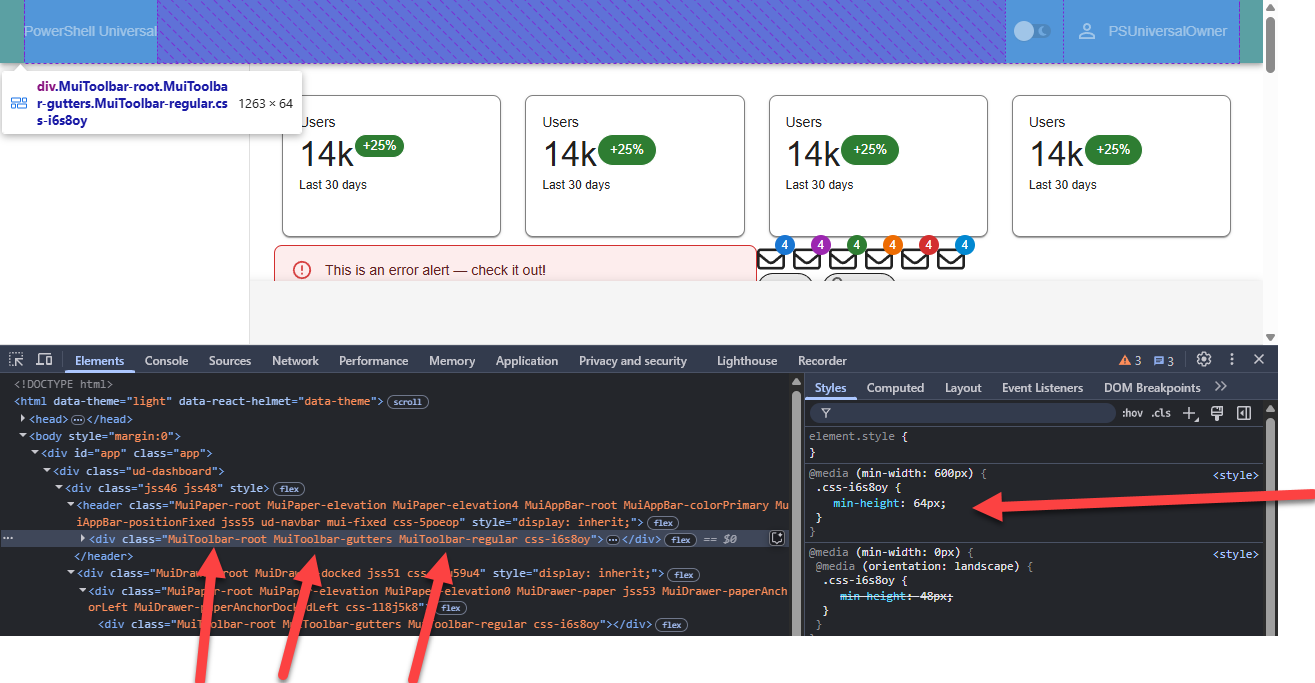
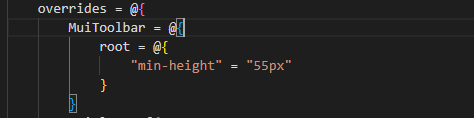
I think a lot of this is im trying to correlate a range of the details as described in Themed components - Material UI into the PSU Hashtable equivalent
Anyone fiddled with some of these items
d429acaff481f8f62b27a927a23949b889980d4d.png
a26d03f7cf3cef401965e35ece23a2becb1e84fa.png
All Comments (5)
Anyone had any luck with understanding/doing this sort of theming?
1 - We currently don’t support accessing the theme like this. It’s static in PSU themes and you don’t have access to the theme object. We likely could extend it. I do worry that the theme is already complicated and would like to find a better way rather than just directing folks to the MUI docs. I haven’t thought through it extensively but a simpler way of accomplishing this would be better because the current example requires JavaScript callbacks.
It’s a balance between extreme customization and easy of use and PSU is near the extreme side but still not extreme enough to meet your needs.
2 - This might just be a bug(ish) in the MuiChip. If we pass the size in via the PS hashtable when creating the chip, it won’t matter what the MUI default is because we override it. You could try to use PS default values for this as well.
3 - Try minHeight rather than min-height. The difference is that React uses the former while CSS uses the latter. It’s a weird intricacy of the translation and might be another consideration we would make for a theme simplifier.
Adam Driscoll
PowerShell Expert and Software Architect at Devolutions
Thanks for the details Adam, much appreciated.
Knowing the 1 and 2 bits and it being a static theme helps me to know where to play with the values and items, Ill give the default thing a bit of a whirl too. Much appreciated
For 3 am pretty sure I tried minHeight before and tested again and the height doesn’t seem to be in the page style anywhere. I might log that one as a bug for a rainy day, it looks like something is setting 64px regardless of styling
For #3, it certainly could be something we are statically setting and overriding the theme\CSS so a bug would be a good.
Adam Driscoll
PowerShell Expert and Software Architect at Devolutions
Did a bit more testing and wrote this guy up for it: Appbar has "hard coded" 64px minHeight · Issue #4653 · ironmansoftware/powershell-universal · GitHub
Pretty sure I can work around it with css styles, so Id definitely not call this a priority in any sense
If I can try two more questions @Adam Driscoll - if it doesnt stretch the friendship too much .
- If I wanted to style every App the same, is the best way to do this to make the JSON for the style, put it in the Binary path and use settings to set the default theme name - and any CSS bits I need I add as style sheet on every app, or is there a way to set a default theme to come form a json file in the repository so its under source control, or some other method
- If I wanted to adjust the CSS/style of the
/portalpage is there a way to change the theme/style for this page
Thanks heaps for the help and pointers