Event Hub Agent - How do (or Can) you specify the PowerShell version (Environment) to use?
Event Hub Agent - How do (or Can) you specify the PowerShell version (Environment) to use?
Is there a way to tell the PowerShell Universal Event Hub Agent to use PowerShell 7 rather than PowerShell 5, without having to shell PowerShell 7 from within a script?
Product: PowerShell Universal
Version: 5.3.3
Recommended Answer
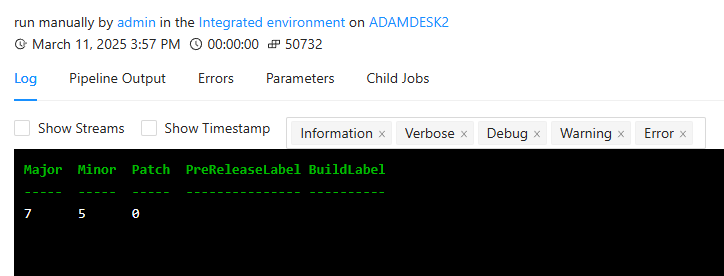
The agent is built on .NET core so it won’t be running WinPS. I just validated this using the following:
Send-PSUEvent -Computer "ADAMDESK2" -Command "Invoke-Expression" -Parameters @{
    "Command" = "`$PSVersionTable.PSVersion"
}
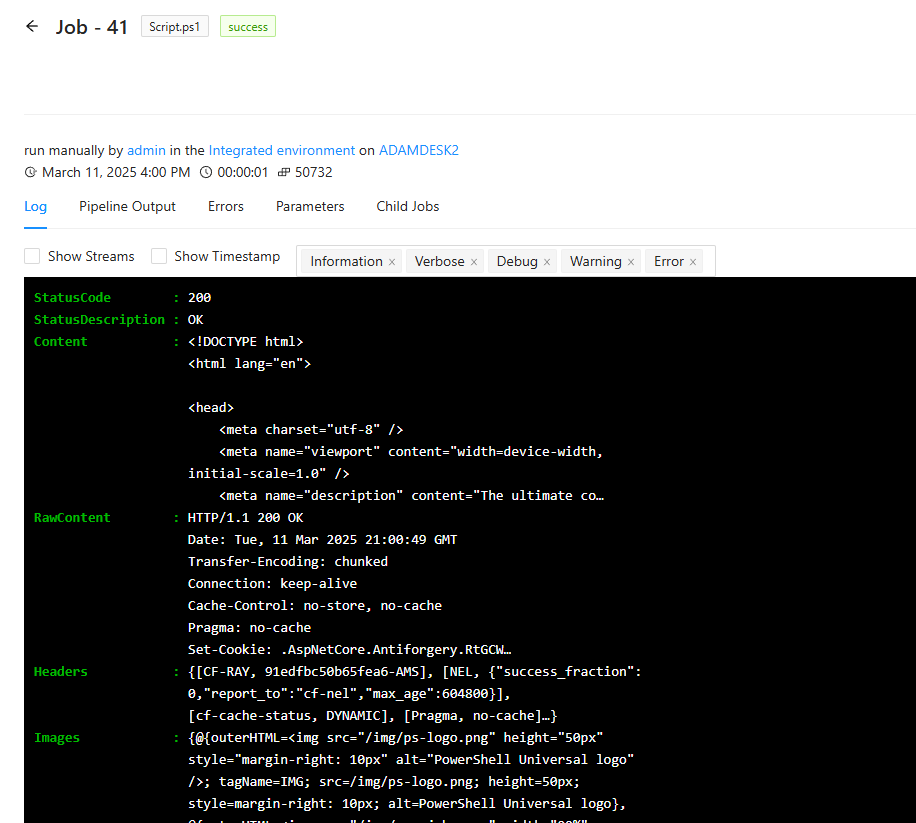
I actually tried Invoke-WebRequest as well.
Send-PSUEvent -Computer "ADAMDESK2" -Command "Invoke-WebRequest" -Parameters @{
    "SkipCertificateCheck" = $true
    "Uri" = "https://www.powershelluniversal.com"
}
I must be not understanding the issue or the configuration.
Adam Driscoll
PowerShell Expert and Developer at Devolutions
2276cc93f044c3b20f999f563fad7075425ea930.png
774616448f3a52394b4f91a6ec605edb6cde27d2.png
All Comments (9)
Event hubs run within the event hub service and don’t start an external process (at the moment). It shouldn’t be running v5 unless it’s doing Windows Compatibility for some cmdlet that doesn’t support 7.
We’ll eventually align the agent job execution with the in-server one but it’s not there yet.
Adam Driscoll
PowerShell Expert and Developer at Devolutions
I’m only talking about the scripts/commands that the agents execute. For example, I’m sending Invoke-WebRequest to the agent along with the parameters to run. Invoke-WebRequest in PowerShell 5 doesn’t support the -SkipCertificateCheck parameter, where PowerShell 7 does. If I try using -SkipCertificateCheck in the command I’m sending to the agent, it fails (because it’s an invalid parameter in PowerShell 5), which tells me that the agent is using PowerShell 5. If I were able to specify that the agent should execute whatever it’s being sent by the PSU server, this wouldn’t be an issue because I could just tell it to use PowerShell 7.

This may be a “safety measure” as it is still (for some reason) not a standard in Windows to have PS7 - have you had success calling the pwsh executable and splatting the data?
edit: asking the last part for my own selfish reasons; i’m looking into something similar soon for some unity across my scripts
I can get it to run the command if I do that, but then another issue comes up, which is that the output from the Invoke-WebRequest doesn’t pass back to the PowerShell 5 process from the shelled PowerShell 7 process, so I never get the response back on the Event Hub side. I’d have to come up with some kind of workaround that dumped the output to a file and then grab the contents after the fact.
For reference, in case it helps you with your own task, here are the commands I got to work with different methods. We’re using this for working with Palo Alto Panorama XML APIs…
$WebRequest = Send-PSUEvent -Hub $PSUEventHubName -ConnectionID $EHConnection.ConnectionID -Data @{
      #Contents = "curl.exe --insecure -X GET `"https://$PanoramaServerIP/api/?type=op&cmd=<show><config><effective-running></effective-running></config></show>&key=$PaloAltoAPIKey&target=$PaloAltoDeviceSerial`""
      #Contents = 'Start-Process -FilePath "pwsh.exe" -ArgumentList "-PassThru -Command Invoke-WebRequest -SkipCertificateCheck -URI ' + "'" + "https://$PanoramaServerIP/api/?type=op&cmd=<show><config><effective-running></effective-running></config></show>&key=$PaloAltoAPIKey&target=$PaloAltoDeviceSerial" + "'" + '"'
      Contents = 'pwsh.exe -Command Invoke-WebRequest -SkipCertificateCheck -URI ' + "'" + "https://$PanoramaServerIP/api/?type=op" + '`&cmd=<show><config><effective-running></effective-running></config></show>`&key=' + "$PaloAltoAPIKey" + '`&target=' + "$PaloAltoDeviceSerial" + "'"
      }
As you can see, I’ve used curl.exe (it’s important that you specify the .exe, otherwise curl is an alias for Invoke-WebRequest as opposed to actual curl), Start-Process to invoke pwsh.exe, and pwsh.exe directly. They all technically work, but the output issue I mentioned is the same in all.
The agent is built on .NET core so it won’t be running WinPS. I just validated this using the following:
Send-PSUEvent -Computer "ADAMDESK2" -Command "Invoke-Expression" -Parameters @{
    "Command" = "`$PSVersionTable.PSVersion"
}
I actually tried Invoke-WebRequest as well.
Send-PSUEvent -Computer "ADAMDESK2" -Command "Invoke-WebRequest" -Parameters @{
    "SkipCertificateCheck" = $true
    "Uri" = "https://www.powershelluniversal.com"
}
I must be not understanding the issue or the configuration.
Adam Driscoll
PowerShell Expert and Developer at Devolutions
2276cc93f044c3b20f999f563fad7075425ea930.png
774616448f3a52394b4f91a6ec605edb6cde27d2.png
Interesting. So, yes, what you just provided does work. What I had previously tried, that does NOT work, is that I had been sending it Invoke-WebRequest as -Data with the Content parameter, so the agent was then dumping that into a temporary .ps1 file that it would execute. It’s that execution that runs as PS5.
Sending it the Invoke-WebRequest via -Command instead of via -Data does allow it to work (as you showed).
I think part of the issue was that there’s not very much documentation about how to configure the agent or how to send it instructions in each scenario, so I was basing the design around what IS listed on the documentation site and what @AnonymousUser had shared here.
So, if what I initially asked for were an option - to tell the agent to explicitly use PS7 when executing scripts - it would allow both methods to work.
Ah. I see. I was missing the difference in parameters. I’ll see what I can do to improve this documentation. I really hope that improvements to the Agent experience in the future will make documentation less of an issue as it’ll just work the same as running scripts on the PSU servers.
Adam Driscoll
PowerShell Expert and Developer at Devolutions
To close this out, here is what I ended up with, after modifying what Adam provided in his example:
$WebRequest = Send-PSUEvent -Hub $PSUEventHubName -ConnectionID $EHConnection.ConnectionID -Command "Invoke-WebRequest" -Parameters @{
      "SkipCertificateCheck" = $true
      "Uri" = "https://$PanoramaServerIP/api/?type=op&cmd=<show><config><effective-running></effective-running></config></show>&key=$PaloAltoAPIKey&target=$PaloAltoDeviceSerial"
      }
The response from the Event Hub agent is stored in the $WebRequest variable for the PSU server to then further process with the rest of the script. This will now be modified for use with other of our clients’ setups for other brands of firewalls and for other purposes, now that it’s functional and easily genericized.