UDTable Fails to Render When Using a Variable Named $rows

Product: PowerShell Universal
Version: 5.3.2
Description:
When using the variable name $rows in a Universal Dashboard script—even when populated with static data—the UDTable component fails to render properly and throws an unexpected error. Changing the variable name (for example, to $dataRows) allows the table to render as expected, suggesting a naming conflict with an internal variable or reserved keyword within Universal Dashboard.
Steps to Reproduce:
- Create a PowerShell script with static data stored in a variable named
$rows:
# Static data assigned to $rows
$rows = @(
    @{ Id = 1; Name = "Alice" }
    @{ Id = 2; Name = "Bob" }
)- Create a Universal Dashboard page that displays a UDTable with some static data:
$homePage = New-UDPage -Name "Home" -Url "/home" -Content {
    $Data = @(
        @{ Name = "Item A"; Value = 100 }
        @{ Name = "Item B"; Value = 200 }
    )
    New-UDTable -Data $Data
}

New-UDApp -Title "Test Dashboard" -Pages $homePage- Launch the dashboard. The UDTable fails to render and displays an error message similar to:
Error rendering component (mu-table)
This error is not expected. Please report it to Ironman Software.
- Rename the variable from
$rowsto another name (e.g.,$dataRows) and rerun the script:
$dataRows = @(
    @{ Id = 1; Name = "Alice" }
    @{ Id = 2; Name = "Bob" }
)- In this case, the UDTable renders correctly.
Expected Behavior:
The UDTable component should render correctly regardless of the variable names used in the script. Using $rows should not cause any conflicts or errors.
Observed Behavior:
- With
$rowsused to store static data, the UDTable component fails to render and an error is thrown. - Changing the variable name (for example, to
$dataRows) resolves the issue, and the table renders as expected.
Please investigate and resolve the naming conflict between the variable $rows and any internal variables used by the UDTable component. If $rows is a reserved name, please update the documentation to warn users and recommend using an alternative variable name.
All Comments (4)
Welcome to the forums!
I would recommend outputting $rows to your console (Write-Information (ConvertTo-Json $rows -Depth 10)) to see its value without trying to set it. If I remember correctly from working with Tables instead of DataGrids, $rows is an internal variable used within the UDTable definition and rendering and is thus supposed to be immutable. Someone feel free to check me on that though.
I just found it within the psm1 as a locally scoped variable: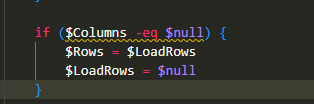
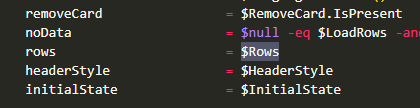
I’d recommend updating the documentation, @Adam Driscoll , to reflect this please!
2f851ca23fa6d1d93217ce4d9f684f4589cee2cb.png
4fe17a347f50b2ac8fcf4b0d2b8f3f42cbb08451.png
In my case, $rows contained data from another table that I wanted to display in UDTable. It took me a while to realize that $rows might be used internally by UDTable, causing a conflict. It would be great if this detail could be added to the documentation to help other users identify the issue more quickly.
IIRC, the way I found it initially was via IntelliSense - it gave the “please do not modify variables used by PSU” message. Better safe than sorry on your variable names in PSU; there are quite a few builtins around. It may be better to use something like $TableRows or ${$tableId}Rows to make sure you’re not stepping over yourself.
