5.2.1 - Invoke-PSUScript Change

@Support@Adam Driscoll
I know version 5 was a significant upgrade. Due to unforeseen circumstances, I had to upgrade these servers to the latest build. Overall, everything seems to work fine, except for a few buttons on a dashboard that call Invoke-UDScript. Here’s an example:
$uwfRUn = Invoke-PSUScript -Script 'TC\fixUWF.ps1' -uwfMachineName $txtWksNameUWF -userWhoRan $User -uwfSymptom $txtUWFsymptoms -email $userEmail
This keeps throwing the following error:
A parameter cannot be found that matches parameter name 'uwfMachineName'.
I also tried rewriting it following the documentation, but no luck:
$parameters = @{
    uwfMachineName = $txtWksNameUWF
    userWhoRan     = $User
    uwfSymptom     = $txtUWFsymptoms
    email          = $userEmail
}

$uwfScript = Get-PSUScript -Name 'TC\fixUWF.ps1'
$uwfRun = Invoke-PSUScript -Script $uwfScript -Parameters $parameters
Despite defining the parameters, the script doesn’t seem to recognize them. Below are the parameters explicitly defined in the script:
param (
    [string]$uwfMachineName,
    [string]$uwfSymptom,
    [string]$userWhoRan,
    [string]$email
)
When trying to run the script, the expected values in the UI no longer populate correctly. Any guidance or suggestions would be greatly appreciated!
Product: PowerShell Universal
Version: 5.2.1
Recommended Answer
If you’re still having problems, feel free to contact support.
Adam Driscoll
PowerShell Expert and Software Architect at Devolutions
All Comments (9)
Just verifying, you don’t see this kind of UI? If the UI doesn’t generate the form, I could see why Invoke-PSUScript wouldn’t see it.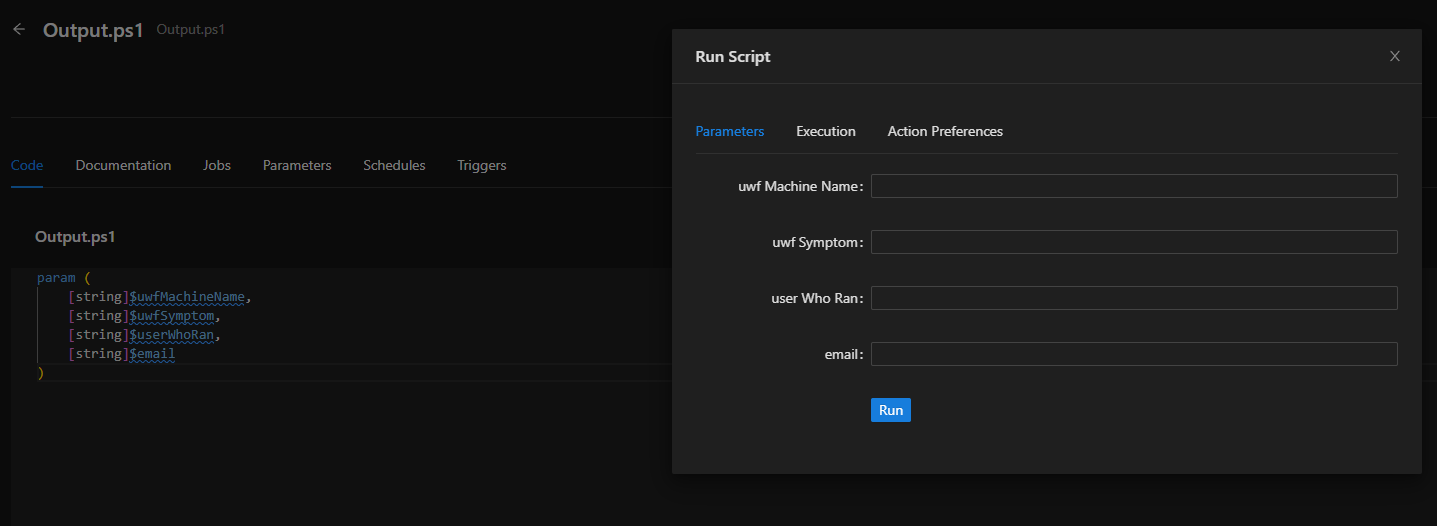
Do you have an error notifications?
Adam Driscoll
PowerShell Expert and Software Architect at Devolutions
bfd3ca01ec5cb9bd0fa5d3a202bd3e49a9df391e.png
Morning @Adam Driscoll
I do not, not on any of my scripts. I thought maybe it was because I had 4.5.1 and 5.2.1 installed. Removed and restarted and still seeing the same thing. I think because I am not seeing the UI is why the Invoke-PSUScript is not seeing the parameters either.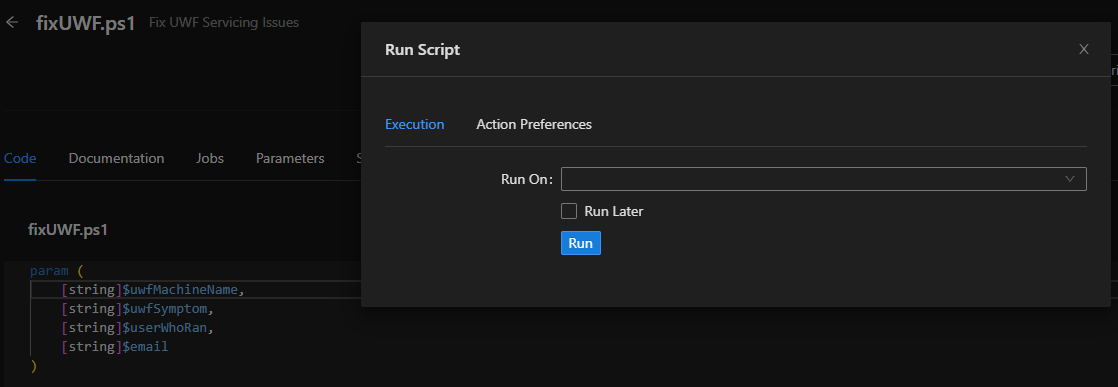
eaf43bc820f8dfac3e5286c1ed684c392a101401.png
Do you have any notification errors in your admin UI? Can you check for errors in your system log?
Adam Driscoll
PowerShell Expert and Software Architect at Devolutions
Hey @Adam Driscoll,
No errors in the UI, just notifications.
Seeing this in the agent log:
2025-01-31 15:58:13.732 -05:00 [ERR] Error starting agent.
Grpc.Core.RpcException: Status(StatusCode="Unknown", Detail="Exception was thrown by handler.", DebugException="Grpc.Core.Internal.CoreErrorDetailException: {"created":"@1738357093.692000000","description":"Error received from peer ipv6:[::1]:56160","file":"..\..\..\src\core\lib\surface\call.cc","file_line":953,"grpc_message":"Exception was thrown by handler.","grpc_status":2}") ---> Grpc.Core.Internal.CoreErrorDetailException: {"created":"@1738357093.692000000","description":"Error received from peer ipv6:[::1]:56160","file":"..\..\..\src\core\lib\surface\call.cc","file_line":953,"grpc_message":"Exception was thrown by handler.","grpc_status":2}
   --- End of inner exception stack trace ---
The other systemlog contains a bunch of misc errors:
2025-01-31 05:54:48.154 -05:00 [WRN] HTTP/2 is not enabled for [::]:5000. The endpoint is configured to use HTTP/1.1 and HTTP/2, but TLS is not enabled. HTTP/2 requires TLS application protocol negotiation. Connections to this endpoint will use HTTP/1.1.

adminAccount.ps1 cannot be loaded because you opted not to run this software now.

2025-01-31 05:54:47.863 -05:00 [WRN] Signature not recognized for PowerShellUniversal.IConfigurationSystemWatcher.Pause; method will not be bound
2025-01-31 05:54:47.863 -05:00 [WRN] Signature not recognized for PowerShellUniversal.IConfigurationSystemWatcher.CheckSum; method will not be bound
Hey @Adam Driscoll - Should I try installing the 5.2.3 that is out to see if this resolve the issue?
This is actually the likely culprit:
adminAccount.ps1 cannot be loaded because you opted not to run this software now.
Do you have AV on this machine or are the files blocked some how? PSU is probably trying to read the files and failing. You could try to do Get-ChildItem -Recurse | Unblock-File on the repository.
Was this an in place upgrade? I don’t know why it would start doing that all of a sudden if that’s the case.
Adam Driscoll
PowerShell Expert and Software Architect at Devolutions
I checked the file first via file explorer and did not see it was blocked. I did go ahead and run Unblock-File recursively on the repository. Does not seem to help.
This was an in-place upgrade. I also checked the execution policy was set correctly. There is an Anti-Virus software installed, our security department said they do not see anything on their end and exclusions are in place.
If you’re still having problems, feel free to contact support.
Adam Driscoll
PowerShell Expert and Software Architect at Devolutions
Sounds good! Thank you!