How to add python environment

i want to add python env to execute some python script,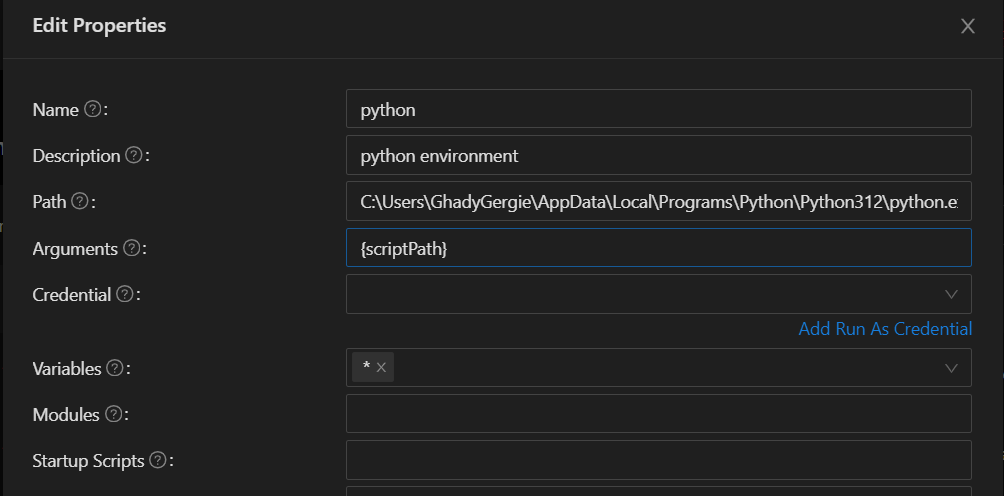
but i got this:C:\Users\GhadyGergie\AppData\Local\Programs\Python\Python312\python.exe: can't open file 'C:\\ProgramData\\UniversalAutomation\\Repository\\{scriptPath}': [Errno 2] No such file or directory
it’s not reading the file name.
does anyone know what should I do to fix it?
371ce99b0245fd882a3e7f166f150cc69cd9fb4b.png
Recommended Answer
You may need to toggle the Minimal Job Environment option in the environment entry since PSU likely wouldn’t have any way to see what Python is doing when it’s used.
You can read more about that at Environments | PowerShell Universal
In there you’ll see that they do explicitly mention Python Scripts as being a use case for this option.
All Comments (1)
You may need to toggle the Minimal Job Environment option in the environment entry since PSU likely wouldn’t have any way to see what Python is doing when it’s used.
You can read more about that at Environments | PowerShell Universal
In there you’ll see that they do explicitly mention Python Scripts as being a use case for this option.