[4.2.19] get-psuschedule attribute 'NextExecution' is not updating automatically
[4.2.19] get-psuschedule attribute 'NextExecution' is not updating automatically

Product: PowerShell Universal
Version: 4.2.19
Hi, I am new to PSU, so far it is working great and has a huge amount of potential!
Let me attempt to layout the situation.
I have a schedule script that is working and executing at the correct time. However I have a dashboard that I’m trying to check its next scheduled execution time and the execution time doesn’t seem to be updating in the background.
My dashboard display element is dynamic and set to auto update. I can get it to work as I expect but I have to first view /admin/automation/schedules in a browser. When I view the schedules I see my script and the expected next execution time.
After I check the schedules page my dashboard element displays the time until next execution correctly and updates every minute.
New-UDDynamic -Id "NextScheduledTime" -Content {
    New-UDLayout -Columns 6 -Content {
    ...
        New-UDCard -Title "Next Rogue AP search in:" -TitleAlignment center -Content {
            $MinutesUntil = New-TimeSpan -Start ((Get-Date).AddHours(7)) -End (Get-PSUSchedule -Script "FindRogueAPs.ps1").NextExecution
            New-UDTypography -Align center ($MinutesUntil.Hours.ToString() + " hours and " + $MinutesUntil.Minutes.ToString() + " minutes")
        } -Elevation 5
    ...
    }
} -AutoRefresh -AutoRefreshInterval 60
After this execution time passes my dashboard element will display the time until the old execution time. So a negative amount of minutes and hours.
It will continue to look to the old time execution time, until I refresh the schedules page. Then the dashboard will reflect the new execution time.
It seems like the NextExecution time or a scheduled script is only updated when the schedules page is opened/refreshed. Am I doing something wrong, Is this intended, or is it a bug?
I hope all of this makes sense.
-Edited Code spacing.
All Comments (6)
Image of schedule showing next execution time: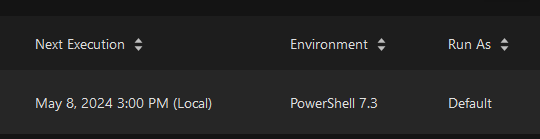
abcdd2d3ccc445026c29952dfde9b734cd744956.png
Image of dashboard element showing the incorrect time until next execution: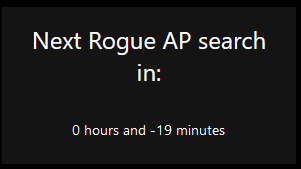
6be8c89d7d4e075173720876e1e1390463a53de2.png
Image of dashboard element showing correct time until next execution: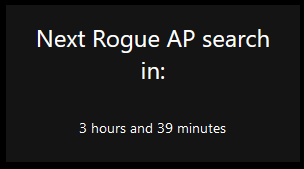
0b279b0ec7283dbd1e9446bb8acf1bd0b4a5f58c.png
Same problem for me, NextExecution not show the currect time.
@Adam Driscoll FYI
Any update?
Im using V5.1.2 and still the same, get-psuschedule next execution wont get update.
This is a bug. Get-PSUSchedule does not populate next execution · Issue #4168 · ironmansoftware/powershell-universal · GitHub
The cmdlet is just returning the data from the internal database but not from hangfire, which calculates this value.
Adam Driscoll
PowerShell Expert and Software Architect at Devolutions