Button not reliable enabling/disabling

Product: PowerShell Universal
Version: 4.2.17
This is driving me nuts since I’ve done it successfully in a bunch of other places. i have this code that shows two calendars, then will enable a button, or disable it and show a red notice based on the dates selected
$today = get-date
New-UDGrid -container -content{
	New-UDCard -Title "Start Date" -Content {
		New-UDDatePicker -id "date_Start" -label "Start Date" -maximumdate $today -value $today -Variant static -views @("day") -Format "MM/dd/yyyy" -onchange {
			Sync-UDElement -id "dyn_Dates"
		}
	}
	New-UDCard -Title "End Date" -Content {
		New-UDDatePicker -id "date_end" -label "End Date" -maximumdate $today -value $today -Variant static -views @("day") "MM/dd/yyyy" -onchange {
			Sync-UDElement -id "dyn_Dates"
		}
	}
	New-UDCard -Content {
		new-uddynamic -id "dyn_Dates" -content {
			$session:StartDate = (get-udelement -Id date_Start).value
			$session:EndDate = (get-udelement -Id date_end).value
			New-UDTypography -text "Start Date: $($session:StartDate.tostring("MM/dd/yyyy"))"
			new-udhtml -markup "<br>"
			New-UDTypography -text "End Date: $($session:EndDate.tostring("MM/dd/yyyy"))"
			new-udhtml -markup "<br>"
			if ($session:startdate -gt $session:EndDate){
				new-udtypography "The start date must be before the end date" -Style @{color = "red"}
			}
			new-udhtml -markup "<br>"
			new-udbutton -id "btnGetData" -text "Get Data" -onclick {
				show-udtoast -message "clicked"
			}
			if ($session:startdate -gt $session:EndDate){
				Show-UDToast -Message "gt"
				Set-UDElement -id "btnGetData" -Properties @{
					disabled = $true
				}
			}
			else {
				Show-UDToast -Message "lt"
				Set-UDElement -id "btnGetData" -Properties @{
					disabled = $false
				}
			}
		}
	}
}
The button doesn’t properly enable/disable based on the dates selected. Video below of it happening. The toast that pops up is either gt or lt depending on the dates selected. I was using that to make sure my If statement was working correctly, which it is.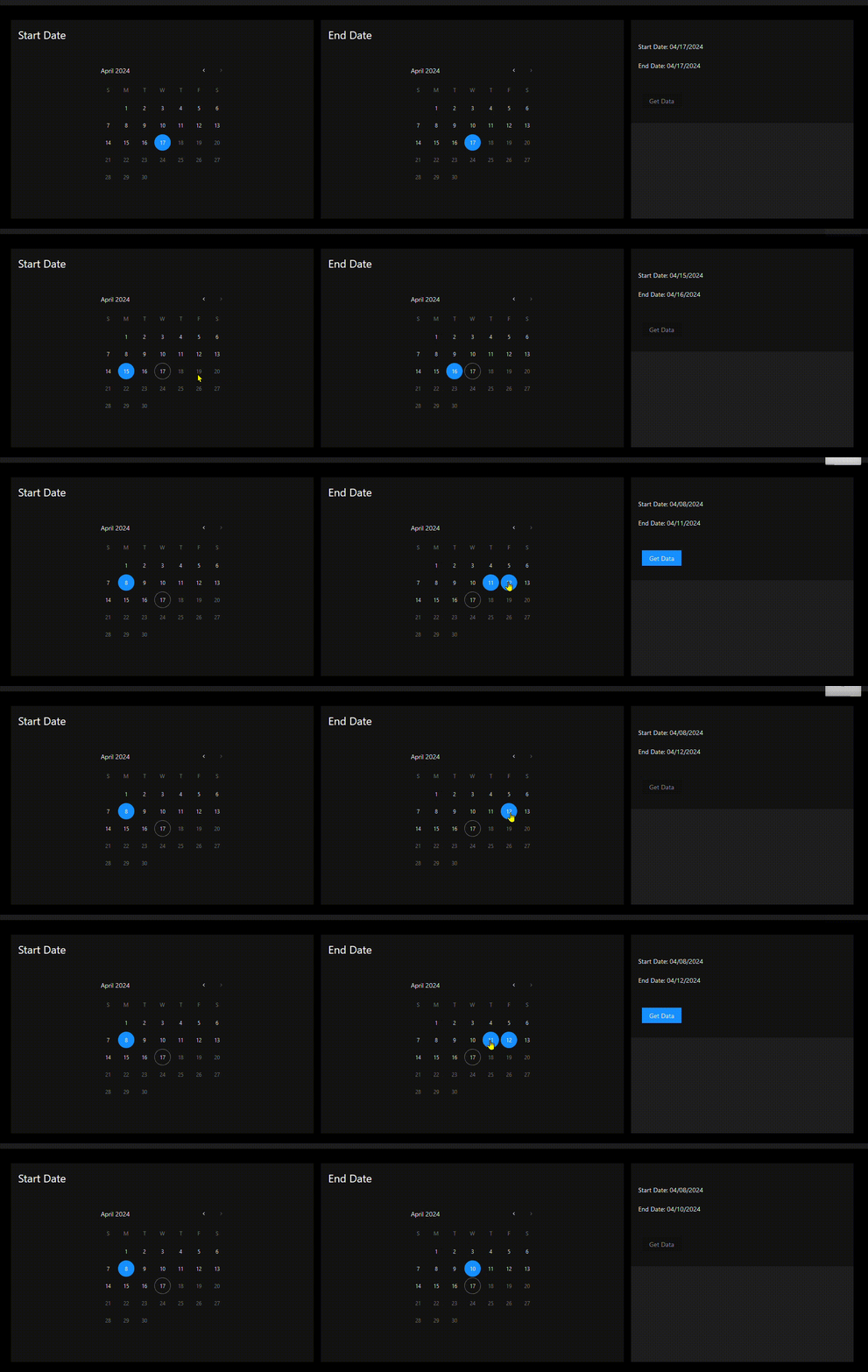
I can’t seem to figure out why the button doesn’t work like it should.
afda188c4c4284c959fee54c878c77221699156c.gif
Recommended Answer
I do something similar and I use a session variable to hold a true/false and set this on the button under the UDDynamic. Example:
$today = Get-Date
New-UDGrid -Container -content {
    New-UDCard -Title 'Start Date' -Content {
        New-UDDatePicker -Id 'date_Start' -Label 'Start Date' -MaximumDate $today -Value $today -Variant static -views @('day') -Format 'MM/dd/yyyy' -OnChange {
            Sync-UDElement -Id 'dyn_Dates'
        }
    }
    New-UDCard -Title 'End Date' -Content {
        New-UDDatePicker -Id 'date_end' -Label 'End Date' -MaximumDate $today -Value $today -Variant static -views @('day') 'MM/dd/yyyy' -OnChange {
            Sync-UDElement -Id 'dyn_Dates'
            Sync-UDElement -Id 'dyn_button'
        }
    }
    New-UDCard -Content {
        New-UDDynamic -Id 'dyn_Dates' -Content {
            $session:StartDate = (Get-UDElement -Id date_Start).value
            $session:EndDate = (Get-UDElement -Id date_end).value
            New-UDTypography -Text "Start Date: $($session:StartDate.tostring('MM/dd/yyyy'))"
            New-UDHtml -Markup '<br>'
            New-UDTypography -Text "End Date: $($session:EndDate.tostring('MM/dd/yyyy'))"
            New-UDHtml -Markup '<br>'
            if ($session:startdate -gt $session:EndDate) {
                New-UDTypography 'The start date must be before the end date' -Style @{color = 'red' }
            }
            New-UDHtml -Markup '<br>'
            New-UDDynamic -Id 'dyn_button' -Content {
                New-UDButton -Id 'btnGetData' -Text 'Get Data' -Disabled:$session:btnDisabled -OnClick {
                    Show-UDToast -Message 'clicked'
                }
            }
            if ($session:startdate -gt $session:EndDate) {
                Show-UDToast -Message 'gt'
                $session:btnDisabled = $true
            } else {
                Show-UDToast -Message 'lt'
                $session:btnDisabled = $false
            }
        }
    }
}All Comments (3)
I do something similar and I use a session variable to hold a true/false and set this on the button under the UDDynamic. Example:
$today = Get-Date
New-UDGrid -Container -content {
    New-UDCard -Title 'Start Date' -Content {
        New-UDDatePicker -Id 'date_Start' -Label 'Start Date' -MaximumDate $today -Value $today -Variant static -views @('day') -Format 'MM/dd/yyyy' -OnChange {
            Sync-UDElement -Id 'dyn_Dates'
        }
    }
    New-UDCard -Title 'End Date' -Content {
        New-UDDatePicker -Id 'date_end' -Label 'End Date' -MaximumDate $today -Value $today -Variant static -views @('day') 'MM/dd/yyyy' -OnChange {
            Sync-UDElement -Id 'dyn_Dates'
            Sync-UDElement -Id 'dyn_button'
        }
    }
    New-UDCard -Content {
        New-UDDynamic -Id 'dyn_Dates' -Content {
            $session:StartDate = (Get-UDElement -Id date_Start).value
            $session:EndDate = (Get-UDElement -Id date_end).value
            New-UDTypography -Text "Start Date: $($session:StartDate.tostring('MM/dd/yyyy'))"
            New-UDHtml -Markup '<br>'
            New-UDTypography -Text "End Date: $($session:EndDate.tostring('MM/dd/yyyy'))"
            New-UDHtml -Markup '<br>'
            if ($session:startdate -gt $session:EndDate) {
                New-UDTypography 'The start date must be before the end date' -Style @{color = 'red' }
            }
            New-UDHtml -Markup '<br>'
            New-UDDynamic -Id 'dyn_button' -Content {
                New-UDButton -Id 'btnGetData' -Text 'Get Data' -Disabled:$session:btnDisabled -OnClick {
                    Show-UDToast -Message 'clicked'
                }
            }
            if ($session:startdate -gt $session:EndDate) {
                Show-UDToast -Message 'gt'
                $session:btnDisabled = $true
            } else {
                Show-UDToast -Message 'lt'
                $session:btnDisabled = $false
            }
        }
    }
}That did it! Strange. I have a few other pages where I do it the way I wrote it and they work fine.
Also I didn’t realize you could add :$boolean to the -disabled parameter. I definitely misunderstood what the docs say when it says it’s a switch parameter.
The boolean on the switch can be done on any switch parameter (AFAIK) and I’m used it in a few of my PowerShell scripts to set the value programmatically.
