Err_too_many_redirects

Hello!
I installed powershell universal, it worked fine for some time, but now the page doesn’t load. Error message: err_too_many_redirects. I tried incognito mode and different browsers but same error always. I also tried to reinstall the latest version.
Regards,
Imre
This page isn’t working
If the problem continues, contact the site owner.
HTTP ERROR 414
All Comments (5)
Did you configure authentication (like OIDC)? Can you check in the network tools to see what the redirect is? F12 in the browser will open them.
Adam Driscoll
PowerShell Expert and Developer at Devolutions
I didn’t configure any other auth method.
From developer tools I can see:
414 URI Too Long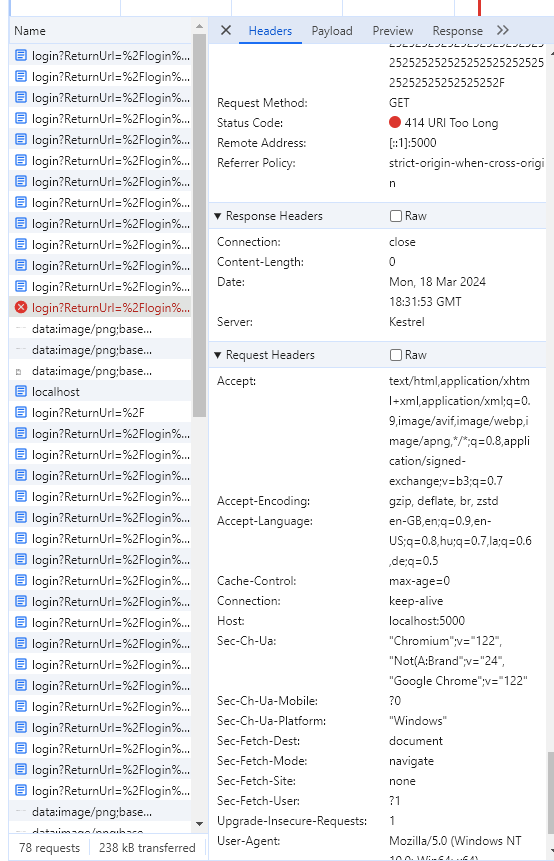
The url is the below, I shortened it, it was much longer.
http://localhost:5000/login?ReturnUrl=%2Flogin%3FReturnUrl%3D%252Flogin%253FReturnUrl%253D%25252Flogin%25253FReturnUrl%25253D%2525252Flogin%2525253FReturnUrl%2525
9c924c16bfab912ee5b411e307f8dad14dacea4a.png
Did you ever get to the bottom of this?
I’m getting this on 5.6.8 currently.
My personal login works fine OIDC via azure.
However I use a secondary service account for testing permissions and roles in PSU (since my account has full admin), when i open incognito mode and login with that, I can get to the admin portal fine but if I try to naviagate to a page on my web app, I get this issue, ‘ERR_TOO_MANY_REDIRECTS’.
I’ve tried everything, cleared cookies, it still doesnt work, not sure why.
I have the same URL as above,
**https://servername/unauthorized?ReturnUrl=%2Funauthorized%3FReturnUrl%3D%252Funauthorized%253FReturnUrl%253D%25252Funauthorized%25253FReturnUrl%25253D%2525252Funauthorized%2525253FReturnUrl%2525253D%252525252Funauthorized%252525253FReturnUrl%252525253D%25252525252Funauthorized%25252525253FReturnUrl%25252525253D%2525252525252Funauthorized%2525252525253FReturnUrl%2525252525253D%2**…… repeats a LOT! then ends with the page name I’m trying to visit.
I’ve no idea what caused this still, something to do with using private browsing / incognito mode + secondary account/login via OIDC, in the end I just used my own account and changed my group memberships while i was testing, resolved all my issues that way. So this is a non-issue for me currently.
Unfortunately I didn’t find any solution. Since then I use it on another computer.
