How to align / style a New-UDUpload?
Product: PowerShell Universal
Version: 4.2.13
Does anyone know how to align a new-udupload?
I’d assume under the hood it was just the same as the new-udbutton element but it doesnt have the -fullwidth param.
Normally when i want to centre align things, i just stick a div around them and center it like this:
New-UDElement -tag div -Attributes @{align="center"} -content {
<other components here>
}
However this method doesnt seem to work with new-udupload either.
I’ve got this odd looking configuation: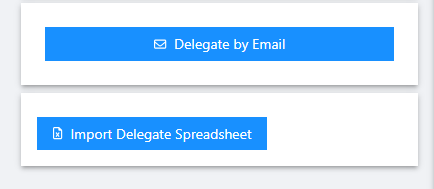
For reference, the button above is setup like this:
Any pointers appreciated
c83c3f34a0169a15930d4699ab002efa0a939ed8.png
db880f564c9de77e72f313780bc7c95c824769a4.png
All Comments (1)

Yes mate. All you need to do is call new-udstyle and apply it to the .muibutton-root I believe I’ve been playing about with css lately and will post the code. But if you inspect the button obtain the MUI class name then look at the docs and use new-udstyle and apply the contents as the button. Job done matey