Multiple issues after updating PSU from 4.2.12 to 4.2.13

I just updated PSU from 4.2.12 to 4.2.13, and I’m now seeing multiple issues within the PSU admin console.
Under Settings/Configuration/Reload Configuration File, I see dashboards.ps1 listed twice, and clicking either of them produces the issues shown here: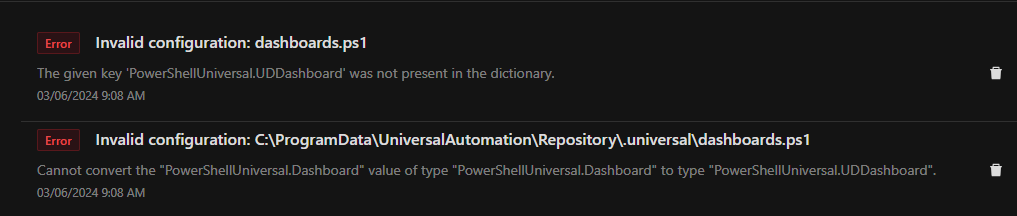
d9164bc4e6f6a159321c7a809f014ea90c15a6df.png
All Comments (13)
Anyone able to help with this? It’s still an issue.
Do you have more than one version of the Universal module installed? This seems like a version mismatch.
Get-Module Universal* -List
Adam Driscoll
PowerShell Expert and Software Architect at Devolutions
Nope.
PS C:\Windows\system32> Get-Module Universal* -List


    Directory: C:\Program Files (x86)\Universal\Modules


ModuleType Version    Name                                ExportedCommands
---------- -------    ----                                ----------------
Script     4.2.13     Universal                           {Add-PSUScriptTag, New-PSUApp, New-UDPage, Remove-PSUCache...


PS C:\Windows\system32>What does your dashboards.ps1 file look like?
Internally, there are 2 classes:
UDDashboard - Returned by New-UDDashboard. Use for defining the content of dashboards.
Dashboard - Returned by New-PSUApp. Used for defining the meta data of apps (dashboards).
It appears that New-UDDashboard is being called in dashboards.ps1.
Adam Driscoll
PowerShell Expert and Software Architect at Devolutions
That file is empty. That was the first place I checked before reporting.
Might have to look in a system log to see what is happening. If it’s empty it shouldn’t even be running anything in there.
Adam Driscoll
PowerShell Expert and Software Architect at Devolutions
This is the log output after telling PSU to reload dashboards.ps1. There doesn’t appear to be anything useful in that, but maybe I’m missing something.
2024-03-13 13:59:10.366 -04:00 [INF] Creating services.
2024-03-13 13:59:10.621 -04:00 [INF] Starting scheduler.
2024-03-13 13:59:10.623 -04:00 [INF] Scheduler QuartzScheduler_$_NON_CLUSTERED shutting down.
2024-03-13 13:59:10.623 -04:00 [INF] Scheduler QuartzScheduler_$_NON_CLUSTERED paused.
2024-03-13 13:59:10.624 -04:00 [INF] Scheduler QuartzScheduler_$_NON_CLUSTERED Shutdown complete.
2024-03-13 13:59:10.624 -04:00 [INF] Using object serializer: Quartz.Simpl.BinaryObjectSerializer, Quartz
2024-03-13 13:59:10.624 -04:00 [INF] Initialized Scheduler Signaller of type: Quartz.Core.SchedulerSignalerImpl
2024-03-13 13:59:10.624 -04:00 [INF] Quartz Scheduler created
2024-03-13 13:59:10.624 -04:00 [INF] RAMJobStore initialized.
2024-03-13 13:59:10.624 -04:00 [INF] Scheduler meta-data: Quartz Scheduler (v3.3.3.0) 'QuartzScheduler' with instanceId 'NON_CLUSTERED'
  Scheduler class: 'Quartz.Core.QuartzScheduler' - running locally.
  NOT STARTED.
  Currently in standby mode.
  Number of jobs executed: 0
  Using thread pool 'Quartz.Simpl.DefaultThreadPool' - with 100 threads.
  Using job-store 'Quartz.Simpl.RAMJobStore' - which does not support persistence. and is not clustered.

2024-03-13 13:59:10.624 -04:00 [INF] Quartz scheduler 'QuartzScheduler' initialized
2024-03-13 13:59:10.624 -04:00 [INF] Quartz scheduler version: 3.3.3.0
2024-03-13 13:59:10.624 -04:00 [INF] Scheduler QuartzScheduler_$_NON_CLUSTERED started.
2024-03-13 13:59:10.624 -04:00 [INF] Dashboard configuration complete.
2024-03-13 13:59:10.635 -04:00 [INF] Creating services.
2024-03-13 13:59:10.850 -04:00 [INF] Starting scheduler.
2024-03-13 13:59:10.852 -04:00 [INF] Scheduler QuartzScheduler_$_NON_CLUSTERED shutting down.
2024-03-13 13:59:10.852 -04:00 [INF] Scheduler QuartzScheduler_$_NON_CLUSTERED paused.
2024-03-13 13:59:10.852 -04:00 [INF] Scheduler QuartzScheduler_$_NON_CLUSTERED Shutdown complete.
2024-03-13 13:59:10.852 -04:00 [INF] Using object serializer: Quartz.Simpl.BinaryObjectSerializer, Quartz
2024-03-13 13:59:10.853 -04:00 [INF] Initialized Scheduler Signaller of type: Quartz.Core.SchedulerSignalerImpl
2024-03-13 13:59:10.853 -04:00 [INF] Quartz Scheduler created
2024-03-13 13:59:10.853 -04:00 [INF] RAMJobStore initialized.
2024-03-13 13:59:10.853 -04:00 [INF] Scheduler meta-data: Quartz Scheduler (v3.3.3.0) 'QuartzScheduler' with instanceId 'NON_CLUSTERED'
  Scheduler class: 'Quartz.Core.QuartzScheduler' - running locally.
  NOT STARTED.
  Currently in standby mode.
  Number of jobs executed: 0
  Using thread pool 'Quartz.Simpl.DefaultThreadPool' - with 100 threads.
  Using job-store 'Quartz.Simpl.RAMJobStore' - which does not support persistence. and is not clustered.

2024-03-13 13:59:10.853 -04:00 [INF] Quartz scheduler 'QuartzScheduler' initialized
2024-03-13 13:59:10.853 -04:00 [INF] Quartz scheduler version: 3.3.3.0
2024-03-13 13:59:10.853 -04:00 [INF] Scheduler QuartzScheduler_$_NON_CLUSTERED started.
2024-03-13 13:59:10.853 -04:00 [INF] Dashboard configuration complete.
2024-03-13 14:00:09.275 -04:00 [INF] ExecuteScript
2024-03-13 14:00:13.411 -04:00 [INF] PSModulePath (Integrated) - C:\Windows\system32\config\systemprofile\Documents\PowerShell\Modules;C:\Program Files\PowerShell\Modules;C:\Program Files (x86)\Universal\Modules;C:\Program Files (x86)\Universal\Modules;C:\Program Files\WindowsPowerShell\Modules;C:\Windows\system32\WindowsPowerShell\v1.0\Modules;C:\Program Files (x86)\Universal\Modules;C:\ProgramData\UniversalAutomation\Repository\Modules;C:\Program Files (x86)\Universal\UniversalDashboard\Components;C:\ProgramData\UniversalAutomation\Repository\Components
2024-03-13 14:00:13.901 -04:00 [INF] PSModulePath (Agent) - C:\Windows\system32\config\systemprofile\Documents\PowerShell\Modules;C:\Program Files\PowerShell\Modules;C:\Program Files (x86)\Universal\Modules;C:\Program Files (x86)\Universal\Modules;C:\Program Files\WindowsPowerShell\Modules;C:\Windows\system32\WindowsPowerShell\v1.0\Modules;C:\Program Files (x86)\Universal\Modules;C:\ProgramData\UniversalAutomation\Repository\Modules;C:\Program Files (x86)\Universal\UniversalDashboard\Components;C:\ProgramData\UniversalAutomation\Repository\Components
2024-03-13 14:00:17.941 -04:00 [INF] PSModulePath (PowerShell 7) - C:\Program Files (x86)\Universal\Modules;C:\Windows\system32\config\systemprofile\Documents\PowerShell\Modules;C:\Program Files\PowerShell\Modules;c:\program files\powershell\7\Modules;C:\Program Files (x86)\Universal\Modules;C:\Program Files (x86)\Universal\Modules;C:\Program Files\WindowsPowerShell\Modules;C:\Windows\system32\WindowsPowerShell\v1.0\Modules;C:\Program Files (x86)\Universal\Modules;C:\ProgramData\UniversalAutomation\Repository\Modules;C:\Program Files (x86)\Universal\UniversalDashboard\Components;C:\ProgramData\UniversalAutomation\Repository\Components
2024-03-13 14:00:18.398 -04:00 [INF] PSModulePath (Windows PowerShell 5.1) - C:\Windows\system32\config\systemprofile\Documents\WindowsPowerShell\Modules;C:\Program Files\WindowsPowerShell\Modules;C:\Windows\system32\WindowsPowerShell\v1.0\Modules;C:\Program Files (x86)\Universal\Modules;C:\Windows\system32\config\systemprofile\Documents\PowerShell\Modules;C:\Program Files\PowerShell\Modules;C:\Program Files (x86)\Universal\Modules;C:\Program Files (x86)\Universal\Modules;C:\Program Files\WindowsPowerShell\Modules;C:\Windows\system32\WindowsPowerShell\v1.0\Modules;C:\Program Files (x86)\Universal\Modules;C:\ProgramData\UniversalAutomation\Repository\Modules;C:\Program Files (x86)\Universal\UniversalDashboard\Components;C:\ProgramData\UniversalAutomation\Repository\Components
2024-03-13 14:00:24.280 -04:00 [INF] ExecuteScript
And you don’t have any dashboards defined in the admin console? It seems like it’s starting a dashboard so idk how that file could be empty.
Adam Driscoll
PowerShell Expert and Software Architect at Devolutions
Nope. Never created any. Just to rule it out, though, I made a “test” app, I see the entry in the dashboards.ps1 file, then I deleted the app, and the file goes back to being empty but the problem remains. Also, I see see dashboards.ps1 listed twice in the Reload Configuration drop-down list (and both cause the same errors).
Do you only see the errors when clicking the buttons? I can give it a shot in a little bit.
Adam Driscoll
PowerShell Expert and Software Architect at Devolutions
Yes. I haven’t seen it trigger in any other way so far. Let me know if you need me to enable any sort of verbose logging or send you any files/outputs so you can better recreate our setup.
I can reproduce this with those steps. I’ll make sure we get this fixed for 4.2.14.
Adam Driscoll
PowerShell Expert and Software Architect at Devolutions
Great. Glad it’s not just me.