SQLLite to SQL Migration
Product: PowerShell Universal
Version: 4.2.4
Have a new installation that was set up with SQLLite and we want to migrate it to MS SQL. I see the data migrator supports LiteDB, but it doesn’t say anything about SQLLite.
@Adam Driscoll Is this supported?
All Comments (4)
github.com/ironmansoftware/issues
Issues was opened for documentation on this. I’ll work on this Monday and put any info I have for it in this post/the git issue.
Started working on this. Set up a SQL 2022 instance.
Download the SQLite.exe here
https://sqlite.org/download.html
put sqlite3 in the same directory as the DB
stop the Powershell Universal service
open sqlite3
enter the following commands
.open database.db
.once SQLite_to_MSSQL.sql
.dump
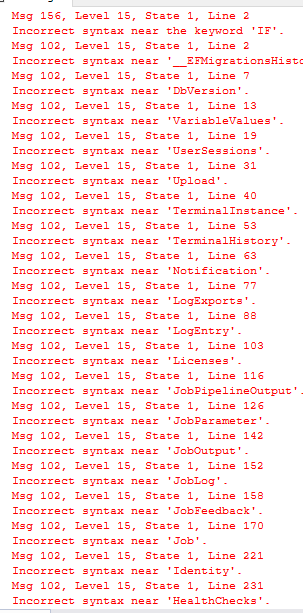
Hit a snag importing that sql file. Tons of syntax errors.
Tried a different way to export using DB Browser
https://sqlitebrowser.org/
and hit pretty much the same syntax errors. Seems like “CREATE TABLE IF NOT EXISTS” doesn’t work in SQL. Played around with modifying that, but then hit Primary Key issues.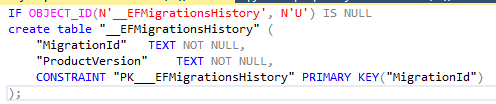

I saw a few other options out there to connect SQLite via ODBC and pull the data over that way as well, but since we are early in getting this server set up I’m just going to re-install it, selecting sql from the beginning, then play around with SQLite > MSSQL another time
5c05d65949f7a4d80d67427e9f6032b950120534.png
95f8e8d66a4acf5bcd84d33330eb44a0e7d4fef2.png
0022c3d35d8e1ae6e48af043029a4a14630621c4.png
5fe844b3c4b1cb906e2b92fbbc3b4e164daeb4a4.png
We don’t need to export the schema since that’s included in the install directory for PSU (SQL folder).
This is what I have so far. The syntax is correct but the I have something wrong with the insert_identity thing because it’s still complaining about it (I think it’s because the columns aren’t being generated in the insert statements). We need to IDs to be the same so that all the FKs line up.
param(
    [Parameter(Mandatory)]
    [string]$DatabasePath,
    [Parameter()]
    [string]$Owner = "dbo"
)

@(
    "Activations",
    "AppToken",
    "Computer",
    "ComputerTag",
    "EventHubConnections",
    "Files",
    "GitSettings",
    "GitStatus",
    "HealthChecks",
    "Identity",
    "Job",
    "JobFeedback",
    "JobLog",
    "JobOutput",
    "JobParameter",
    "JobPipelineOutput",
    "Licenses",
    "Notification",
    "TerminalHistory",
    "TerminalInstance",
    "Upload",
    "UserSessions",
    "Variable",
    "VariableValues"
) | ForEach-Object {
    $Table = $_

    ".open $DatabasePath
.mode insert
SELECT * FROM $_;
    " | sqlite3 | ForEach-Object { $_.Replace('INSERT INTO "table"', "SET IDENTITY_INSERT [$Owner].[$Table] ON;`r`nINSERT INTO [$Owner].[$Table]") + ";`r`nSET IDENTITY_INSERT [$Owner].[$Table] OFF;" }
}
I’ve been testing it with this.
C:\src\universal\tools\SQLiteToSql.ps1 -DatabasePath C:\ProgramData\psu.db | Out-File data.sql
This thing works better at exporting: GitHub - sqlitebrowser/sqlitebrowser: Official home of the DB Browser for SQLite (DB4S) project. Previously known as "SQLite Database Browser" and "Database Browser for SQLite". Website at:
It generates columns and data. You can select tables. The only thing missing from what it generates is the IDENTITY_INSERT statements.
Adam Driscoll
PowerShell Expert and Software Architect at Devolutions

Any new on an official migrate tool?