Python in PSU general questions

Was testing out PSU 4.2 for the Custom environments and it works great. The only questions I have is how can you pass in variables or any other type of data and can you invoke a .py script. I tried creating an API as shown below.
Invoke-PSUScript -Script 'Preprocessing\Tokenize.py' | Wait-PSUJob
$Job = Get-PSUScript -Name 'Preprocessing\Tokenize.py' | Get-PSUJob -OrderDirection Descending -First 1
Get-PSUJobPipelineOutput -Job $Job
Get-PSUJobOutput -Job $Job
The only part of the API that doesn’t work is “Invoke-PSUScript”. The get job output works as expected. Was wondering if this cmdlet would be updated to run .py scripts.
Additionally im curious if there will be something similar to how Parameter’s with Powershell ask for input will be added. Either by var = input() or var = system.argv
This is the output of the API request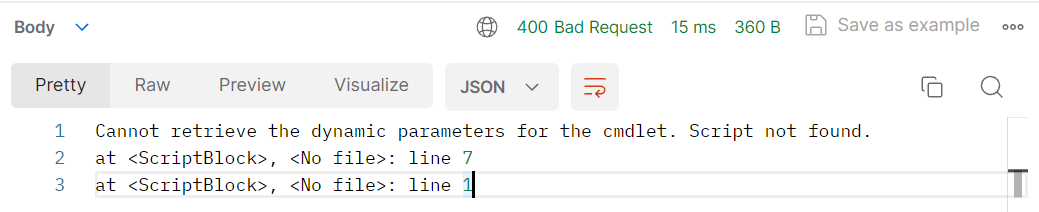
Thanks in advanced
~Oce
0166d3f5923e9c4540f1ebe04749c4de9ce2784c.png
All Comments (6)
Just as an update I wanted to share this code runs fine
import sys

x = sys.argv[0]
print ("Script Name: " + x)
Output: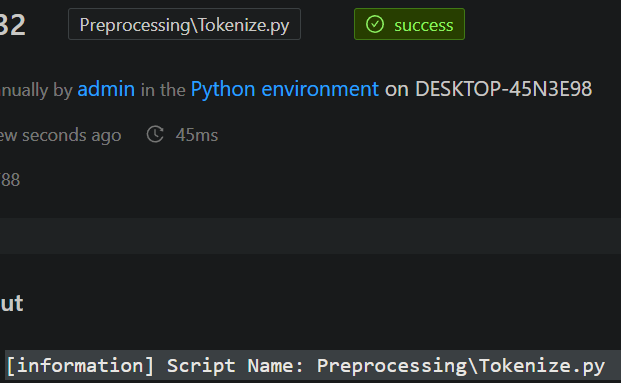
0397b920d8d4eeb2a08f2e84dd6d3ac86964974f.png
I tried using
from sys import argv
One, Two, Three = argv
however like you said its not currently possible to pass variables to the python environment. I think that would be a cool feature to be added.
The 1st thing I would check is if $Secret variables created in PSU can be passed into Python.
Anything else restricted to PowerShell
Variables are passed in as environment variables to sub processes like this. You cannot (yet) use secrets.
Adam Driscoll
PowerShell Expert and Software Architect at Devolutions
Do the python environments support run as? I can’t seem to get that working. When setting the environment or script to run as saved credentials it will sit running indefinitely.
Just found a bug with the latest 4.2
when building a custom environment I now have to manually add the path of the script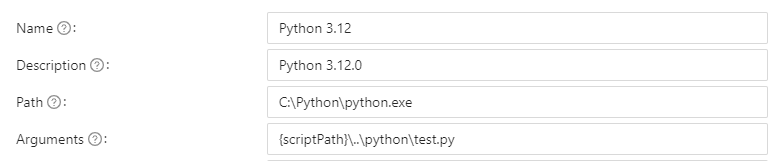
If it is not done this way you get the following error
27c9749b5018c90f33e36c19d19e250869f6f669.png
c448e5c12fab3045610fdb1c9db2eb81e2618c5a.png