Landing Page URL Redirect | V4.1

Product: PowerShell Universal
Version: 4.1.5
I’m looking to use the Landing Page template but it appears V4 doesn’t have the import feature so i copied the code from here (https://github.com/ironmansoftware/universal-landing-page/blob/main/dashboards/Landing%20Page/Landing%20Page.ps1) and pasted it into a new App.
When i navigate to that app it loads and dynamically displays the apps the user has permission to but it doesn’t appear to be passing the url.
When clicking any of the dashboards i get this error:
Cannot bind argument to parameter 'Url' because it is an empty string.
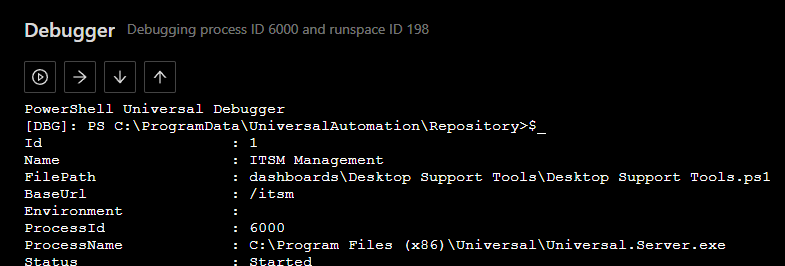
If i add a wait-debugger here and inspect the $_ variable i can see there is a BaseUrl
if ($_.Authenticated -and $_.Role) {
                Wait-Debugger
                Protect-UDSection -Role $_.Role -Content $Content
            }
If i add it on the on-click event though the $_ variable is empty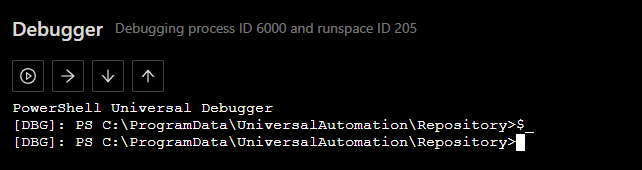
Has something changed in functionality that now affects the way this should work as this landing page appears to have been put together during 2.X so maybe it needs to reference the URL differently?
Cheers,
Jamie
694095095fcbc3fa00ca2ff04a7538d2d27eba19.png
794c258144713b996a1d5cf5e9dcad71c765d100.png
Recommended Answer
Hi Jamie,
I got this to work by setting the $_ variable into another variable. Something with scoping…
New-UDDashboard -Title 'Home' -Content {
    New-UDLayout -Columns 4 -Content {
        Get-PSUDashboard -Integrated | Sort-Object Name | ForEach-Object {
            if ($_.Name -eq 'Landing Page') {
                return
            }

            if ($_.Authenticated -and $User -eq $null) {
                return
            }

            $Dashboard = $_

            $Content = {
                New-UDElement -Tag 'div' -Content {
                    New-UDCard -Title $_.Name -Content {
                        New-UDStack -Direction column -Spacing 2 -Content {
                            New-UDTypography $_.Description
                            New-UDStack -Direction row -Content {
                                $_.Tag | ForEach-Object {
                                    if ($_ -eq $null) { return }
                                    $Tag = Get-PSUTag -Name $_ -Integrated
                                    New-UDChip -Label $_ -Style @{
                                        borderRadius    = "0px"
                                        backgroundColor = $_.Color
                                        color           = "white"
                                    }
                                }
                            }
                        }
                    } -Style @{
                        minHeight = '172px'
                    }
                } -Attributes @{
                    style   = @{
                        cursor = "pointer"
                    }
                    onClick = {
                        Invoke-UDRedirect -Native $Dashboard.BaseUrl
                    }
                }
            }

            if ($_.Authenticated -and $_.Role) {
                Protect-UDSection -Role $_.Role -Content $Content
            }
            else {
                & $Content
            }
        }
    }
} -HeaderContent {
    if (-not $User) {
        New-UDButton -Text 'Login' -OnClick {
            Invoke-UDRedirect -Native '/login'
        }
    }
}
Adam Driscoll
PowerShell Expert and Developer at Devolutions
All Comments (5)
Hi Jamie,
I got this to work by setting the $_ variable into another variable. Something with scoping…
New-UDDashboard -Title 'Home' -Content {
    New-UDLayout -Columns 4 -Content {
        Get-PSUDashboard -Integrated | Sort-Object Name | ForEach-Object {
            if ($_.Name -eq 'Landing Page') {
                return
            }

            if ($_.Authenticated -and $User -eq $null) {
                return
            }

            $Dashboard = $_

            $Content = {
                New-UDElement -Tag 'div' -Content {
                    New-UDCard -Title $_.Name -Content {
                        New-UDStack -Direction column -Spacing 2 -Content {
                            New-UDTypography $_.Description
                            New-UDStack -Direction row -Content {
                                $_.Tag | ForEach-Object {
                                    if ($_ -eq $null) { return }
                                    $Tag = Get-PSUTag -Name $_ -Integrated
                                    New-UDChip -Label $_ -Style @{
                                        borderRadius    = "0px"
                                        backgroundColor = $_.Color
                                        color           = "white"
                                    }
                                }
                            }
                        }
                    } -Style @{
                        minHeight = '172px'
                    }
                } -Attributes @{
                    style   = @{
                        cursor = "pointer"
                    }
                    onClick = {
                        Invoke-UDRedirect -Native $Dashboard.BaseUrl
                    }
                }
            }

            if ($_.Authenticated -and $_.Role) {
                Protect-UDSection -Role $_.Role -Content $Content
            }
            else {
                & $Content
            }
        }
    }
} -HeaderContent {
    if (-not $User) {
        New-UDButton -Text 'Login' -OnClick {
            Invoke-UDRedirect -Native '/login'
        }
    }
}
Adam Driscoll
PowerShell Expert and Developer at Devolutions
That did the trick, thank you very much.
There are 2 issues i have noticed though if you can help with these please
Admin Console Link
The Admin Role puts this on the landing page however it links to /experimental/admin rather than /admin and the experimental page is blank, i can’t see anything in the landing page that is setting this though?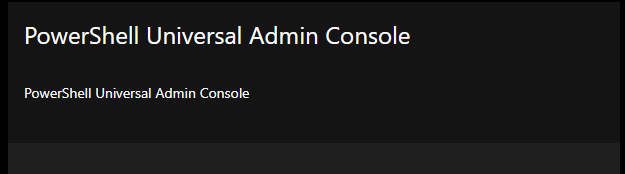
Admin Console Showing for All
Users without permission to the Admin console still see it appear on their landing page, if they click it, they are not able to access it but is it possible to be updated not to show Admin Console and Documentation if you’re not an Admin?
This only appears to be for those options, if i remove permissions for an app i created, they don’t see it.
edce556d0a3ad72f768e8313d717eba388bf24f0.png
Ah, yeah. Those can be hidden.
            if ($_.Name -eq 'Landing Page' -or $_.Hidden) {
                return
            }
Adam Driscoll
PowerShell Expert and Developer at Devolutions
Ah, so simple.
That’s perfect, thank you very much!
I had the same ‘scope’ problem, additionally clicks on the created div did not trigger the redirect. Therefor I’ve modified the original a bit more, thats how it looks for me now: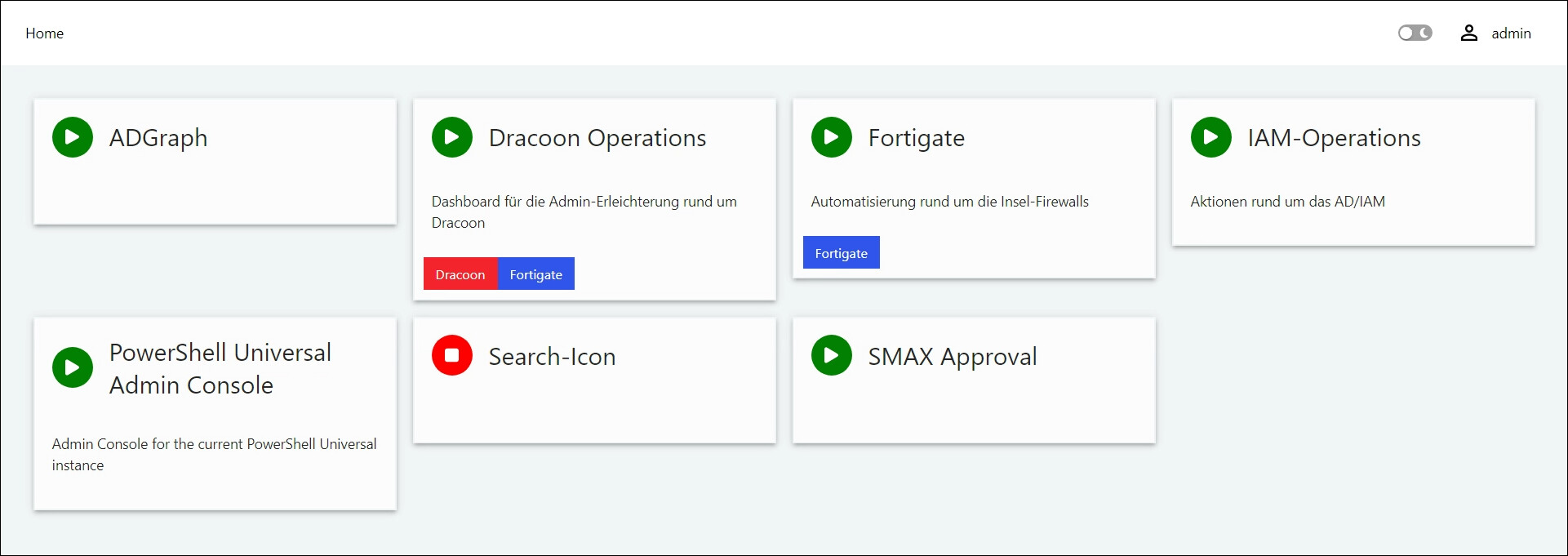
Changes to original (as I remember )
- The cards are created manuallyHeader and footer can be handled differently
- An Icon-Avatar shows if the app is running at allSometimes after a server restart one app stays in “Starting”, or apps with known critical bugs get stopped by the admin
- Hidden and unwanted dashboards get filtered (code line 14) but
- The admin console gets added manually to the list of auto detected dashboards (Lines 4-12)
- As
ForEach-Objecthas as scoping problem (root cause of this thread) I’ve changed to simpleForEachloops.
Heres the full code:
New-UDDashboard -Title 'Home' -Content {
    New-UDLayout -Columns 4 -Content {
        $myDashBoards = Get-PSUDashboard -Integrated #| Sort-Object Name
        $myDashBoards += [PSCustomObject]@{
            Name          = "PowerShell Universal Admin Console"
            Description   = "Admin Console for the current PowerShell Universal instance"
            Role          = @('Administrator')
            baseURL       = "/admin"
            Hidden        = $false
            Authenticated = $true
            Status        = "Started"
        }

        $myDashBoards = $myDashBoards | Sort-Object Name | Where-Object { ($_.Name -notin @('Landing Page', 'Samples') -and (-not $_.Hidden)) -and ($_.baseURL -notin @('/apps/docs')) }
        $myDashBoards | Format-Table name, baseURL, Role -Wrap | out-string | write-host
        foreach ($dashBoard in $myDashBoards ) {
            $Content = {
                New-UDElement -Tag 'div' -Content {
                    switch ($Dashboard.Status) {
                        'Started' {
                            $avatar = New-UDAvatar -Content { New-UDIcon -Icon "play" -Style @{color = "white"; backgroundColor = "green" } } -Sx @{backgroundColor = "green" }
                        }
                        Default {
                            $avatar = New-UDAvatar -Content { New-UDIcon -Icon "stop" -Style @{color = "white"; backgroundColor = "red" } } -Sx @{backgroundColor = "red" }
                        }
                    }

                    $Header = New-UDCardHeader -Avatar $avatar -Title $Dashboard.Name # -SubHeader "#$($Session:RequestID), $($entity."related.RegisteredForLocation.DisplayLabel")";
                    $Body = New-UDCardBody -Content {
                        New-UDStack -Direction column -Spacing 2 -Content {
                            New-UDTypography $Dashboard.Description
                        }
                    }
                    $Footer = New-UDCardFooter -Content {
                        New-UDStack -Direction row -Content {
                            $Dashboard.Tag | ForEach-Object {
                                if ($_ -eq $null) { return }
                                New-UDChip -Label $_ -Style @{
                                    borderRadius    = "0px"
                                    backgroundColor = $_.Color
                                    color           = "white"
                                }
                            }
                        }
                    }

                    New-UDCard -Header $Header -Body $Body -Footer $Footer -Sx @{
                        border = '2px solid #f0f2f5'
                    }
                } -Attributes @{
                    style   = @{
                        cursor = "pointer"
                    }
                    onClick = {
                        Invoke-UDRedirect -Native $Dashboard.BaseUrl
                    }
                }
            }

            if ($Dashboard.Authenticated -and $Dashboard.Role) {
                Protect-UDSection -Role $Dashboard.Role -Content $Content
            }
            else {
                & $Content
            }

        }
    }
} -HeaderContent {
    if (-not $User) {
        New-UDButton -Text 'Login' -OnClick {
            Invoke-UDRedirect -Native '/login'
        }
    }
}
70caa5997ce725d8a32de1656c6d5fe9ad7bd608.jpeg