DatePicker not lining up to Textbox

I’m having an issue lining up the UDDatePicker object with two textboxes. I’m using a UDGrid inside a UDCard. Both the textboxes line up but I can’t get the UDDatePicker to lineup with them. The Date Picker is shifted up and overlapping the text box above it. I’m still new to UDApps so I’m sure there is a better way of doing this. Any suggestions would be helpful.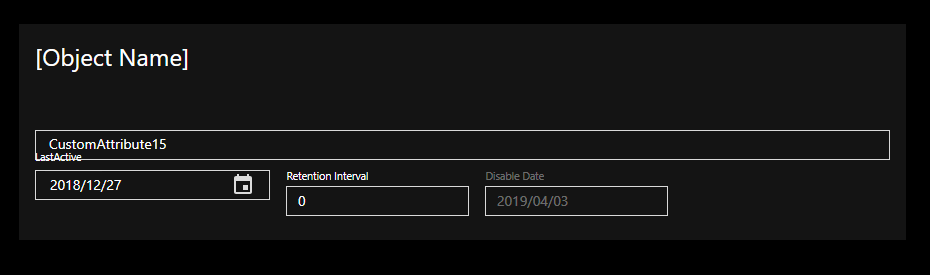
function Get-MyText {
    $date = Get-Date $Page:LastActive -Format "yyyy/MM/dd"
    "LastActive>$date;Interval>$($Page:Interval);Disable>$($Page:DisableDate)"
}

New-UDApp -Title 'Inactive DLs' -Content {

    $Page:LastActive = "2018/12/27"
    $Page:Interval = "0"
    $Page:DisableDate = "2019/04/03"

    New-UDCard -Id "ExampleCard" -Title "[Object Name]" -Content {

        New-UDTextbox -Value $Page:MyText -Label "CustomAttribute15" -Id "Cust15" -FullWidth

        New-UDGrid -Container -Spacing 2 -Children {

            New-UDGrid -Item -Children {
                New-UDDatePicker -Id "LastActive"  -Format 'YYYY/MM/DD' -Value $Page:LastActive -OnChange {
                    $Page:LastActive = (Get-UDElement -Id "LastActive").Value
                    Set-UDElement -Id "Cust15" -Properties @{ Value = Get-MyText }
                } -Label "LastActive"
            }

            New-UDGrid -Item -Children {
                New-UDTextbox -Type 'number' -Minimum (-1) -Value $Page:Interval -Label "Retention Interval" -Id "txtInterval"
            }

            New-UDGrid -Item -Children {
                New-UDTextbox -Type text -Value $Page:DisableDate -Label "Disable Date" -Id "txtDisableDate" -Disabled
            }

        } # End of Grid
    } # End of Card
} # End of App
Product: PowerShell Universal Version: 4.1.1
8ff8f24375d8b880f47723643d563538585c5cd0.png
All Comments (4)
I tried this on my instance,
I actually get a different issue than yours, presumably because of my custom theme: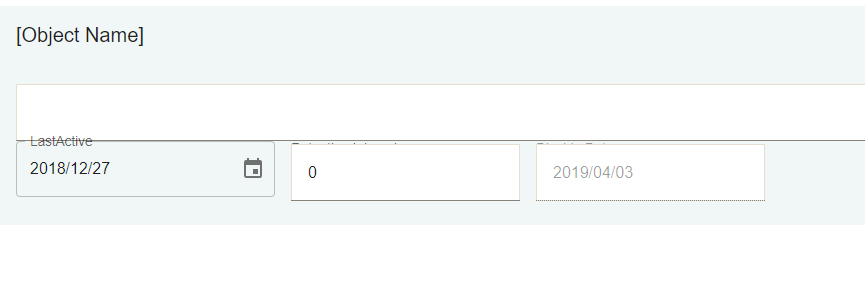
I added a couple of line breaks between the text box and lower line.
Then updated the variant on those textboxes to outlined, now it looks like this: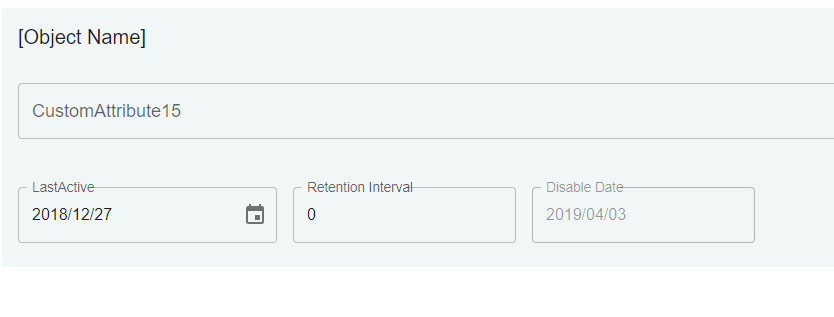
So I’m pretty sure the issue is themeing/styling related.
Are you using the default theme or anything different?
You might be able to add a custom class in your theme and use the -ClassName on those textboxes, the same can be done for datepicker if required.
8aa541dd552e2e66d67fa45435d6c9d238239a2f.png
dcbb0b8f2c6a1976d8a5782b9af9aaab1efd0482.png
How do you add a line break?
I’m having the same issue. Did you ever figure this out? Afaik I don’t have any custom theme or style defined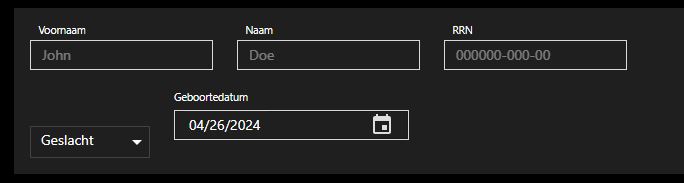
2b806d097e5cf35a5af83179f9eb324ac478bc5b.jpeg
Sorry I never included the code, this is UD version 4.3.2 with no theme:
(I took the code OP posted above, and removed the variables / put some static values for testing).
New-UDCard -Id "ExampleCard" -Title "[Object Name]" -Content {

    New-UDTextbox -Value "test" -Label "CustomAttribute15" -Id "Cust15" -FullWidth
    New-UDHtml -Markup "<br><br>"
    New-UDGrid -Container -Spacing 2 -Children {

        New-UDGrid -Item -Children {
            New-UDDatePicker -Id "LastActive"  -Format 'YYYY/MM/DD' -Value "2024/01/01" -OnChange {
                Set-UDElement -Id "Cust15" -Properties @{ Value = Get-MyText }
            } -Label "LastActive"
        }

        New-UDGrid -Item -Children {
            New-UDTextbox -Type 'number' -Minimum (-1) -Value 10 -Label "Retention Interval" -Id "txtInterval" -Variant outlined
        }

        New-UDGrid -Item -Children {
            New-UDTextbox -Type text -Value "test2" -Label "Disable Date" -Id "txtDisableDate" -Disabled -Variant outlined
        }

    }
}
I just use
html tags for line breaks.
Changed the textbox variants to ‘outlined’ and made no other changes.
Here’s how it looks: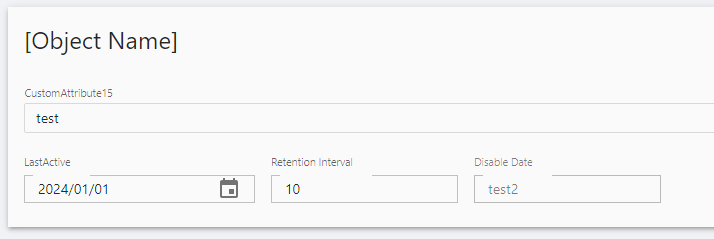
@AnonymousUser - your issue is slightly different from OPs since you’re using different components, but i just gave a quick test and managed to get them to (nearly) align by using the outlined variant of the New-UDSelect too, the bottom is off by a few px but its something I’d probably live with than faff around. Otherwise using classes or divs / other html elements to nudge things around might be the only way
922163fa5c1ca48294337a6209649e97573c30c5.png