Identities not showing the correct scripts based on access controls
Identities not showing the correct scripts based on access controls

Product: PowerShell Universal
Version: 3.9.17
I created a new role, “deployment” and then created a new access control, which is a script resource.
Looking at the user that is tied to the deployment role id assume that only that single script in the above screenshot would show up under their scripts? Or am I interpreting this wrong?
Identity > scripts - /admin/security/identities/88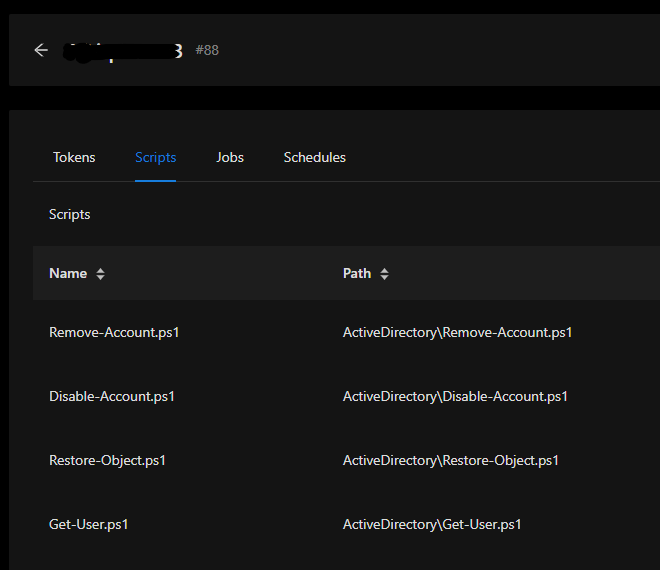
35746b0ed28bd2e8750b9194c5ec432c37b7f07c.png
b65a0ca2a0c392c43aa7cff750ca13b57ccd3bcd.png
All Comments (4)
@Adam Driscoll is this how permissions are supposed to work?
Trying to get a better understanding of roles and how RBA works inside PSU.
This seems incorrect. If the user logs in and goes to the scripts page, do they see all the scripts or do they only see all the scripts on the identities page?
Adam Driscoll
PowerShell Expert and Software Architect at Devolutions
When I log in with a user that is a part of the deployment role that role only has access to test.ps1 then they will only see that one script and job history as expected. However, when you are logged in as admin and navigate to https://psudev/admin/security/identities/76 and click on scripts, you see all the scripts the admin has access to when Id expected to see what scripts the user I’m viewing with ID of 76 has access to.
Also can’t figure out why the names of the scripts are not showing up when under scripts for this user.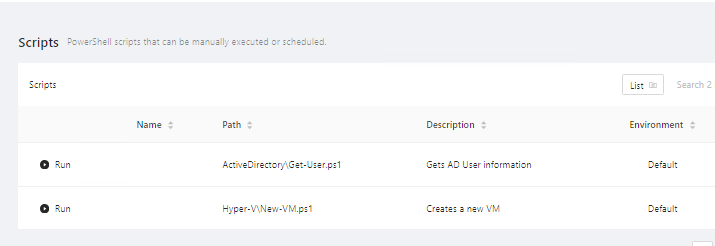
3b67d883ee15037e52b2371a762218716da0ae9b.png
bump.