Role based Navigation with children objects

Hello,
I’m trying to get the navigation panel to have some static mapping and icons based upon a role a user is part of. How do you get the navigation to evaluate roles?
What’s happening for me is that it doesn’t acknowledge that my user is in the ServerApprover group and defaults to the other set of navigation supplied.
$Navigation = @(
    if ($Roles -contains "ServerApprovers") {
        New-UDListItem -Icon (New-UDIcon -Icon home -Size lg) -Label "Home" -OnClick { Invoke-UDRedirect -url "/" }
        New-UDListItem -Icon (New-UDIcon -Icon thumbsup -Size lg) -Label "Approvals" -OnClick { Invoke-UDRedirect -url "/Approvals/HostingApproval" }
        New-UDListItem -Icon (New-UDIcon -Icon tombstone -Size lg) -Label "Decoms" -Children {
            New-UDListItem -Label "Decoms" -OnClick { Invoke-UDRedirect -url "/Decoms/Decoms" }
            New-UDListItem -Label "Stage for Decom" -OnClick { Invoke-UDRedirect -url "/Decoms/StageDecom" }
        }
        New-UDListItem -Icon (New-UDIcon -Icon database -Size lg) -Label "MSL" -Children {
            New-UDListItem -Label "MSL" -OnClick { Invoke-UDRedirect -url "/MSL/MSL" }
            New-UDListItem -Label "Edit MSL Record" -OnClick { Invoke-UDRedirect -url "/MSL/EditMSL" }
            New-UDListItem -Label "Add Missing MSL" -OnClick { Invoke-UDRedirect -url "/MSL/MissingMSL" }
        }
        New-UDListItem -Icon (New-UDIcon -Icon home -Size lg) -Label "MontlyTotals" -OnClick { Invoke-UDRedirect -url "/MonthlyTotals" }
        New-UDListItem -Icon (New-UDIcon -Icon list -Size lg) -Label "NamingDictionary" -Children {
            New-UDListItem -Label "Server Naming Example" -OnClick { Invoke-UDRedirect -url "/NamingDictionary/NamingDictionary" }
            New-UDListItem -Label "Line Of Business" -OnClick { Invoke-UDRedirect -url "/NamingDictionary/LineOfBusiness" }
            New-UDListItem -Label "Location" -OnClick { Invoke-UDRedirect -url "/NamingDictionary/Location" }
            New-UDListItem -Label "Product Code" -OnClick { Invoke-UDRedirect -url "/NamingDictionary/ProductCode" }
            New-UDListItem -Label "Function Code" -OnClick { Invoke-UDRedirect -url "/NamingDictionary/FunctionCode" }
            New-UDListItem -Label "Operating System" -OnClick { Invoke-UDRedirect -url "/NamingDictionary/OperatingSystem" }
            New-UDListItem -Label "Server Owners" -OnClick { Invoke-UDRedirect -url "/NamingDictionary/ServerOwners" }
            New-UDListItem -Label "Service Code" -OnClick { Invoke-UDRedirect -url "/NamingDictionary/ServiceCode" }
        }
        New-UDListItem -Icon (New-UDIcon -Icon server -Size lg) -Label "Server Build Form" -OnClick { Invoke-UDRedirect -url "/ServerBuild/Server-Request-Form" }
        New-UDListItem -Icon (New-UDIcon -Icon pen -Size lg) -Label "Edit Server Request" -OnClick { Invoke-UDRedirect -url "/ServerBuild/editRequest" }
    }
    else {
        New-UDListItem -Icon (New-UDIcon -Icon home -Size lg) -Label "Home" -OnClick { Invoke-UDRedirect -url "/" }
        New-UDListItem -Icon (New-UDIcon -Icon tombstone -Size lg) -Label "Decoms"  -OnClick { Invoke-UDRedirect -url "/Decoms/Decoms" }
        New-UDListItem -Icon (New-UDIcon -Icon database -Size lg) -Label "MSL" -OnClick { Invoke-UDRedirect -url "/MSL/MSL" }
        New-UDListItem -Icon (New-UDIcon -Icon home -Size lg) -Label "MontlyTotals" -OnClick { Invoke-UDRedirect -url "/MonthlyTotals" }
        New-UDListItem -Icon (New-UDIcon -Icon list -Size lg) -Label "NamingDictionary" -OnClick { Invoke-UDRedirect -url "/NamingDictionary/NamingDictionary" }
        New-UDListItem -Icon (New-UDIcon -Icon server -Size lg) -Label "Server Build Form" -OnClick { Invoke-UDRedirect -url "/ServerBuild/Server-Request-Form" }
        New-UDListItem -Icon (New-UDIcon -Icon pen -Size lg) -Label "Edit Server Request" -OnClick { Invoke-UDRedirect -url "/ServerBuild/editRequest" }
    }
)
And results in this showing in the UI. However, I can still get to the other pages that are defined in the navigation with the role as most of those have the -Role @('ServerApprovers) flag in the Page definition.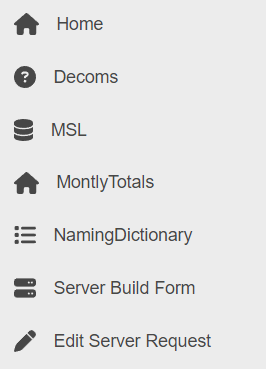
Product: PowerShell Universal
Version: 4.0.6
730bf2cea0eb50f4e62a70bea4727ad87bca7374.png
All Comments (8)
I have found that in order for it to evaluate the roles, you have to add this to the pages:-LoadNavigation $Navigation
If you just add it to the dashboard, the dashboard loads before any roles are evaluated.
-LoadNavigation $Navigation
I had tried that as well, which does result in the correct items showing in the navigation, but it seems to totally ignore the navigation block defined.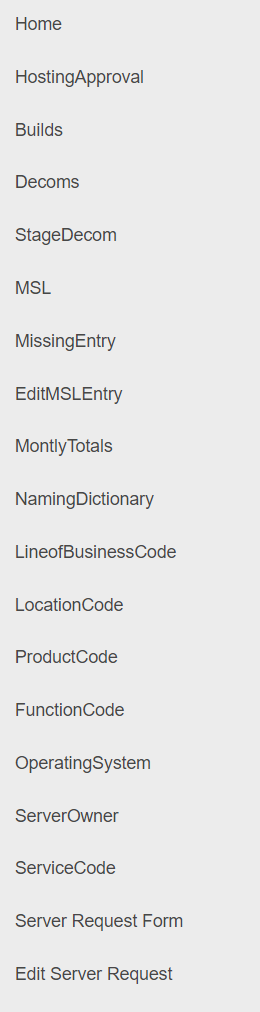
99346a0838c67e978badc8282b85793ffc0ab7da.png
Make sure you change it from an array to a script block when using -LoadNavigation.
$Navigation = {
 # Navigation code here
}
Adam Driscoll
PowerShell Expert and Software Architect at Devolutions
That didn’t make any difference
I just tried it and it works for me. Here’s a full example. I used my Active Directory role rather than your server approvers role.
$Navigation = {
    if ($Roles -contains "Active Directory") {
        New-UDListItem -Icon (New-UDIcon -Icon home -Size lg) -Label "Home" -OnClick { Invoke-UDRedirect -url "/" }
        New-UDListItem -Icon (New-UDIcon -Icon thumbsup -Size lg) -Label "Approvals" -OnClick { Invoke-UDRedirect -url "/Approvals/HostingApproval" }
        New-UDListItem -Icon (New-UDIcon -Icon tombstone -Size lg) -Label "Decoms" -Children {
            New-UDListItem -Label "Decoms" -OnClick { Invoke-UDRedirect -url "/Decoms/Decoms" }
            New-UDListItem -Label "Stage for Decom" -OnClick { Invoke-UDRedirect -url "/Decoms/StageDecom" }
        }
        New-UDListItem -Icon (New-UDIcon -Icon database -Size lg) -Label "MSL" -Children {
            New-UDListItem -Label "MSL" -OnClick { Invoke-UDRedirect -url "/MSL/MSL" }
            New-UDListItem -Label "Edit MSL Record" -OnClick { Invoke-UDRedirect -url "/MSL/EditMSL" }
            New-UDListItem -Label "Add Missing MSL" -OnClick { Invoke-UDRedirect -url "/MSL/MissingMSL" }
        }
        New-UDListItem -Icon (New-UDIcon -Icon home -Size lg) -Label "MontlyTotals" -OnClick { Invoke-UDRedirect -url "/MonthlyTotals" }
        New-UDListItem -Icon (New-UDIcon -Icon list -Size lg) -Label "NamingDictionary" -Children {
            New-UDListItem -Label "Server Naming Example" -OnClick { Invoke-UDRedirect -url "/NamingDictionary/NamingDictionary" }
            New-UDListItem -Label "Line Of Business" -OnClick { Invoke-UDRedirect -url "/NamingDictionary/LineOfBusiness" }
            New-UDListItem -Label "Location" -OnClick { Invoke-UDRedirect -url "/NamingDictionary/Location" }
            New-UDListItem -Label "Product Code" -OnClick { Invoke-UDRedirect -url "/NamingDictionary/ProductCode" }
            New-UDListItem -Label "Function Code" -OnClick { Invoke-UDRedirect -url "/NamingDictionary/FunctionCode" }
            New-UDListItem -Label "Operating System" -OnClick { Invoke-UDRedirect -url "/NamingDictionary/OperatingSystem" }
            New-UDListItem -Label "Server Owners" -OnClick { Invoke-UDRedirect -url "/NamingDictionary/ServerOwners" }
            New-UDListItem -Label "Service Code" -OnClick { Invoke-UDRedirect -url "/NamingDictionary/ServiceCode" }
        }
        New-UDListItem -Icon (New-UDIcon -Icon server -Size lg) -Label "Server Build Form" -OnClick { Invoke-UDRedirect -url "/ServerBuild/Server-Request-Form" }
        New-UDListItem -Icon (New-UDIcon -Icon pen -Size lg) -Label "Edit Server Request" -OnClick { Invoke-UDRedirect -url "/ServerBuild/editRequest" }
    }
    else {
        New-UDListItem -Icon (New-UDIcon -Icon home -Size lg) -Label "Home" -OnClick { Invoke-UDRedirect -url "/" }
        New-UDListItem -Icon (New-UDIcon -Icon tombstone -Size lg) -Label "Decoms"  -OnClick { Invoke-UDRedirect -url "/Decoms/Decoms" }
        New-UDListItem -Icon (New-UDIcon -Icon database -Size lg) -Label "MSL" -OnClick { Invoke-UDRedirect -url "/MSL/MSL" }
        New-UDListItem -Icon (New-UDIcon -Icon home -Size lg) -Label "MontlyTotals" -OnClick { Invoke-UDRedirect -url "/MonthlyTotals" }
        New-UDListItem -Icon (New-UDIcon -Icon list -Size lg) -Label "NamingDictionary" -OnClick { Invoke-UDRedirect -url "/NamingDictionary/NamingDictionary" }
        New-UDListItem -Icon (New-UDIcon -Icon server -Size lg) -Label "Server Build Form" -OnClick { Invoke-UDRedirect -url "/ServerBuild/Server-Request-Form" }
        New-UDListItem -Icon (New-UDIcon -Icon pen -Size lg) -Label "Edit Server Request" -OnClick { Invoke-UDRedirect -url "/ServerBuild/editRequest" }
    }
}

New-UDApp -Title 'Self-Service' -Pages @(
    Get-UDPage -Name 'Dashboard'
    Get-UDPage -Name 'Services'
    Get-UDPage -Name 'Service'
    Get-UDPage -Name 'Service Groups'
    Get-UDPage -Name 'Settings'
    Get-UDPage -Name 'Users'
    Get-UDPage -Name 'History'
    Get-UDPage -Name 'New Service'
) -LoadNavigation $Navigation -NavigationLayout Permanent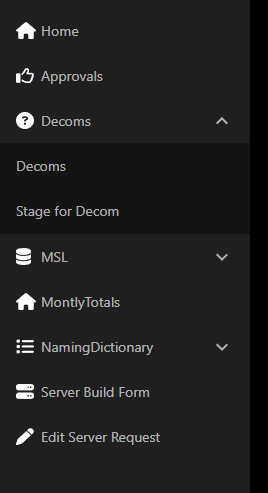
And if I don’t have a role, it looks like this.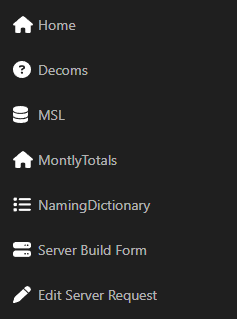
Adam Driscoll
PowerShell Expert and Software Architect at Devolutions
fdcc9b3fd13e4785f2a20270da81d18ab3f69409.png
14c914ac4e53445dc0d0e6980fc29358345d7213.png
if ($Roles -contains "Active Directory")@Adam Driscoll why would you not use the Protect-UDSection?
$Navigation = {
    New-UDListItem -Label "Welcome! $User" -Icon (New-UDIcon -Icon user)
    Protect-UDSection -Role $BoardingRoles -Children {}
}
Any pros/cons with Protect-UDSection vs something like if ($Roles -contains "Active Directory")
Trying to understand what the recommendation for RBA on dashboards.
Protect-UDSection is a really simple function that just does the $Roles -contains logic. I think it just makes it easier to read when you use that function rather than what I suggested.
Adam Driscoll
PowerShell Expert and Software Architect at Devolutions
New-UDApp -Title 'Self-Service' -Pages @(UDApp was the missing piece to my puzzle. I was using a UDDashboard still. Moving to that has resolved the issue and it now works similar for me.
Thank you!