Invalid configuration: logging.ps1

Product: PowerShell Universal
Version: 3.8.x to 4.0.3
We upgraded to 4.0.3, now we are getting this error, but we don’t have a logging.ps1 file.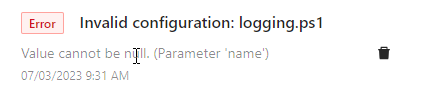
@Adam Driscoll, do you know why we would be seeing this, i even searched my repo and settings for a logging.ps1 reference and there is none.
[09:08:00 DBG] Reading configuration for LoggingTarget
[09:08:00 DBG] Reading configuration file logging.ps1
[09:08:00 DBG] File doesn't exist or is empty. Setting default items.
[09:08:00 ERR] Failed to read configuration file. logging.ps1
System.ArgumentNullException: Value cannot be null. (Parameter 'name')
   at System.ArgumentNullException.Throw(String paramName)
   at System.Environment.ExpandEnvironmentVariables(String name)
   at UniversalAutomation.Services.LoggingTargetsConfigurationScript.<>c__DisplayClass8_0.<OnReadAfterAllAsync>b__0(LoggerConfiguration lc) in C:\actions-runner\_work\universal\universal\src\Universal.Server\Services\Configuration\LoggingTargets.cs:line 116
   at Serilog.Configuration.LoggerSinkConfiguration.Logger(Action`1 configureLogger, LogEventLevel restrictedToMinimumLevel, LoggingLevelSwitch levelSwitch)
   at UniversalAutomation.Services.LoggingTargetsConfigurationScript.OnReadAfterAllAsync(Boolean initialSync) in C:\actions-runner\_work\universal\universal\src\Universal.Server\Services\Configuration\LoggingTargets.cs:line 116
   at UniversalAutomation.Services.ConfigurationScript`1.ReadAsync(String rootPath, Boolean initialSync) in C:\actions-runner\_work\universal\universal\src\PowerShellUniversal\ConfigurationScript.cs:line 215
This causes nothing to be logged at all, so logging in general is broken.
904d262bb8d57c8cc92f9059688dfab13a631b15.png
Recommended Answer
ok, i am finding out that you have to remove
	"Logging": {
		"Path": "E:\\src\\psu\\sitename\\PowerShellUniversal\\log.txt",
		"RetainedFileCountLimit": 31,
		"LogLevel": {
			"Default": "Information",
			"Microsoft": "Warning",
			"Microsoft.Hosting.Lifetime": "Information",
			"Grpc": "Information"
		}
	},
and replace it with above
"SystemLogPath": "E:\\src\\psu\\sitename\\PowerShellUniversal\\systemLog.txt",
All Comments (3)
Do you have the systemLogSetting path in appsettings.json?
“SystemLogPath”: “%ProgramData%\PowerShellUniversal\systemLog.txt”,
Adam Driscoll
PowerShell Expert and Developer at Devolutions
ok, i am finding out that you have to remove
	"Logging": {
		"Path": "E:\\src\\psu\\sitename\\PowerShellUniversal\\log.txt",
		"RetainedFileCountLimit": 31,
		"LogLevel": {
			"Default": "Information",
			"Microsoft": "Warning",
			"Microsoft.Hosting.Lifetime": "Information",
			"Grpc": "Information"
		}
	},
and replace it with above
"SystemLogPath": "E:\\src\\psu\\sitename\\PowerShellUniversal\\systemLog.txt",
Umm, is there an upgrade reference to this somewhere?
I didn’t find it here:
docs.powershelluniversal.com