Few bugs in PSU

Product: PowerShell Universal
Version: 3.9.8
Dashboard credentials:
For make the credentials selection work, I change the system account to local system account instead of domain service account - when I select dashboard using the creds I stored in a secret variable, the dashboard is not using the credential I supllied.
I check it using:
    Show-UDToast -Message "$($env:USERNAME)" -Duration 20000
    Show-UDToast -Message "$([System.Security.Principal.WindowsIdentity]::GetCurrent().Name)" -Duration 20000
    Show-UDToast -Message "$(whoami)" -Duration 20000
Schedule Deletion bug
When I click on the trash icon for deleting a schedule - It not deleting the task.
Settings bug
- When I change the default environment for using powershell 7.2.7\5.0 - It still show me ‘Integrated’ value instead the value I selected.
- When I change the dashboard title it won’t change.
All Comments (11)
Another issues I found:
I also cant stop a schedule by pressing the stop button - it’s seems like everything at the schedulers not work well…
BUMP
When I change the credentials of a dashboard I can see that it already changed in the configuration file:
New-PSUDashboard -Name "ActiveDirectory" -FilePath "dashboards\ActiveDirectory\ActiveDirectory.ps1" -BaseUrl "/ADModule" -Authenticated -DisableAutoStart
New-PSUDashboard -Name "Landing Page" -FilePath "dashboards\Landing Page\Landing Page.ps1" -BaseUrl "/landing-page" -Authenticated -Role @('Administrator','User','Helpdesk') -AutoDeploy -Description "Landing page for dashboards."
New-PSUDashboard -Name "HelpDesk" -FilePath "dashboards\HelpDesk\HelpDesk.ps1" -BaseUrl "/helpdesk" -Authenticated -Role @('Administrator') -DisableAutoStart -AutoDeploy -VerboseErrorMessages
New-PSUDashboard -Name "Playgroup" -FilePath "dashboards\Playgroup\Playgroup.ps1" -BaseUrl "/playground" -Authenticated -DisableAutoStart -Description "A component playground for PowerShell Universal Dashboard."
New-PSUDashboard -Name "Windows Developer Tools" -FilePath "dashboards\Windows Tools\Windows Tools.ps1" -BaseUrl "/windevtools" -Authenticated -DisableAutoStart -Description "A set of tools for Windows developers. "
New-PSUDashboard -Name "Dashboard" -FilePath "dashboards\Dashboard\Dashboard.ps1" -BaseUrl "/dashboard" -Authenticated -DisableAutoStart
New-PSUDashboard -Name "LocalAccounts" -FilePath "dashboards\LocalAccounts\LocalAccounts.ps1" -BaseUrl "/local-accounts" -Authenticated -DisableAutoStart
New-PSUDashboard -Name "Morning Checks" -FilePath "dashboards\Morning Checks\Morning Checks.ps1" -BaseUrl "/morningchecks" -Environment "Windows PowerShell 7.2.7" -Authenticated -Role @('Administrator') -AutoDeploy -Description "System Team Morning Checks" -Credential "svcpdevops"
New-PSUDashboard -Name "test8910" -FilePath "dashboards\test8910\test8910.ps1" -BaseUrl "/test8910" -Authenticated -DisableAutoStart
New-PSUDashboard -Name "Reset Students Passwords" -FilePath "dashboards\Reset Students Passwords\Reset Students Passwords.ps1" -BaseUrl "/rststupwd" -Authenticated -AutoDeploy
New-PSUDashboard -Name "Find Locked Files" -FilePath "dashboards\Find Locked Files\Find Locked Files.ps1" -BaseUrl "/helpdesk/findlockedfiles" -Authenticated -Role @('Administrator','User','Helpdesk') -AutoDeploy -Credential "svcpeyeshare" -Tag @('Helpdesk_Access')
New-PSUDashboard -Name "Find Locked Users" -FilePath "dashboards\Find Locked Users\Find Locked Users.ps1" -BaseUrl "/findlockedusers" -Environment "Windows PowerShell 7.2.7" -Authenticated -Role @('Administrator') -AutoDeploy -Description "Find Locked Users Dashboard" -Credential "svcpeyeshare" -VerboseErrorMessages
New-PSUDashboard -Name "Unlock AD Users" -FilePath "dashboards\Unlock AD Users\Unlock AD Users.ps1" -BaseUrl "/unlockadusers432" -Authenticated -Role @('Administrator') -AutoDeploy -Description "Unlock ad users forum test" -Credential "ServiceAccount"
New-PSUDashboard -Name "Find Locked Users Test 123" -FilePath "dashboards\Find Locked Users Test 123\Find Locked Users Test 123.ps1" -BaseUrl "/flusrstst123" -Authenticated -Role @('Administrator') -AutoDeploy -Credential "ServiceAccount"
But actually it still get the SYSTEM service account credential (the user who run’s “Powershell Universal service”)
I’ll run through this list and let you know if I can reproduce and need more info.
The schedule one I can definitely reproduce. This will be resolved in 4.0.3.
Adam Driscoll
PowerShell Expert and Developer at Devolutions
Can I Safely upgrade from 3.9.8 to 4.0.3? I notice there is major changes.
If it helps, I upgraded without issues. Always take a backup just in case. (Just good policy)
@Adam Driscoll
I Upgraded to 4.0.3 and Cant login to the dashboard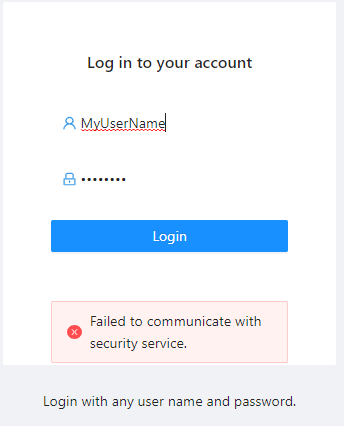
Inspaction: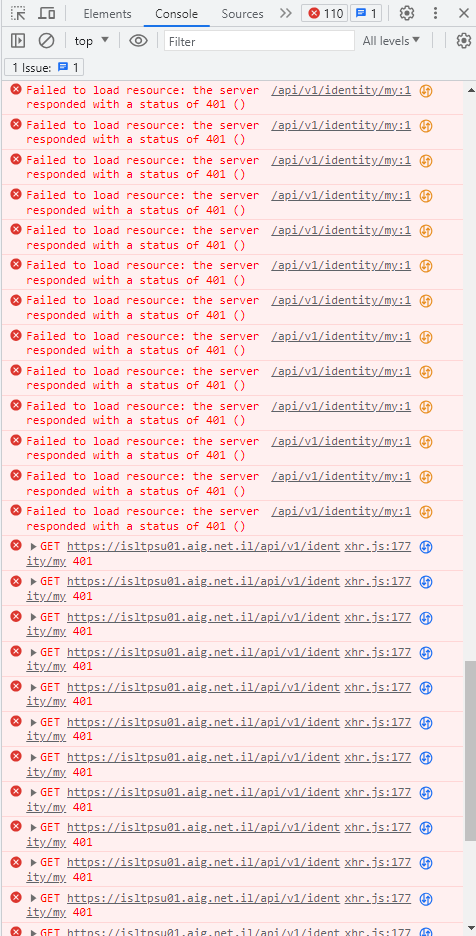
Authentication.ps1
param(
    [PSCredential]$Credential
)

#
#   You can call whatever cmdlets you like to conduct authentication here.
#   Just make sure to return the $Result with the Success property set to $true
#


$Result = [Security.AuthenticationResult]::new()
if ($Credential.UserName -eq 'Admin' -or $Credential.UserName -eq "admin")
{
    #Maintain the out of box admin user
    $Result.UserName = 'Default Admin'
    $Result.Success = $true
}
else
{
    # Get current domain using logged-on user's credentials - this validates their credential
    $CurrentDomain = "LDAP://DC=MY,DC=DOMAIN,DC=LOCAL"  # Insert Your Domain Here
    $domain = New-Object System.DirectoryServices.DirectoryEntry($CurrentDomain,($Credential.UserName),$Credential.GetNetworkCredential().password)
    if ($domain.name -eq $null)
    {
        #"Authentication failed for $($Credential.UserName)!" | Out-File "C:\Logs\adlogin.txt"
        New-PSUAuthenticationResult -ErrorMessage 'Bad username or password'
        $Result.UserName = ($Credential.UserName)
        $Result.Success = $false
    }
    else
    {
    <#$ADGroupList = (Get-ADGroup -Filter * -searchbase "OU=Powershell Universal Dashboard,OU=Resources,OU=Groups,OU=Accounts,DC=MY,DC=DOMAIN,DC=LOCAL" -Properties *).Name
    foreach($ADGroup in $ADGroupList) {
    if (Get-ADUserMemberOf -User $Credential.UserName -Group $ADGroup) {

        }

    }#>
      write-host "Successfully authenticated with domain $($domain.name)"
        "Authentication success for $($Credential.UserName)!" | Out-File "C:\Logs\adlogin.txt"
        $Result.UserName = ($Credential.UserName)
        $Result.Success = $true
    }
}

$Result
P.S: Same Error on 3.9.10
828ede9c00dd0388fbbe57a16f8270fe7d04dce4.png
90369a8244a3549c3314f009bd754f617ab38f82.png
Can you share a log file? It seems like the external PS process that runs logins is not running.
I’m not sure but it could be related to this: Issue loading modules in 4.0.4 - #2 by adam
Adam Driscoll
PowerShell Expert and Developer at Devolutions
@Adam Driscoll
Hi, I can log in when I upgrade to 4.0.5 - Some features were missing like dashboard advanced editor that I use to see my changes on the same page.
When I Upgrade to 3.9.10 - All my dashboards aren’t being loaded.
although when I look at dashboards.ps1 and dashboard folder I can see them all.
d28bdeb58b03f974bc6eefd85165e22aa98363d5.png
@Adam Driscoll
Upgrade to 3.9.11 and get the same error I got at 4.0.3 (Failed to communicate with security service)
Can you open a support case? I think we may need to look at your environment. support@ironmansoftware.com
Adam Driscoll
PowerShell Expert and Developer at Devolutions
Seems to be fixed at 3.9.12 - Thanks!