UD v4 - creating a new app fails without modifying/adding/deling what was produced by UD itself
UD v4 - creating a new app fails without modifying/adding/deling what was produced by UD itself

I have UD V4.0.2
When I go to Apps and create a new app, based on the multi page template, the app never runs.
I never touched any of the components or pages or settings, I just created the TestApp and try to run it/view it.
The View App results:
Page not found
at <ScriptBlock>, /root/.PowerShellUniversal/Repository/dashboards/TestApp/TestApp.ps1: line 14
at <ScriptBlock>, <No file>: line 1
System.Exception: Page not found
   at UniversalAutomation.GetDashboardPageCommand.BeginProcessing() in C:\actions-runner\_work\universal\universal\src\Cmdlets\GetDashboardPageCmdlet.cs:line 21
   at System.Management.Automation.Cmdlet.DoBeginProcessing()
   at System.Management.Automation.CommandProcessorBase.DoBegin()
Page not found
at <ScriptBlock>, /root/.PowerShellUniversal/Repository/dashboards/TestApp/TestApp.ps1: line 15
at <ScriptBlock>, <No file>: line 1
System.Exception: Page not found
   at UniversalAutomation.GetDashboardPageCommand.BeginProcessing() in C:\actions-runner\_work\universal\universal\src\Cmdlets\GetDashboardPageCmdlet.cs:line 21
   at System.Management.Automation.Cmdlet.DoBeginProcessing()
   at System.Management.Automation.CommandProcessorBase.DoBegin()
Page not found
at <ScriptBlock>, /root/.PowerShellUniversal/Repository/dashboards/TestApp/TestApp.ps1: line 16
at <ScriptBlock>, <No file>: line 1
System.Exception: Page not found
   at UniversalAutomation.GetDashboardPageCommand.BeginProcessing() in C:\actions-runner\_work\universal\universal\src\Cmdlets\GetDashboardPageCmdlet.cs:line 21
   at System.Management.Automation.Cmdlet.DoBeginProcessing()
   at System.Management.Automation.CommandProcessorBase.DoBegin()
Cannot bind argument to parameter 'Pages' because it is an empty array.
at <ScriptBlock>, /root/.PowerShellUniversal/Repository/dashboards/TestApp/TestApp.ps1: line 16
at <ScriptBlock>, <No file>: line 1
System.Management.Automation.ParameterBindingValidationException: Cannot bind argument to parameter 'Pages' because it is an empty array.
   at System.Management.Automation.ParameterBinderBase.ValidateNullOrEmptyArgument(CommandParameterInternal parameter, CompiledCommandParameter parameterMetadata, Type argumentType, Object parameterValue, Boolean recurseIntoCollections)
   at System.Management.Automation.ParameterBinderBase.BindParameter(CommandParameterInternal parameter, CompiledCommandParameter parameterMetadata, ParameterBindingFlags flags)
   at System.Management.Automation.CmdletParameterBinderController.BindParameter(CommandParameterInternal argument, MergedCompiledCommandParameter parameter, ParameterBindingFlags flags)
   at System.Management.Automation.CmdletParameterBinderController.BindParameter(UInt32 parameterSets, CommandParameterInternal argument, MergedCompiledCommandParameter parameter, ParameterBindingFlags flags)
   at System.Management.Automation.CmdletParameterBinderController.BindNamedParameter(UInt32 parameterSets, CommandParameterInternal argument, MergedCompiledCommandParameter parameter)
   at System.Management.Automation.ParameterBinderController.BindNamedParameters(UInt32 parameterSets, Collection`1 arguments)
   at System.Management.Automation.CmdletParameterBinderController.BindCommandLineParametersNoValidation(Collection`1 arguments)
   at System.Management.Automation.CmdletParameterBinderController.BindCommandLineParameters(Collection`1 arguments)
   at System.Management.Automation.CommandProcessor.BindCommandLineParameters()
   at System.Management.Automation.CommandProcessor.Prepare(IDictionary psDefaultParameterValues)
   at System.Management.Automation.CommandProcessorBase.DoPrepare(IDictionary psDefaultParameterValues)
   at System.Management.Automation.Internal.PipelineProcessor.Start(Boolean incomingStream)
   at System.Management.Automation.Internal.PipelineProcessor.SynchronousExecuteEnumerate(Object input)
--- End of stack trace from previous location ---
   at System.Management.Automation.Internal.PipelineProcessor.SynchronousExecuteEnumerate(Object input)
   at System.Management.Automation.PipelineOps.InvokePipeline(Object input, Boolean ignoreInput, CommandParameterInternal[][] pipeElements, CommandBaseAst[] pipeElementAsts, CommandRedirection[][] commandRedirections, FunctionContext funcContext)
   at System.Management.Automation.Interpreter.ActionCallInstruction`6.Run(InterpretedFrame frame)
   at System.Management.Automation.Interpreter.EnterTryCatchFinallyInstruction.Run(InterpretedFrame frame)
The App folder structure: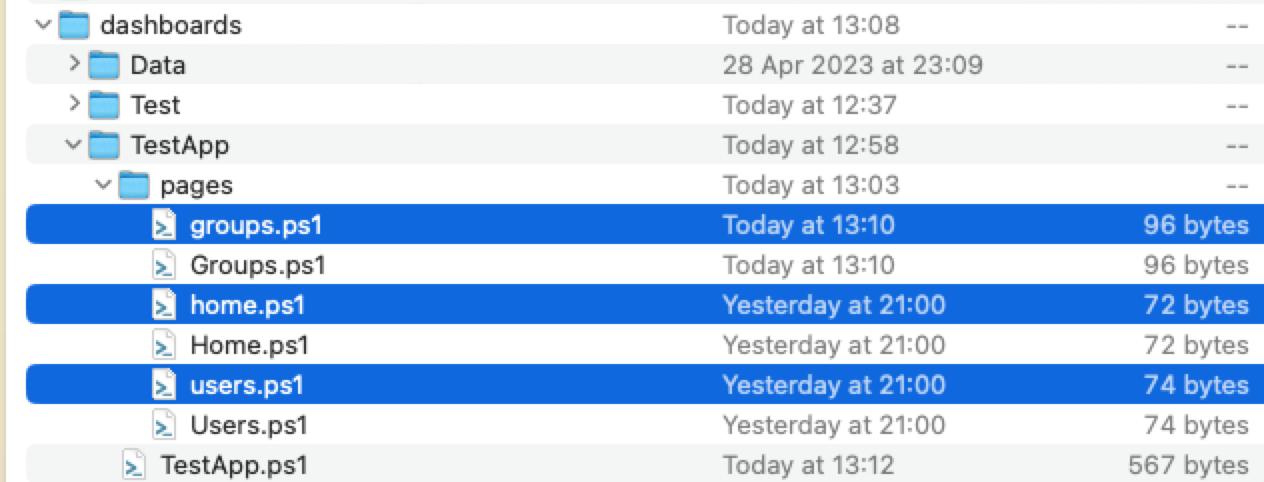
The TestApp code page: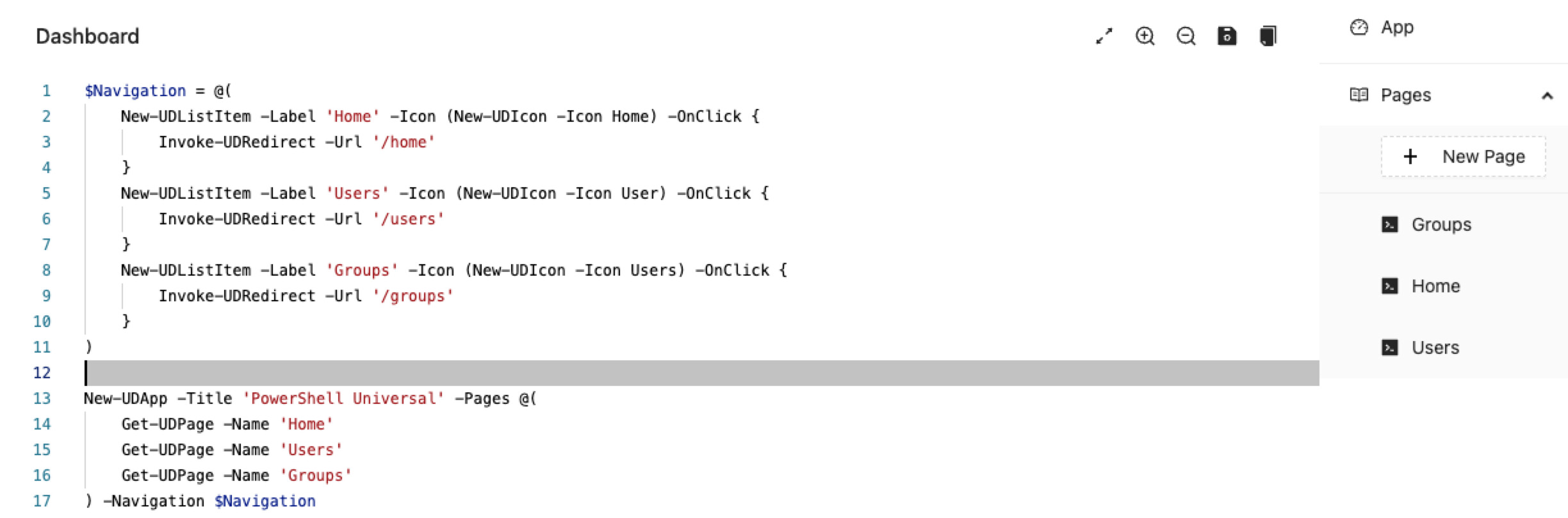
Product: PowerShell Universal
Version: 4.0.2
5d99e50ee8b83fed8eeac59ddaaba12a46290195.jpeg
8a5bdaf3e383c3512fa5d5c0633786d8c15177b7.png
All Comments (4)
Just tested 4.0.3 and this issue is still present,
I can reproduce this on Linux as well with 4.0.3. I’ll see if I can get to the bottom of it.
Adam Driscoll
PowerShell Expert and Developer at Devolutions
I just tested this in release 4.0.4 and the issue is now resolved.
Thanks!
Another issue just popped up for me. When I go to the generated pages and try to save a page, I get an error message. Just created a new App, went to the pages, edit one and tried to save it. The edit was just adding a ‘1’ to the text ‘Groups’, nothing more. Tried to restart PSU as well, did not help.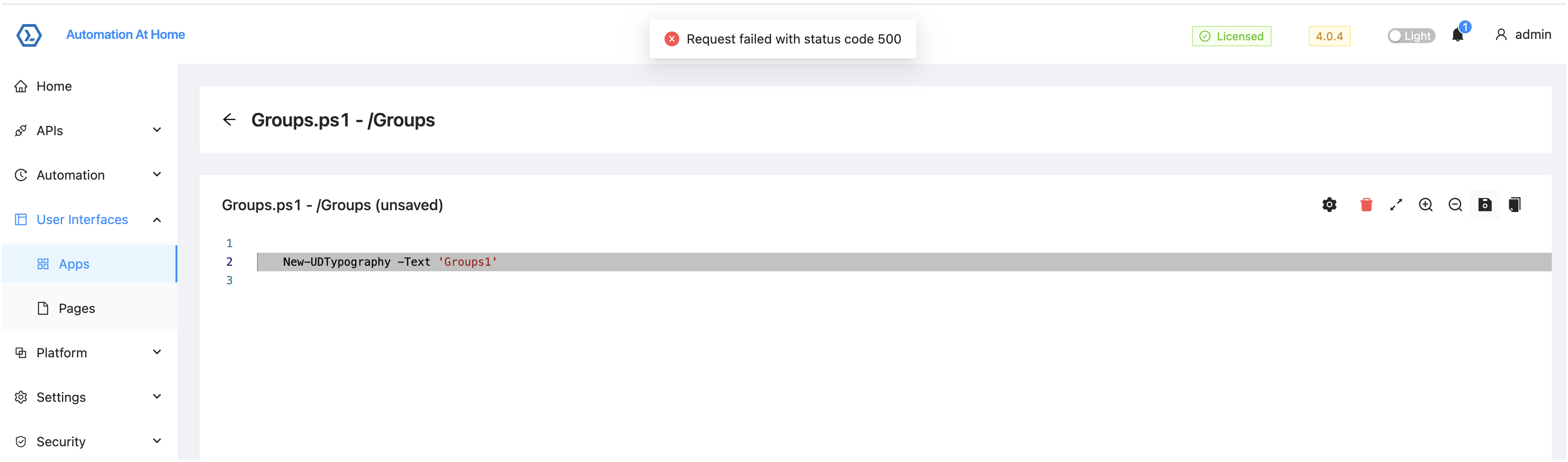
5819820b0ccef35b731a08f3dfb8f9bf55735c05.png