PowerShell Universal - 3.8.0
PowerShell Universal - 3.8.0
Release Notes
API
- Added support for renaming and setting the description, URL and version for the Endpoints swagger document
- Added a button to view the swagger documentation from the APIs page
- Added settings to API page
- Added Endpoint documentation
- Added New-PSUEndpointDocumentation, Get-PSUEndpointDocumentation and Remove-PSUEndpointDocumentation
- Fixed an issue where setting Content-Type to application/json and not specifying a body would fail when running an API under Windows PowerShell
Automation
- Add new run script button and script editor button
- Hide Run As drop down when Integrated environment is selected
- Added -Condition to New-PSUTrigger
- Added Guid ID for jobs to improve security
- Changed the default job handshake timeout to 30 seconds
- Added Licensing Expiring and License Expired triggers
Dashboards
- Add -Switch to New-UDListItem and -SwitchAlignment, -CheckBoxAlignment
- Added -Static to New-UDPage
- Added New-UDMarkdown
- Added -DefaultDashboardTheme to Set-PSUSettings
- Added -VerboseErrorMessages to New-PSUDashboard
- Added Logout button to user menu when using non-forms login.
- Added -Property to Get-UDElement (#1994)
- CodeEditor now honors light\dark theme (#2016)
- Autocomplete now doesn’t error on clear (#2073)
- Added -LightTheme-DarkTheme to New-UDCodeEditor
- Added -DisableInteractiveHost to New-UDDashboard
- Added support for -Title in the Dashboard page editor (#2004)
- Added -DisablePrevious to New-UDStep
- Adding all Pro icons and new mappings
- Removed endpoints card (#2105)
- Add -PublishedFolder to New-UDEditor (#1822)
- Fixed an issue where the -Title would not be displayed in the browser tab until the page loaded (#2095)
- Fixed an issue where -LoadingComponent of New-UDDynamic would not use variables (#2109)
- Adding md for New-UDIcon (#2127)
- Adding Icon and RemoveIconStyle to New-UDStep
- Adding -ExtraSmallSize and -ExtraLargeSize to New-UDColimn (#2138)
- Fixed an issue where New-UDChartJS background fill would not work (#2145)
- Added -AlignItems to New-UDStack (#2158)
- Autocomplete now auto-highlights the first item in the list (#2154)
- Fixed an issue where UDAutomcomplete OnEnter could not access the selected value (#2165)
- Added New-UDDivider (#2164)
- Adding -Disabled to both New-UDTransferList and New-UDTransferListItem (#1948)
- Adding -Disabled to New-UDRadioGroup (#2140)
- Fixed an issue with UDSelect theming and groups (#2092)
- Matching params between table and grid (#2072)
Pages
- Added Content Type to Text, Paragraph and Title
- Added allow-downloads to the iframe component (#2074)
- Fixe an issue where script’s weren’t displayed as full paths (#1988)
- Enabled edit button for Operators (#1953)
Platform
- Added PowerShell Protect deprecation notification
- Added support for external app token validation
- Moved Don’t Load Profile setting to Environments tab
- Fixed an issue where saving configuration files could overwrite the wrong file
- Editor now prompts when navigating away from a page that isn’t saved (#1916)
- Added -CredentialVault and -Password to Set-PSUIdentity and New-PSUIdentity
- Internal schedules jobs are now removed on server shutdown
- Implicit Windows Compatibility is now disabled by default in the integrated environment
- Added description property to environments.
- Added Reload Resources property to environments.
- Added -UseLogoSize to Set-PSUSettings
- Added -DisableImplicitWinCompat to New-PSUEnvironment
- Improved git commit page\modal
- Added full git history, improved how git sync status is stored
- Added Remove-PSULicense
- Added Expiring Soon warning and expired license buffer
- Added -Name to New-PSUPublished folder
- Added User Sessions page (#2104)
- Added -DefaultRoute to New-PSURole (#47)
- Login page now checks for a valid session and will redirect if another tab in the same session authenticates (#1194)
- Fixed an issue where git sync would get stuck if an edit was in progress and the mode was changed to automatic (#2167)
- Fixed an issue where the file system watcher would trigger when a .git file changed causing a log message (#2168)
- APIs and Dashboards will now reload modules changed in PSU (#1920)
- Added support for PSScriptAnalyzer in editors within the admin console (#1987)
Downloads
Adam Driscoll
PowerShell Expert and Developer at Devolutions
All Comments (14)
I seem to run into an issue: The added or subtracted value results in an un-representable DateTime. (Parameter ‘months’). Seems to be something with license
System.ArgumentOutOfRangeException: The added or subtracted value results in an un-representable DateTime. (Parameter ‘months’)
at System.DateTime.ThrowDateArithmetic(Int32 param)
at System.DateTime.AddMonths(Int32 months)
at Universal.Server.Services.LicenseService.CacheLicenses(Boolean force) in C:\actions-runner_work\universal\universal\src\Universal.Server\Services\LicenseService.cs:line 238

Tried to update, now all my pages just show:
EDIT
Rolled back and saw this in my error log: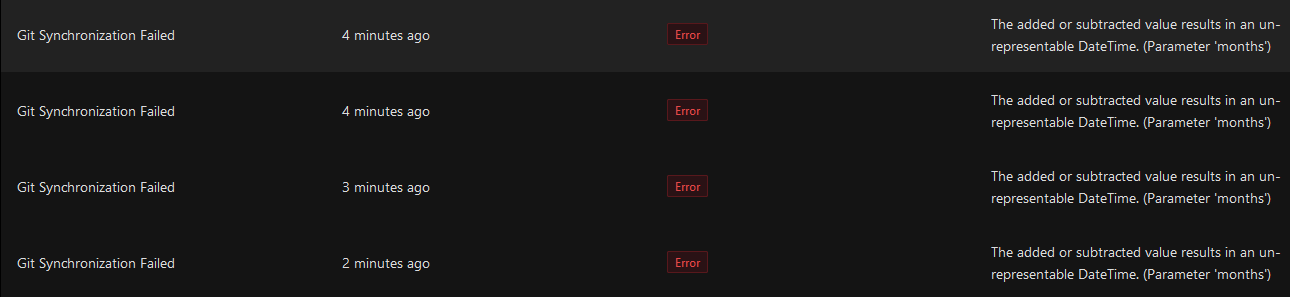
8d4ea111d69873a34e141616f086ada2e576e8be.png
f8195ba8b747da9e9fdc262ff66e8f99264281b7.png
I received this when I try to load my dev environment using 3.8.0 :
I have just spun up 2 additional containers (1 licenced and 1 not licenced). The unlicensed container appears to load, and I receive the same error with the licenced container.
I’ve generated some debug logs and will upload them to a support ticket.
Hope they help
28bb81b1c3b66854fa32858a0a2028bf92dbc7c5.png
Thanks. We’re rolling out a fix for this shortly.
Adam Driscoll
PowerShell Expert and Developer at Devolutions
my dashboards start but display nothing just blank screens.
get this message looping in the logs
2023-03-14 09:01:28.157 +01:00 [DBG] Socket opened using Sub-Protocol: ‘null’.
2023-03-14 09:01:28.169 +01:00 [DBG] Completed connection handshake. Using HubProtocol ‘json’.
2023-03-14 09:01:28.176 +01:00 [DBG] Waiting for the client to close the socket.
2023-03-14 09:01:28.177 +01:00 [DBG] Socket closed.
I’m having the same issue, my end running 3.8.1.
Debug logs available on request
Can you please email support@ironmansoftware.com so we can get some more info?
Adam Driscoll
PowerShell Expert and Developer at Devolutions
Hi @Adam Driscoll,
The requested logs are in your inbox
@AnonymousUser,
Is your instance connected to an SQL server or does it use litedb?
Few issues after updating to 3.8
This keeps showing up in the logs
2023-03-14 10:21:08.416 -05:00 [ERR] Failed to groom.
Microsoft.Data.SqlClient.SqlException (0x80131904): Invalid object name 'UserSessions'.
   at Microsoft.Data.SqlClient.SqlConnection.OnError(SqlException exception, Boolean breakConnection, Action`1 wrapCloseInAction)
   at Microsoft.Data.SqlClient.TdsParser.ThrowExceptionAndWarning(TdsParserStateObject stateObj, Boolean callerHasConnectionLock, Boolean asyncClose)
   at Microsoft.Data.SqlClient.TdsParser.TryRun(RunBehavior runBehavior, SqlCommand cmdHandler, SqlDataReader dataStream, BulkCopySimpleResultSet bulkCopyHandler, TdsParserStateObject stateObj, Boolean& dataReady)
   at Microsoft.Data.SqlClient.SqlDataReader.TryConsumeMetaData()
   at Microsoft.Data.SqlClient.SqlDataReader.get_MetaData()
   at Microsoft.Data.SqlClient.SqlCommand.FinishExecuteReader(SqlDataReader ds, RunBehavior runBehavior, String resetOptionsString, Boolean isInternal, Boolean forDescribeParameterEncryption, Boolean shouldCacheForAlwaysEncrypted)
   at Microsoft.Data.SqlClient.SqlCommand.RunExecuteReaderTds(CommandBehavior cmdBehavior, RunBehavior runBehavior, Boolean returnStream, Boolean isAsync, Int32 timeout, Task& task, Boolean asyncWrite, Boolean inRetry, SqlDataReader ds, Boolean describeParameterEncryptionRequest)
   at Microsoft.Data.SqlClient.SqlCommand.RunExecuteReader(CommandBehavior cmdBehavior, RunBehavior runBehavior, Boolean returnStream, TaskCompletionSource`1 completion, Int32 timeout, Task& task, Boolean& usedCache, Boolean asyncWrite, Boolean inRetry, String method)
   at Microsoft.Data.SqlClient.SqlCommand.ExecuteReader(CommandBehavior behavior)
   at Microsoft.Data.SqlClient.SqlCommand.ExecuteDbDataReader(CommandBehavior behavior)
   at Microsoft.EntityFrameworkCore.Storage.RelationalCommand.ExecuteReader(RelationalCommandParameterObject parameterObject)
   at Microsoft.EntityFrameworkCore.Query.Internal.SingleQueryingEnumerable`1.Enumerator.InitializeReader(Enumerator enumerator)
   at Microsoft.EntityFrameworkCore.Storage.ExecutionStrategy.<>c__DisplayClass31_0`2.<Execute>b__0(DbContext context, TState state)
   at Microsoft.EntityFrameworkCore.Storage.ExecutionStrategy.ExecuteImplementation[TState,TResult](Func`3 operation, Func`3 verifySucceeded, TState state)
   at Microsoft.EntityFrameworkCore.Storage.ExecutionStrategy.Execute[TState,TResult](TState state, Func`3 operation, Func`3 verifySucceeded)
   at Microsoft.EntityFrameworkCore.Query.Internal.SingleQueryingEnumerable`1.Enumerator.MoveNext()
   at Microsoft.EntityFrameworkCore.DbContext.RemoveRange(IEnumerable`1 entities)
   at PowerShellUniversal.SQL.SqlTable`1.DeleteRange(Func`2 query) in C:\actions-runner\_work\universal\universal\src\PowerShellUniversal.SQL\Database.cs:line 669
   at UniversalAutomation.GroomService.GroomSessions() in C:\actions-runner\_work\universal\universal\src\Universal.Server\Services\GroomService.cs:line 68
   at UniversalAutomation.GroomService.Groom() in C:\actions-runner\_work\universal\universal\src\Universal.Server\Services\GroomService.cs:line 272
ClientConnectionId:1d25a122-80e2-4c14-ab45-d610eef28e80
Error Number:208,State:1,Class:16
and I get this when loading the homepage.
bc52425e0d796ff0960d27790467082dc23ed2c8.png
Looks like the schema upgrade is failing → SQL Upgrade in 3.8.1 is not running properly · Issue #2186 · ironmansoftware/issues · GitHub
Adam Driscoll
PowerShell Expert and Developer at Devolutions
hi, its SQL
Thanks @AnonymousUser,
I raised a support ticket for this and, for me, it appears to be resolved in 3.8.2.
The problem was traced to instances using SQL.
Added support for PSScriptAnalyzer in editors within the admin console (#1987)
@Adam Driscoll - I added KB0040 to describe how to address the PSScriptAnalyzer warning in the Health Check feature when the module has not been installed yet (to the PSU integrated environment).