Issue with OIDC CallbackPath in High-Available Azure App Service Infrastructure
Issue with OIDC CallbackPath in High-Available Azure App Service Infrastructure

Hi everyone,
we have the following deployment:
- 2x Azure App Service Web App with Container-Image from Docker-Hub (ironmansoftware/universal:3.7.10-ubunutu-20.04-ps-7.3.0)
- Azure SQL Server + DB as backend
- Azure DevOps Git Repository for PowerShell Universal Configuration Repository
- OIDC SSO with an Azure App Registration
Lets call the app service containers:
- APP001
- APP002
Our deployment works very well if we browse the app-service urls from each container seperately (https ://APP001.azurewebsites.net or https ://APP02.azurewebsites.net)
As we want to use this deployment as an high-available setup, we want to use a single url for both servers (e.g. https ://APP-HA.ourdomain.com) (a frontend load balancer)
In our case, we use Azure Application Gateway in Standard SKU v1. This works very well for the local (non-sso) login (https ://APP-HA.ourdomain.com/login → bypass oidc)
But as soon as we want to use OIDC and browse to https ://APP-HA.ourdomain.com, PowerShell Universal is redirecting us to APP01.azurewebsites.net/auth/signin-oidc, but is should redirect us to the HA url: https ://APP-HA.ourdomain.com/auth/signin-oidc
Unfortunately, we can only define a relative path in OIDC configuration (“Authentication__OIDC__CallbackPath”: “/auth/signin-oidc”)
How can we redirect to the custom high-available domain after successful login in Azure AD?
The redirectUri in the Azure App Registration is pointing to the high-available uri (https ://APP-HA.ourdomain.com)
We get the following error: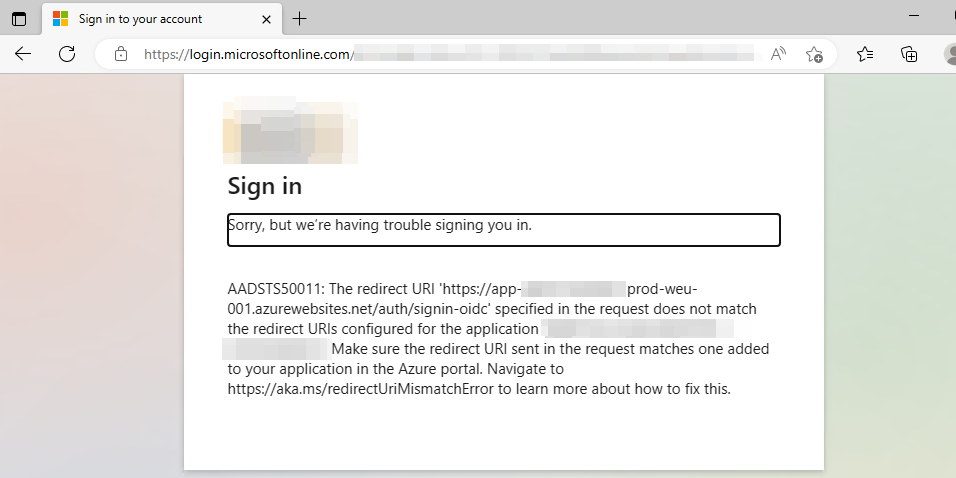
7d12f60980744de1fcba73806fbffc70424f4227.png
All Comments (10)
Based on that you are being redirect to HTTPS, I assume that you set this but do you have the forwarded headers env var set in your web app?
docs.powershelluniversal.com
Adam Driscoll
PowerShell Expert and Developer at Devolutions
Hi Adam,
thank you for your quick response.
Yes, we have set the forwarded headers env variable.
Here are some of our variables: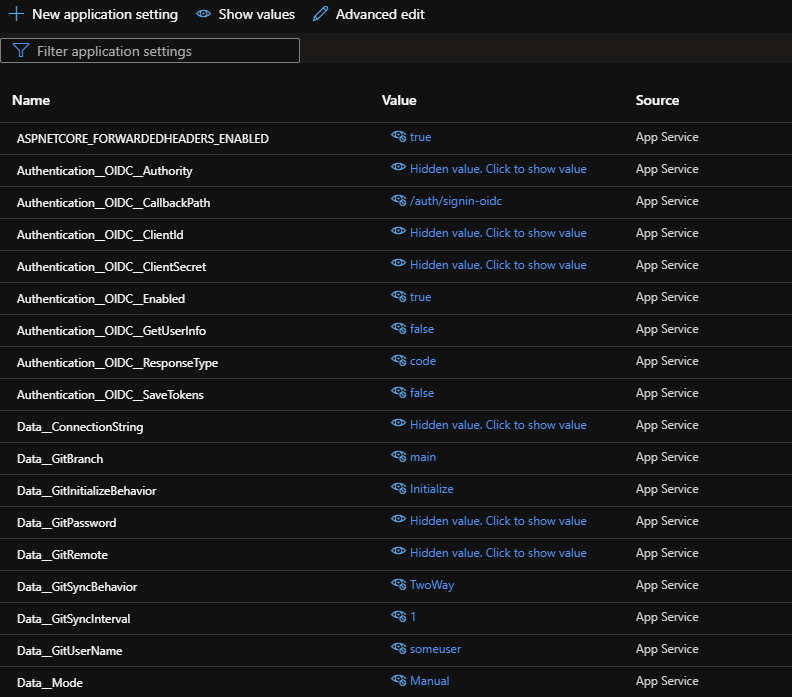
05c0715bad3f74d9003a146127528bc3c3e3fc31.png
It looks like we need to make a tweak to the forwarded headers logic in PSU. The last header (X-Forwarded-Host) is not being processed. It appears we are only passing along the original client IP and protocol. This is why it switches to HTTPS but doesn’t change the forwarded host name.
            app.UseForwardedHeaders(new ForwardedHeadersOptions
            {
                ForwardedHeaders = ForwardedHeaders.XForwardedFor | ForwardedHeaders.XForwardedProto // | ForwardedHeaders.XForwardedHost
            });
Obviously, this is a little tweak on our end but will require some testing to ensure that it works for you. I can get this into tonight’s nightly build and deploy a preview docker image if that works for you.
Adam Driscoll
PowerShell Expert and Developer at Devolutions
that would be phenomenal, as soon as we get the preview image we’ll test it and give you feedback
@Adam Driscoll i have seen you already published the 3.7.12 nightly build with the changes on the X-Forwarded-Host header. Thank you for the very quick implementation!
since we run psu completely serverless with Azure App Services, I wanted to download the Docker image.
In the download area I only found the installers, in Docker-Hub there is only version 3.7.11.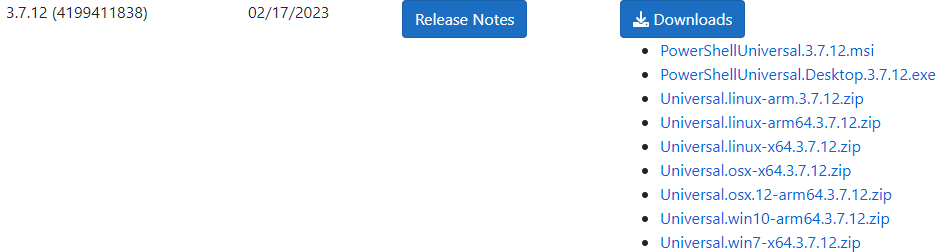
Do you already have the 3.7.12 preview available as a Docker image?
We are currently running on ironmansoftware/universal:3.7.10-ubunutu-20.04-ps-7.3.0
6fc4d2977ba43c88ca1498ea38ab5d0ea7eace78.png
9718cc46a9af65b0104b0e14bac0a969be2beb15.png
This has been pushed to docker hub under the preview tag.
ironmansoftware/universal:preview
Adam Driscoll
PowerShell Expert and Developer at Devolutions
Hi @Adam Driscoll ,
unfortunately, the preview didn’t work for us, after updating our app to preview, it says version 3.7.0.
We upgraded to the new 3.7.12 release, but he still have the same issue:
After login, it is still redirecting to one of the app service urls.
01e550e5e42588d3f7e342fc16233c46ea42de3c.png
@Adam Driscoll
We have now replaced the Azure App Gateway with an Ubuntu VM with Nginx as a reverse proxy for testing.
Unfortunately we still have the same problem, after login it redirects to the hostname of the PSU instance, not to the “shared” name of the application in the reverse proxy (the original URL when called).
If we login via the internal admin user (/login), the redirect is correct (high-available url in the reverse proxy).
So I suspect the problem in connection with PSU and OpenID-Connect.
How do you configure a common URL in a PSU High-Available infrastructure with OpenID-Connect in NGINX?
we continued to research the issue. Apparently, PSU does handle the “x-forwarded-host” header correctly. Unfortunately, in NGINX we cannot set this x-forwarded-host to the shared URL (https://APP-HA.ourdomain.com) because Azure App Services only supports https://APP01.azurewebsites.net or https:// APP02.azurewebsites.net as it knows any other url. This problem can basically be solved, but only for ONE WebApp by configuring a custom domain in Azure App Services. However, this is only ever possible for one web app, since two web apps cannot use the same custom domain.
Now almost everything works WITHOUT the X-Forwarded-host header. Unfortunately only not the authentication.
We have tested extensively with OpenID, it is the case that PSU is always redirected to https://APP01.azurewebsites.net/auth… or https://APP02.azurewebsites.net/auth/… …
We thought that we can fix this problem by switching to SAML and in PSU as Redirect URI the shared URL (https://APP-HA.ourdomain.com/Saml2/Acs).
Unfortunately, PSU seems to ignore the redirect Uri that is in the PSU-SAML settings and still redirect to (https://APP01.azurewebsites.net/Saml2/Acs).
@Adam Driscoll
Should I open a service request for this?
Yes, please. I understand the issue you’re running into and, while I do not have a solution at this time, opening a case will make sure we prioritize it.
Adam Driscoll
PowerShell Expert and Developer at Devolutions