Open a file from dashboard

Hi,
I am a beginner with powershell and PSU. I am trying to import all my scripts from PS to PSU and execute via a dashboard.
What I am trying to do is very basic, from the dashboard open & update a csv file via a button then excute the script via another button.
the script will import the updated csv file .
My issue is when clicking the button the csv file is not opening from the dashbord but works fine from powershell.
Any help would be appreciated.
Thanks
My script :
New-UDButton -Text ‘Update CSV File Before Executing the Script’ -OnClick {
Invoke-Item ‘E:\admin\hostlist.csv’
New-UDButton -Text ‘Click Here to Run The Script’ -OnClick {
Invoke-PSUScript ‘host.ps1’
}
Recommended Answer
Hi Mohamed,
First I’ll say I would recommend not leaking any Bastion/iDrac information (for the purposes of demonstration, I would create a “fake” set of IP’s, and for any API Keys just leave blank.
Second, you have tons of different options for editing the data. Here is some code for you to look at and refine .
My apologies if I missed anything obvious, I created a csv with only 3 columns on my local machine to do some testing with.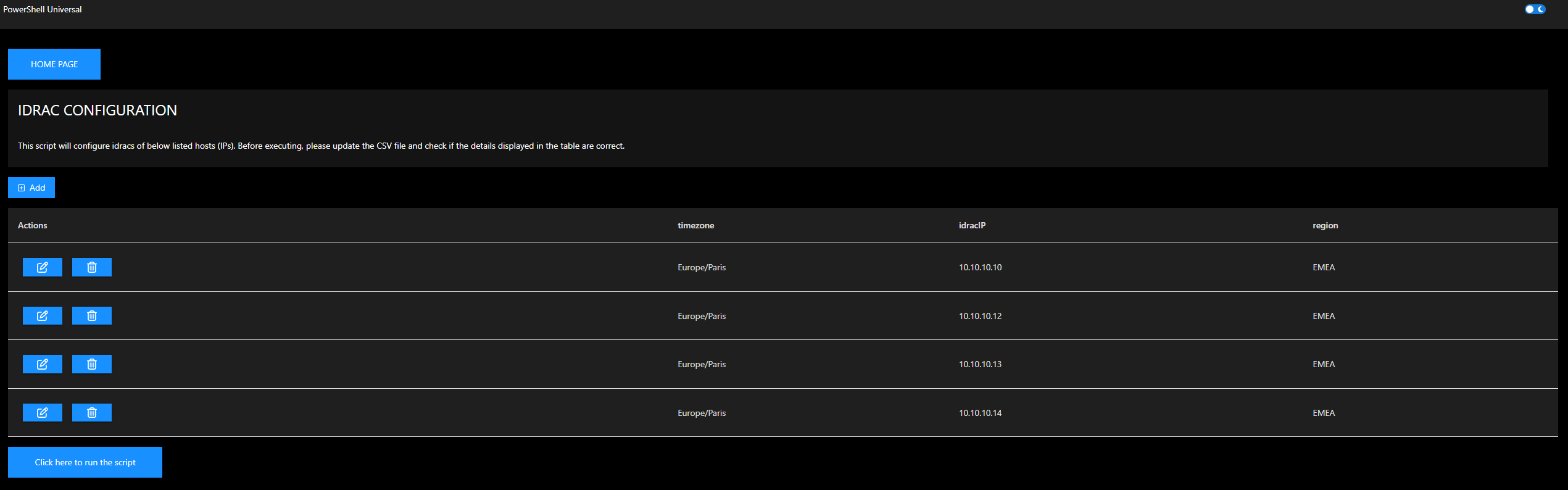
$AppToken = 'XXXXXXXXXXXXXXX'

$Page:CSVPath = "E:\Scripts\Powershell-Universal-Scripts\iDRAC\idraclist.csv"

New-UDButton -Text 'HOME PAGE' -Style @{ Width = "150px"; Height = "50px" } -OnClick {
    Invoke-UDRedirect -url http://psuserver:5000/scripts/Home
}
New-UDGrid -Item -SmallSize 6 -Content {
    New-UDCard -Title 'IDRAC CONFIGURATION' -Content {
        New-UDTypography -Variant h6 "This script will configure idracs of below listed hosts (IPs). Before executing, please update the CSV file and check if the details displayed in the table are correct."
    }
}
$Columns = @(
    New-UDTableColumn -Property 'fake' -Title 'Actions' -Render {
        New-UDButton -Icon (New-UDIcon -Icon Edit -Size lg) -OnClick {
            $Page:EditRow = $EventData
            Show-UDModal -Content {
                New-UDForm -Children {
                    $Page:EditRow | Get-Member -MemberType NoteProperty | select -ExpandProperty name | Foreach {
                        New-UDTextbox -id $_ -Label $_ -Value $Page:Editrow.$_
                    }
                } -OnSubmit {
                    $Data = Import-Csv $Page:CSVPath
                    $Row = $Data | Where-Object { $_ -match $Page:EditRow }
                    $EventData | Get-Member -MemberType NoteProperty | select -ExpandProperty name | Foreach {
                        $Row.$_ = $EventData.$_
                    }
                    $Data | Export-Csv $Page:CSVPath
                    Sync-UDElement -Id 'idracTable' -Broadcast
                    Hide-UDModal
                }

            }
        }
        New-UDButton -Icon (New-UDIcon -Icon TrashCan -Size lg) -color error -OnClick {
            $Page:EditRow = $EventData
            Show-UDModal -Content {
                New-UDAlert -Severity warning -Text "YOU ARE ABOUT TO REMOVE THIS ROW."
                New-UDCheckBox -Label 'CONFIRM' -OnChange {
                    If ($Body -eq $true) {
                        $Page:ConfirmDelete = $true
                        Sync-UDElement -Id 'idracConfirmDelete'
                    }
                    elseif ($Body -eq $false) {
                        $Page:ConfirmDelete = $false
                        Sync-UDElement -Id 'idracConfirmDelete'
                    }
                }
                New-UDDynamic -Id 'idracConfirmDelete' -Content {
                    If ($Page:ConfirmDelete -eq $true) {
                        New-UDButton -Icon (New-UDIcon -Icon TrashCan -Size lg) -color error -OnClick {
                            $Data = Import-Csv $Page:CSVPath
                            $Data | Where-Object { $_ -notmatch $Page:EditRow } | Export-CSV $Page:CSVPath
                            $Page:ConfirmDelete = $false
                            Sync-UDElement -Id 'idracTable' -Broadcast
                            Hide-UDModal
                        }
                    }
                    If ($Page:ConfirmDelete -ne $true) {
                        New-UDButton -Icon (New-UDIcon -Icon TrashCan -Size lg) -color error -Disabled
                    }
                }
            }
        }
    }
    New-UDTableColumn -Property 'timezone'
    New-UDTableColumn -Property 'idracIP'
    New-UDTableColumn -Property 'region'
)
New-UDButton -Text "Add" -Icon (New-UDIcon -Icon PlusSquare) -OnClick {
    Show-UDModal -Content {
        New-UDForm -Children {
            Import-Csv $Page:CSVPath | Get-Member -MemberType NoteProperty | select -ExpandProperty name | Foreach {
                New-UDTextbox -id $_ -Label $_
            }
        } -OnSubmit {
            $EventData | Export-Csv $Page:CSVPath -Append
            Sync-UDElement -Id 'idracTable' -Broadcast
            Hide-UDModal
        }

    }
}
New-UDTable -Id 'idracTable' -Columns $Columns -LoadData {
    $Data = Import-Csv $Page:CSVPath

    foreach ($Filter in $EventData.Filters) {
        $Data = $Data | Where-Object -Property $Filter.Id -Match -Value $Filter.Value
    }

    $TotalCount = $Data.Count

    if (-not [string]::IsNullOrEmpty($EventData.OrderBy)) {
        $Descending = $EventData.OrderDirection -ne 'asc'
        $Data = $Data | Sort-Object -Property $EventData.orderBy -Descending:$Descending
    }

    $Data = $Data | Select-Object -First $EventData.PageSize -Skip ($EventData.Page * $EventData.PageSize)

    $Data | Out-UDTableData -Page $EventData.Page -TotalCount $TotalCount -Properties $EventData.Properties
}


New-UDButton -Text 'Click here to run the script' -Style @{ Width = "250px"; Height = "50px" } -OnClick {
    Set-UDElement -Id 'button' -Properties @{
        disabled = $true
        text     = "Running the script"
    }
    Connect-PSUServer -ComputerName http://localhost:5000 -AppToken $AppToken

    $Job = Invoke-PSUScript -Script 'iDrac-Configuration.ps1'

    while ($Job.Status -ne 'Completed') {
        Start-Sleep 1
        $Output = (Get-PSUJobOutput -Job $Job).Data -join ([Environment]::NewLine)
        Set-UDElement -Id 'codeEditor' -Properties @{
            code = $Output
        }

        $Job = Get-PSUJob -Id $Job.Id
    }

    Set-UDElement -Id 'button' -Properties @{
        disabled = $false
        text     = "Click here to run the script"
    }
} -Id 'button'
1720ea2e5c63ec1ed2e00ff77a31a04203dea9e1.png
All Comments (20)
What is the full context to this? Are you trying to add a line to the end of it? Are you trying to modify data that is in the CSV?
To me, this seems like you need to import the CSV, display it in a table that allows editing, have the user edit the data, then export it. It works when you run it from PowerShell because once you do invoke-Item it will open it in notepad or excel or whatever program is the default.
Hi,
I have several scripts which imports csv files after users update the variables before executing it.
CSV file is in a local share in PSU server.
Rather than going to that local share, open csv file and update, I would like to have a button to open the csv file from the dashboard so that the user can update and save.
If there is any possibilities to display directly that csv file in the dashboard and save or
have a table in the dashboard where user can add the details which will then update the csv and imported by the script would be great as well.
Thanks for the help.
Example of my script:
#### IMPORT CSV FILE ####
$idraclist = Import-Csv "E:\Scripts\Powershell-Universal-Scripts\iDRAC\idraclist.csv"

write-host "This script will reset root password, import idrac SCP and set new time zone"
sleep 2

# Enter existing credential
$pwd = $Secret:idracold
$newpass = $Secret:idracnew
write-host "Resetting iDRAC root password"

foreach ($item in $idraclist) {

# idrac list imported from CSV
$idracIP = $item.idracIP
$timezone = $item.timezone
$region = $item.region

# Reset root password
racadm -r $idracIP -u root -p $pwd set iDRAC.Users.2.Password $newpass
sleep 2
}
write-host "Root password is now changed on all hosts"
sleep 2
write-host "Configuring new Timezone"

foreach ($item in $idraclist) {

# idrac list imported from CSV
$idracIP = $item.idracIP
$timezone = $item.timezone
$region = $item.region

# Change timezone
racadm -r $idracIP -u root -p $newpass set iDRAC.TIME.Timezone $timezone
sleep 2
}
write-host "New Timezone is now configured on all hosts"
sleep 2
Write-Host "Importing" $region "iDRAC Server Configuration profile."

foreach ($item in $idraclist) {

# idrac list
$idracIP = $item.idracIP
$timezone = $item.timezone
$region = $item.region

# Import Server Configuration Profile XML

if ($region -eq "AMER") {
racadm -r $idracIP -u root -p $newpass set -t xml -f E:\iDRAC\scp-idrac-no-ip-AMER.xml
}
elseif ($region -eq "EMEA") {
racadm -r $idracIP -u root -p $newpass set -t xml -f E:\iDRAC\scp-idrac-no-ip-EMEA.xml
}
elseif ($region -eq "APAC") {
racadm -r $idracIP -u root -p $newpass set -t xml -f E:\iDRAC\scp-idrac-no-ip-APAC.xml
}
else
{
 Write-Host 'Sorry, the region is not correct' }

 }
write-host $region "iDRAC Server Configuration profile is now imported on all hosts"Adding PSU Dashbord script for a better understanding.
# Use Get-UDPage -Name 'IDRAC' to use this page in your dashboard

$AppToken = 'eyJhbGciOiJIUzI1NiIsInR5cCI6IkpXVCJ9.eyJodHRwOi8vc2NoZW1hcy54bWxzb2FwLm9yZy93cy8yMDA1LzA1L2lkZW50aXR5L2NsYWltcy9uYW1lIjoiYWRtaW4iLCJodHRwOi8vc2NoZW1hcy54bWxzb2FwLm9yZy93cy8yM3IiLCJuYmYiOjE2NzYwMjI2ODMsImV4cCI6MjEzMzkzOTA2MCwiaXNzIjoiSXJvbm1hblNvZnR3YXJlIiwiYXVkIjoiUG93ZXJTaGVsbFVuaXZlcnNhbCJ9.57kslyhZSHGxEtAPldKKtKzGe_Bm1uvOLPap2dRrHY8'

New-UDButton -Text 'HOME PAGE' -Style @{ Width = "150px"; Height = "50px"} -OnClick {
        Invoke-UDRedirect -url http://psuserver:5000/scripts/Home
                }
New-UDGrid -Item -SmallSize 6 -Content {
    New-UDCard -Title 'IDRAC CONFIGURATION' -Content {
    New-UDTypography -Variant h6 "This script will configure idracs of below listed hosts (IPs). Before executing, please update the CSV file and check if the details displayed in the table are correct."
                            }
}

New-UDDynamic -Content {
        $Data = Import-Csv E:\Scripts\Powershell-Universal-Scripts\iDRAC\idraclist.csv
        New-UDTable -Data $Data
    } -AutoRefresh -AutoRefreshInterval 5

New-UDButton -Text 'Click here to update CSV file before executing the script' -Style @{ Width = "400px"; Height = "50px"} -OnClick {
        Invoke-Item 'E:\Scripts\Powershell-Universal-Scripts\iDRAC\idraclist.csv'
                }

    New-UDButton -Text 'Click here to run the script' -Style @{ Width = "250px"; Height = "50px"} -OnClick {
        Set-UDElement -Id 'button' -Properties @{
            disabled = $true
            text = "Running the script"
        }
        Connect-PSUServer -ComputerName http://localhost:5000 -AppToken $AppToken

        $Job = Invoke-PSUScript -Script 'iDrac-Configuration.ps1'

        while($Job.Status -ne 'Completed')
        {
            Start-Sleep 1
            $Output = (Get-PSUJobOutput -Job $Job).Data -join ([Environment]::NewLine)
            Set-UDElement -Id 'codeEditor' -Properties @{
                code = $Output
            }

            $Job = Get-PSUJob -Id $Job.Id
        }

        Set-UDElement -Id 'button' -Properties @{
            disabled = $false
            text = "Click here to run the script"
        }
    } -Id 'button'

    New-UDCodeEditor -Id 'codeEditor' -ReadOnly -Height 500 -Theme 'vs-dark'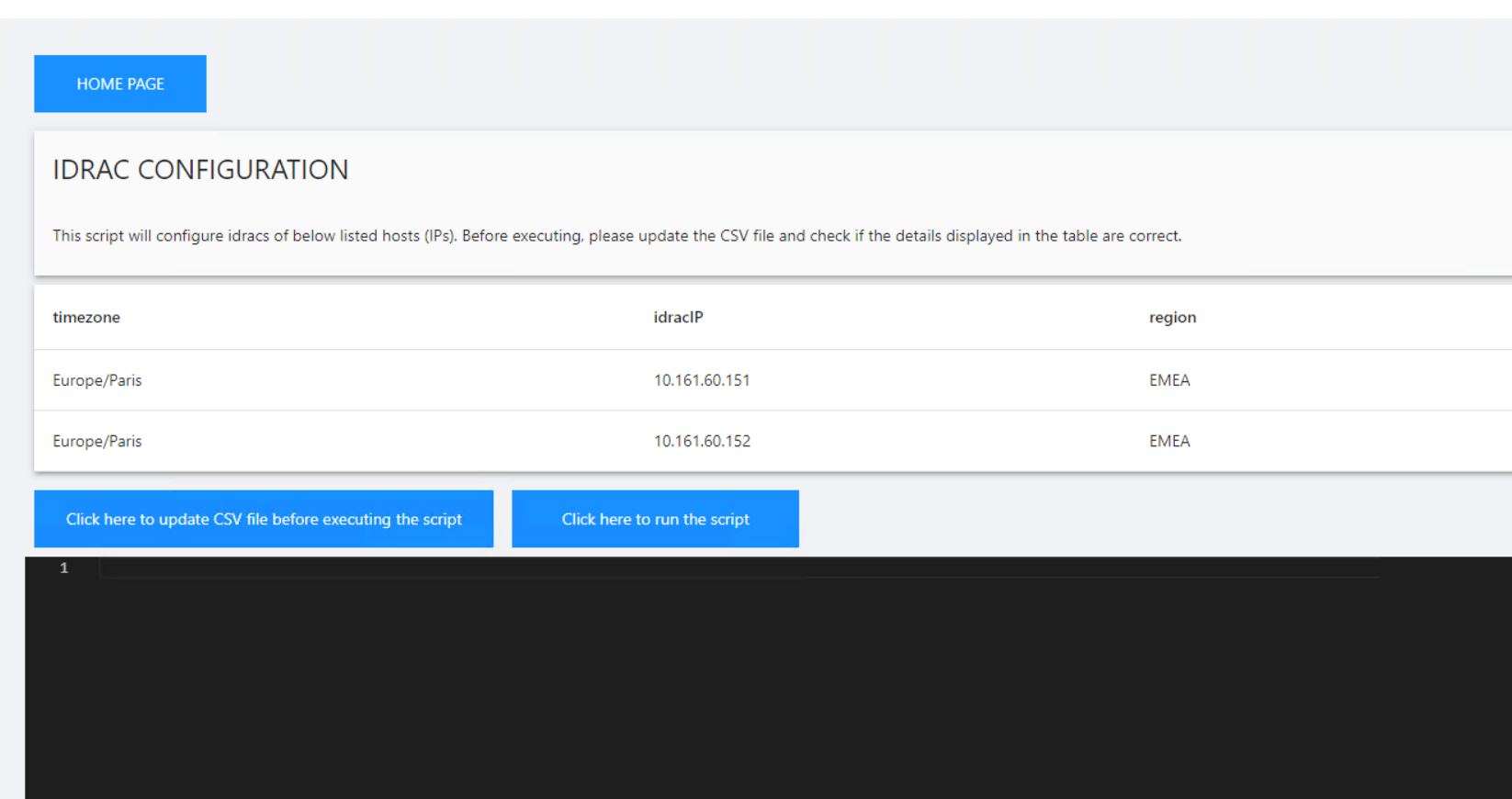
4f07d45b96121fcc1b9a1534f178977bd5510435.png
Have you tried looking at the editor or code editor?
As mentioned in the chat, I really think this could solve your problem.
I tried few things but seems that result is not as expected.
Do you have any examples which can be very helpful ? I have also added the scripts above for a better understanding.
Thanks
Please see the updates below. I’m opening a modal when you click the button that has the code editor in. It also has a save button that reads the contents of the code editor and writes them to disk.
# Use Get-UDPage -Name 'IDRAC' to use this page in your dashboard

$AppToken = 'eyJhbGciOiJIUzI1NiIsInR5cCI6IkpXVCJ9.eyJodHRwOi8vc2NoZW1hcy54bWxzb2FwLm9yZy93cy8yMDA1LzA1L2lkZW50aXR5L2NsYWltcy9uYW1lIjoiYWRtaW4iLCJodHRwOi8vc2NoZW1hcy54bWxzb2FwLm9yZy93cy8yM3IiLCJuYmYiOjE2NzYwMjI2ODMsImV4cCI6MjEzMzkzOTA2MCwiaXNzIjoiSXJvbm1hblNvZnR3YXJlIiwiYXVkIjoiUG93ZXJTaGVsbFVuaXZlcnNhbCJ9.57kslyhZSHGxEtAPldKKtKzGe_Bm1uvOLPap2dRrHY8'

$CSVPath = E:\Scripts\Powershell-Universal-Scripts\iDRAC\idraclist.csv

New-UDButton -Text 'HOME PAGE' -Style @{ Width = "150px"; Height = "50px"} -OnClick {
        Invoke-UDRedirect -url http://psuserver:5000/scripts/Home
                }
New-UDGrid -Item -SmallSize 6 -Content {
    New-UDCard -Title 'IDRAC CONFIGURATION' -Content {
    New-UDTypography -Variant h6 "This script will configure idracs of below listed hosts (IPs). Before executing, please update the CSV file and check if the details displayed in the table are correct."
                            }
}

New-UDDynamic -Content {
        $Data = Import-Csv $CSVPath
        New-UDTable -Data $Data
    } -AutoRefresh -AutoRefreshInterval 5

New-UDButton -Text 'Click here to update CSV file before executing the script' -Style @{ Width = "400px"; Height = "50px"} -OnClick {

$CSV =   Get-Content $CSVPath
Show-UDModal -Content {
    New-UDCodeEditor -Id 'codeEditor' -Height 500 -Theme 'vs-dark' -Code $CSV
    New-UDButton -Text 'Save' -OnClick {
          Set-Content -Value ((Get-UDElement -Id 'codeEditor').Code) -Path $CSVPath
           Hide-UDModal
    }
}
                }

    New-UDButton -Text 'Click here to run the script' -Style @{ Width = "250px"; Height = "50px"} -OnClick {
        Set-UDElement -Id 'button' -Properties @{
            disabled = $true
            text = "Running the script"
        }
        Connect-PSUServer -ComputerName http://localhost:5000 -AppToken $AppToken

        $Job = Invoke-PSUScript -Script 'iDrac-Configuration.ps1'

        while($Job.Status -ne 'Completed')
        {
            Start-Sleep 1
            $Output = (Get-PSUJobOutput -Job $Job).Data -join ([Environment]::NewLine)
            Set-UDElement -Id 'codeEditor' -Properties @{
                code = $Output
            }

            $Job = Get-PSUJob -Id $Job.Id
        }

        Set-UDElement -Id 'button' -Properties @{
            disabled = $false
            text = "Click here to run the script"
        }
    } -Id 'button'
Adam Driscoll
PowerShell Expert and Software Architect at Devolutions
Hi @Adam Driscoll ,
Many thanks for your help. I am pretty much nearing to the result.
When I click the button, the code editor is empty (content from csv is not shown) and I have the below error.
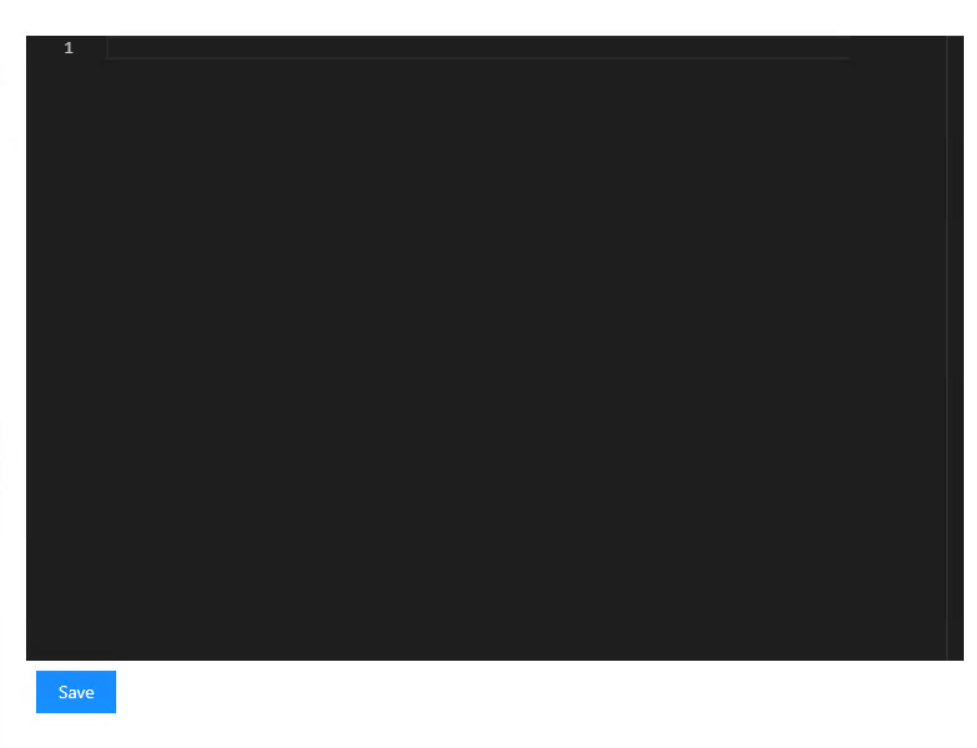
There is no possibilities to open the csv file by clicking the button ? it will ease user to edit the file.
Thanks
01ca6a9fe20768e8f2f8d892fe57db4d52c5211c.png
33410bc159c0b13c84523edf68bb23146e9fe9a0.png
Can you try this?
$CSV = Get-Content $CSVPath -Raw
Adam Driscoll
PowerShell Expert and Software Architect at Devolutions
It works perfectly now, many Thanks @Adam Driscoll.
I am reasking the question as in code editor editing is not as easier as editing in csv file directly as shown in the picture below.
No option at all to open the csv file from the local share by clicking a button or edit in editor in much better way ?
Many Thanks again, appreciate a lot your help
Hi Mohamed,
First I’ll say I would recommend not leaking any Bastion/iDrac information (for the purposes of demonstration, I would create a “fake” set of IP’s, and for any API Keys just leave blank.
Second, you have tons of different options for editing the data. Here is some code for you to look at and refine .
My apologies if I missed anything obvious, I created a csv with only 3 columns on my local machine to do some testing with.
$AppToken = 'XXXXXXXXXXXXXXX'

$Page:CSVPath = "E:\Scripts\Powershell-Universal-Scripts\iDRAC\idraclist.csv"

New-UDButton -Text 'HOME PAGE' -Style @{ Width = "150px"; Height = "50px" } -OnClick {
    Invoke-UDRedirect -url http://psuserver:5000/scripts/Home
}
New-UDGrid -Item -SmallSize 6 -Content {
    New-UDCard -Title 'IDRAC CONFIGURATION' -Content {
        New-UDTypography -Variant h6 "This script will configure idracs of below listed hosts (IPs). Before executing, please update the CSV file and check if the details displayed in the table are correct."
    }
}
$Columns = @(
    New-UDTableColumn -Property 'fake' -Title 'Actions' -Render {
        New-UDButton -Icon (New-UDIcon -Icon Edit -Size lg) -OnClick {
            $Page:EditRow = $EventData
            Show-UDModal -Content {
                New-UDForm -Children {
                    $Page:EditRow | Get-Member -MemberType NoteProperty | select -ExpandProperty name | Foreach {
                        New-UDTextbox -id $_ -Label $_ -Value $Page:Editrow.$_
                    }
                } -OnSubmit {
                    $Data = Import-Csv $Page:CSVPath
                    $Row = $Data | Where-Object { $_ -match $Page:EditRow }
                    $EventData | Get-Member -MemberType NoteProperty | select -ExpandProperty name | Foreach {
                        $Row.$_ = $EventData.$_
                    }
                    $Data | Export-Csv $Page:CSVPath
                    Sync-UDElement -Id 'idracTable' -Broadcast
                    Hide-UDModal
                }

            }
        }
        New-UDButton -Icon (New-UDIcon -Icon TrashCan -Size lg) -color error -OnClick {
            $Page:EditRow = $EventData
            Show-UDModal -Content {
                New-UDAlert -Severity warning -Text "YOU ARE ABOUT TO REMOVE THIS ROW."
                New-UDCheckBox -Label 'CONFIRM' -OnChange {
                    If ($Body -eq $true) {
                        $Page:ConfirmDelete = $true
                        Sync-UDElement -Id 'idracConfirmDelete'
                    }
                    elseif ($Body -eq $false) {
                        $Page:ConfirmDelete = $false
                        Sync-UDElement -Id 'idracConfirmDelete'
                    }
                }
                New-UDDynamic -Id 'idracConfirmDelete' -Content {
                    If ($Page:ConfirmDelete -eq $true) {
                        New-UDButton -Icon (New-UDIcon -Icon TrashCan -Size lg) -color error -OnClick {
                            $Data = Import-Csv $Page:CSVPath
                            $Data | Where-Object { $_ -notmatch $Page:EditRow } | Export-CSV $Page:CSVPath
                            $Page:ConfirmDelete = $false
                            Sync-UDElement -Id 'idracTable' -Broadcast
                            Hide-UDModal
                        }
                    }
                    If ($Page:ConfirmDelete -ne $true) {
                        New-UDButton -Icon (New-UDIcon -Icon TrashCan -Size lg) -color error -Disabled
                    }
                }
            }
        }
    }
    New-UDTableColumn -Property 'timezone'
    New-UDTableColumn -Property 'idracIP'
    New-UDTableColumn -Property 'region'
)
New-UDButton -Text "Add" -Icon (New-UDIcon -Icon PlusSquare) -OnClick {
    Show-UDModal -Content {
        New-UDForm -Children {
            Import-Csv $Page:CSVPath | Get-Member -MemberType NoteProperty | select -ExpandProperty name | Foreach {
                New-UDTextbox -id $_ -Label $_
            }
        } -OnSubmit {
            $EventData | Export-Csv $Page:CSVPath -Append
            Sync-UDElement -Id 'idracTable' -Broadcast
            Hide-UDModal
        }

    }
}
New-UDTable -Id 'idracTable' -Columns $Columns -LoadData {
    $Data = Import-Csv $Page:CSVPath

    foreach ($Filter in $EventData.Filters) {
        $Data = $Data | Where-Object -Property $Filter.Id -Match -Value $Filter.Value
    }

    $TotalCount = $Data.Count

    if (-not [string]::IsNullOrEmpty($EventData.OrderBy)) {
        $Descending = $EventData.OrderDirection -ne 'asc'
        $Data = $Data | Sort-Object -Property $EventData.orderBy -Descending:$Descending
    }

    $Data = $Data | Select-Object -First $EventData.PageSize -Skip ($EventData.Page * $EventData.PageSize)

    $Data | Out-UDTableData -Page $EventData.Page -TotalCount $TotalCount -Properties $EventData.Properties
}


New-UDButton -Text 'Click here to run the script' -Style @{ Width = "250px"; Height = "50px" } -OnClick {
    Set-UDElement -Id 'button' -Properties @{
        disabled = $true
        text     = "Running the script"
    }
    Connect-PSUServer -ComputerName http://localhost:5000 -AppToken $AppToken

    $Job = Invoke-PSUScript -Script 'iDrac-Configuration.ps1'

    while ($Job.Status -ne 'Completed') {
        Start-Sleep 1
        $Output = (Get-PSUJobOutput -Job $Job).Data -join ([Environment]::NewLine)
        Set-UDElement -Id 'codeEditor' -Properties @{
            code = $Output
        }

        $Job = Get-PSUJob -Id $Job.Id
    }

    Set-UDElement -Id 'button' -Properties @{
        disabled = $false
        text     = "Click here to run the script"
    }
} -Id 'button'
1720ea2e5c63ec1ed2e00ff77a31a04203dea9e1.png
@AnonymousUser it’s really awesome and beyond my expectations and much better !!!
it’s really cool from you, I really appreciate the help received for a beginner in the world of scripting from you all and this forum.
Glad to help!
Scripting with PS requires a certain mindset (to work through the flow of the script) and PSU only adds to that, with quirks of the product and dynamic elements vs non-dynamic.
Hi @AnonymousUser,
Sorry to bother you, New-UDTableColumn is not displaying more than 5 rows, any working to display all rows ?
Thanks
docs.powershelluniversal.com
You’ll need to add the -ShowPagination and ‘-PageSize X’ parameter. The first will show the page controls, the other will determine how many rows per page.
I got it now, many thanks again.
Hi @AnonymousUser ,
I am trying to add few extra functions with this code to prefill information of few table columns
When user click on edit button, I would like to have choices for user on region and timezone so that the user don’t need to enter data manually.
I tried to use filter funtion unsuccessfully, any help would be appreciated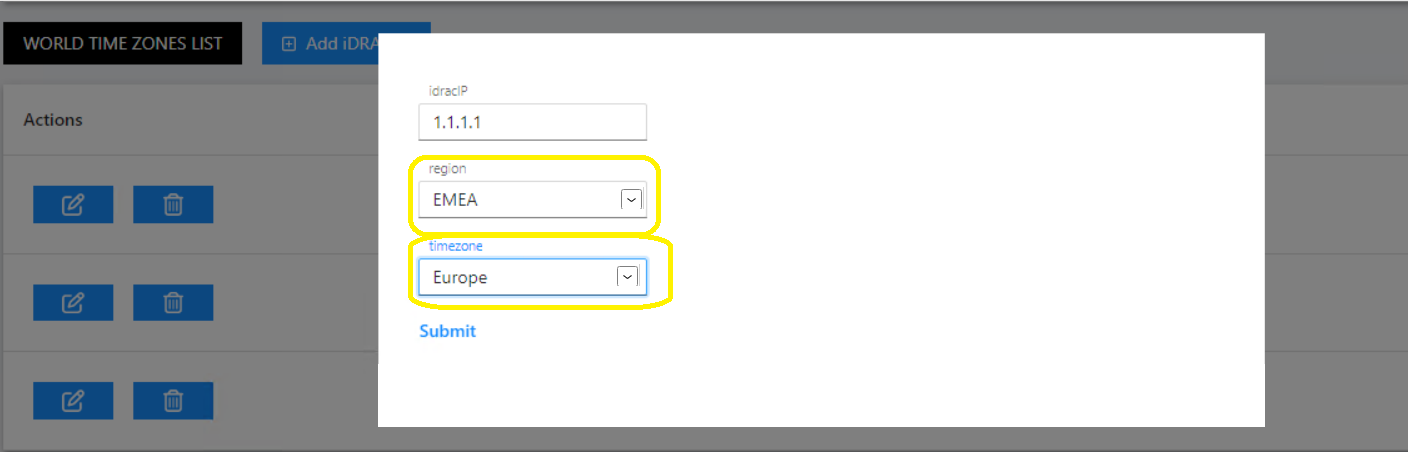
Many Thanks.
842b8166b73a50b060fe4e7ec2918221bbd48eaa.png
Any help @AnonymousUser@Adam Driscoll please ?
Thanks
Not sure if I’m understanding you correctly, but let me try.
Are you trying to have a button open up a modal window so they can select some settings, then have the Table use those previous selections when filtering data?
Hi @AnonymousUser
Yes, select pre filled information rather putting it manually
I would like to collect data from either powershell universal if there is any possibilities or vcenter for example server name, network nic, datastore etc…
Hi @AnonymousUser ,
Hope you’re doing fine.
I somehow managed to work on this and got the below code but it is not fully working.
When I click edit button, I can see the drop down menu for “Region” and “Timezone” but no data is displayed unfortunately.
What is wrong with the code ?
Any help would be appreciated.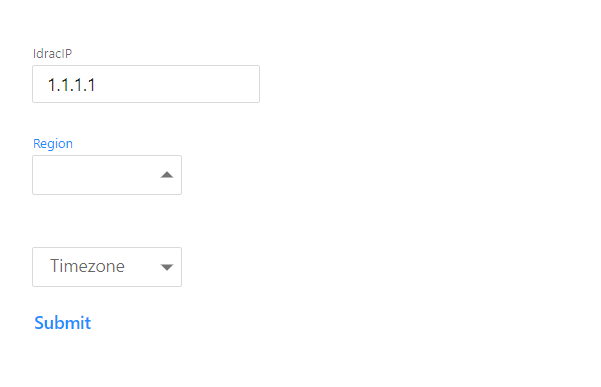
$AppToken = ''

#CSV file path
$Page:CSVPath = "path\test.csv"

# Define arrays for Timezone and Region
$Timezones = @("Timezone1", "Timezone2", "Timezone3")
$Regions = @("AMER", "EMEA", "APAC")

#Table where user enter information and save in a csv file
$Columns = @(
    New-UDTableColumn -Property 'fake' -Title 'Actions' -Render {

# Edit button click handler
New-UDButton -Icon (New-UDIcon -Icon Edit -Size lg) -OnClick {
    $Page:EditRow = $EventData
    $selectedTimezone = $Page:EditRow.Timezone
    $selectedRegion = $Page:EditRow.Region
    Show-UDModal -Content {
        New-UDForm -Children  {
            foreach ($Property in $Page:EditRow | Get-Member -MemberType NoteProperty) {
                $PropertyName = $Property.Name
                $PropertyValue = $Page:Editrow.$PropertyName

if ($PropertyName -eq "Timezone") {
    New-UDSelect -Id 'select' -Label $PropertyName -DefaultValue  $selectedTimezone {
        foreach ($Timezone in $Timezones) {
            New-UDSelectOption -Name $Timezone -Value $Timezone
        }
    }
} elseif ($PropertyName -eq "Region") {
    New-UDSelect -Id "select" -Label $PropertyName -DefaultValue $selectedRegion {
        foreach ($reg in $Regions) {
            New-UDSelectOption -Name $reg -Value $reg
        }
    }
} else {
    New-UDTextbox -Id $PropertyName -Label $PropertyName -Value $PropertyValue
}

            }
        } -OnSubmit {
            $Data = Import-Csv $Page:CSVPath
            $Row = $Data | Where-Object { $_ -match $Page:EditRow }
            $EventData | Get-Member -MemberType NoteProperty | ForEach-Object {
                $PropertyName = $_.Name
                $PropertyValue = $EventData.$PropertyName

                if ($PropertyName -eq "Timezone") {
                    $PropertyValue = ($EventData."${PropertyName}Dropdown" | Out-String).Trim()
                } elseif ($PropertyName -eq "Region") {
                    $PropertyValue = ($EventData."${PropertyName}Dropdown" | Out-String).Trim()
                }

                $Row.$PropertyName = $PropertyValue
            }
            $Data | Export-Csv $Page:CSVPath
            Sync-UDElement -Id 'idracTable' -Broadcast
            Hide-UDModal
        }
    }
}

        New-UDButton -Icon (New-UDIcon -Icon TrashCan -Size lg) -color error -OnClick {
            $Page:EditRow = $EventData
            Show-UDModal -Content {
                New-UDAlert -Severity warning -Text "YOU ARE ABOUT TO REMOVE THIS ROW."
                New-UDCheckBox -Label 'CONFIRM' -OnChange {
                    If ($Body -eq $true) {
                        $Page:ConfirmDelete = $true
                        Sync-UDElement -Id 'idracConfirmDelete'
                    }
                    elseif ($Body -eq $false) {
                        $Page:ConfirmDelete = $false
                        Sync-UDElement -Id 'idracConfirmDelete'
                    }
                }
                New-UDDynamic -Id 'idracConfirmDelete' -Content {
                    If ($Page:ConfirmDelete -eq $true) {
                        New-UDButton -Icon (New-UDIcon -Icon TrashCan -Size lg) -color error -OnClick {
                            $Data = Import-Csv $Page:CSVPath
                            $Data | Where-Object { $_ -notmatch $Page:EditRow } | Export-CSV $Page:CSVPath
                            $Page:ConfirmDelete = $false
                            Sync-UDElement -Id 'idracTable' -Broadcast
                            Hide-UDModal
                        }
                    }
                    If ($Page:ConfirmDelete -ne $true) {
                        New-UDButton -Icon (New-UDIcon -Icon TrashCan -Size lg) -color error -Disabled
                    }
                }
            }
        }
    }
    New-UDTableColumn -Property 'IdracIP'
    New-UDTableColumn -Property 'Timezone'
    New-UDTableColumn -Property 'Region'
)

New-UDTable -Id 'idracTable' -Columns $Columns -LoadData {
    $Data = Import-Csv $Page:CSVPath

    foreach ($Filter in $EventData.Filters) {
        $Data = $Data | Where-Object -Property $Filter.Id -Match -Value $Filter.Value
    }

    $TotalCount = $Data.Count

    if (-not [string]::IsNullOrEmpty($EventData.OrderBy)) {
        $Descending = $EventData.OrderDirection -ne 'asc'
        $Data = $Data | Sort-Object -Property $EventData.orderBy -Descending:$Descending
    }

    $Data = $Data | Select-Object -First $EventData.PageSize -Skip ($EventData.Page * $EventData.PageSize)

    $Data | Out-UDTableData -Page $EventData.Page -TotalCount $TotalCount -Properties $EventData.Properties
} -ShowPagination -PageSize 10
6c10e63bdf198322e2aab3e23ee32d5852ff7cee.png