PowerShell Universal - 3.5.0
PowerShell Universal - 3.5.0
Release Notes
APIs
- Added the ability to view API info when One-Way git sync was enabled
- Added experimental feature for C#-based APIs
- Fixed an issue where data uploaded as files would be UTF8 encoded.
- Fixed an issue where folder view would not correctly create folders when over 3 parts
- Fixed an issue where changing an APIs URL would cause a 404
- Fixed an issue where testing an API with variables wouldn’t return the specified values
- Added persistent API logging
- Fixed an issue where editing endpoint roles could result in the endpoint becoming inaccessible.
Automation
- Added the ability to view script info when One-Way git sync was enabled
- Added Git Sync trigger
- Fixed an issue where you could not view terminal instances
- Fixed an issue where terminal output could overwrite the prompt
- Fixed an issue where Warnings would overwrite the Failed error state of jobs
- Fixed an issue where terminating errors would cause job failures when Error Action was set to Continue
- Fixed an issue where jobs would not time out properly
- Fixed an issue where the Server Started trigger would run on the default job queue
- Fixed an issue where $UAJob.Parameters would be null
- User Profiles are now loaded by default when using run as credentials
- Added -DontLoadProfile to New-PSUSetting to disable loading of profiles for run as credentials
- Removed the limit on 25 jobs a day for the free version
Dashboard
- Added support for Read-Host
- Added support for Get-Credential
- Added support for $Host.UI.PromptForChoice
- Added support for Write-Progress
- Added Back button to advanced editor
- Added -TimeZone to New-UDDatePicker and New-UDTimePicker
- Fixed an issue where web socket JSON serialization would throw an error when referential loops were detected.
- Fixed an issue where New-UDDataGrid filters wouldn’t render correctly when using a custom theme
- Fixed an issue where New-UDDataGrid row height would expand to its contents
- Fixed an issue where -PageSize wouldn’t be honored on New-UDDataGrid
- Added -OnBlur to New-UDTextbox
- Added New-UDRating
- Fixed an issue where New-UDDatePicker\New-UDTimePicker would throw an error when invalid dates were typed
- Fixed an issue with the default color for New-UDButton
- Added -OnExport to New-UDDataGrid
- Fixed an issue where -LoadData on New-UDTable could cause errors when multiple tables were on a page
Platform
- Added support for specifying a custom favicon.ico
- Added Agent environment
- Added experimental feature support
- Licenses are now stored in the database
- Git manual mode is now the default
- Updated internal PowerShell Environment to 7.2.7
- Fixed an issue where links in the notification drop down would not work when hosted as a nested IIS site
- Admin Console Title now updates the brower’s tab title
- Added the ability to limit users that can login to the admin console
- Fixed an issue where the app bar would be an incorrect color in dark mode on a custom login page
- Added scheduled and memory based environment recycling
- Improved the layout of modals in the admin console
- Git proxy type is set to auto instead of none by default to support git environment variables
- Fixed an issue where the MSI wouldn’t correctly detect an existing appsettings.json file
- Fixed an issue where invalid git sync settings could cause heartbeats to retry continuously
- Improved validation on the git sync settings dialog
- Fixed an issue where changing a git remote with an external git client wouldn’t update the local repo’s remote
- Git sync now throws an exception if it cannot finish running a command in 60 seconds when using an external git client
Downloads
Adam Driscoll
PowerShell Expert and Developer at Devolutions
All Comments (13)

- Added experimental feature for C#-based APIs
Are there any plans to introduce Python based API’s?
It’s something we are considering since we’ve had a few asks for it. C# was an easier lift since it’s also .NET based.
Adam Driscoll
PowerShell Expert and Developer at Devolutions
Thank you for this release, i KNOW it was a lot of work.
Do you have documentation on how to use features?
- Added support for Read-Host
- Added support for Get-Credential
- Added support for $Host.UI.PromptForChoice
- Added support for Write-Progress
Just put together some docs here: Interaction - PowerShell Universal
Adam Driscoll
PowerShell Expert and Developer at Devolutions
Removed the limit on 25 jobs a day for the free version
You may want to update the docs on the about page for the limit change
docs.powershelluniversal.com
Documentation changes needed in the below section too (Feature Comparison → Automation → Jobs)
https://ironmansoftware.com/pricing/powershell-universal
Very curious about the c# API, as I’ve been meaning to expand beyond Powershell. Any plans to make a video about it using this? Maybe a demo of an API written in Powershell that you then convert to c#?
You may have seen the docs here but the API included is actually a functional one that can get and restart dashboards.
docs.powershelluniversal.com
Honestly, one shortcoming of this feature is that there isn’t any documentation of the actual PSU classes that you have access to so unless you feel like digging around with ILSpy, it might be hard to get something meaningful accomplished. That said, I’d love to hear some ideas for what you’d like to accomplish and I’d be happy to code up some examples.
I think C# APIs will be good at things like:
- Caching data quickly
- Storing data in SQL
- Processing files
What I don’t think C# APIs will be good at:
- Invoking services like Azure and VMWare
- Windows Management
- Remote Scenarios
What I’d love to be able to support
- NuGet packages - So many possibilities…
Adam Driscoll
PowerShell Expert and Developer at Devolutions
Hi Adam,
For what I do in my environment, SQL CRUD and processing files (mostly just ingesting the JSON, dumping to a folder for a job to run later) would be great.
I’m definitely someone who “learns by doing”, but tends to need good solid examples to pick apart and figure out how it all comes together, which is why I like Powershell so much. I can take code and run it line by line and examine the outputs…
C# seems a bit daunting in that aspect, as it needs compiled and ran. At least to my knowledge I can’t just “run” pieces of it.
Hey, how do we specify the custom favicon?
Thanks.
You can specify it in the Settings \ General \ Admin Console page.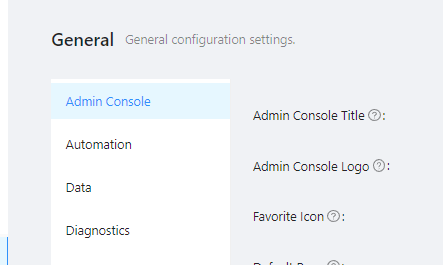
Adam Driscoll
PowerShell Expert and Developer at Devolutions
77ef1628288eca8d0a1a8a2894cd04d018fa087a.png
@Adam Driscoll Are there plans for more documentation in the nearish future? We are very interested in utilizing the c# endpoints for basic crud / EF functionality. As you said in the plugins documentation nothing is really documented so it’s been a bit tough to really experiment… The documentation for the experimental feature has a little more but about the same. Many things just fail and we are flying a little blind. We can at least gather that the IDatabase interface is PowerShellUniversal.SQL.Database… but… that’s as far as we have gotten…
We are primarily looking for:
- an example of taking in query params or a body. Not sure how some of the apirequest parameters match up with asp.net
- using IDatabase to read / write, preferably to another database than what PSU uses.
- Any information about the environment itself. Is it possible to import libraries? What’s context is a c# endpoint run in?
- Are there compile time logs anywhere if there are errors?
I believe PSU is using EF behind the scenes? Would that be available or would we want to look at using something like Microsoft.Data.Sqlclient?
Really, looking for anything… or if anyone has successfully used a c# endpoint for basic CRUD stuff and can point me in that direction that would be awesome.
Thanks!