How to apply regex mask to New-UDTextBox?

The documentation gives a pattern matching example, but I can’t figure out how to apply regex to it. It simply starts outputting the regex in the textbox.
New-UDTextbox -Id 'txtEmail' -Label 'Email' -Mask '^[a-zA-Z0-9_.+-]+@[a-zA-Z0-9-]+\.[a-zA-Z0-9-.]+$'
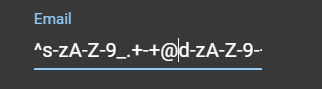
Product: PowerShell Universal
Version: 3.3.2
b7666fbbb0d32a2d288308c8ec6172462542aca8.png
Recommended Answer
I can reproduce this. I’ll open an issue for it.
Adam Driscoll
PowerShell Expert and Developer at Devolutions
All Comments (4)
I can reproduce this. I’ll open an issue for it.
Adam Driscoll
PowerShell Expert and Developer at Devolutions
To achieve what you are looking for we are going to have to implement a different type of functionality. The problem is that we are using a very popular library called IMask to perform the masking. The problem is that the regex masking is must be able to match all intermediately typed characters before it will allow the text to be entered.
I find this really weird because you can’t actually do a regex match on an email address because adam@ would not match now would adam@ironm. It does work for matching digits or non-whitespace etc. This was not my assumption of how it worked but I was incorrect.
In order to use this regex feature, you can use the forward slash identifiers to more or less instruct IMask that the string is a regex and not a pattern. Notice them on the beginning and end of the mask.
For example, this regex wouldn’t allow any spaces.
New-UDTextbox -Id 'txtEmail' -Label 'Email' -Mask '/^\S*$/'
Adam Driscoll
PowerShell Expert and Developer at Devolutions
we are going to have to implement a different type of functionality. The problem is that we are using a very popular library called IMask to perform the masking. The problem is that the regex masking is must be able to match all intermediately typed characters before it will allow the text to be entered.
Thanks Adam. I’ll play around with it to get it “close enough” for now.
Hi @Adam Driscoll
Sorry for bumping this up but do you habe news on this end?
I was also just trying to get regex to work and indeed it still doesn’t work.
Would like to use this expression for email validation but the textbox doesn’t accept any inputs after setting the mask…'/^[\w-\.]+@([\w-]+\.)+[\w-]{2,4}$/'
Thanks a lot for your help.
Best regards,
Don