Script Jobs stuck on "Canceling"

Hi All,
I’ve got some jobs stuck on Canceling, and cant seem to get them to stop, this is the output of one of them:
Id : 4861
CreatedTime : 9/8/2021 8:08:23 AM
StartTime : 9/8/2021 8:08:23 AM
EndTime : 1/1/0001 12:00:00 AM
Status : Canceling
Output :
Script :
IsScriptDeleted : False
ScriptFullPath : Get-Sessions.ps1
ScriptCommitId :
AppToken : UniversalAutomation.AppToken
Identity : UniversalAutomation.Identity
ParentJob :
ParentLineNumber : 0
Debug : False
ComputerName : localhost
Port : 51464
ProcessId : 6416
RunspaceId : 3
Activity : Preparing modules for first use.
CurrentOperation :
PercentComplete : -1
SecondsRemaining : -1
StatusDescription :
Environment : 5.1.14393.4583
Agent :
Computer : UniversalAutomation.Computer
ErrorAction : SilentlyContinue
Children :
JobOutput :
Parameters :
Notes :
Credential :
ScheduleId : 0
Triggered : False
Trigger :
I’ve restarted the universal service and even the server expecting it to clear out but hasn’t helped. Any suggestions please?
I cant seem to find any powershell processes for them so not sure if they are actually attempting to run anything.
Thanks
All Comments (29)
It’s not trying to run anything at this point. I’ll open an issue for this though since it’s a bug.
Adam Driscoll
PowerShell Expert and Software Architect at Devolutions
Hi Adam,
Was going to open another topic for this, but saw this was already open.
This has been stuck… It doesn’t appear to have affected anything, I’m currently at 238 jobs. This is also on 2.5.2, I upgraded last night from 2.3.1, hoped the upgrade would clear it out.
e3b126781c9ddb3209eede58f635d48f2591d1b1.png
I don’t think was ever resolved so I’ve opened an issue and put it in the 2.6 milestone : Jobs stuck in a cancelling state · Issue #702 · ironmansoftware/issues · GitHub
Adam Driscoll
PowerShell Expert and Software Architect at Devolutions
Yeah I just struck this too. A job that started 7am Saturday was still running when I checked this morning (Monday), saying it had been running for 121 years (as the start date/time was not set for some reason).
I cancelled it, and now it’s been spinning on “canceling” for about 10 minutes. Starting the schedule again produced a new job, but that job eventually timed out. It seems like it’s waiting on the previous one to cancel.
Tried restarting the Azure app to no avail.
Edit: Confusingly, the job that failed to start because the previous one is still cancelling also says it ran for 121 years. PSU’s got itself in a knot somehow over this one job from Saturday morning.
Not sure why a cancelling job would prevent another job from starting. That might be another thread we should start to figure out why that’s the case. We don’t limit jobs from starting aside from the concurrent limit in Settings. The issue that’s discussed in this thread has been fixed in 2.6 and in that version, when you restart the server, jobs that are marked as cancelling will be marked as failed.
Adam Driscoll
PowerShell Expert and Software Architect at Devolutions
I have been able to run the script since (which is how I found out about the secret variables not persisting) so it must’ve been some funky one-off thing. I’ll ignore this one now until 2.6 comes out! Looking forward to it!
Yeah I’ve seen this twice now since updating to 2.6.2. Visit PSU after leaving it alone for a day or so, and a script that should only take a few seconds to run says it has been running for > 121 years, and won’t cancel. When I look at the associated job, there is output, so it’s like PSU isn’t properly detecting that the script has finished running. Any info I can give you to help debug this one, Adam?
This might help! The logs are full of this for the past few days, over and over:
2021-12-23 00:52:17.682 +00:00 [ERR] Error when dispatching 'OnDisconnectedAsync' on hub.
System.NullReferenceException: Object reference not set to an instance of an object.
   at UniversalDashboard.TerminalHub.OnDisconnectedAsync(Exception exception) in D:\a\universal\universal\src\Universal.Server\Hubs\TerminalHub.cs:line 69
   at Microsoft.AspNetCore.SignalR.Internal.DefaultHubDispatcher`1.OnDisconnectedAsync(HubConnectionContext connection, Exception exception)
   at Microsoft.AspNetCore.SignalR.Internal.DefaultHubDispatcher`1.OnDisconnectedAsync(HubConnectionContext connection, Exception exception)
   at Microsoft.AspNetCore.SignalR.HubConnectionHandler`1.HubOnDisconnectedAsync(HubConnectionContext connection, Exception exception)
2021-12-23 00:52:17.875 +00:00 [ERR] Failed disposing connection VvHn6LGCQt9EZWnQW4MCTA.
System.NullReferenceException: Object reference not set to an instance of an object.
   at UniversalDashboard.TerminalHub.OnDisconnectedAsync(Exception exception) in D:\a\universal\universal\src\Universal.Server\Hubs\TerminalHub.cs:line 69
   at Microsoft.AspNetCore.SignalR.Internal.DefaultHubDispatcher`1.OnDisconnectedAsync(HubConnectionContext connection, Exception exception)
   at Microsoft.AspNetCore.SignalR.Internal.DefaultHubDispatcher`1.OnDisconnectedAsync(HubConnectionContext connection, Exception exception)
   at Microsoft.AspNetCore.SignalR.HubConnectionHandler`1.HubOnDisconnectedAsync(HubConnectionContext connection, Exception exception)
   at Microsoft.AspNetCore.SignalR.HubConnectionHandler`1.RunHubAsync(HubConnectionContext connection)
   at Microsoft.AspNetCore.SignalR.HubConnectionHandler`1.OnConnectedAsync(ConnectionContext connection)
   at Microsoft.AspNetCore.SignalR.HubConnectionHandler`1.OnConnectedAsync(ConnectionContext connection)
   at Microsoft.AspNetCore.Http.Connections.Internal.HttpConnectionContext.ExecuteApplication(ConnectionDelegate connectionDelegate)
   at Microsoft.AspNetCore.Http.Connections.Internal.HttpConnectionContext.WaitOnTasks(Task applicationTask, Task transportTask, Boolean closeGracefully)
   at Microsoft.AspNetCore.Http.Connections.Internal.HttpConnectionContext.DisposeAsync(Boolean closeGracefully)
   at Microsoft.AspNetCore.Http.Connections.Internal.HttpConnectionManager.DisposeAndRemoveAsync(HttpConnectionContext connection, Boolean closeGracefully)
EDIT:
I came back to PSU after a day to find multiple pages of “queued” instances of a job that should only run once a day, and the one I cancelled still in a “cancelling” state, so I restarted the Azure App Service instance.
Was met with “HTTP Error 502.5 - ANCM Out-Of-Process Startup Failure” after the Azure service restarted, and couldn’t get PSU to start at all. So now I’m redeploying, which usually seems to fix it.
EDIT 2:
Nope, not coming back up, even after a redeploy. ANCM Out-Of-Process Startup Failure.
EDIT 3:
And we’re up. Got the LiteDB transaction error again that I mentiioned in a different thread. Deleted database-log.db and it started working again immediately.
EDIT 4:
Dang it. My scheduled job worked every day since posting this, and I logged on this morning (first day back to work after the break) and it was still running after “121 years”. LiteDB transaction error again.
I’ve deleted the log file and restarted the app. This transaction error happens without anyone using the system, seemingly at random.
Just in case the stack trace helps (it’s different from the previous one):
[ERR] Error in ConcurrentJobFilter
System.Exception: LiteDB ENSURE: transaction must be active to rollback (current state: Disposed)
   at LiteDB.Constants.ENSURE(Boolean conditional, String message)
   at LiteDB.Engine.TransactionService.Rollback()
   at LiteDB.Engine.LiteEngine.AutoTransaction[T](Func`2 fn)
   at LiteDB.LiteCollection`1.Update(T entity)
   at UniversalAutomation.LiteDBTable`1.Update(T item) in D:\a\universal\universal\src\UniversalAutomation.LiteDBv5\LiteDBDatabase.cs:line 515
   at UniversalAutomation.Services.Automation.ConcurrentJobFilter.TryPerforming(PerformingContext filterContext) in D:\a\universal\universal\src\Universal.Server\Services\Automation\ConcurrentJobFilter.cs:line 79
   at UniversalAutomation.Services.Automation.ConcurrentJobFilter.OnPerforming(PerformingContext filterContext) in D:\a\universal\universal\src\Universal.Server\Services\Automation\ConcurrentJobFilter.cs:line 41
Man. LiteDB really doesn’t like running in Azure. I’ll open an issue for this. I don’t really understand why it’s attempting to rollback.
As a side note, in v3 we are working on SQL server support so Azure SQL will work. Additionally, cloud hosting is a focus. It will be part of our nightly integration tests and deployments.
Issue: Errors with LiteDB when running in Azure · Issue #825 · ironmansoftware/issues · GitHub
Adam Driscoll
PowerShell Expert and Software Architect at Devolutions
Yeah it’s very strange. It’s just a Windows box in the end, and nobody’s touching it, so there’s no reason for LiteDB to get in a tangle the way it is. Hoping that the focus on cloud hosting means we can stick with LiteDB and not have to faff around with Azure SQL, but I’ll do what I can to get the product stable enough to use in production.
I was just able to reproduce this trying to restart a dashboard. Happens every time.
2022-01-12 17:36:23.774 +00:00 [ERR] Connection id "0HMELTP1GDGJV", Request id "0HMELTP1GDGJV:00000028": An unhandled exception was thrown by the application.
System.Exception: LiteDB ENSURE: transaction must be active to rollback (current state: Disposed)
   at LiteDB.Constants.ENSURE(Boolean conditional, String message)
   at LiteDB.Engine.TransactionService.Rollback()
   at LiteDB.Engine.LiteEngine.AutoTransaction[T](Func`2 fn)
   at LiteDB.LiteCollection`1.Insert(T entity)
   at LiteDB.LiteRepository.Insert[T](T entity, String collectionName)
   at UniversalAutomation.LiteDBTable`1.Insert(T item) in C:\src\universal\src\UniversalAutomation.LiteDBv5\LiteDBDatabase.cs:line 508
   at UniversalAutomation.DashboardController.RestartAsync(Int64 id) in C:\src\universal\src\Universal.Server\Controllers\DashboardController.cs:line 225
   at Microsoft.AspNetCore.Mvc.Infrastructure.ActionMethodExecutor.TaskOfIActionResultExecutor.Execute(IActionResultTypeMapper mapper, ObjectMethodExecutor executor, Object controller, Object[] arguments)
   at Microsoft.AspNetCore.Mvc.Infrastructure.ControllerActionInvoker.<InvokeActionMethodAsync>g__Awaited|12_0(ControllerActionInvoker invoker, ValueTask`1 actionResultValueTask)
   at Microsoft.AspNetCore.Mvc.Infrastructure.ControllerActionInvoker.<InvokeNextActionFilterAsync>g__Awaited|10_0(ControllerActionInvoker invoker, Task lastTask, State next, Scope scope, Object state, Boolean isCompleted)
   at Microsoft.AspNetCore.Mvc.Infrastructure.ControllerActionInvoker.Rethrow(ActionExecutedContextSealed context)
   at Microsoft.AspNetCore.Mvc.Infrastructure.ControllerActionInvoker.Next(State& next, Scope& scope, Object& state, Boolean& isCompleted)
   at Microsoft.AspNetCore.Mvc.Infrastructure.ControllerActionInvoker.InvokeInnerFilterAsync()
Adam Driscoll
PowerShell Expert and Software Architect at Devolutions
Man I’m so glad you’re able to repro this. I’m striking it all the time. Will be happily working away on a script for an hour or two, running it each time I make changes, and then one time out of the blue it’ll just pop up an “error” toast and I’ll not be able to run it again before I stop the app, delete the log file, and start the app again. Super frustrating! I’m definitely not against using LiteDB rather than the overhead of SQL Server, but it’ll be great if you can get to the bottom of what’s causing the error.
I’m getting closer. After looking at the LiteDB source, it looks like LiteDB is throwing an exception internally and then eating it and then throwing the above exception so I’m not exactly sure what the actual error is yet. Once I can dig that out, I should have some more information to go on.
Adam Driscoll
PowerShell Expert and Software Architect at Devolutions
I found issues in the LiteDB repository pertaining to this exact issue:
- dbname-log.db file does not get truncated on Azure · Issue #1622 · mbdavid/LiteDB · GitHub
- [BUG] corrupted collections on azure web app · Issue #1653 · mbdavid/LiteDB · GitHub
After the log file reaches about 8 MB for me it starts to fail.
Based on some comments within the issues, I updated my Data__ConnectionString environment variable on my web app to use the shared connection mode. I also delete my database and log file to start fresh.
So far, I haven’t run into the issue and the log file seems to be flushing to the database.
filename=D:\home\Data\PowerShellUniversal\database.db;Connection=shared
It also sounds like other users have downgraded to v4 and then it works. I will try that next but we had other issues with v4 and large amounts of data being written to it (like in jobs).
Adam Driscoll
PowerShell Expert and Software Architect at Devolutions
Can confirm that the log file has consistently been around 8MB the last few times I’ve deleted it!
I’ve been running jobs every 30 seconds for the last 3 hours without incident. Seems this this may have done it for me.
Adam Driscoll
PowerShell Expert and Software Architect at Devolutions
OK I’ve just given this a try, but I keep getting “HTTP Error 502.5 - ANCM Out-Of-Process Startup Failure” when the app tries to start.
The log file has this error:
Unhandled exception. System.UnauthorizedAccessException: Access to the path 'D:\home\data\PowerShellUniversal\database.db' is denied.
   at System.IO.FileStream.FlushOSBuffer()
   at System.IO.FileStream.Flush(Boolean flushToDisk)
   at LiteDB.StreamExtensions.FlushToDisk(Stream stream)
   at LiteDB.Engine.WalIndexService.CheckpointInternal()
   at LiteDB.Engine.WalIndexService.TryCheckpoint()
   at LiteDB.Engine.LiteEngine.Dispose(Boolean disposing)
   at LiteDB.Engine.LiteEngine.Dispose()
   at LiteDB.SharedEngine.CloseDatabase()
   at LiteDB.SharedEngine.EnsureIndex(String collection, String name, BsonExpression expression, Boolean unique)
   at LiteDB.LiteCollection`1.EnsureIndex(String name, BsonExpression expression, Boolean unique)
   at UniversalAutomation.LiteDBv5Database.SetupTables() in D:\a\universal\universal\src\UniversalAutomation.LiteDBv5\LiteDBDatabase.cs:line 135
I can see that the database.db file has been created anew, but for some reason PSU doesn’t think it has access to it. Did you do anything other than updating the connection string and deleting the database/log files?
For now I’ve removed the ;Connection=shared text but left the filename= prefix in there, and I’m back up. Every instinct tells me that the explicit use of filename= shouldn’t make a difference, but you never know.
FYI I just tried this again now that I’ve updated us to 2.7.1 but it still won’t start if “connection=shared” is in the connection string.
Same stack trace as this issue:
[BUG] System.UnauthorizedAccessException when running from a shared directory · Issue #1893 · mbdavid/LiteDB (github.com)
All i did was update the connection string. I’ll continue to investigate and take a look at my Azure lab today.
Adam Driscoll
PowerShell Expert and Software Architect at Devolutions
I’m still fighting this and tried something a bit different. Instead of creating a standard (code) app service, I created a container app service. I can pull the image directly from Docker Hub and store the files in an Azure File Share and I have none of the issues we’ve been encountering with standard Azure Web Apps.
I actually wrote up some docs on how to configure that: Azure - PowerShell Universal
I really like this method because then there isn’t a need to setup deployment of the application bits and you can just setup deployment of the configuration files to the file share.
That said, there is a caveat. Windows Containers do not support a Basic tier and their Production tier is super expensive.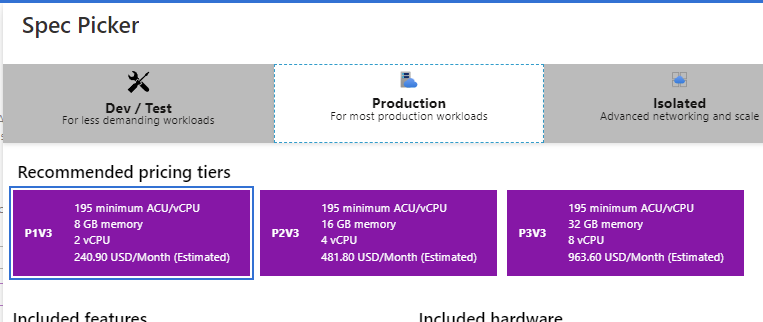
Linux Container App Services do support Basic Dev \ Test tiers and are free or very cheap.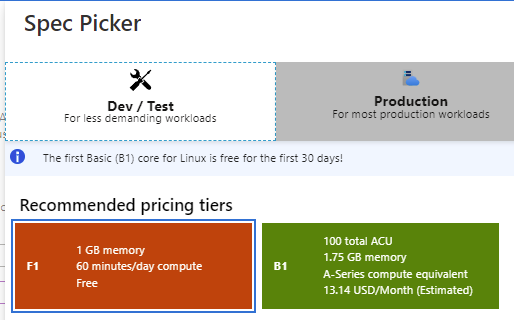
They also offer more reasonable Production tiers for Linux.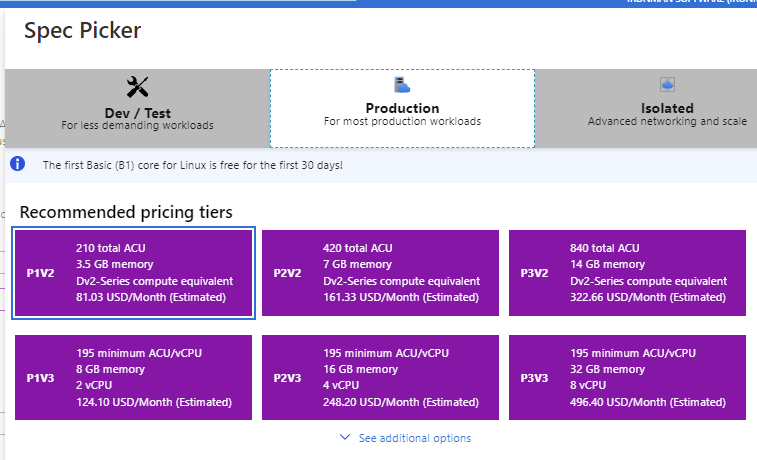
So if your scripts can run on Linux (or in the Integrated mode), then this may be an option. You could also run Windows Containers if you have deep pockets.
I’m still working on figuring out what’s happening with the storage on Standard App Services. They do not support path mappings to file shares like containers do.
Adam Driscoll
PowerShell Expert and Software Architect at Devolutions
bee7db0969d8648ef5a03c9712b6d0f0f7bd3e17.png
e320007f0d478d61b9b2b7cedda125861f6706a8.png
be803a5ca9f8e9493ecefabe97e96dc9a6cd1651.png
I’ve actually updated this instance as a demo for PSU. Let’s give it a real-world test by having it on the public internet
psudemo-container.azurewebsites.net
Adam Driscoll
PowerShell Expert and Software Architect at Devolutions
I did see on the “unautthorized” LiteDB GitHub issue there was a commit that was supposed to fix it, but I’m not sure whether that commit is part of a release. Part of me wonders whether your lab environment is running a slightly newer LightDB than PSU 2.7.1 and that’s why the connection string change works for you but not me.
I actually can reproduce the LiteDB issue every time in my standard app service (Windows). Even with the shared connection I’m experiencing the problem on startup and cannot login. I haven’t updated the LiteDB library since we’ve been on the most recent version. My next step is going to try to build my own version of LiteDB to see if I can resolve it that way.
It’s only the Linux Container that is working well in Azure. That is running the 2.7.3 Linux image from Docker Hub.
Adam Driscoll
PowerShell Expert and Software Architect at Devolutions
After many, many tests over the last few days, I think I’ve resolved the LiteDB issue. I was able to create a test application that would exhibit the behavior really quickly and finally tweaked LiteDB in a way that has given me 100% success rate for the test app and with PSU.
If you want to try it, you can download the DLL here.
Dropbox
You will need to replace it in D:\home\site\wwwroot\ in your Azure app. I’ve just been deploying via FTP to test. I am not using connection=shared in my connection string.
Adam Driscoll
PowerShell Expert and Software Architect at Devolutions
This is great news! I’ve swapped in the new DLL and restarted the app, and after a bit of fiddling with scripts etc the log is up to 5MB:
I kind of expected the db to grow and the log to never get very big, but maybe it only flushes when it hits 8MB? And that’d be why things went awry with the previous version when it hit 8MB?
c0737d180b785557b2d0c48ee091de53c9f54d50.png
Awesome! Yeah the default checkpoint for the log to data file is 1000 pages and a page is 8kb so it’s about 8 MB by default.
Adam Driscoll
PowerShell Expert and Software Architect at Devolutions
Going to run a build with the updated DLL now - sounds like great work again @Adam Driscoll!
Will this be included in upcoming releases? Weighing whether to add a task to my pipeline to inject it.
This will be in the 2.8 release that is out next Tuesday.
Adam Driscoll
PowerShell Expert and Software Architect at Devolutions
Having the same issue on v.4.2.20, running as Az webapp in a Linux container…