Get the output from script "live" in dashboard?

Hi,
I’m using invoke-script to run a script from my dashboard and I’m wondering if anyone has gotten it to work to get “live” feedback from the output form the script so the user can see what the script are doing?
Product: PowerShell Universal
Version: 1.4.6
All Comments (29)
You could, in theory useStart-Transcript at the beginning and Stop-Transcript At the end to write output to a log, and implement an auto-updating text area in your dashboard.
That said, if you are just looking for debugging, I recommend checking out the universal extension for VSCode if you haven’t already, as that might fill some of those needs.
It was more for the user so they can see what happens during the process when they execute the script.
Ah, I see. I think the transcript may actually work for that. I’ve not tried it. Maybe @Adam Driscoll could shed some light on the terminal output built into the admin console, and whether it would be trivial to implement a similar component?
You can use Get-PSUJobOutput to receive output for a job from a dashboard. You could use the UDCodeEditor component to display that output. It’s the same component that we use in the admin console. Set-UDElement works with that component to set the code.
You could do something similar to this in your dashboard. It’s not a full working example but let me know if you need one.
$JobOutput = Get-PSUJobOutput -Job $Job
Set-UDElement -Id 'codeEditor' -Properties @{
    code = $JobOutput
}
Adam Driscoll
PowerShell Expert and Developer at Devolutions
I have tried that but I can’t get it to work, here is my code: The script are running fine but I don’t get any output in return and inside the admin portal I can see returns so it are writing returns
    Show-UDModal {
                                                New-UDDynamic -Id 'VDICreate' -content {
                                                    Add-ADGroupMember -Identity $VDIADGrp -Members $VDIADUsr
                                                    Write-EventLog -LogName "PSU-Regionen" -Source "ADDuserToGroup" -EventID 20 -EntryType Information -Message "$($User) gav medlemskap åt $($VDIADUsr) till gruppen $($VDIADGrp)`nUtfördes från:`nLokalt IP:$($LocalIpAddress)`nExternt IP: $($RemoteIpAddress)" -Category 1 -RawData 10, 20
                                                    Invoke-UAScript -Script 'CreateVDI.ps1' -AppToken $AppToken -PODSite $PODSite -VDIType $VDIType -VDIADName $VDIADName -VDIADUsr $VDIADUsr -VDIObj $VDIObj -VDIOrder $VDIOrder -VDIKst $VDIKst -VDIOther $VDIOther | Tee-Object -Variable Job | Wait-UAJob -Timeout 120
                                                    $JobOutput = Get-PSUJobOutput -Job $Job
                                                    Set-UDElement -Id 'codeEditor' -Properties @{

                                                        code = $JobOutput

                                                    } -AutoRefresh -AutoRefreshInterval 1

                                                    #Skicka med $User variabeln till scriptet så att eventlogen kan skapas där
                                                } -LoadingComponent {
                                                    New-UDProgress -Circular
                                                }
                                            }-Footer {
                                                New-UDButton -Text "Stäng" -OnClick {
                                                    Sync-UDElement 'VDICreateStart'
                                                    Hide-UDModal
                                                }
} -FullWidth -MaxWidth 'sm' -PersistentA couple changes that should help. Remove the Wait-UAJob so the script progresses past that point. Then loop every second until the job is completed and get the job output and set it to the code editor. Make sure to call Get-UAJob again to refresh the status of the job object.
$Job = Invoke-UAScript -Script 'CreateVDI.ps1' -AppToken $AppToken -PODSite $PODSite -VDIType $VDIType -VDIADName $VDIADName -VDIADUsr $VDIADUsr -VDIObj $VDIObj -VDIOrder $VDIOrder -VDIKst $VDIKst -VDIOther $VDIOther

while ($Job.Status -ne 'Completed')
{
  Start-Sleep 1
  $JobOutput = Get-PSUJobOutput -Job $Job
  Set-UDElement -Id 'codeEditor' -Properties @{
      code = $JobOutput
   }
   # Refresh job object
   $Job = Get-UAJob -Id $Job.Id
}
Adam Driscoll
PowerShell Expert and Developer at Devolutions
I get this error message:
ImgBB
Link appears broken (at least to me)
Here is the corrected error message
ImgBB
Here is the new one
ImgBB
Hi again,
I get this error when I’m trying the code it seems auth failure but I have tried with apptoken for admin user but still the same issue.
I have no trouble running the scripts from the dashboard it seem it’s only when I’m trying to get the output.
ImgBB
Previus image was broken so let’s try again…
Hi again,
I get this error when I’m trying the code it seems auth failure but I have tried with apptoken for admin user but still the same issue.
I have no trouble running the scripts from the dashboard it seem it’s only when I’m trying to get the output.
@AnonymousUser Rob, here is a fixed link to the error message.
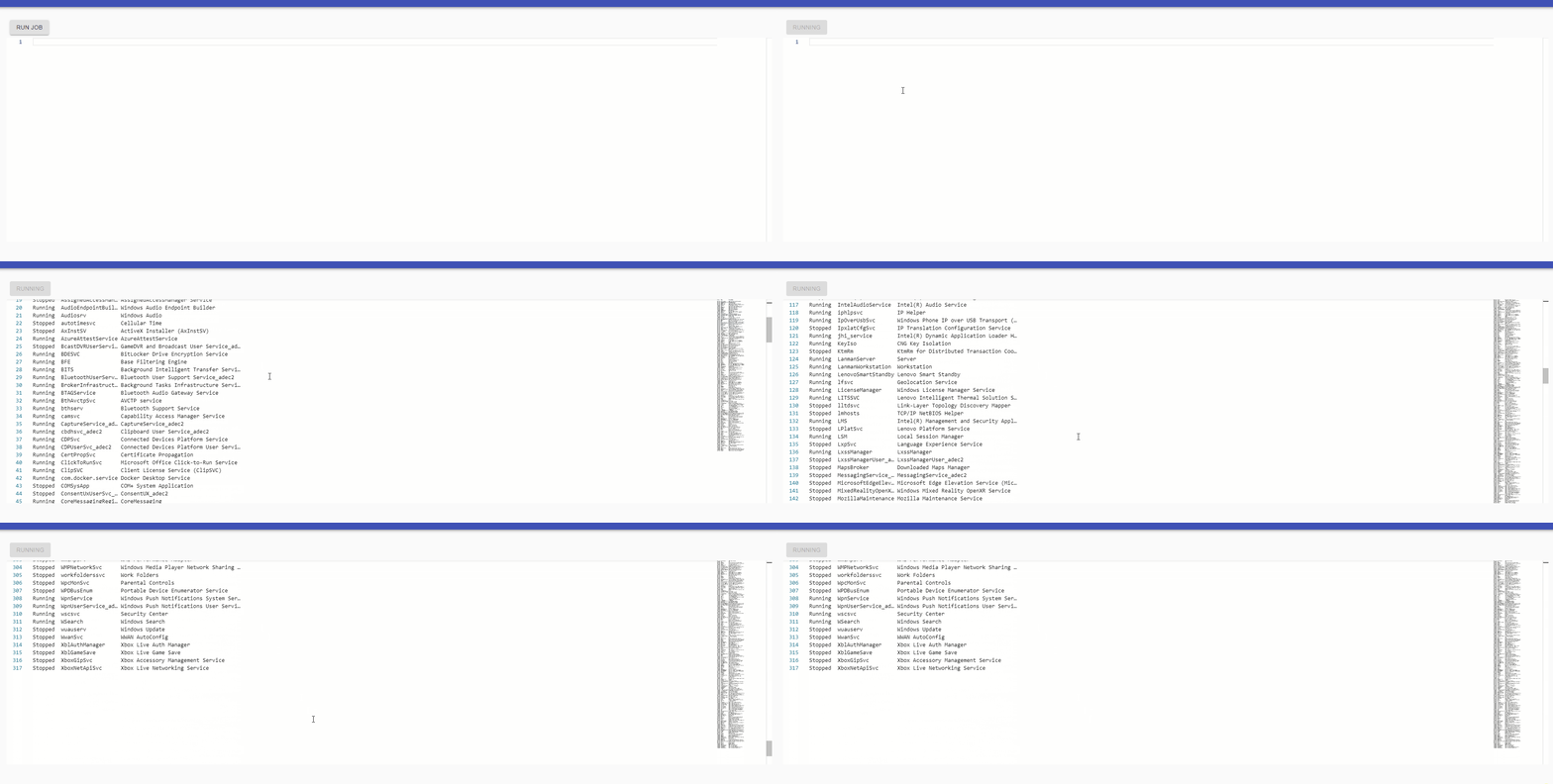
I just verified that this works for me. I’ve created an admin app token and am using Connect-PSUServer in my script to use that app token for the PSU cmdlets.
$AppToken = 'eyJhbGciOiJIUzI1NiIsInR5cCI6IkpXVCJ9.eyJodHRwOi8vc2NoZW1hcy54bWxzb2FwLm9yZy93cy8yMDA1LzA1L2lkZW50aXR5L2NsYWltcy9uYW1lIjoiQWRtaW4iLCJodHRwOi8vc2NoZW1hcy54bWxzb2FwLm9yZy93cy8yMDA1LzA1L2lkZW50aXR5L2NsYWltcy9oYXNoIjoiN2ZmMjQ4NmEtNjI2Ni00NDA5LThjZWYtYTgwYzlkZmU4NDNhIiwic3ViIjoiUG93ZXJTaGVsbFVuaXZlcnNhbCIsImh0dHA6Ly9zY2hlbWFzLm1pY3Jvc29mdC5jb20vd3MvMjAwOC8wNi9pZGVudGl0eS9jbGFpbXMvcm9sZSI6IkFkbWluaXN0cmF0b3IiLCJuYmYiOjE2MTc4MTMwMDMsImV4cCI6MTYyNTU4OTAwMywiaXNzIjoiSXJvbm1hblNvZnR3YXJlIiwiYXVkIjoiUG93ZXJTaGVsbFVuaXZlcnNhbCJ9.2HKwY8No9A9uTTUHnZoAWrIatT1Dx1GZDZgntlOarko'

New-UDDashboard -Title "Hello, World!" -Content {
    New-UDButton -Text 'Run Job' -OnClick {
        Set-UDElement -Id 'button' -Properties @{
            disabled = $true
            text = "Running"
        }
        Connect-PSUServer -ComputerName http://localhost:5000 -AppToken $AppToken

        $Job = Invoke-UAScript -Script 'GetService.ps1'

        while($Job.Status -ne 'Completed')
        {
            Start-Sleep 1
            $Output = (Get-UAJobOutput -Job $Job).Data -join ([Environment]::NewLine)
            Set-UDElement -Id 'codeEditor' -Properties @{
                code = $Output
            }

            $Job = Get-UAJob -Id $Job.Id
        }

        Set-UDElement -Id 'button' -Properties @{
            disabled = $false
            text = "Run Job"
        }
    } -Id 'button'

    New-UDCodeEditor -Id 'codeEditor' -ReadOnly -Height 500
}
Adam Driscoll
PowerShell Expert and Developer at Devolutions
f1e7a8a675d64156dcc41d310273d28be37881bf.gif
Works like a charm now with that code example.
It was that you needed to connect to it first - the part you added.
The size of the codebox is it possible for it to bee auto? So it fits inside a card?
Does Get-PSUJobOutput not include Verbose messages?
Do you have your verbose preference set to continue? If not we won’t receive the verbose message from the PS runtime in our PS host.
$VerbosePreference = "Continue"
Write-Verbose "Test"
Adam Driscoll
PowerShell Expert and Developer at Devolutions
Is the code in this thread still more or less current, @Adam Driscoll? It works for me, but when the job finishes running I get a bunch of “Failed to query.NotFound” popups: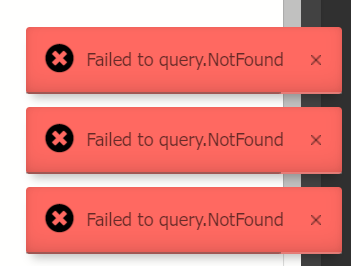
Here’s the code I’m using:
                $wipe = (Get-UDElement -Id 'wipe').checked

                $job = (Invoke-PSUScript 'Set-AutopilotRoomTag.ps1' -Integrated -Room $EventData.room -GroupTag $EventData.tag -Wipe:$wipe)

                while ($job.Status -ne 'Completed' -and $job.Status -ne 'Failed')
                {
                    Start-Sleep 1
                    $Output = (Get-PSUJobOutput -Job $Job -Integrated).Data -join ([Environment]::NewLine)
                    Set-UDElement -Id 'codeEditor' -Properties @{
                        code = $Output
                    }

                    $Job = Get-PSUJob -Id $Job.Id -Integrated
                }
Matt
a7b526d0d0b8a46b67ebd3759033aba40cbf093f.png
Ah! If I wrap the “Get-PSUJobOutput” in a try/catch I can suppress the popup! So that line is throwing a lot of exceptions that are being shown when the job finally completes. Any clue as to why that line would be throwing the “Failed to query.NotFound” exceptions for a running job? Anything I can do about that other than catching the exception?
Seems like a bug. I would expect that cmdlet to return null if there wasn’t output rather than returning any error message. I’ll open an issue.
Adam Driscoll
PowerShell Expert and Developer at Devolutions
Just on this one, @Adam Driscoll - it’d be super cool if there was a built-in dashboard component that was essentially the same as the “job output” panel when you execute a script. I’m not sure how it would work, but being able to show the live output of a job without having to write the above code would be really nice.
I can open an issue for this. I think enough people have tried to do this to warrant a component.
Adam Driscoll
PowerShell Expert and Developer at Devolutions
Did you ever get to this one, @Adam Driscoll? I’m revisiting a dashboard that shows job output “live”, and wondering if there’s a built-in way to do this now.
This hasn’t been implemented yet.
Adam Driscoll
PowerShell Expert and Developer at Devolutions
This would definately be great, would be nice if it also honored -foregroundcolor aswell on any write-host commands
Real time output / updating on a script would be really handy
Regards
Rhys
Edited, i worked out my issue, in debugging i had been bypassng the params on the actual script
leaving the below code as it might help someone with this in the future
New-UDButton -Text 'Deploy Proofpoint' -OnClick {
    Set-UDElement -Id 'btnDeployProofpoint' -Properties @{
        disabled = $true
        text = "Deploying Proofpoint"
    }

    $AppToken = 'My App Sevret'

    Connect-PSUServer -ComputerName http://localhost:5000 -AppToken $AppToken

    $Job = Invoke-PSUScript -Script 'Deploy-Proofpoint-Essentials.ps1' -CompanyName $($EventData.Context.CompanyName)

    while($Job.Status -ne 'Completed')
    {
        Start-Sleep 1
        $Output = (Get-PSUJobOutput -Job $Job).Data -join ([Environment]::NewLine)
        Set-UDElement -Id 'codeEditor' -Properties @{
            code = $Output
        }

        $Job = Get-PSUJob -Id $Job.Id
    }

    Set-UDElement -Id 'btnDeployProofpoint' -Properties @{
        disabled = $true
        text = "Job Completed"
    }

} -Id 'btnDeployProofpoint'
New-UDCodeEditor -Id 'codeEditor' -ReadOnly -Height 500
PS. really loving your product i wish i found PowerShell Universal a long time ago.
Thanks
Rhys
@Adam Driscoll While I have your code working and it works well showing the script output, I have an issue where it shows the output of a previous job if I run a secondary script without first refreshing my browser.
I’m believe it has something to do with sessions and not clearing session info between running different scripts but i don’t know what I’m missing, essentially the first script I run the output window is clear and it gets live view as the script runs
if I then go to a different script and run it the output windows flickers with all the previous output for the first job/script
If this doesn’t make sense let me know and ill create a screen recording
Is there something I should have in each of my scripts or UD Pages that clears this session data each time a page is loaded?
Thanks
Rhys
Can you share a screen recording? I’m not quite understanding.
Adam Driscoll
PowerShell Expert and Developer at Devolutions
Where are we at with this? Is anyone doing something like this today?
Even better yet, I think it would be really nice to have the ability to view something as we see with “write-progress” in the jobs section when a job is running.
Something like this would give the user a bit more feedback for those longer running processes.
81d0a279f57d21de76dc5239a83a0ca24eec37f7.png
I know this product is always being modified and updated. But yeah as for a progress bar that would only work if you kind of defined the start and end of your script…there is a component which is built in which can display loading progress. It’s been a while since I built a component but if I can find one…or if others can post links to an existing component happy to have a go