How to format Git settings in appsettings.json

Hi,
I did try some options for Git connection, but can’t get a connection and I don’t really understand which username and password must be used.
I don’t know if it makes a difference, but i’m using a private repo.
I checked the documentation and also checked the forum, but I can’t find a example.
  "Data": {
    "RepositoryPath": "%ProgramData%\\UniversalAutomation\\Repository",
    "ConnectionString": "%ProgramData%\\UniversalAutomation\\database.db",
    "GitRemote": "",
    "GitUserName": "",
    "GitPassword": ""
  },
All Comments (22)
Hi @AnonymousUser,
We need to update the documentation for this. If you are using GitHub, you can create a Personal Access Token instead of using the user name and password. Then your username can be anything and you can use your PAT as the password.
I’ve had success with just using my username and password but I think we’re going to change the recommendation here to use the PAT instead.
Make sure that you include the .git extension when putting in your remote URL.
Adam Driscoll
PowerShell Expert and Software Architect at Devolutions
Hi,
Thanks for the answers, I will try it later because i’m finishing a other project first. Can you tell me what you’re using as the GitRemote format? Like:
- HTTPS: https://github.com/QMSPS/Q-PowerAPI.git
- git@github.com:QMSPS/Q-PowerAPI.git
Or something else? If you let me know (ore someone else) I will check it.
Kind regards,
ARKO
We’ve been using format number 1.
Adam Driscoll
PowerShell Expert and Software Architect at Devolutions
@Adam Driscoll I’m also having an issue with Git sync. I’m receiving the following error in the logs:2020-07-14T20:08:10.6727961-05:00 [ERR] Failed to sync: "There is no tracking information for the current branch." " at LibGit2Sharp.Commands.Pull(Repository repository, Signature merger, PullOptions options) at UniversalAutomation.Git.GitService.Pull() in C:\src\universal\src\UniversalAutomation.Git\GitService.cs:line 225 at UniversalAutomation.GitSyncService.TrySync() in C:\src\universal\src\UniversalAutomation\Services\GitSyncService.cs:line 83 at UniversalAutomation.GitSyncService.Sync() in C:\src\universal\src\UniversalAutomation\Services\GitSyncService.cs:line 54" (2d6ed692)
There is no tracking information for the current branch.
Can you check the status of the local git repo using standard git commands? I’m not sure how it got into the state you are in but you might be able to get it straightened out manually and then PSU should be able to sync.
PSU effectively does a git pull followed by a git push during the git sync. We only support a single master branch at the moment and don’t specify that branch specifically.
stackoverflow.com
Adam Driscoll
PowerShell Expert and Software Architect at Devolutions
@Adam Driscoll thanks for your help. I was able to get the previous commits pushed, but now it fails to push automatically. If I enter the directory, I see that a push is waiting and can push manually, but I’m seeing this in the logs:2020-07-14T22:49:00.9377294-05:00 [ERR] Failed to sync: "programdata configuration file owner is not valid" " at LibGit2Sharp.Core.Ensure.HandleError(Int32 result) at LibGit2Sharp.Core.Proxy.ConvertPath(Func``2 pathRetriever) at LibGit2Sharp.Core.Proxy.git_config_find_programdata() at LibGit2Sharp.Configuration..ctor(Repository repository, String repositoryConfigurationFileLocation, String globalConfigurationFileLocation, String xdgConfigurationFileLocation, String systemConfigurationFileLocation) at LibGit2Sharp.Repository.<>c__DisplayClass25_1.<.ctor>b__3() at System.Lazy``1.ViaFactory(LazyThreadSafetyMode mode) at System.Lazy``1.ExecutionAndPublication(LazyHelper executionAndPublication, Boolean useDefaultConstructor) at System.Lazy``1.CreateValue() at LibGit2Sharp.Repository.get_Config() at LibGit2Sharp.Branch.RemoteNameFromLocalBranch() at LibGit2Sharp.Branch.get_RemoteName() at LibGit2Sharp.Commands.Pull(Repository repository, Signature merger, PullOptions options) at UniversalAutomation.Git.GitService.Pull() in C:\src\universal\src\UniversalAutomation.Git\GitService.cs:line 225 at UniversalAutomation.GitSyncService.TrySync() in C:\src\universal\src\UniversalAutomation\Services\GitSyncService.cs:line 83 at UniversalAutomation.GitSyncService.Sync() in C:\src\universal\src\UniversalAutomation\Services\GitSyncService.cs:line 54" (2d6ed692)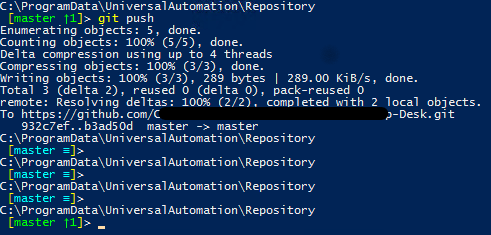
4e82e407ce8883b7517e661bf879f271ca8323f6.png
How are you running Universal? Service or something? It seems like file permissions may be incorrect now that you used the git commands manually…
Adam Driscoll
PowerShell Expert and Software Architect at Devolutions
As a service, yeah. Installed via the msi.
Resurrecting an old thread because we’ve just hit this same error message:
Git Synchronization Failed
There is no tracking information for the current branch
Our GitHub repo was a new, blank repo, and I was sure to add a setting Data__GitBranch = “main” to our environment variables.
When I drop to the repository folder in the Azure Kudu console and type “git status” I see this:
D:\home\data\PowerShellUniversal\Repository>git status
On branch master
No commits yet
Untracked files:
(use “git add …” to include in what will be committed)
.universal/
… (list of .ps1 files)
(Notice it says “On branch master”? Our GitHub repo doesn’t have a master branch.)
Does PSU not honour the Data__GitBranch environment variable? Do I need to add it to the appsettings.json file? Or is there something else I need to do to get it to clone and sync with “main”?
Cheers,
Matt
I tried setting GitBranch=“main” in the appsettings.json, deleting the “.git” folder from the repository and restarting the app service. No joy - same recurring error.
The “Git” page in PSU has always looked “correct” insofar as it says “main”: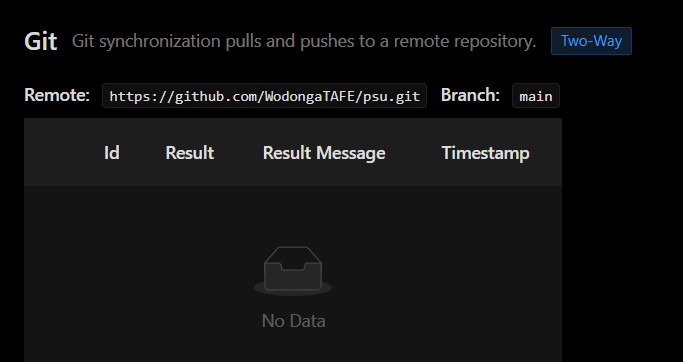
Something under the hood is still looking for a “master” branch despite the setting, I think.
0a358a265c334e3bc6a0f38bcedcbf0c83b8c8f4.png
I have a GitHub repo for testing git sync that uses main rather than master.
  "Data": {
    "RepositoryPath": "%ProgramData%\\UniversalAutomation\\Repository",
    "ConnectionString": "filename=%ProgramData%\\UniversalAutomation\\database.db;upgrade=true",
    "GitRemote": "https://github.com/ironmansoftware/shiny-octo-waffle.git",
    "GitUserName": "adamdriscoll",
    "GitPassword": "redacted",
    "GitBranch": "main",
    "GitSyncBehavior": "OneWay",
    "ConfigurationScript": ""
  },
You are completely deleting the repository folder within the app service and then it recreates it and it’s in the master branch?
Adam Driscoll
PowerShell Expert and Software Architect at Devolutions
Yeah exactly. I don’t have GitSyncBehaviour set, but other than that my settings are similar to yours.
I stop the service, delete the .git folder and restart the service, and the .git folder is re-created, but the HEAD file looks like this:
ref: refs/heads/master
… even though the “Git” page says it’s syncing main.
Just updated to 2.8.2 and repeated the process of shutting down the service, deleting the .git folder and restarting, but the newly-created HEAD file still says master.
Ok. Any way you can send me the full log file?
I just doubled checked that I’m not going crazy. I stood up a new bare repository in GitHub.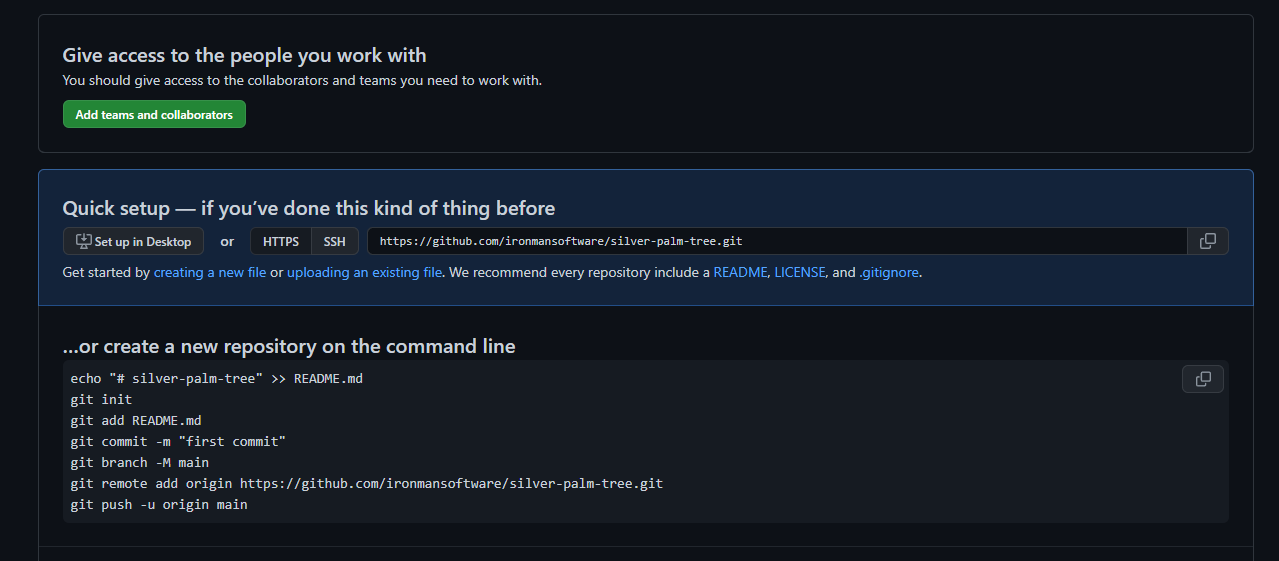
My repository folder was like this.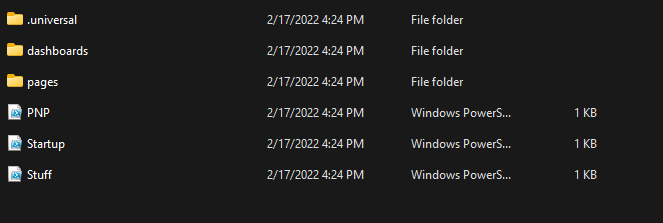
Started up universal after setting the GitHub settings.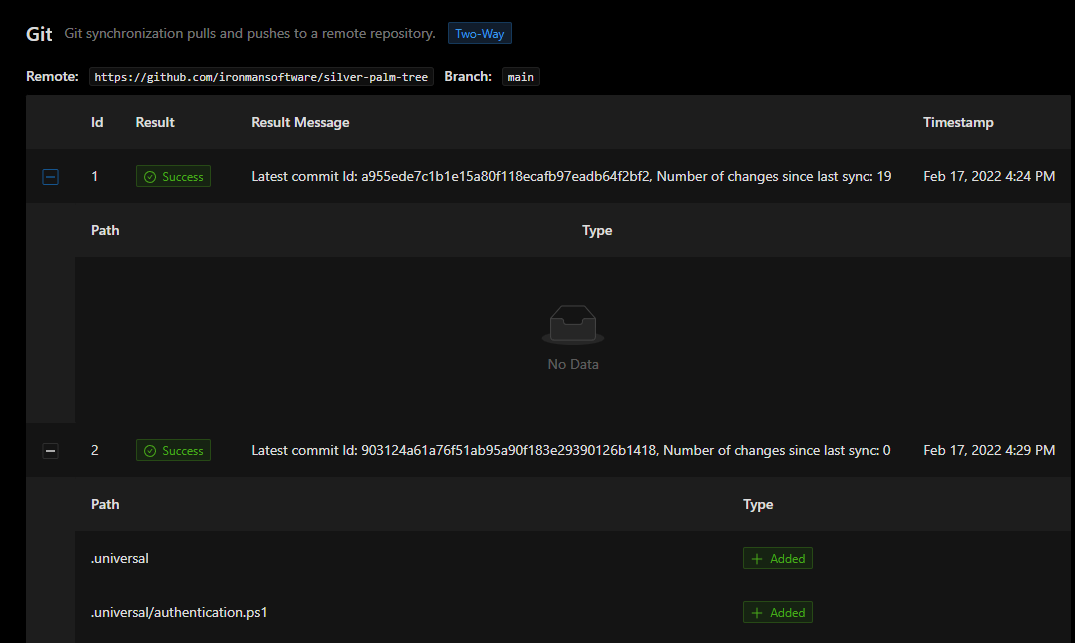
And now my repository has the files and the main branch.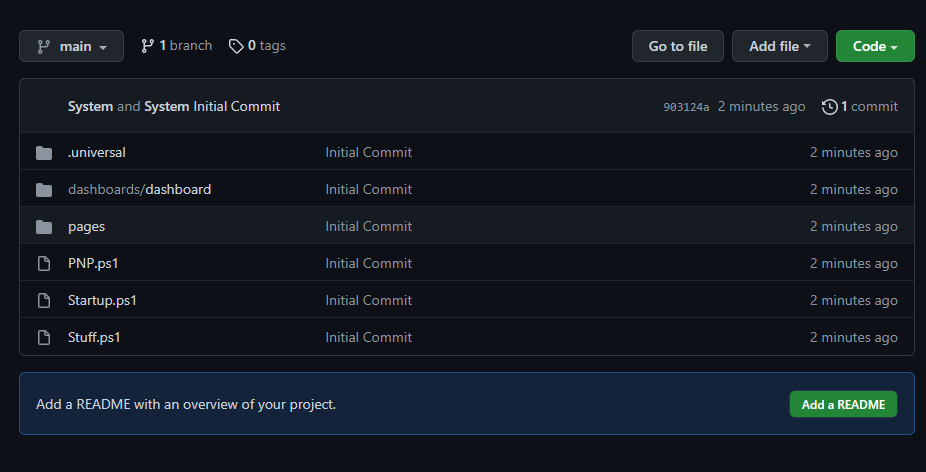
And my repository has a .git folder with the proper branch in head.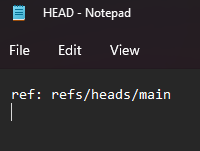
Just want to be clear on the steps I took to ensure that I’m doing the same thing as you. If you did something different, let me know and I can try that.
Adam Driscoll
PowerShell Expert and Software Architect at Devolutions
0167e338d2b0ae1efa1b7aac2c6544131de6bace.png
fcf6e03912851e7edb3673ca432b2ab308a7973e.png
f3cf4a4004ee851680baf3d3503442bcf1fc4aec.png
36402e2be29cf6fc2b3b0e906dc349ba7b236d53.png
16aa20ef4b579477b36e535ecf78efb6fc4c9c57.png
Absolutely! Here’s the top part of the log. From then on it’s just the same GIT exception repeated every minute:
2022-02-17 22:37:55.241 +00:00 [INF] Azure Web Sites environment detected. Using 'D:\home\ASP.NET\DataProtection-Keys' as key repository; keys will not be encrypted at rest.
2022-02-17 22:38:06.897 +00:00 [ERR] Error registering vault PSUSecretStore
2022-02-17 22:38:06.899 +00:00 [ERR] Exception:
System.TypeInitializationException: The type initializer for 'Microsoft.PowerShell.SecretStore.SecureStoreFile' threw an exception.
 ---> System.UnauthorizedAccessException: Attempted to perform an unauthorized operation.
   at System.Security.AccessControl.Win32.SetSecurityInfo(ResourceType type, String name, SafeHandle handle, SecurityInfos securityInformation, SecurityIdentifier owner, SecurityIdentifier group, GenericAcl sacl, GenericAcl dacl)
   at System.Security.AccessControl.NativeObjectSecurity.Persist(String name, SafeHandle handle, AccessControlSections includeSections, Object exceptionContext)
   at System.Security.AccessControl.NativeObjectSecurity.Persist(String name, AccessControlSections includeSections, Object exceptionContext)
   at System.Security.AccessControl.NativeObjectSecurity.Persist(String name, AccessControlSections includeSections)
   at System.Security.AccessControl.FileSystemSecurity.Persist(String fullPath)
   at System.IO.FileSystemAclExtensions.SetAccessControl(DirectoryInfo directoryInfo, DirectorySecurity directorySecurity)
   at Microsoft.PowerShell.SecretStore.SecureStoreFile.SetDirectoryACLs(String directoryPath)
   at Microsoft.PowerShell.SecretStore.SecureStoreFile..cctor()
   --- End of inner exception stack trace ---
   at Microsoft.PowerShell.SecretStore.SecureStoreFile.get_ConfigRequiresPassword()
   at Microsoft.PowerShell.SecretStore.LocalSecretStore.get_PasswordRequired()
   at Microsoft.PowerShell.SecretStore.SetSecretStoreConfiguration.EndProcessing()
   at System.Management.Automation.Cmdlet.DoEndProcessing()
   at System.Management.Automation.CommandProcessorBase.Complete()
2022-02-17 22:39:51.559 +00:00 [INF] Azure Web Sites environment detected. Using 'D:\home\ASP.NET\DataProtection-Keys' as key repository; keys will not be encrypted at rest.
2022-02-17 22:41:44.126 +00:00 [ERR] Failed to sync: Unknown branch: main    at UniversalAutomation.Git.GitService.Push() in D:\a\universal\universal\src\Universal.Server\Services\GitService.cs:line 231
   at UniversalAutomation.GitSyncService.TrySync() in D:\a\universal\universal\src\Universal.Server\Services\GitSyncService.cs:line 158
   at UniversalAutomation.GitSyncService.Sync() in D:\a\universal\universal\src\Universal.Server\Services\GitSyncService.cs:line 71
2022-02-17 22:41:50.996 +00:00 [WRN] The cookie '.AspNetCore.OpenIdConnect.Nonce.CfDJ8Opgu2V4dK1BpyLvxt3uehZMB7lEq4rUA6pGkWUJHHw2uOA71zsZ2E6ndHvCgbjY2CdwSAEWJQK8ccnU57O8N7ZBcF4FikJDBJVFKTkb5KoO5Z_KMbs5hyDbDXWJh9uEuun6DeNTf_kqTNy4tIfKi45xEkGmTYjv1oBDwJ9sewcL1D0YEaoSZk2i408uovUp_JTc33adWGdEJa0uuBEyGAGsrxUnPLEKbtUTcQjVIY_XwR5KjTXKeBda8kRaqHtJjXjm5iNC_sYJZNpM3JOG9sc' has set 'SameSite=None' and must also set 'Secure'.
2022-02-17 22:41:51.024 +00:00 [WRN] The cookie '.AspNetCore.Correlation.LxoKDUAMjryryqtheNMEf9BO_B4wjlloJx77fa9lb2s' has set 'SameSite=None' and must also set 'Secure'.
2022-02-17 22:42:00.191 +00:00 [WRN] The cookie '.AspNetCore.OpenIdConnect.Nonce.CfDJ8Opgu2V4dK1BpyLvxt3uehbxvSrx_P6RO19pDp6H4T4lIkw1cUCtXPBfG_eLScptGuRZciY3z_F3iR_Td4mh3pbm6BAa0dvlDx9I2ln4WIAxLBN2vh7KUCKSNhVEISUG_jlIdDrWrFZBrFFh1w_qtgfH6jjdHJUnKvR9-Hfnh1Clh75U54sYXHPm6zHNqLfP8OvNKeJVQOplb5-afHFnHS92i7SjOD6lww1KxtjGmePPmk3m6k5AyTSjGznIZxgXG7fAKEZFqEa_kwZKsFoacyg' has set 'SameSite=None' and must also set 'Secure'.
2022-02-17 22:42:00.201 +00:00 [WRN] The cookie '.AspNetCore.Correlation.7RtV7fyroHCInyJnTAYsubMYGuYboaQhCCznxLWibME' has set 'SameSite=None' and must also set 'Secure'.
2022-02-17 22:42:00.955 +00:00 [ERR] Failed to sync: There is no tracking information for the current branch.    at LibGit2Sharp.Commands.Pull(Repository repository, Signature merger, PullOptions options)
   at UniversalAutomation.Git.GitService.Pull() in D:\a\universal\universal\src\Universal.Server\Services\GitService.cs:line 265
   at UniversalAutomation.GitSyncService.TrySync() in D:\a\universal\universal\src\Universal.Server\Services\GitSyncService.cs:line 132
   at UniversalAutomation.GitSyncService.Sync() in D:\a\universal\universal\src\Universal.Server\Services\GitSyncService.cs:line 71
2022-02-17 22:42:18.538 +00:00 [WRN] The cookie '.AspNetCore.OpenIdConnect.Nonce.CfDJ8Opgu2V4dK1BpyLvxt3uehbjI9QxO2MOrSHy2YZlpf4HVR5oMnqacmdoMLyDCIREWlhZDChcny2e4fRt_8r9H89KxISoDvYT3xnkebYWDpXfBYuYTrc2UCwE1LiANtg129D8c6yYjmjlivAIe_fxB-dyZaKtHbdcl14KFqMacSUoXG9xFWvNWVm8oo7oxEz4G3rK6MZZPrloa3xMv_9FWAN6MLDVrapTdVZR_Y3VF4ZmPaR8reI6JfQL-HcZZmI6eIKY3LIvckTw_c0K3K-y9bU' has set 'SameSite=None' and must also set 'Secure'.
2022-02-17 22:42:18.548 +00:00 [WRN] The cookie '.AspNetCore.Correlation.eZyWX0Ngt_37G_tSPZ6Zkx_88c_4i2WY9c7TVtVFuBc' has set 'SameSite=None' and must also set 'Secure'.
2022-02-17 22:43:00.839 +00:00 [ERR] Failed to sync: There is no tracking information for the current branch.    at LibGit2Sharp.Commands.Pull(Repository repository, Signature merger, PullOptions options)
   at UniversalAutomation.Git.GitService.Pull() in D:\a\universal\universal\src\Universal.Server\Services\GitService.cs:line 265
   at UniversalAutomation.GitSyncService.TrySync() in D:\a\universal\universal\src\Universal.Server\Services\GitSyncService.cs:line 132
   at UniversalAutomation.GitSyncService.Sync() in D:\a\universal\universal\src\Universal.Server\Services\GitSyncService.cs:line 71
It looks to me like you’re doing everything the same as me. Obviously I’m in an Azure app service, and I’ve set my Git configuration as environment variables: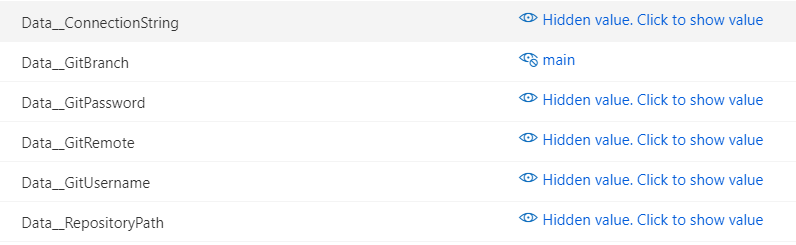
I know they’re working because my Git page shows the right values (as in my screenshot above).
But yeah … for some reason when it initializes the repository and creates the .Git folder, it does so using the master branch. I’m baffled.
eec908691894798c03e2d951cedd8e620d38fd9f.png
That is baffling. I’ll continue to play around with this to see if I can reproduce it and see if I can get any additional logging\diagnostics into the product that might help us determine what’s happening here.
Adam Driscoll
PowerShell Expert and Software Architect at Devolutions
@Adam Driscoll should I be installing a nightly build to try to capture some extra diagnostic info for you on this one? I really want to use PSU for production but I can’t until we’ve gotten it properly version controlled, so I’m very keen to do whatever I can to help you solve this.
Tonight’s nightly build will include a lot more logging for all the git services. You will need to enable the debug level and you should see a bunch of information written during the initialization and execution of this particular feature.
We also identified an issue where git sync jobs could cause an exhaustion of job runners because of a deadlock that is also resolved in this build. I’m not sure if that has anything to do with the problem you are seeing.
Adam Driscoll
PowerShell Expert and Software Architect at Devolutions
OK we just deployed the latest nightly after removing the .git folder (and setting the log level to Debug).
Below is the log. I don’t see anything in there that says it’s initialising the repo, but I do see (on line 57) that it immediately tried to sync branch “main” (the branch we want) but couldn’t find it (because when I check our app service repository folder, the newly-created repo is “master”).
What else can we try?
Edit: I’ve had to revert back to 2.8.3 because the 2.9.0 nightly broke our dashboard. Apparently New-UDChartJS is not a command anymore in 2.9.0. Dunno if that should be a GH issue or if it’s one of those things that happens in nightly builds.
2022-02-24 22:29:07.024 +00:00 [DBG] Hosting starting
2022-02-24 22:29:07.554 +00:00 [INF] Azure Web Sites environment detected. Using 'D:\home\ASP.NET\DataProtection-Keys' as key repository; keys will not be encrypted at rest.
2022-02-24 22:29:15.609 +00:00 [DBG] Reading data from file 'D:\home\ASP.NET\DataProtection-Keys\key-65bb60ea-7478-41ad-a722-efc6ddee7a16.xml'.
2022-02-24 22:29:15.708 +00:00 [DBG] Reading data from file 'D:\home\ASP.NET\DataProtection-Keys\key-9f878564-7875-4b09-b71c-4ceca1636edf.xml'.
2022-02-24 22:29:15.778 +00:00 [DBG] Found key {65bb60ea-7478-41ad-a722-efc6ddee7a16}.
2022-02-24 22:29:15.953 +00:00 [DBG] Found key {9f878564-7875-4b09-b71c-4ceca1636edf}.
2022-02-24 22:29:15.973 +00:00 [DBG] Considering key {65bb60ea-7478-41ad-a722-efc6ddee7a16} with expiration date 2022-05-07 21:49:59Z as default key.
2022-02-24 22:29:16.003 +00:00 [DBG] Forwarded activator type request from Microsoft.AspNetCore.DataProtection.AuthenticatedEncryption.ConfigurationModel.AuthenticatedEncryptorDescriptorDeserializer, Microsoft.AspNetCore.DataProtection, Version=5.0.0.0, Culture=neutral, PublicKeyToken=adb9793829ddae60 to Microsoft.AspNetCore.DataProtection.AuthenticatedEncryption.ConfigurationModel.AuthenticatedEncryptorDescriptorDeserializer, Microsoft.AspNetCore.DataProtection, Culture=neutral, PublicKeyToken=adb9793829ddae60
2022-02-24 22:29:16.014 +00:00 [DBG] Opening CNG algorithm 'AES' from provider 'null' with chaining mode CBC.
2022-02-24 22:29:16.022 +00:00 [DBG] Opening CNG algorithm 'SHA256' from provider 'null' with HMAC.
2022-02-24 22:29:16.033 +00:00 [DBG] Using key {65bb60ea-7478-41ad-a722-efc6ddee7a16} as the default key.
2022-02-24 22:29:16.040 +00:00 [DBG] Key ring with default key {65bb60ea-7478-41ad-a722-efc6ddee7a16} was loaded during application startup.
2022-02-24 22:29:24.664 +00:00 [ERR] Error registering vault PSUSecretStore
2022-02-24 22:29:24.667 +00:00 [ERR] Exception:
System.TypeInitializationException: The type initializer for 'Microsoft.PowerShell.SecretStore.SecureStoreFile' threw an exception.
 ---> System.UnauthorizedAccessException: Attempted to perform an unauthorized operation.
   at System.Security.AccessControl.Win32.SetSecurityInfo(ResourceType type, String name, SafeHandle handle, SecurityInfos securityInformation, SecurityIdentifier owner, SecurityIdentifier group, GenericAcl sacl, GenericAcl dacl)
   at System.Security.AccessControl.NativeObjectSecurity.Persist(String name, SafeHandle handle, AccessControlSections includeSections, Object exceptionContext)
   at System.Security.AccessControl.NativeObjectSecurity.Persist(String name, AccessControlSections includeSections, Object exceptionContext)
   at System.Security.AccessControl.NativeObjectSecurity.Persist(String name, AccessControlSections includeSections)
   at System.Security.AccessControl.FileSystemSecurity.Persist(String fullPath)
   at System.IO.FileSystemAclExtensions.SetAccessControl(DirectoryInfo directoryInfo, DirectorySecurity directorySecurity)
   at Microsoft.PowerShell.SecretStore.SecureStoreFile.SetDirectoryACLs(String directoryPath)
   at Microsoft.PowerShell.SecretStore.SecureStoreFile..cctor()
   --- End of inner exception stack trace ---
   at Microsoft.PowerShell.SecretStore.SecureStoreFile.get_ConfigRequiresPassword()
   at Microsoft.PowerShell.SecretStore.LocalSecretStore.get_PasswordRequired()
   at Microsoft.PowerShell.SecretStore.SetSecretStoreConfiguration.EndProcessing()
   at System.Management.Automation.CommandProcessorBase.Complete()
2022-02-24 22:29:26.631 +00:00 [DBG] Reading configuration file licenses.ps1
2022-02-24 22:29:29.564 +00:00 [DBG] Reading configuration file accessControls.ps1
2022-02-24 22:29:29.573 +00:00 [DBG] Reading configuration file tags.ps1
2022-02-24 22:29:29.826 +00:00 [DBG] Reading configuration file settings.ps1
2022-02-24 22:30:57.714 +00:00 [DBG] Hosting starting
2022-02-24 22:30:57.898 +00:00 [INF] Azure Web Sites environment detected. Using 'D:\home\ASP.NET\DataProtection-Keys' as key repository; keys will not be encrypted at rest.
2022-02-24 22:31:03.012 +00:00 [DBG] Reading data from file 'D:\home\ASP.NET\DataProtection-Keys\key-65bb60ea-7478-41ad-a722-efc6ddee7a16.xml'.
2022-02-24 22:31:03.042 +00:00 [DBG] Reading data from file 'D:\home\ASP.NET\DataProtection-Keys\key-9f878564-7875-4b09-b71c-4ceca1636edf.xml'.
2022-02-24 22:31:03.090 +00:00 [DBG] Found key {65bb60ea-7478-41ad-a722-efc6ddee7a16}.
2022-02-24 22:31:03.113 +00:00 [DBG] Found key {9f878564-7875-4b09-b71c-4ceca1636edf}.
2022-02-24 22:31:03.142 +00:00 [DBG] Considering key {65bb60ea-7478-41ad-a722-efc6ddee7a16} with expiration date 2022-05-07 21:49:59Z as default key.
2022-02-24 22:31:03.171 +00:00 [DBG] Forwarded activator type request from Microsoft.AspNetCore.DataProtection.AuthenticatedEncryption.ConfigurationModel.AuthenticatedEncryptorDescriptorDeserializer, Microsoft.AspNetCore.DataProtection, Version=5.0.0.0, Culture=neutral, PublicKeyToken=adb9793829ddae60 to Microsoft.AspNetCore.DataProtection.AuthenticatedEncryption.ConfigurationModel.AuthenticatedEncryptorDescriptorDeserializer, Microsoft.AspNetCore.DataProtection, Culture=neutral, PublicKeyToken=adb9793829ddae60
2022-02-24 22:31:03.183 +00:00 [DBG] Opening CNG algorithm 'AES' from provider 'null' with chaining mode CBC.
2022-02-24 22:31:03.192 +00:00 [DBG] Opening CNG algorithm 'SHA256' from provider 'null' with HMAC.
2022-02-24 22:31:03.203 +00:00 [DBG] Using key {65bb60ea-7478-41ad-a722-efc6ddee7a16} as the default key.
2022-02-24 22:31:03.210 +00:00 [DBG] Key ring with default key {65bb60ea-7478-41ad-a722-efc6ddee7a16} was loaded during application startup.
2022-02-24 22:31:06.710 +00:00 [DBG] Reading configuration file licenses.ps1
2022-02-24 22:31:08.617 +00:00 [DBG] Reading configuration file accessControls.ps1
2022-02-24 22:31:08.625 +00:00 [DBG] Reading configuration file tags.ps1
2022-02-24 22:31:08.837 +00:00 [DBG] Reading configuration file settings.ps1
2022-02-24 22:32:46.540 +00:00 [ERR] Failed to sync: Unknown branch: main    at UniversalAutomation.Git.GitService.Push() in D:\a\universal\universal\src\Universal.Server\Services\GitService.cs:line 266
   at UniversalAutomation.GitSyncService.TrySync() in D:\a\universal\universal\src\Universal.Server\Services\GitSyncService.cs:line 172
   at UniversalAutomation.GitSyncService.Sync() in D:\a\universal\universal\src\Universal.Server\Services\GitSyncService.cs:line 77
2022-02-24 22:32:53.009 +00:00 [WRN] The cookie '.AspNetCore.OpenIdConnect.Nonce.CfDJ8Opgu2V4dK1BpyLvxt3uehZebBjM5Qln9dfMnk6QSuhJ0wyeakSOrtWRRCe53KHXv62dmTV22niMJGZlatySGkP1Y2Eut-KtG5WDEYqYllJWtOJVGzR_TaUvQsuTeqA23NF7k3KCOuSeivGrclZmjCNyHCbWc180-He4ZHW3gYjlh_j6aDyRCwvqDLMhV631NECmOhLI2_ybzOhR73DH6nf9xB1lugBqA2X7Mj321A8OMjWSy0FcKcQIOapkmTxtVfzcEAnWhuRx6VZSjYJqzoQ' has set 'SameSite=None' and must also set 'Secure'.
2022-02-24 22:32:53.028 +00:00 [WRN] The cookie '.AspNetCore.Correlation.pP3wWjbVryXb3EOiqzIa_BJtlmq90GfYBU0w1xZqQBY' has set 'SameSite=None' and must also set 'Secure'.
2022-02-24 22:33:03.453 +00:00 [WRN] The cookie '.AspNetCore.OpenIdConnect.Nonce.CfDJ8Opgu2V4dK1BpyLvxt3ueha7lzZp2kZWG0tOltusAdXDhLc5Qy-gftig2Ljmhfs4lwTdNIEQEeRlXhGRB4_Vdv1RV7BHUXq5yKkC0HOe7pZBtJP4MhPV3zOs756vvYwCQvrM3enywqsE1Rh7PbcwtEAS0SmZIi_316DdrnxVGISlb6liL9q2vFGjSJ_sLzDqXBNscacUsvMCpdMvzs7u_dkCs9wmR6mwJGWgorlf_AGmNOEZMV88yiJdvQjLqhKGc9yC2LhGOwD0xb77B9wZBXo' has set 'SameSite=None' and must also set 'Secure'.
2022-02-24 22:33:03.472 +00:00 [WRN] The cookie '.AspNetCore.Correlation.qeGtX_phelRX6Pe2l0WSDuDSTw9u1CykTE5xXXquqY4' has set 'SameSite=None' and must also set 'Secure'.
2022-02-24 22:33:09.230 +00:00 [ERR] Failed to sync: There is no tracking information for the current branch.    at LibGit2Sharp.Commands.Pull(Repository repository, Signature merger, PullOptions options)
   at UniversalAutomation.Git.GitService.Pull() in D:\a\universal\universal\src\Universal.Server\Services\GitService.cs:line 308
   at UniversalAutomation.GitSyncService.TrySync() in D:\a\universal\universal\src\Universal.Server\Services\GitSyncService.cs:line 146
   at UniversalAutomation.GitSyncService.Sync() in D:\a\universal\universal\src\Universal.Server\Services\GitSyncService.cs:line 77
2022-02-24 22:33:13.496 +00:00 [WRN] The cookie '.AspNetCore.OpenIdConnect.Nonce.CfDJ8Opgu2V4dK1BpyLvxt3uehboD-qHTqTOcDp6HWvzrrjnyTOydTWtOjC1cDlezE66VVNfoDSxBkkq_24bydU2W3ktr-f2aUnWqYZnpW6z7SCmvJH5yQElnBPOqTNJ8oMOOCDEPM3eQfubZ8-bg4LCoB4pqJR5-PSi5XQ_g3ntP6bmrh3b40PUZ02PuwdpC-nxtO3DsTcaH9Yt5Fm7UMwP6K51GXmD9QME4xIT6pOUornla0jf0gCs7XvLH6OBgfjSJTh17WxAdWBPeRphDVE6gAo' has set 'SameSite=None' and must also set 'Secure'.
2022-02-24 22:33:13.565 +00:00 [WRN] The cookie '.AspNetCore.Correlation.-ulZSQMR22mUjLODTv9ighF2gHp1-ZfSTHKD-87gjc8' has set 'SameSite=None' and must also set 'Secure'.
2022-02-24 22:34:09.455 +00:00 [ERR] Failed to sync: There is no tracking information for the current branch.    at LibGit2Sharp.Commands.Pull(Repository repository, Signature merger, PullOptions options)
   at UniversalAutomation.Git.GitService.Pull() in D:\a\universal\universal\src\Universal.Server\Services\GitService.cs:line 308
   at UniversalAutomation.GitSyncService.TrySync() in D:\a\universal\universal\src\Universal.Server\Services\GitSyncService.cs:line 146
at UniversalAutomation.GitSyncService.Sync() in D:\a\universal\universal\src\Universal.Server\Services\GitSyncService.cs:line 77Hi Together,
today i faced the same error messages. Ii figured out that my personal acces token was expired. Maybe this helps someone who is facing this issue again
There is no tracking information for the current branch.
@AnonymousUser
Also just got this myself today, I accidently deleted my Azure DevOps PAT Token so generated a new one and then reconfigured my git and I was getting this same error, didnt get chance to check logs like mabster, my repo branch is also ‘main’ witihin ADO so wondering if it was a similar issue.
One thing I did try to do was restart my web app (linux docker) and it didnt make any difference.
Shortly after I went into the PSU admin, git config and hit the reset button, then just re-added the git config, after doing this I hit sync and the last sync status ‘3 hours ago’ didnt update, but when I made a change to one of my roles and then manually saved it, that worked and now it seems without issue again.
TL;DR: try hitting ‘reset’ in the git settings, then reapplying your git configuration, then making a change and adding a commit.