New Pivot Table Charting Component

UD-PivotTable
A powershell version of https://github.com/plotly/react-pivottable
My Reason For This Component
At my work I always seem to find that I have to put the raw data into a prettier format. Obviously UniversalDashboard does a great job in making this happen. But for instance when it comes to the sales team and you show them a grid but that grid has 1420 results or more, then you have to show them how to to export that data to excel, then all the steps involved to put that into a pivot table within excel. Just so they can have the data grouped better and not so many rows to digest. Well you know they are not going to remember, or simply carry on asking you. So this is how I plan to tackle that issue through the use of New-UDPivotTable an interactive dynamic pivot table/graph component.
Parameters
- -Data This is the only parameter in this component this is a mandatory paramater, as without this being supplied there will be no data to display
The Data Parameter Has To Be A HashTable
So the trick with passing the data to this component is it has to be in a hashtable format. This component works wonders
displaying SQL data, but for this example I will show how to put the output of get-process into a hashtable
 $Processes = Get-Process | sort-object CPU -Descending | Name, CPU, WorkingSet, VirtualMemorySize, StartTime
                $DataHash = @()
                foreach ($item in $Processes) {
                    $DataHash += @{
                        Name              = $item.Name
                        CPU               = $item.CPU
                        WorkingSet        = $item.WorkingSet
                        VirtualMemorySize = $item.VirtualMemorySize
                        StartTime         = $item.StartTime
                    }
                }
Now the variable $DataHash can be passed to the component like so
New-UDPivotTable -Data {$DataHash}
Literally that’s is all there is to passing the data to this component
Demo Of The Component
Import-Module -Name UniversalDashboard
Import-Module -Name UniversalDashboard.UDPivotTable
Get-UDDashboard | Stop-UDDashboard
$theme = Get-UDTheme -Name Default
Start-UDDashboard -Port 1000 -AutoReload -Dashboard (
    New-UDDashboard -Title "Powershell UniversalDashboard" -Theme $theme -Content {
        New-UDRow -Columns {
            New-UDColumn -Size 8 -Content {
###For DEMO purposes selecting the top 4 CPU processes on my local machine###
                $Processes = Get-Process | sort-object CPU -Descending | Select-Object -first 4 Name, CPU, WorkingSet, VirtualMemorySize, StartTime
###Now we need to convert the data we want to show in New-UDPivotTable into a hashtable
                $hash = @()
                foreach ($item in $Processes) {
                    $hash += @{
                        Name              = $item.Name
                        CPU               = $item.CPU
                        WorkingSet        = $item.WorkingSet
                        VirtualMemorySize = $item.VirtualMemorySize
                        StartTime         = $item.StartTime
                    }
                }
###Once you have all your data in a hashtable format simply pass that to
###New-UDPivotTable -Data parameter in a scriptblock
                New-UDPivotTable -Data { $hash }
            }
        }

    }
)
Then simply drag and drop for how you wish your data to be displayed.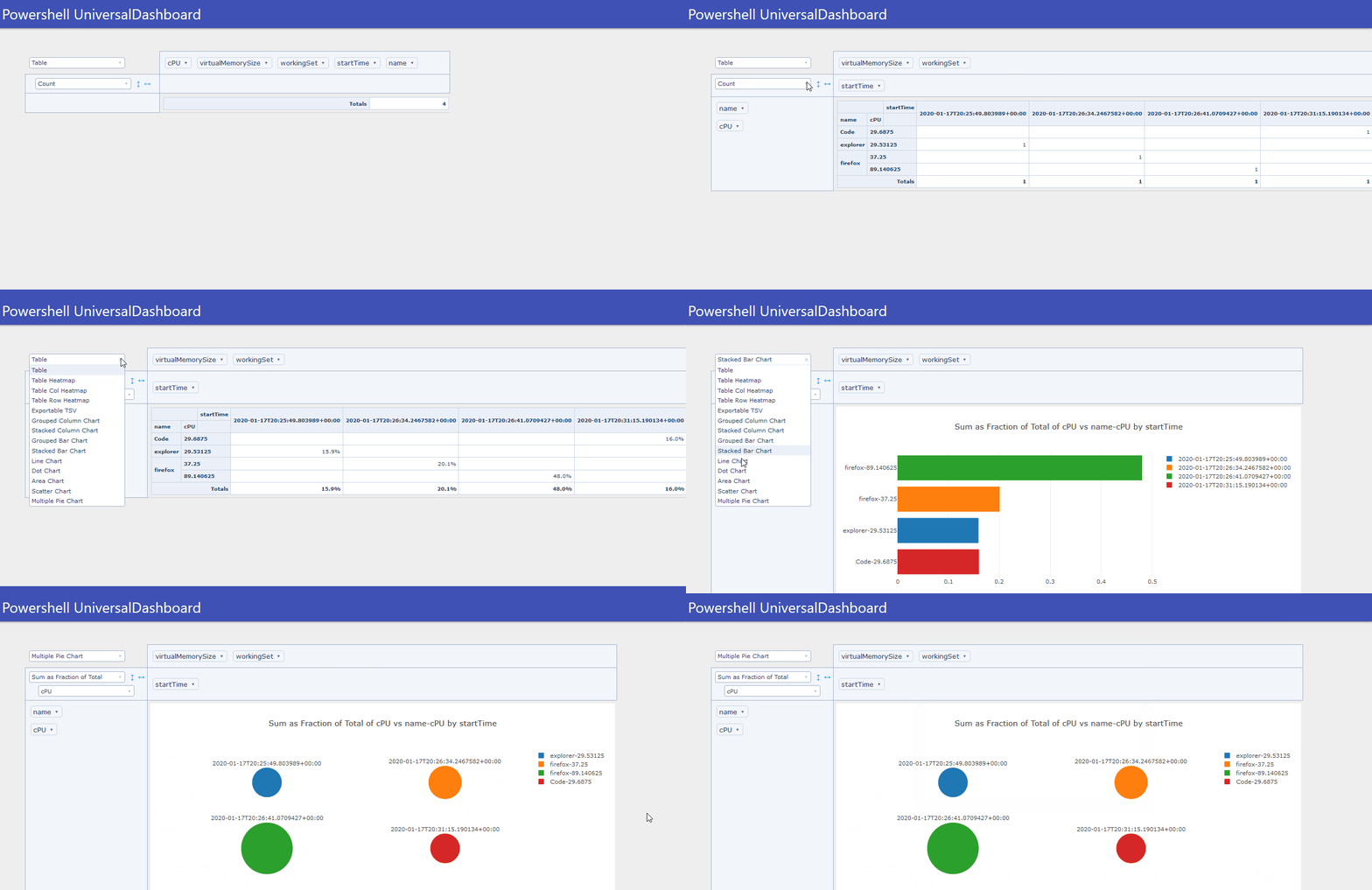
I hope people enjoy using this, you can get your copy here:-
https://marketplace.universaldashboard.io/Dashboard/UniversalDashboard.UDPivotTable
or here:-
powershellgallery.com
7c52cc6251f5f7063e77e973cc24733cdaede012.gif
All Comments (4)
And once again … A nice component + great use case that can also fit for my requirements

Adam Driscoll
PowerShell Expert and Developer at Devolutions
Thanks @AnonymousUser I do a lot of work with SQL, and this is like easier and quicker to use than Excel on making stuff look awesome. Is pretty damn responsive, most data I chucked at it was just over 30,000 rows and handled that ok, a little bit of time delay when rendering some of the charts, but only due to the amount of data I was trying to display in them. I plan on making this the go-to-tool for the people who cannot do pivots in Excel.
Really simple to break down the data and dynamically drag and drop your own columns to produce the reports.
For anyone finding this old thread:
Hi, i know this is an old post, but i really liked the UD-Pivot component from @AnonymousUser and since there is nothing similar built it (see Add Pivot Table support as new component · Issue #4942 · ironmansoftware/powershell-universal), i rebuild the component by myself with newest react components, working in the latest PSU version.
The module should be backward compatible, at least in my dashboards/apps it is.
you can see it here: PowerShell Gallery | UniversalDashboard.Pivot 1.0.0
Function is named New-UDPivot
I also added a lot of parameters - you can now customize the pivot table and also give presets for the properties including value filters.
More information on the github repository: GitHub - eizedev/UD-Pivot: PowerShell Universal custom component for interactive pivot tables based on react-pivottable (React 19 compatible) · GitHub