More bling for the marketplace SweetAlert2

So I been trying to chip in and create some custom components, to hopefully inspire other UD addicts to do the same. So I found this project here:- https://sweetalert2.github.io/#examples
and I thought this looked super cool, and had way more bling than your standard toast notification. As I love bling that I cannot afford I thought I would create this little beauty for UD. So next I found someone implementing this into ReactJs here:- https://github.com/kessejones/react-sweetalert2 then as I’m no react pro, I did some testing and building and here is a sneak peek:-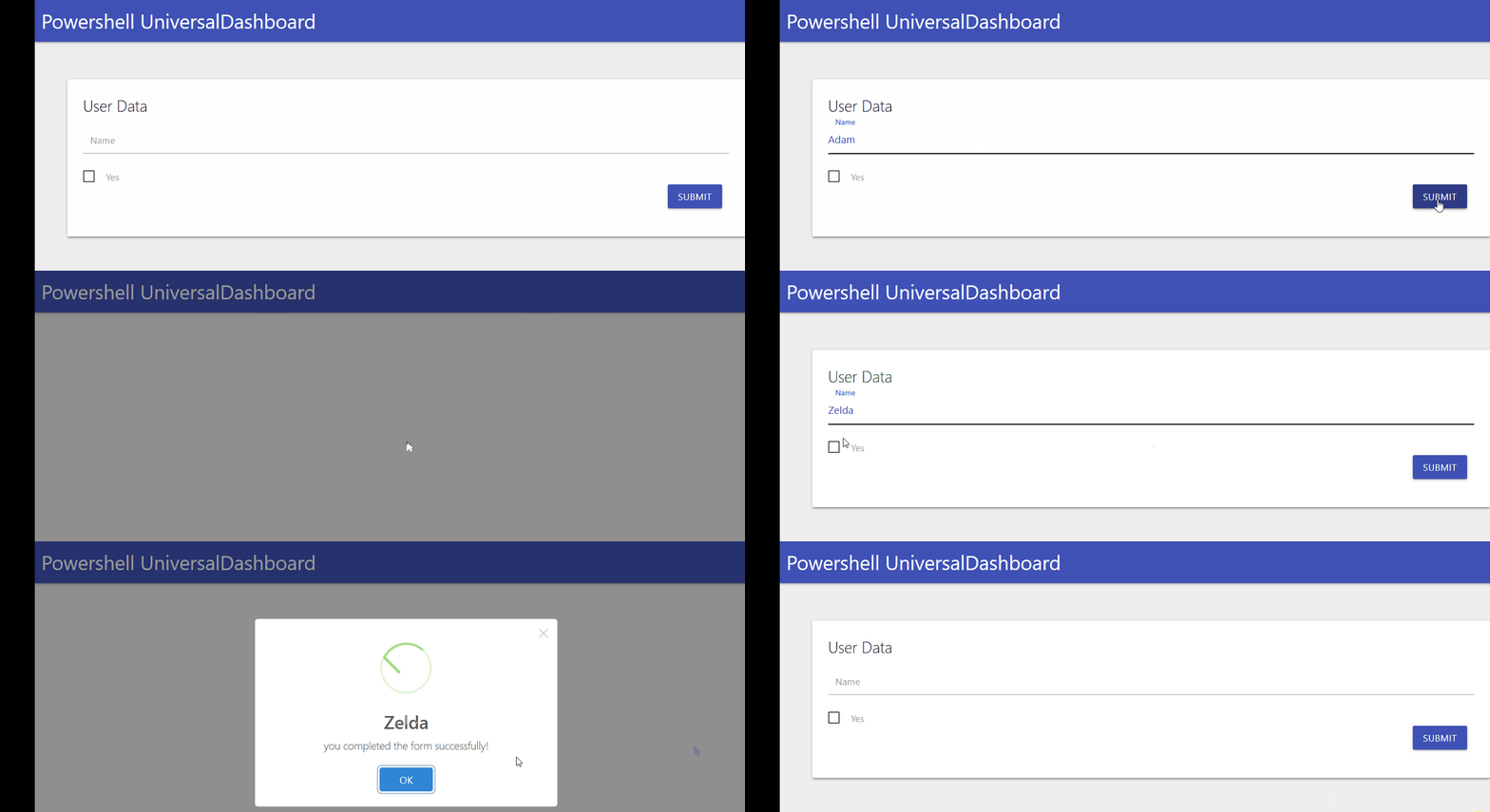
I will be uploading this to powershell gallery and github tomorrow but I hope you like what you see? I will make sure to make a readme for this as well.Now on the marketplace https://marketplace.universaldashboard.io/Dashboard/UniversalDashboard.UDSweetAlert and powershell gallery
a52edecf790c9dcad43b8ba54f288b9a8fa80929.gif
All Comments (29)
Looking forward to submit a couple of issues about it when I find them
Looks very nice, I can see my self using it a few places already.
Also, his name is Link
very nice
Lol, I know his name is Link but my daughters’ name is Zelda…anyways…I got round to uploading this now https://www.powershellgallery.com/packages/UniversalDashboard.UDSweetAlert/1.0.0 have fun and I did put a readme on github waiting for it to sync to https://marketplace.universaldashboard.io/Dashboard/UniversalDashboard.UDSweetAlert any questions please ask
Good stuff, I like it alot! it got WAF!
Off work today so doing the school run for the Mrs and I managed to build another UD component so watch this space for more bling
This is a much wanted module - I have been using Modal’s for this same function but this is nicely wrapped.
Just a few minutes testing/playing with this module - I have noticed the Alert does not work when inside a UDButton
@AnonymousUser are you looking to add some of the additional configuration options? such as allowOutsideClick and allowEnterKey? Example found here - https://sweetalert2.github.io/#configuration
Amazing work!
Thanks @AnonymousUser much appreciated. Yeah the new-udbutton is expecting a json script block I believe, and I couldnt get it to work with that. It does work on it’s own and has a timer, or does work nicely on new-uninputaction as I have hopefully put in the readme.
I mean I don’t know if you looked at https://sweetalert2.github.io/#input-types
But yeah there is a lot more this can do. I would definatly like to develop this a bit more, just need to beef up my react skills.
Please feel free to post any issues on this or things you would like to see on the gihub repository associated with this https://github.com/psDevUK/UDsweetAlert
Many Thanks
+1!
I’m adding this to my dashboard now, Got a couple places it could be used!
adding this now
Ok telling you this on a side note…life with 4 kids (all girls) is real tough…anyways, I saw this being an easy upgrade I have now published the version 1.0.1 to powershell gallery
New-UDInputAction -Content { New-UDSweetAlert -type "success" -title "$Name" -Text "you completed the form successfully!" -allowOutsideClick $false -allowEscapeKey $false -allowEnterKey $false }
forces you to click the ok button…hope this is what you wanted?
Any good idea on why this doesn’t show?
    New-UDButton -Text "test" -OnClick {
        New-UDSweetAlert -type "success" -title "test" -Text "you completed the form successfully!" -allowOutsideClick $false -allowEscapeKey $false -allowEnterKey $false
    }
The OnClick block fires just fine - any toast I throw in there shows just fine.
Yeah…as mentioned in previous post I believe this is looking for a json formatted script, and you’d have to pass the parameters as pscutom objects…or thats what I figured from watching youtube vid and inspecting the react element using the firefox react tool I installed.
So I couldn’t get it to work on a normal button, hence the example I have given is on the new-UDinputAction command where it just runs as expected. Think I need to upload the root folder onto the github repo I got then shout for some help in the development area…I mean it works if I render my own HTML button in the JSX but then you have a standard grey crappy looking HTML button, so I’d then have to include the materialize library for the button…I mean I know I done a few components now but still learning as I’m going.
Spent like an hour or more late last night trying to get the input to work with no luck so I might have to ask a man who can on this one for some development tips…
@AnonymousUser So when I use this with inputs, it causes the input to never return.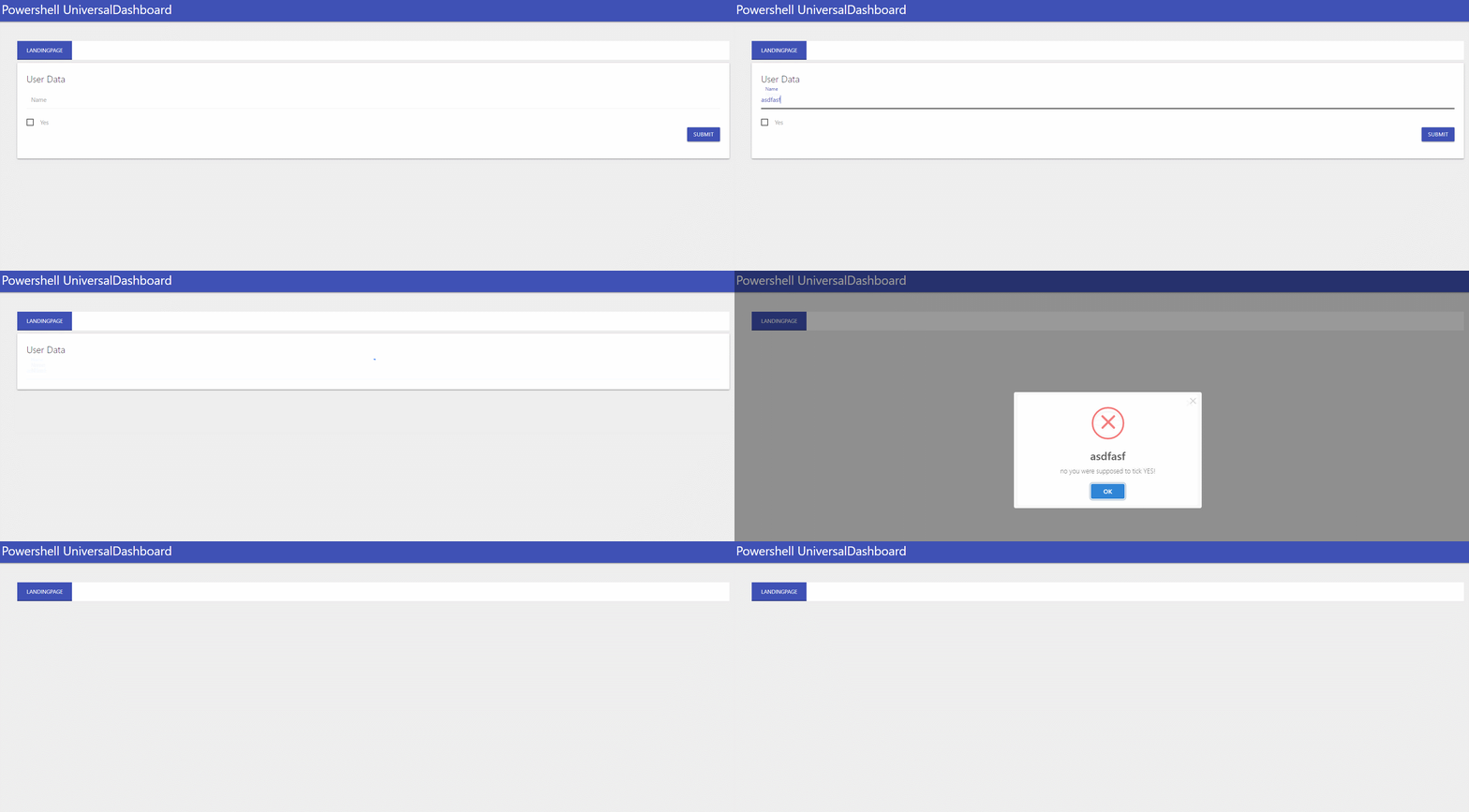
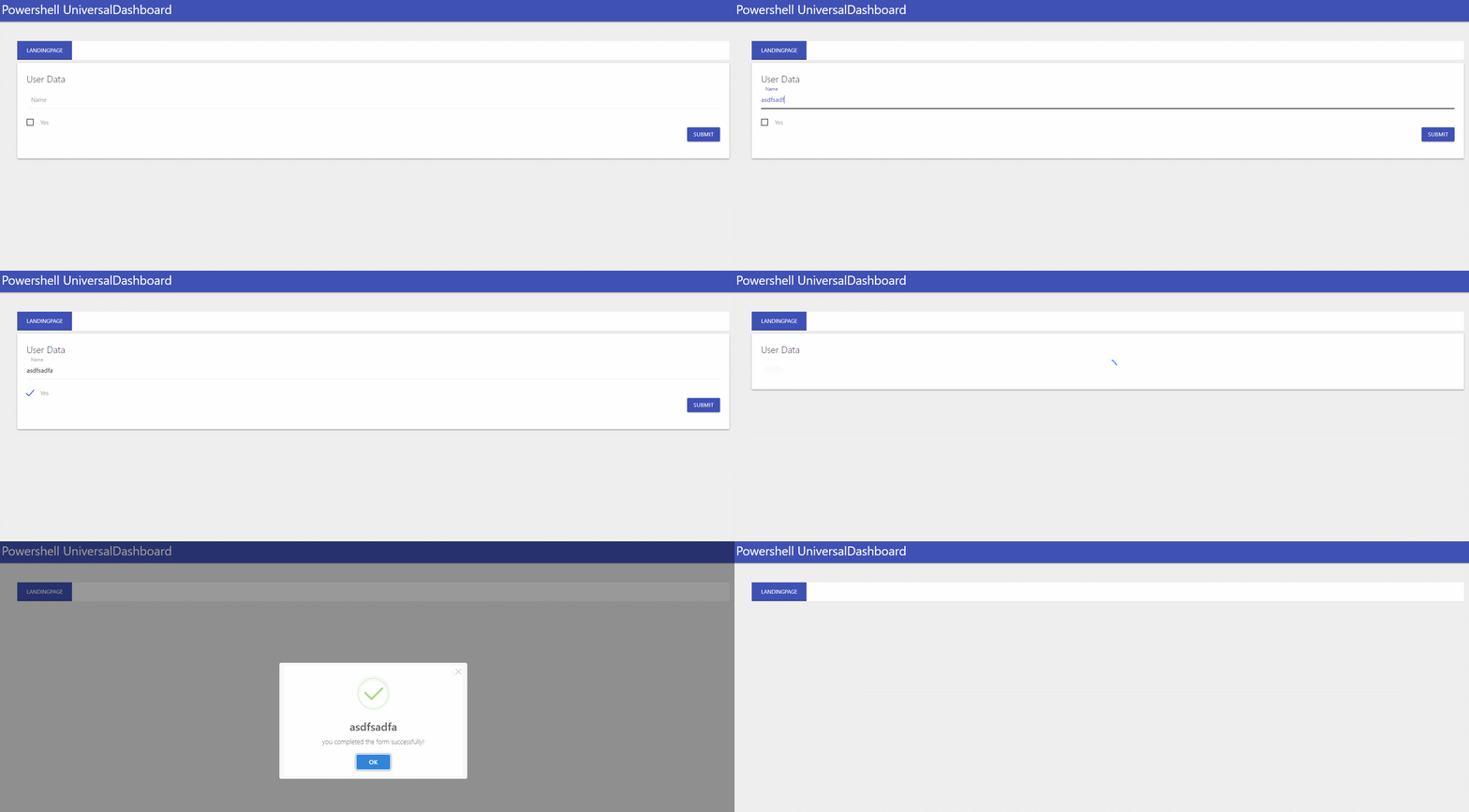
This happens with input fields for me when there was an unhandled error or unhandled output. Say a command was ran with -passthru and it’s output was not set to a variable.
Why does this not happen in your example, but when I run the github example it occurs.
569da39fd8691f9f17bd4cf941fb07fb497fd999.gif
3657cbc661269ad42891b47591a834ddb5893bb8.gif
Hi @AnonymousUser thanks for trying out this component. So I thought everything worked but sadly the input doesn’t. I tried to fix something else the spinner animation and broke the underlying JSX file. Doh! However I am now looking at sweetalert as better documentation for people who are not react jsx pros. I do have a github repo for this so this is on my TO DO list. Peace
P.S I used the poshud demo of input to take the input as a parameter then display the parameter name in the sweeralert2 window
Just about to eat but after that I will post the code behind my gif
after the alet display it unmount the input , if you upload your source code to github the jsx files and not only the js bundle file maybe i could help you.
I will take you up on that offer. Cheers bro
I just hate the 20 characters limit
Yo @AnonymousUser I forgot to welcome you to the community HELLO and WELCOME to the UD forums! Now that is over and done with and I have had a lovely chinese take-away to fuel my brain, here is the code behind my GIF:-
Import-Module -Name UniversalDashboard.Community
Import-Module -Name UniversalDashboard.UDSweetAlert
Get-UDDashboard | Stop-UDDashboard
$Endpoint = New-UDEndpointInitialization -Module @('UniversalDashboard.UDSweetAlert')
Start-UDDashboard -Port 10005 -Dashboard (
    New-UDDashboard -Title "Powershell UniversalDashboard" -Content {
        New-UDTabContainer -Tabs {
            New-UDTab -Text "LandingPage" -Content {
                New-UDSweetAlert -Type info -Text "Hello" -ConfirmButtonText "I Agree" -Position top -ShowLoading $true
                New-UDInput -Title "User Data" -Endpoint {
                    param($Name, [bool]$Yes)

                    if ($Yes) {
                        New-UDInputAction -Content { New-UDSweetAlert -title "$Name" -type success -allowOutsideClick $false -allowEscapeKey $false -allowEnterKey $false }
                    }
                    else {
                        New-UDInputAction -Content { New-UDSweetAlert -type "error" -title "$Name" -Text "no you were supposed to tick YES!" }
                    }
                }

            }
        }
    } -EndpointInitialization $Endpoint
)
Hope this helps you out, let me know if I can help more, but this is still a WIP but I was so excited I released it a tad too early…as mentioned this will wipe out the underlying input box…but I am sure @AnonymousUser has plenty of tricks to show me on making this better. Peace
P.S depending how new you are to UD you don’t need the end point initialization in 2.6.1 and above I believe, but as I been using UD for a little while now I have used it in this demo.
@AnonymousUser That is the code I used. I am running 2.6.2, but have seen this behavior with inputs for many months.
ok…? can you let us know if your running it on a MAC or something crazy like that…? What browser are you using? I mean im forced to use IE at my work, but like everything shows fine (apart from some nivo charts) are you using community or enterprise? I am sure @Adam Driscoll would like feedback if you cannot get the code I posted to work, or if you cannot get inputs to display, have you also tried using the code on www.poshud.com on the inputs? Cos if they don’t work then there is a problem that needs to be submitted on github
Yeah, I have spoken to Adam about it. It happens on both windows 10 and server 2016 running under powershell or IIS. Chrome and Firefox are the browsers used on this dashboard. I am running Enterprise, but it happens on Prod Enterprise server, and dev box with community edition.
If any code inside of a udinput has output, it causes the input to get stuck spinning. If you make sure to have everything out to null, then it works fine. For some reason, these modals are giving me the same issue.
Thanks @AnonymousUser for clarifying the setup…I too am also running windows 10 at home and work, at work I installed the IIS on my windows 10 work PC and everything runs great…I have installed community on my home laptop running windows 10, no iis installed but everything works fine and dandy in that too. So I take it your using server 2016 to host in iis? Or are you using windows 10 iis to host? Just if your using windows 10 and hosting cannot see why you are getting this behaviour
P.S sadly I dont have server 2016 to test on…
Yeah, I have no idea why I see that behavior. It took me months to finally track down the issue being related to output. Will do the same thing if something has an unhandled exception.
Just another 2 pence worth but I mean seen other users say stuff has happened since 2.x.x upgrade…so have you tried a much earlier release of UD and do u get same issue? Please clarify if running the iis on server 2016? If so have u tried just hosting on win 10. Finally you get same issue running that demo script locally not on iis on win 10???
This happens with all elements that trigger the UDSweetAlert. What I did (hack but it works) is stuff the UDSweetAlert in a UDModal.
So when the UDSweetAlert loads it’s only wiping the Modal which you don’t even notice, then Hide .
                           New-UDInputAction -Content {
                                Show-UDModal -Content {
                                   $AccessTokenGenerator = $((Get-Random -Minimum 0 -Maximum 99999 ).ToString('00000'))
                                   New-UDSweetAlert -ShowLoading $true -Type success -Text "Your Access Token is $($AccessTokenGenerator)"
                                }
                                   Hide-UDModal
}Nice hack @AnonymousUser I need to get this working again on my laptop back to where I was with the JSX file I broke then will post this on github as been offered help on fixing issues with this by @AnonymousUser which I do not want to pass up that offer! Thanks again for sharing this ‘workaround’
Any luck getting this working again? I upgraded to 2.7.0 and this stopped working.
Hey @AnonymousUser to be totally honest with you , I haven’t revisited this component…I think I had some issue in IE trying to use it, and as thats the browser I am forced to use at work so I gave up… I’m not a quitter, but been like so stupidly busy at work…I will revisit this component and see if I can get it working in 2.7.0 as running that myself now after re-licensing. I did think it looked super cool, and got a basic version working, but couldn’t get the input fields to work on this so again parked it, and tried to build other components that worked easier. Or alternativley look at another alert modal component and see if that is easier to work with, thanks for showing your interest in this control.
Just resurrecting this one. @AnonymousUser is there any news on SweetAlert? This would be really cool to have, even if it was natively bundled with PSU and the ability to potentially use https://animate.style as well.
I think it may also be worth suggesting that perhaps the list of available components on the marketplace should be reviewed and sanitised as this is still available on there but has no information on what version(s) it is/isn’t compatible with.