Unable to add Hub Privileged account entry using RDM

Hello,
When attempting to add an entry of type 'Devolutions Hub Privileged account', RDM responds with an access denied message when attempting to select the Vault. It also prompts for reauthentication beforehand, even though this already occurred when opening the data source. The respective user has necessary permissions to PAM vaults, and they can be accessed directly using RDM or WebUI.
This is a blocker for environments where multiple administrator have multiple privileged accounts, and the credential attribute of entries in shared vaults is set to 'find by name (uservault)'. For example, to search for 'My Domain1 Admin' or 'My Domain2 admin' which link to personal PAM accounts in Hub.
Please let me know if you would like any additional info.
Thanks
Joe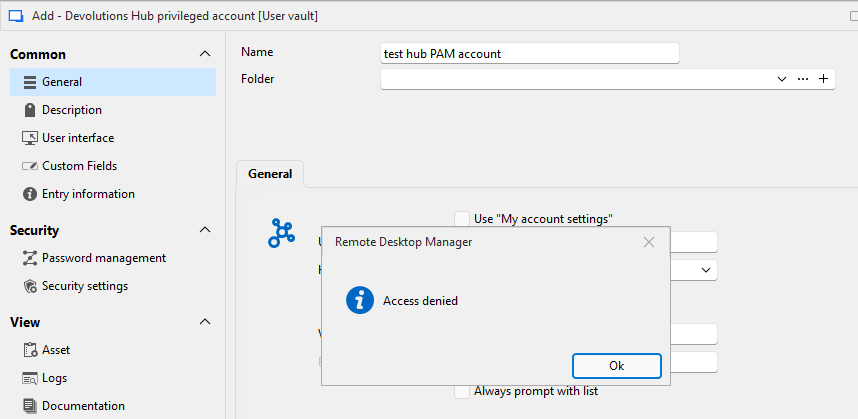
1043ceba-17e5-45d4-bc3f-f441d7b4d37f.png
All Comments (8)
Hi Joe,
Thank you for reaching to our forum.I tested this on my side using RDM 2026.1.22 with Devolutions Hub Business. I created a Hub Privileged Account entry from my Personal Vault, following the same workflow you described, and it worked as expected.
I tested both scenarios:
- with Use my account settings enabled;
- with Use my account settings disabled and the account selected manually.
In both cases, I was able to find the PAM vaults and select the privileged account.
That said, I did run into a similar behavior once, but after re-authenticating, I was not able to reproduce it again. This may indicate a local cache/session/authentication state issue rather than a permanent permission issue.
Could you please try the following?
1- Update RDM to the latest version
Please confirm which RDM version you are currently using and update to the latest available build if you are not already on it.
2- Reset the RDM cache
In RDM, try resetting the local cache, Ctrl + F5 then restart RDM and authenticate again to your Hub Business datasource.
3- Re-authenticate to Hub Business
Sign out/sign back in to the Hub datasource, then try creating the Hub Privileged Account entry again.
4- Test with temporary administrator permissions
As a validation test, temporarily grant administrator rights to the affected user/test account, then retry the same operation.
If it works as administrator, we can narrow it down to permissions.
If it still fails as administrator, it is more likely related to cache, authentication, datasource context, or the RDM version/build.
5- Validate the Hub host when not using “Use my account settings”
If you disable Use my account settings and manually enter/select the user, make sure the correct Host is selected, especially if you have access to multiple Hub Business instances. Selecting the wrong Hub host can prevent RDM from finding the expected PAM vaults/accounts.
6- Try configuring it through My Account Settings
Please also try this path:
File > My Account Settings > My Privileged Account
Select the privileged account there, then retry the entry configuration. This should achieve a similar result to using Find by name, but through the account settings flow.
Please let us know:
- your exact RDM version;
- whether resetting the cache and re-authenticating changes the behavior;
- whether the issue still happens after updating RDM;
- whether the test works when the user is temporarily granted administrator rights;
- whether you have multiple Hub Business accounts/hosts available in RDM.
This will help us determine if the issue is permission-related, caused by the selected Hub host/context, or due to a stale local cache/session state.
Best regards,
Michel Audi
Hi Michel,
Thanks for looking into this. Re the info requested:
- Using RDM 2026.1.22.
- Resetting cache didn't alter behavior
- Elevating user to administrator didn't alter behavior
- Using or not using 'my account settings' didn't alter behavior
- Yes RDM has multiple Hubs configured
The issue may be limited to when authenticating via SSO (EntraID), as I was able to get it to work when using a 'Devolutions' credential, however there was still a secondary authentication prompt when clicking the 'vault' button, which shouldn't be necessary since authentication had already occurred previously when opening the data source.
Please let me know if you would like any additional info.
Joe
Hi Michel,
Any update on this one?
Thanks
Joe
Hi Joe,
Thank you for yor patience and providing the additional details about your environment (RDM 2026.1.22, multiple Hub Business instances and usage of Microsoft Entra ID for SSO). I’ve reproduced your workflow on my end using the same RDM version (2026.1.22) and tested both standard Devolutions accounts and SSO via Entra ID. In all cases I was able to add a Devolutions Hub Privileged Account entry without encountering the “Access Denied” error.
Below is a summary of my findings and further recommendations to help isolate the source of the problem.
SSO test results
- RDM version: 2026.1.22 (same as yours).
- Authentication: Tested with both a Devolutions account and with SSO through Microsoft Entra ID. In both scenarios RDM prompted for authentication once and allowed me to browse and select the PAM vault. The entry was created successfully.
- Use my account settings: Tested with this option enabled and disabled. When disabled, I manually selected the correct Host and still did not encounter any vault selection issues.
Given that the issue does not occur on a comparable configuration, the cause is likely environmental (token caching, permissions, or a missing component such as the encryption service). The steps below may help resolve it.
Suggested next steps
- Ensure the Devolutions Cloud Services (PAM/Encryption) service is up‑to‑date. The Devolutions Cloud Services installer deploys the Privileged access management module and the Encryption service which are required for SSO‑enabled PAM integration. An outdated or misconfigured service can lead to authentication failures. Download the latest installer, verify that the Encryption service component is enabled, and restart the service. You can run multiple instances for high availability.
- Review the service logs in Windows Event Viewer. Devolutions Cloud Services write their operational logs to Event Viewer. Reviewing these logs can reveal communication problems, missing encryption keys, or token errors. Filter by time around your failed attempts and note any warnings or errors.
- Re‑authenticate in RDM and refresh your SSO token. Sign out of the Hub data source in RDM,Delete the datasource, close the application, and recreate and sign back in using SSO. Expired or stale tokens can cause the secondary authentication prompt you described. If possible, perform the test using a separate SSO account to determine whether the issue is tied to a specific user.
- Validate the host selection. When “Use my account settings” is disabled, double‑check that the Host field matches the machine on which the privileged account exists. Selecting the wrong host or a different Hub instance will result in an access error.
Please try the steps above, particularly updating/reinstalling the Devolutions Cloud Services and reviewing the event logs. If the problem persists after confirming the service is current and your token is refreshed, please share the specific errors from Event Viewer and we’ll work with our engineering team to investigate further.
Let me know the feedback.
Best regards,
Michel Audi
Hi Michel,
Thanks for looking into this.
You mentioned being prompted to reauthenticate when attempting to select a vault/PAM credential. Should this be happening, as authentication typically occurs when connecting to the data source, not when accessing a particular vault or entry? Perhaps this is a bug that requires a ticket being opened with the development team?
Regarding the access denied message, could we schedule a support call to troubleshoot this please?
I still could not get it to work using a non administrative SSO user on a different computer connecting to Hub for first time which I think rules out stale token and caching related causes. PAM vaults and credentials are accessible to same user via WebUI which I think rules out permissions being the cause. There is nothing logged in the Windows event log when the error occurs. Encryption service was recently deployed to Azure a few weeks ago, and I'm not aware of a way to manually update that type of template-based deployment, and if it was missing / not working, users would be unable to authenticate to hub with force SSO enabled.
Using the profiler in RDM seems to indicate a successful authentication flow, but the access denied prompt still occurs.
Please let me know if you would like any additional info.
Thanks
Joe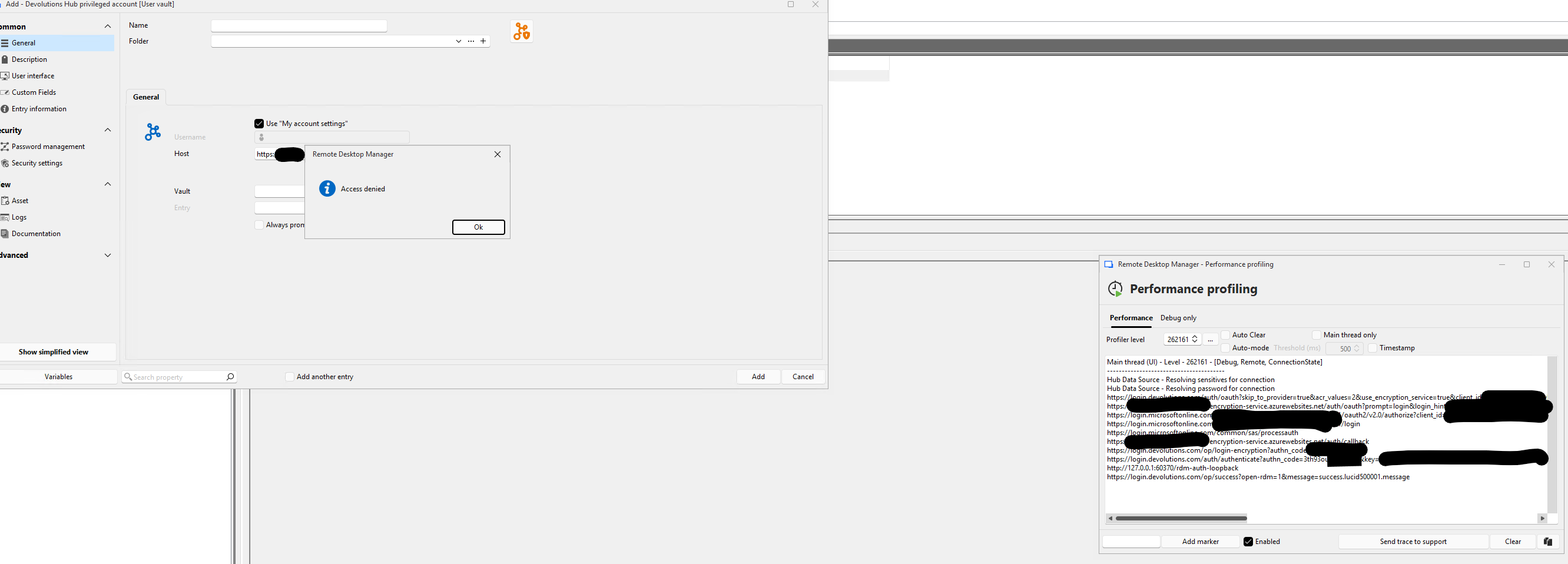
47793833-7e08-4132-9a1b-f7b025ca2acd.png
fyi, also turned on debug logging in RDM. The following snippet from the log file indicates token was obtained successfully prior to the access denied message being shown.
[5/20/2026 11:35:02 AM]DEBUG ImageFileName:C:\Users\user\AppData\Local\Devolutions\RemoteDesktopManager\\Images\Themes\CredentialHubPamSmall.png
[5/20/2026 11:35:12 AM]DEBUG Devolutions Account Login: Retrieving Access Code
[5/20/2026 11:35:29 AM]DEBUG Devolutions Account Login: Access Code retrieved successfully
[5/20/2026 11:35:29 AM]DEBUG Devolutions Account Login: Retrieving Access Token
[5/20/2026 11:35:29 AM]DEBUG Devolutions Account Login: Decoding tokens
[5/20/2026 11:35:29 AM]DEBUG Devolutions Account Login: Tokens obtained successfully
Hello Joe,
Thank you for the additional details. I’m checking with our engineering team and will get back to you as soon as possible.
I appreciate your patience.
Best regards,
Michel Audi
Hello Joe,
We’ve tested on our side and had another engineer verify as well, but we weren’t able to reproduce the issue. We’ll open a ticket and send you a remote session invitation so we can look into what’s happening.
Best regards,
Michel Audi