Hub Pam heartbeat button non responsive / delayed result

Hello,
When clicking the 'heartbeat' button in Hub/Cloud WebUI for a domain user PAM account, there is no visual indicator that something is happening, eventually after 30-60 seconds there will be a popup incorrectly indicating that the privileged account doesn't exist, while the log tab shows that the heartbeat was successful.
The 'test' button for the respective PAM provider succeeds, and have verified that the account's actual password matches what is stored in Hub. Was working ok last week, maybe broke after Version 2026.1.101.0 (May 4, 2026)
Please let me know if any additional info required.
Thanks
Joe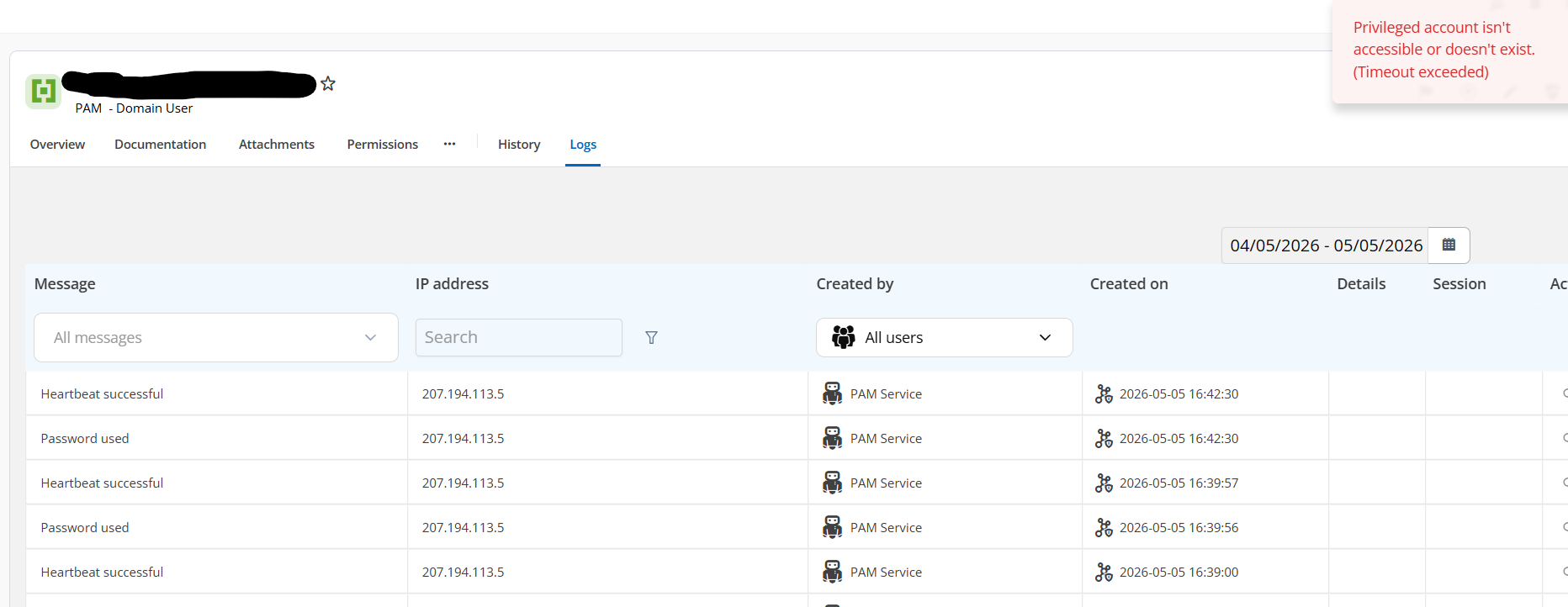
e23e209e-fcb8-4bd0-8013-7c277e69750a.png
All Comments (10)
fyi, restarting PAM service seems to have resolved the issue of being able to successfully validate a domain credential.
Still unsure as to why logs were showing success when it was actually failing due to timeout yesterday.
Hello Joe,
Thank you for this feedback.
I have opened an investigation ticket.
Could you also tell me if the agent is installed on the server with the latest version available?
https://cdn.devolutions.net/download/Hub/Services/Setup.Devolutions.Hub.Services.2026.1.2.0.msi
Best regards,
Patrick Ouimet
Hi Patrick,
Yes its the current latest.
Joe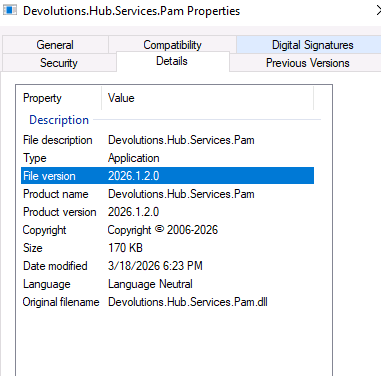
d635c936-d01e-404b-811a-a09b9550d1d7.png
Hello Joe,
Thank you for this feedback.
A fix will be available on version 2026.1.103.
Best regards,
Patrick Ouimet
Perfect, thanks Patrick
Hello Joe,
Version 2026.1.103 should have the fix for this issue.
The version is already available.
Best regards,
Patrick Ouimet
Hi Patrick,
Did a bit of testing with this, and not sure that the issue has been resolved.
Upon first attempt this morning at manually running a heartbeat, it failed and the WebUI responded immediately and correctly logged the failure.
I restarted the PAM service, and then the originally reported behavior returned (i.e. non responsive web UI when clicking synchronize button).
Tracked the issue to what i believe is a change in 2026.1.103 (but unable to verify as release notes don't appear to be currently published at Release notes | Devolutions Cloud). The domain user PAM providers had been configured to use LDAP protocol with TCP port 636, as this was the only way I could get it to work last week (need to use port 636 to support password changes). Attempted to set the protocol to LDAPS, but the test failed and an error is logged in gateway log saying "WebSocket forwarding failure error="bad gateway: TLS connect: invalid peer certificate: BadSignature". Switching back to LDAP protocol and port 389 enable successful test of provider, but I don't believe this configuration will support password rotation. TlsVerifyStrict is not present in the gateway.json file, so it should be defaulting to off as per https://github.com/Devolutions/devolutions-gateway
In summary, the webUI is still not responsive when there is an underlying issue with PAM service connectivity to domain controller, and gateway is not trusting internally issued SSL certs for LDAPS. I think the logging is still a bit off too, over the course of testing/restarting/reconfiguring, saw some PAM accounts showing failure for the heartbeat checks, and others showing success even though it was failing, and others not reporting anything.
Please let me know if you would like any additional info.
Joe
Hi @jm2
Thank you for the information provided. I would like to confirm whether your PAM service was installed using the ID specified in the host field.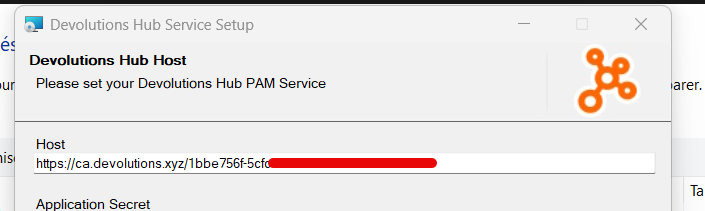
Regrards
hub-service.png
Hi Sayed,
It was installed using the subdomain FQDN (i.e. company.devolutions.app).
Joe
fyi, have separated the LDAPS TLS issue into its own thread Gateway not trusting internally issued certs on domain controllers for PAM provider LDAPS