RDM unable to access Hub/Cloud datasource after restart

Hello,
Adding a new Hub/Cloud data source to RDM is successful, however after restarting it goes permanently into offline mode and needs to be recreated to regain access.
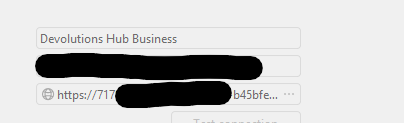
I noticed that when initially adding the data source it displays the datasource host url as https://ca.devolutions.app/<GUID>, but after clicking save then going back to datasource settings, the url has changed to the subdomain format i.e. GUID.something (its truncated and non editable in RDM so cant see the full FQDN).
For the Hub that this issue is occurring with, the subdomain (companyX.devolutions.app) was configured as part of the setup a few weeks ago, so not sure why RDM is attempting to use GUID.something instead.
Possibly related to:
- 2026.1.101.0 release Version 2026.1.101.0 (May 4, 2026)
- Unable to set workspace custom name to match existing subdomain
Please let me know if you would like any additional info.
Thanks
Joe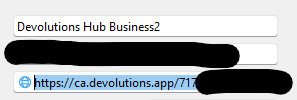
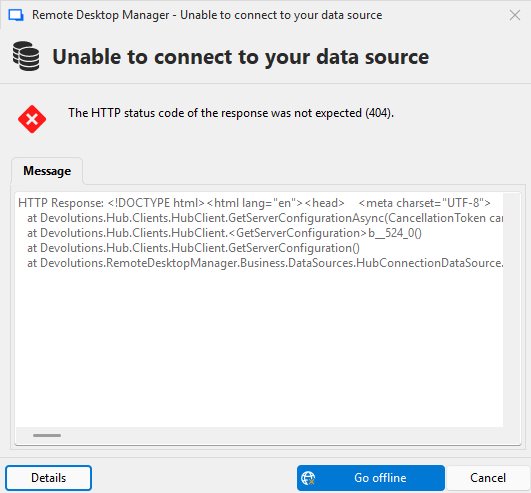
HTTP Response:
<!DOCTYPE html>
<html lang="en">
<head>
<meta charset="UTF-8">
<meta name="viewport" content="width=device-width, initial-scale=1">
<title>Hub Creating or Not Found</title>
<link rel="stylesheet" href="assets/index.css">
</head>
<body>
<div class="error-page-header">
<a href="https://devolutions.net" class="devolutions-logo-link">
<img src="assets/images/devolutions-logo-large.png" alt="Devolutions logo" class="logo">
</a>
</div>
<div class="container">
<img src="assets/images/page-not-found-sysadminotaur.png" alt="404 illustration" class="illustration">
<h1>404 – Hub creating or not found</h1>
<p>The hub you’re looking for might currently be in the process of being created, or it could not be found.</p>
</div>
</body>
</html>
Devolutions.Hub.Clients.ApiException: The HTTP status code of the response was not expected (404).
Status: 404
Response:
<!DOCTYPE html>
<html lang="en">
<head>
<meta charset="UTF-8">
<meta name="viewport" content="width=device-width, initial-scale=1">
<title>Hub Creating or Not Found</title>
<link rel="stylesheet" href="assets/index.css">
</head>
<body>
<div class="error-page-header">
<a href="https://devolutions.net" class="devolutions-logo-link">
<img src="assets/images/devolutions-logo-large.png" alt="Devolutions logo" class="logo">
</a>
</div>
<div class="container"
at Devolutions.Hub.Clients.HubClient.GetServerConfigurationAsync(CancellationToken cancellationToken)
at Devolutions.Hub.Clients.HubClient.<GetServerConfiguration>b__524_0()
at Devolutions.Hub.Clients.HubClient.GetServerConfiguration()
at Devolutions.RemoteDesktopManager.Business.DataSources.HubConnectionDataSource.Login()
31d0fa27-49ef-4968-af0b-807e1c5b6569.png
5ee2f5a8-4e23-44c9-b2f6-adb5f0b26600.png
3aef266d-b621-4d80-a56f-dfc8641a3b27.png
All Comments (5)
Hello Joe,
Thank you for the detailed report and screenshots.
I was able to reproduce the same behaviour on our side: the Hub/Cloud data source can be added successfully, but after RDM is restarted, the saved data source URL appears to be converted to an unexpected subdomain-based format and then fails with a 404 / “Hub Creating or Not Found” response.
I have reported this to our QA team for investigation. At this point, this looks like an issue with how RDM is saving or reloading the Hub data source URL after restart, rather than an issue with your Hub permissions or account access.
For now, the only workaround I can suggest is to recreate the Hub/Cloud data source when access is required, or use the Hub web interface directly until we have a fix available. I know that is not ideal, but I wanted to be transparent that there does not appear to be a permanent client-side workaround at the moment.
I have attached your Hub/workspace IDs, screenshots, error message, and stack trace to the internal report. We will follow up once we have more information from QA or development.
Best regards,
Hi William,
Thanks for the update, and appreciate the frankness.
Its possible that this can be solved as part of the resolution for Unable to set workspace custom name to match existing subdomain, because in that particular Hub the subdomain is shown as being set to a default value (presumedly GUID.something), when the account was actually configured with a companyx.devolutions.app subdomain. If the value could be updated to reflect what was initially configured upon Hub creation, it might solve the RDM issue. Not entirely sure why this occurred for one Hub account, as for another it seems the recent upgrade successfully transferred the pre-existing sub domain, and thus RDM is working fine with that one.
Hopefully the QA/Development team are able to prioritize a fix, as I imagine this issue will be a blocker for some hub/cloud customers actively (or imminently) onboarding users.
Joe
Hello @jm2 ,
We have successfully identified the issue and applied a fix. This correction will be included in the next release version.
Thank you for your patience.
Best regards,
Thanks Yevgeniy, are you able to provide an approx eta of next release pls?
@jm2 The build is currently in the testing phase, I believe it will be available during next week.
Thank you.