Disable force SSO via Powershell not working

Hello,
Using the guide Disable Force SSO on all users in Devolutions Cloud using PowerShell - Devolutions Documentation
When attempting to set the AllowDevolutionsAccountLogin parameter, it responds with error 'InvalidOperation: The property 'AllowDevolutionsAccountLogin' cannot be found on this object. Verify that the property exists and can be set.'
Also tried to change the ForceSSOLogin value, but Set-HubSystemSettings doesn't seem to actually perform the action.
Please let me know if you would like any additional info.
Thanks
Joe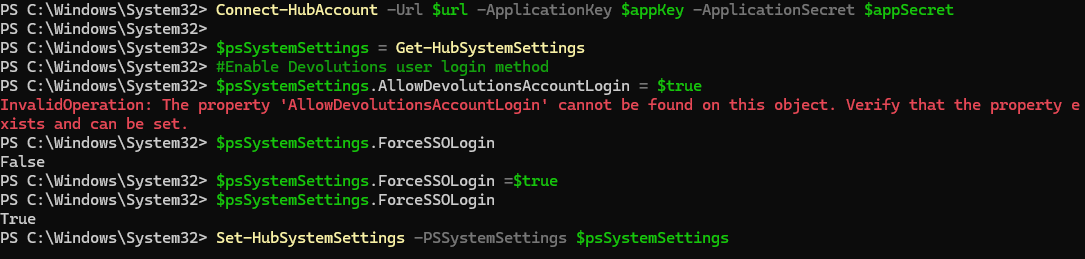
cba60be3-0d52-473e-84e6-1c0f2f149dbb.png
Recommended Answer
Hello @jm2,
The fix is already available in the latest version of the powershell.
The support team can intervene if you lose access to your hub, and we can work together to find the best available solution.
Please let us know if the script is working on your end.
Have a great day!
All Comments (4)
Hello,
It’s a known issue and a ticket has been opened internally.
We will post it here once we have a solution.
Thank you for being so patient.
Best regards,
Érica Poirier
Thanks Erika, is there an approximate ETA for this one?
If a customer enforces SSO in the Hub/Cloud, and it stops working, can Devolutions support team turn it off for them (i.e. in lui of being able to do so via PowerShell)?
Hello @jm2,
The fix is already available in the latest version of the powershell.
The support team can intervene if you lose access to your hub, and we can work together to find the best available solution.
Please let us know if the script is working on your end.
Have a great day!
Hi Yevgeniy,
Thanks for the update. Have confirmed that the version allows toggling of the AllowDevolutionsAccountLogin value.
Joe