Workspace App / Keyboard shortcut for copying username, password or both
Workspace App / Keyboard shortcut for copying username, password or both
2 votes

Hey,
we are currently in the process of migrating from Netwrix to Devolutions and are overall very satisfied with the platform.
However, there is one feature we are currently missing that would significantly improve usability in our daily workflows.
In Netwrix, it is possible to use keyboard shortcuts to quickly copy the username, password, or both at once. This allows for a much faster and more efficient handling of credentials, especially when working with multiple systems.
At the moment, Devolutions does not seem to offer a comparable shortcut-based functionality for copying credentials.
Feature request:
We would like to request the addition of configurable keyboard shortcuts for:
- Copying the username
- Copying the password
- Optionally copying both username and password together
This feature would greatly enhance productivity and streamline workflows, particularly for administrators who frequently need to access and use credentials.
Thank you for considering this request. Please let us know if further details or use cases would be helpful.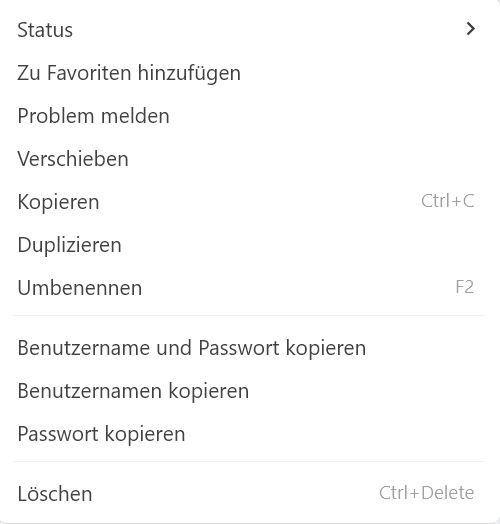
workspace.png
All Comments (6)
Hello,
Thank you for the detailed suggestion, and we’re glad to hear that your migration from Netwrix to Devolutions is going well overall.
We are planning to add keyboard navigation within entries using the arrow keys, and we will also include keyboard shortcuts for copying the username, password, or both. This should be part of an upcoming minor release.
Best regards,
Sébastien Aubin
Product manager - Password Management
Hey Sebastian,
thank you for this heads-up. This is great.
What would be handy as well for me is a shortcut in RDM to get into properties of an entry. Is this possible already or is this planned?
Thank you
Hello,
In RDM, by default, the shortcut to open the properties of the entry is Ctrl+E. You can find it under "edit" in the keyboard shortcut settings, located in File > Settings: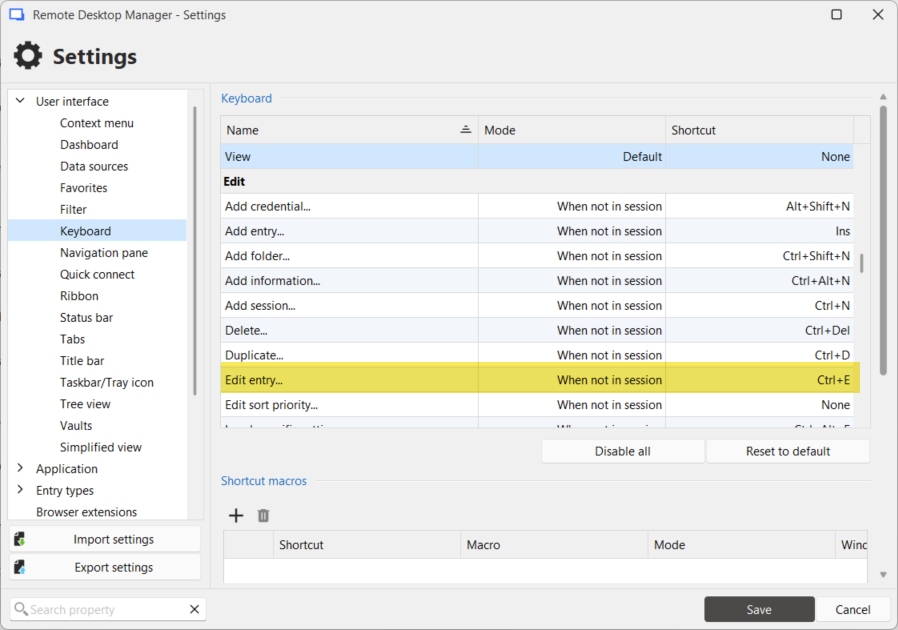
Regards,
Hubert Mireault
1223f06d-08e1-4e65-aa9f-b98c5ebb5264.png
Perfect, I did not know this overview. This helps a lot. Thank you
Hello,
Thank you for being so patient!
I'm pleased to inform you that a new version of Workspace Desktop (2026.1.2.0) has been released, featuring the requested feature.
Please let us know if this works or if you encounter any issues.
Best regards,
Maxim Robert
Hi Maxim,
thank you very much. This helps a lot.
Nico