Run a Powershell Script in multiple servers using RDM Agent
Run a Powershell Script in multiple servers using RDM Agent

Is it possible to run a single PowerShell .ps1 script using the RDM Agent across multiple server connections?
Using Script/Tools option
0a6b87ef-c14a-4275-bf85-f1f5688359e3.png
All Comments (1)
Hi Jesus,
Yes, it’s possible to run a single PowerShell (.ps1) script across multiple server connections using Devolutions Agent.
Here’s how to do it:
- In RDM, select all the RDP sessions you want to target (multi-select).
- Right-click the selection, then go to Devolutions Agent and choose either New Agent or Legacy Agent (depending on what you’re using).
- A window will open. Select PowerShell.
- Set the format to File, then browse to and select the .ps1 file you need to run.
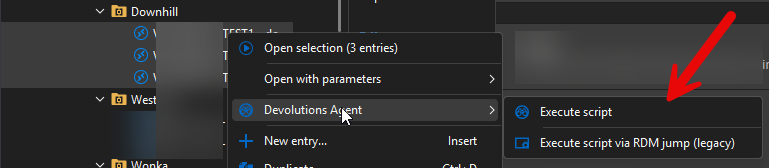
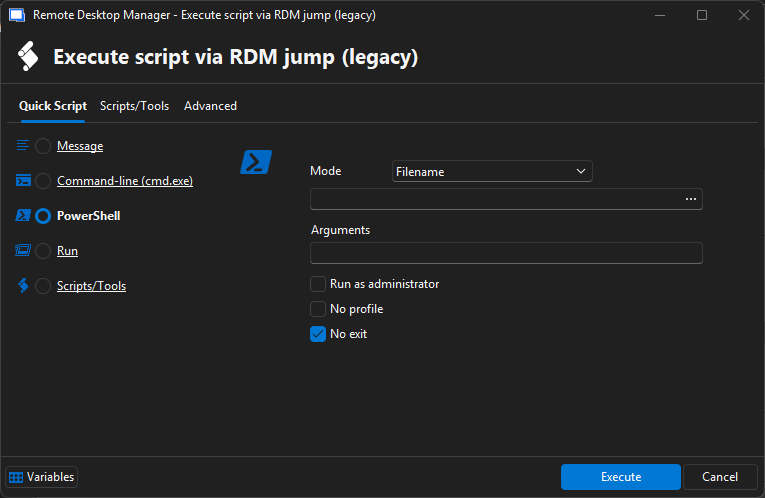
For more details, you can also refer to the documentation here: https://docs.devolutions.net/rdm/commands/tools/more-tools/rdm-agent/
Best regards,
Alexis
Alexis Geller Peiro
576d04a5-aa76-48cc-bb8f-49de4a17457f.png
1499d2f2-2fdc-4b93-abc5-89fe6006059f.png