Cached/Offline did not work for RDM with Devolutions HUB Datasource

Since Cloudflare just had some issues we lost the Connection to our Vault.
What i would expect that when I restart RDM i can select offline and continue to work with the Cached vault.
What I got, a greyed out Offline Button and a non working Online connection.
Cache is setup to 7 days and i was connected right before... so what did I do wrong?
46b6900d-c521-48eb-8009-fba45776a5a5.png
All Comments (8)
Ended up here with exactly the same thought. Historically, the database was local with backup to cloud. That worked fine. But now we appear to be purely online only. I was offered an offline option but RDM didn't display any entries and then hung on what looked like a logon prompt.
Vast numbers of services relying on Cloudflare is a real bad idea... it's a single point of failure. Imagine a bad actor working out how to hurt most people at once...
I've just done an export of the RDM file and added to the monthly maintenance checklist...
Hello @CU @rob02,
Could you make sure that your user has offline access? To do so, go to Administration - Users to handle it for each user, or you can go to Administration - System Settings - Users and allow offline for all the users that have offline selected by default. Also, you can enable the "Allow syncing all vaults (background) RDM and Companion" option in order to sync all the vaults on your login in RDM. Otherwise, RDM will keep offline only the vaults that you have visited (downloaded to offline).


43867488-58d5-4316-9be2-7f4af9dba260.png
538feba3-642a-40aa-9706-c15c41c928ec.png
700ef286-f949-425f-9d75-07401ec5f484.png
ok looks like the Allow Offline in the User settings is set to "no" but not to Default (which is also no...)
Do we have to enable that for every User manually?
Ah, found the default setting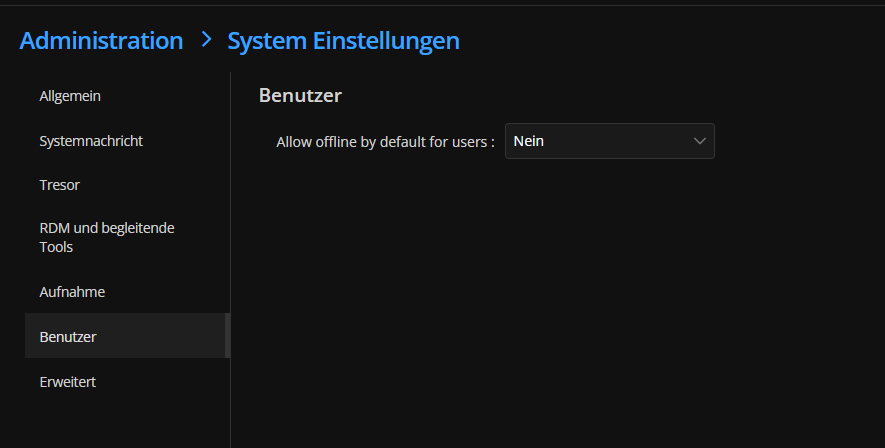
have changed it to Yes
Can we change that in batch for Existing Users?
83b80205-58d3-4a72-a658-70649d71c3ca.png
Hello @CU, currently, the only way to execute batch edit on users is via the PowerShell module.
Best regards,
What wonders me, we are using SCIM provisioned users, and all had the "no" but not the "Default: No" selected
so changing the Default didn't change their setting to yes because they had the "wrong" no selected.
Changed it now to Default yes and, luckily we didn't have that much users yet so all are changed to Default: Yes by hand
But this wrong default looks like a bug for me
I'll verify that with a new user (don't know i I'm able to check this by this week)
We added the "default" option relatively recently. All existing users keep the value that was set before, and all new users are set to default.