Browser Extension: Select entry with keyboard
2 votes

Hi!
It would be useful to be able to quickly select/autofill an entry in the browser extension using the keyboard.
When you open the extension, the search field already has focus, so it's easy to just hit the keyboard shortcut to activate the extension (Ctrl+Shift+Z by default) and start typing to search. Then I'd intuitively press the down arrow key to select an entry from the list and then press Enter to auto-fill, but that doesn't work. Not even switching through the controls using the tab key works. Focus is always reset to the refresh button.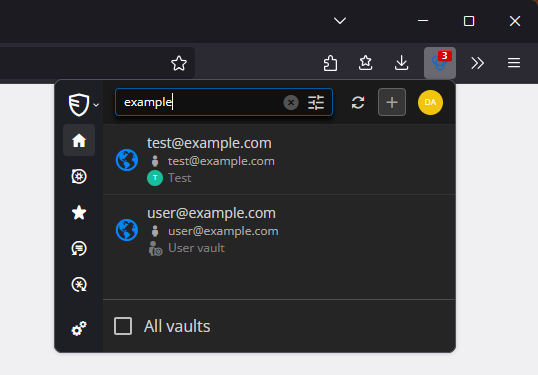
So my request is to make down/up arrow keys select entries from the list and Enter trigger auto-fill, like when you click the entry.
Another thing: Can you make the extension popup remember the search/filter after you close it and re-open it? Many websites need you to fill in username, password and one-time code on three different pages, and auto-fill only ever fills them in one at a time. When there's many entries for a specific website, it would be useful if it remembered the search filter (or even the last selected entry) so I don't have to look for the entry three times. If there's more than one entry matching the current site, the auto-fill keyboard shortcut (Ctrl+Shift+Y by default) could also just use the last selected entry, instead of just not filling out anything.
Thanks!
8b9fac2c-c8c1-4ca0-a4f8-d6507ed8f2bf.png
All Comments (6)
Hi,
We created tickets to implement keyboard navigation and for the remember search/last used entry according to the current tab context.
Thank you for your feedback.
Best regards,
Olivier Désalliers
Thank you!
I noticed the keyboard navigation works now! Thank you!
I'll use this thread for another request: In the extension settings, there's an option to "Automatically copy one-time password after auto-fill".
I noticed this only works with my DVLS source not with RDM. Could you make it work with RDM too?
And one more thing with the DVLS data source: When you open the extension, it lists all credentials that match the current website. But when you type in the search box, it will list all entries matching the search, even if they don't match the website URL. I'd prefer the search to just to filter the matching entries, not search all entries, like it is with RDM data source. I think it should at least be an option or be behind a "search all entries" button.

Thank you!
82f55cb3-dd9e-4f4e-9727-a4fcb851c0f2.png
e0e78a6e-8292-41f6-ad78-a7e2701e2265.png
ef831da5-6891-4974-ade4-c82442f67039.png
Hi,
Yes, both keyboard navigation and "Automatically copy one-time password after auto-fill" were released on the same day you posted your message.
For the automatic OTP copy when connected to RDM, this is already planned for the next minor version, provided the RDM you are connected to is at least version 2025.3.
Regarding the search/filter with DVLS, in a future version the search results will be split into two sections:
• Matching current tab: equivalent to filter (entries that match your tab’s website and the search)
• All entries: equivalent to the current search, excluding the entries already shown in Matching
Thank you for your feedback.
Best regards,
Olivier Désalliers
That's great! Thanks!
Hi,
Versions 2025.3.3.4/2025.3.3.5 have been released. The “Automatically copy one-time password after auto-fill” is now supported when connected to RDM.
Best regards,
Olivier Désalliers
