Cache for pwned passwords
1 vote

Hi!
When you open the Entry security analyzer report with the Show compromised password (pwned) option, the list takes a long time to load because DVLS seems to query api.pwnedpasswords.com for each password sequentially. It's the same in RDM with the Password analyzer.
I think this could be optimized.
- API calls could parallelized, if they are not already.
- Hashes could be cached for some time, so you wouldn't need to wait for the whole list to load every time you change the filter or switch pages.
- The query could run in the background and populate the pwned-status field of each entry as they come in, instead of the whole GUI becoming unusable for a long time.
- You can even download all password hashes and query them offline: https://haveibeenpwned.com/api/v3#PwnedPasswordsDownload
Thank you!
All Comments (8)
Hello,
Thank you for your request. I am creating a ticket, and we will investigate that during our next development cycle. We will post back here once we have an update.
Best regards,
François Dubois
Thank you!
Hello!
I have another request for the entry security analyzer: Can you add a filter to include only entries in a specific folder and subfolders? The activity log report has that for example.
Also, I noticed filtering by the "Compromised (pwned)" password strength doesn't work. When this is selected, I get no entries at all. Only the "Show compromised password (pwned)" checkbox works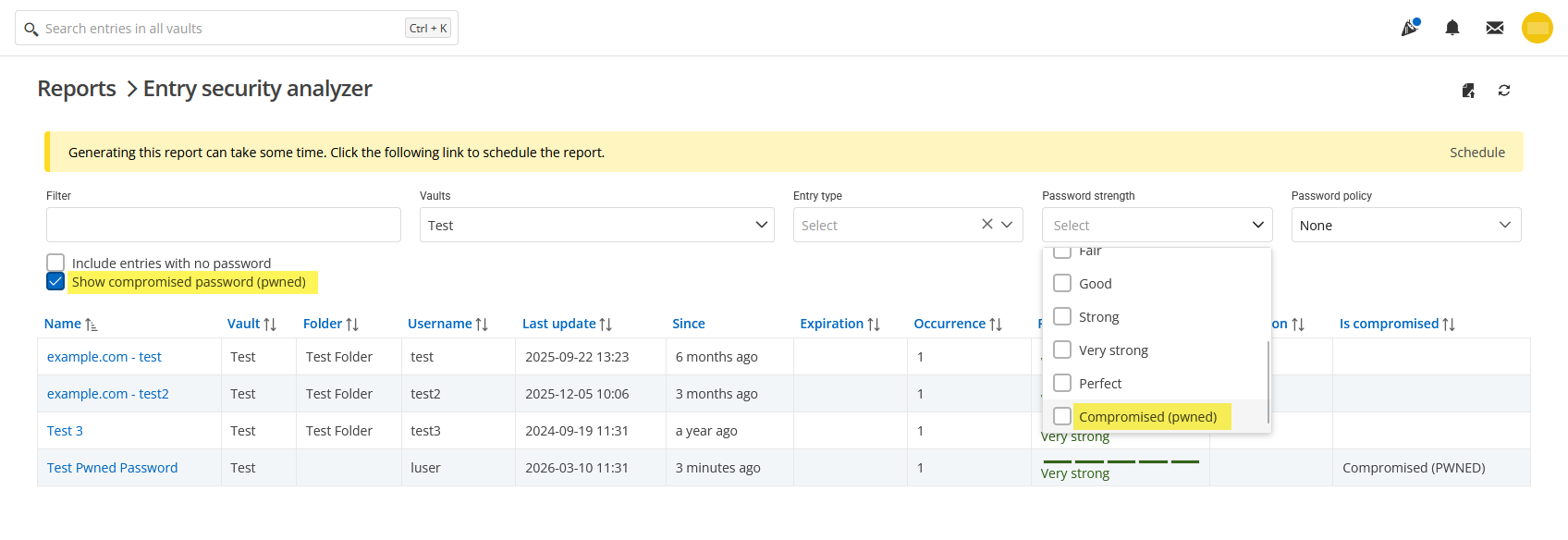
Thank you!
a231aea8-a095-480f-8f8f-9386fbf3b489.png
Hello @Daniel Albrecht
Thank you for reaching out.
I have created both an improvement request and a bug report based on your feedback.
I will keep you informed as soon as its becomes available.
Thank you
Marc-Andre Bouchard
Hello,
Thank you for being so patient!
I'm pleased to inform you that a new version of DVLS (2026.1.15.0 2026.1.12.0) has been released, featuring a fix for the reported bug.
Note that a Database upgrade is required if you're not already using version 2026.1 of DVLS.
Please let us know if this works or if you encounter any issues.
Best regards,
Maxim Robert
Thank you Maxim!
I don't see DVLS 2026.1.15 available yet - I'll test later when it's published.
Meanwhile I tried the Entry security analyzer in RDM 2025.3.32 and RDM 2026.1.15: I see the calls to api.pwnedpasswords.com are now made in the background in both versions, so you can use the GUI while it's doing that. That's great!
I noticed another issue though: In RDM 2025.3 it creates a single TCP/TLS session to check all passwords. It takes about 20 Seconds to load 500 entries here. In RDM 2026.1 it creates a new TCP/TLS session for each password in sequence and it takes about 60 seconds to load 500 entries, so the new implementation has worse performance. Looking at packets in Wireshark, they don't seem to be parallel connections, but in Process Monitor I see "TCP Connect" and "TCP Disconnect" events in parallel batches of around 10 to 15 connections, so I don't know exactly what's happening, but it is definitely slower.
Also, a few more suggestions (partially repeating my original post):
- While loading, you just see a progress indicator with no percentage or message, so you don't know what's happening or how long it's going to take. You could add a status message, like "Checking compromised passwords... 68/500".
- Right now, the "Is compromised" column shows nothing (empty string) or "Compromised (pwned)". But there's no value to indicate when it's not checked yet, or if it's not compromised.
- You could make it update the list in real time. Right now the whole list shows an empty "Is compromised" column until all entries have been checked.
- The result still isn't cached, so each time you refresh or change the filter, it loads the whole list again. Once a password is found to be pwned, it will never be un-pwned again, so you could store the state of that entry locally in a cache file. Then check the local cache file first, before sending the request to the API again. Also for entries that returned an uncompromised status, you could write them to the cache file too including a timestamp. Then only query the API again if the last check has been more than an hour or even a day ago.
For security, the local cache file probably should not contain the password hashed themselves, to avoid password cracking attacks. For the purpose of caching, you could create a separate hash from other data, like the entry ID, last password change time, or even a partial password hash (like the one that's used to query the API in the first place).
Thank you!
Best regards,
Daniel
Hello Daniel,
Thank you for your response, and I appreciate you pointing out the typo.
I’ve updated my message to reflect version 2026.1.12.0. The development team has also seen your message and will provide additional information as soon as possible.
In the meantime, if you have any further questions, please don't hesitate to let us know.
Best regards,
Maxim Robert
Hi!
I didn't realize it was a typo 🙂 I updated our staging instance to 2026.1.12.0 now.
Setting the "Password strength" filter to "Compromised (pwned)" does filter the list correctly now, but the status is not reflected in the "Password strength" column in the results. The "Is compromised" column is not visible unless you select the "Show compromised password (pwned)" checkbox.
Also it still freezes the UI for a minute while processing the API requests one at a time. (it takes about 45 seconds to load 500 entries)
Thank you!