Add Mouse Jiggler Support in RDP Sessions on Linux
2 votes

Dear team,
I noticed there are some missing features in the Linux version of RDM in comparison to Windows version. For example there is no mouse jiggler in RDP sessions, which greatly simplifies my life on some occasions. As I may be required to move to Linux, it's becoming important to me.
Are you planning on reviewing and implementing what's missing? Or are there technical obstacles preventing you from doing that?
By the way RDM on Linux is very impressive!
Thanks.
Recommended Answer
Hello everyone,
To better track each issue individually, we’ve created separate threads for the topics discussed here:
- Mouse Jiggler Support in RDP Sessions on Linux – This feature request will remain in this thread, as it was the original topic.
- Batch Edit Functionality for SSH Session Settings on Linux = https://forum.devolutions.net/topics/44817/add-batch-edit-in-rdm-linux
- Logging Not Working with "Global" Mode for Terminal Sessions on Linux = https://forum.devolutions.net/topics/44818/global-logging-mode-not-working-for-terminal-sessions-on-linux
We’ll continue the discussions and share updates in each respective thread.
Thank you for your understanding.
Best regards,
Carl Marien
All Comments (11)
Hello,
We’ve noted your request for the mouse jiggler and will definitely consider it for a future update.
Regarding feature gaps, the way we work on the Linux team is by prioritizing features based on user requests and needs. The Windows version has accumulated a large number of features over time, and porting all of them would be a significant effort. That’s why we rely on input like yours to guide what gets implemented next.
Thanks again for your feedback and for the kind words about RDM on Linux — we really appreciate it!
Best regards,
Simon Duguay Létourneau
Great to read that.
When I'll use RDM on Linux more, I'll get back with useful suggestions for the most compelling missing features (if any).
Thank you!
Hello,
Thank you. For any feature requests, please use our Feature Request forum.
https://forum.devolutions.net/forums/101/remote-desktop-manager-linux--feature-request
I will also transfer this post to the Linux Feature Request section:
Best regards,
Carl Marien
Hi all,
I started to use RDM a couple of day ago and imported all my connections from remmina.
What I now really miss is any kind of "mass edit" of my connections.
For example, I need to log all printable output to text files locally by default for all terminal sessions.
I tried to set the protocol path in global settings, as well as the mode to overwrite. In the session entry, I set logging to enable, use "Global" and "$HOST$_$DATE$-$TIME_TEXT$.log" as filename.
I also set to log all printable output.
It does not work at all.
So now I found out that I have to configure all sessions separately and set logging to "user defined" and protocol-path to the full path to the file incl. filename.
That's OK, but I have to edit ~200 sessions.
So it would be good to have a mass edit option, which I would like to request here.
Thx, best regards
Markus
Hello,
It appears there's an issue when using the "Global" logging mode — we'll work on resolving that.
What I now really miss is any kind of "mass edit" of my connections.
Would the batch edit feature available in our Windows version meet your needs?
Best regards,
Simon Duguay Létourneau
When discussing mass edits, it happened a few times that I used the PowerShell module on Windows to interact with the vault, such as mass editing properties of all RDP sessions. I can see that you advertise the PowerShell module works on Linux as well. Is that correct?
https://docs.devolutions.net/powershell/Getting-started/installation/
You're absolutely right, you can use the PowerShell module on Linux. It’s likely the most effective workaround for mass editing right now.
Simon Duguay Létourneau
Hello,
It appears there's an issue when using the "Global" logging mode — we'll work on resolving that.
What I now really miss is any kind of "mass edit" of my connections.
Would the batch edit feature available in our Windows version meet your needs?
Best regards,
I can choose batch edit only for general settings: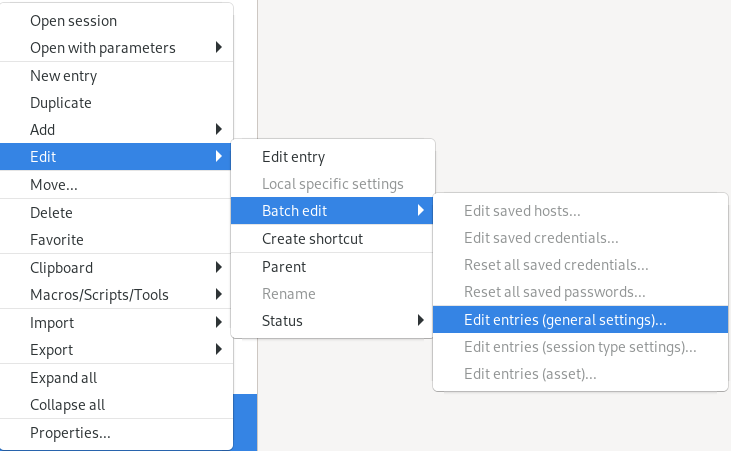
The settings for SSH sessions are not available: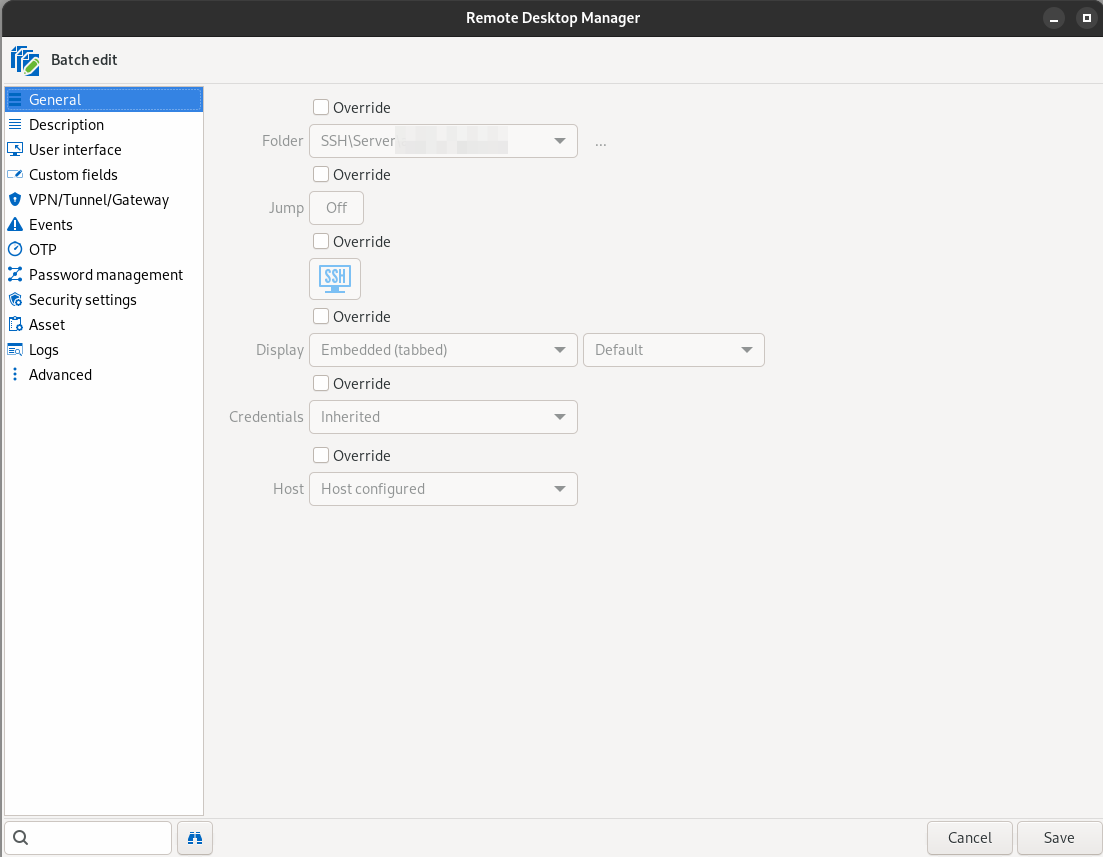
The settings I need to batch edit is located here: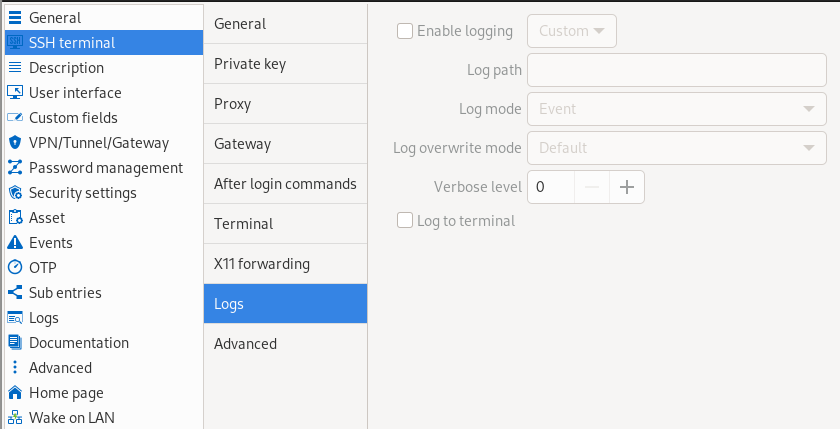
I do not have Windows, so I can't compare it.
Best regards
Markus
5cb606cb-ebef-4a2c-910c-ce65a64bd8d3.png
e3a13f2d-37ed-4e7f-b222-3dc04216cffc.png
754bb400-d8be-4ca8-a6ee-74d5e2d27900.png
Hello everyone,
To better track each issue individually, we’ve created separate threads for the topics discussed here:
- Mouse Jiggler Support in RDP Sessions on Linux – This feature request will remain in this thread, as it was the original topic.
- Batch Edit Functionality for SSH Session Settings on Linux = https://forum.devolutions.net/topics/44817/add-batch-edit-in-rdm-linux
- Logging Not Working with "Global" Mode for Terminal Sessions on Linux = https://forum.devolutions.net/topics/44818/global-logging-mode-not-working-for-terminal-sessions-on-linux
We’ll continue the discussions and share updates in each respective thread.
Thank you for your understanding.
Best regards,
Carl Marien
Hello,
Thank you for being so patient!
I'm pleased to inform you that a new version of RDM Linux (2026.2.0.4) has been released, featuring the fix for your issue.
Latest Version: Download RDM
Please let us know if this works or if you encounter any issues.
Best regards,
Maxim Robert
Hello,
Thank you for being so patient!
I'm pleased to inform you that a new version of RDM Linux (2026.2.0.4) has been released, featuring the fix for your issue.
Latest Version: Download RDM
Please let us know if this works or if you encounter any issues.
Best regards,
Maxim Robert