powershell vault/entry template

In rdm I want to create a bunch of vaults using powershell.
But I have a vault template in rdm which i'd obviously want to use, is this somehow an option?
I don't believe there is a pwsh command to get/set the vault templates.
Or is there another command to set the vault permissions (not user or role)
Below is the script i currently have, as you can see i use a entry template aswell, but i cant figure out vault templates.
$datasourceID = '12345'
$customerTemplateID = '12345'
# Set to correct datasource. (poc)
Set-RDMCurrentDataSource -ID $datasourceID
# get vaultnames from csv
$vaultnames = ['test1','test2','test3']
foreach $vaultname in $vaultnames
{
# use vault template somehow
$vault = New-RDMVault -Name $vaultname
Set-RDMVault -Repository $vault
# change to the new vault
Set-RDMCurrentVault -Repository $vault
# apply entry templateset
$s = New-RDMSession -TemplateID $customerTemplateID -Type TemplateGroup
Set-RDMSession $s
}
All Comments (5)
Hello Maxime,
Thank you for contacting us on that matter!
Unfortunately, after confirming with my colleague from the development team, it is currently not possible to create a Vault based on a Vault template via PowerShell. But if you want, I can move your question to the feature request forum.
When you mentioned "(not user or role)", are you referring to the fact that you don't want to do it by User or Roles?
Thank you for keeping me updated. If you have any other questions, please let us know.
Best regards,
Maxim Robert
Hello Maxime,
Thank you for contacting us on that matter!
Unfortunately, after confirming with my colleague from the development team, it is currently not possible to create a Vault based on a Vault template via PowerShell. But if you want, I can move your question to the feature request forum.
When you mentioned "(not user or role)", are you referring to the fact that you don't want to do it by User or Roles?
Thank you for keeping me updated. If you have any other questions, please let us know.
Best regards,
Hey Maxim,
When I create a vault using the gui it defaults to Inherited, which is great as a i set some defaults in system settings.
But when creating a vault/repository using powershell it defaults to disallowed.
So how do i create a vault with inherited setting
Hello Maxime,
Thank you for your response, and sorry for the delay.
Could you please try unchecking the option "Create vault with restricted access by default" under Administration > Security Settings > Security? Then, please try rerunning the script and see if the problem persists. 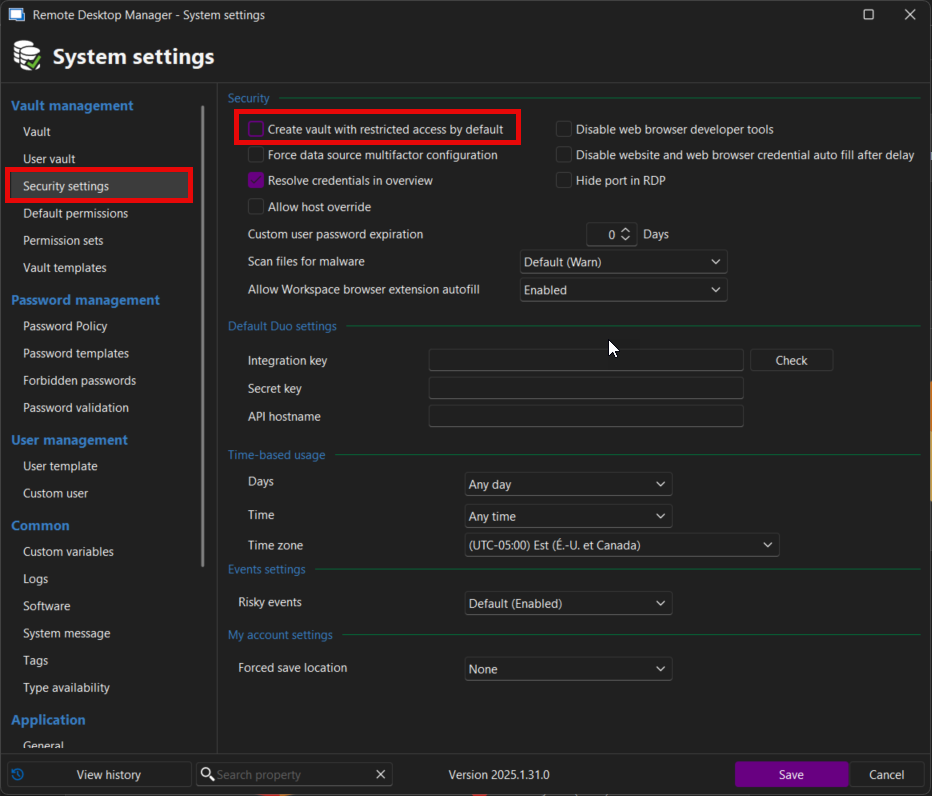
Also, could you please provide us with your current data source in RDM?
If you're using Devolutions Server (DVLS), please provide us with a screenshot of your Administration > System Settings > Vault Management.
Thank you for your collaboration. If you have any other questions, please let us know.
Best regards,
Maxim Robert
2025-05-12_10-57-32.png
Hello Maxime,
Thank you for your response, and sorry for the delay.
Could you please try unchecking the option "Create vault with restricted access by default" under Administration > Security Settings > Security? Then, please try rerunning the script and see if the problem persists.
Also, could you please provide us with your current data source in RDM?
If you're using Devolutions Server (DVLS), please provide us with a screenshot of your Administration > System Settings > Vault Management.
Thank you for your collaboration. If you have any other questions, please let us know.
Best regards,
Hey Maxime,
This settings was already disabled. But I think I didn't update-rdmui or something like that. The day after it just worked as one would expect.
Hello Maxime,
Thank you for your response!
I'm glad to hear that this is working! I will mark this thread as resolved.
If you have any further questions, please let us know.
Best regards,
Maxim Robert